Cutscriptvs Cap
Cap
Cutscript is a 0.1 beta screen recorder and editor: pick it to cut by editing words and post the file yourself. Pick Cap to send a share link with comments, or to self-host.
Written by the people who make Cutscript. Checked 31 October 2026. Cap and its logo are trademarks of their owner, and Cutscript is not affiliated with or endorsed by them.
Pick Cutscript if
- You cut by deleting words in the desktop app, fillers and pauses included
- You want an AI that plans and makes the edit, on your own accounts
- You want .cube looks, scopes or tracked blur (Colors is on a Mac now)
- You want voiceover, dubbing or music made inside the editor, on your keys
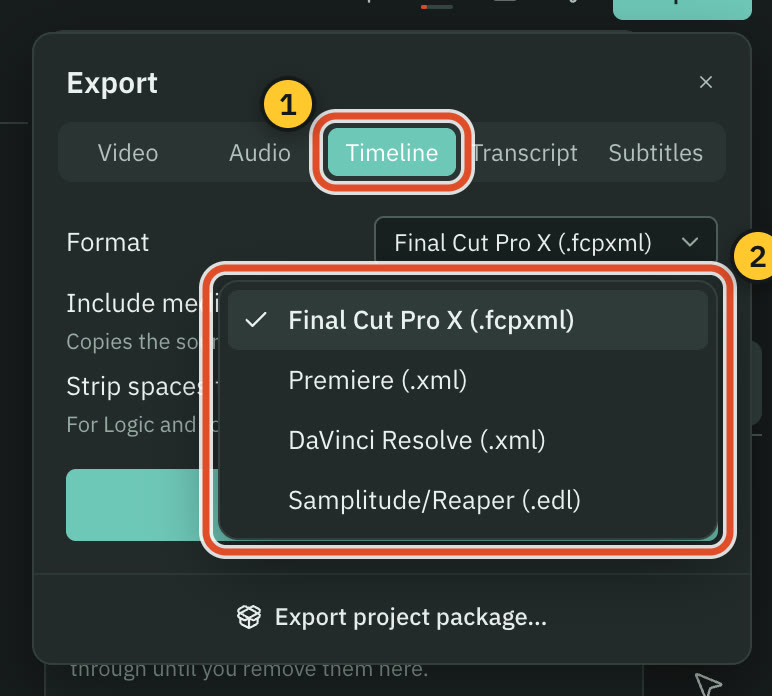
- You hand your cut to Final Cut, Premiere or Resolve (Pro only)
Pick Cap if
- You want to send a link with comments, and analytics on Pro
- You want open source (mostly AGPLv3) you can self-host
- You need team roles, SOC 2 Type II, ISO 27001 or HIPAA BAAs
- You want to record on Linux, in Chrome or in a browser
- You want a free plan with no watermark, for personal use
At a glance
| What | Cutscript | Cap |
|---|---|---|
| Best for | Demos, tutorials and talks cut by their words | Demos, bug reports and tutorials sent as a link |
| Maturity | 0.1 beta. Expect rough edges | Desktop 0.6.2 (28 Oct 2026), about 24.2k GitHub stars |
| Price (checked 31 Oct 2026) | Free, or Pro at $4.17 a month paid yearly ($49.99 a year), or $9.99 monthly | Free for personal use. Desktop License $29 a year or $58 once. Pro $8.16 per user a month billed yearly, $12 monthly |
| Free plan | YesEvery feature except timeline export. Free account needed | YesFull editor and 4K/60fps export. Personal use only |
| Watermark | PartlyA moving watermark on free video exports. Pro removes it | YesNone on any plan, per Cap |
| Platforms | YesMac and Windows. Recording on a Mac needs macOS 15 | YesMac, Windows, Linux, Chrome extension, web recorder |
| Where files live | On your computer | Local in Studio Mode until you share. Instant Mode uploads |
| Sharing | NoYou get a file and post it yourself | YesLinks, embeds and timestamped comments. Analytics on Pro |
| Editing | YesDelete words in the app to cut, plus a multitrack timeline | YesEffect lanes in Studio. Cut by words in the web editor |
| AI | YesYour ChatGPT plan, Claude on a Mac, your keys or local models | PartlyTitles, summaries, chapters on Pro. AI editing: not found in their docs |
| Hand-off to other editors | YesPro only: Final Cut, Premiere, Resolve or EDL | Not found in their docsNot found in their docs |
| Source code | NoNot public | YesOpen, mostly AGPLv3. Self-hostable |
YesPartlyNoNot found in their docs
Recording
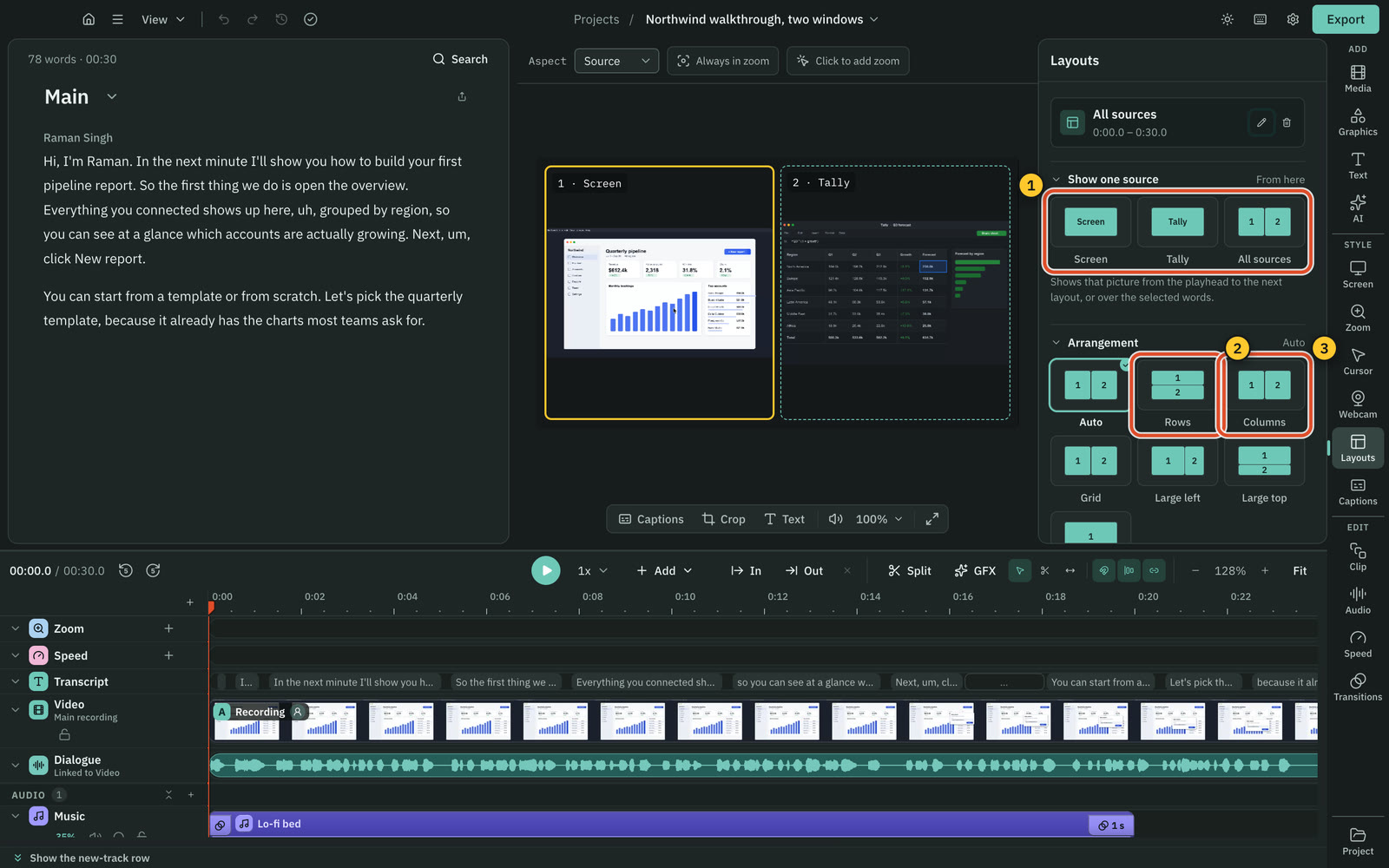
Both record screen, sound and camera. Cap records in more places, and Cutscript's area, drawing and phone modes are Mac only.
CutscriptA desktop recorder with every input on its own track
CapTwo modes, and more places to record
| What | Cutscript | Cap |
|---|---|---|
| Area recording | PartlyMac only: free, 16:9, 9:16, 4:3, 1:1 or exact size | YesCustom area in Studio Mode |
| Several sources in one take | YesUp to three pictures, each its own file. Picture only | PartlyAdd clips in the editor. Multi-display capture not found |
| System sound | YesAll sound or none. Per-app on a Mac, experimental, opt in | YesmacOS 13+ with no driver, Windows loopback, Linux stereo |
| Phone or tablet | PartlyCabled iPhone or iPad on a Mac. Experimental | Not found in their docsiOS app in changelog, store release unconfirmed |
| Drawing while recording | PartlyMac only, in display, window and area takes | PartlyChrome extension. Desktop video: not found in their docs |
| Teleprompter | NoNot offered | YesSince desktop 0.5.7 |
| Record in a browser | NoNot offered. You record in the desktop app | YesChrome extension and web recorder |
More detail
Cutscript
- Display or window on Mac and Windows, area on a Mac. Picture, voice, system sound and camera each get a track.
- Add up to two more pictures to a take, each its own file. On Windows, displays and windows only.
- On a Mac, draw while recording: pen, arrows, step numbers, laser, spotlight and privacy boxes.
- On a Mac the pointer stays editable and clicks are tracked. On Windows the pointer is in the video, with no clicks.
- Needs 5 GB free, and macOS 15 on a Mac. Phone capture and some microphones and cameras are still being checked on real hardware.
Cap
- Instant Mode uploads as you record and gives a link. Studio Mode records locally, with screen, camera and mic tracks.
- Targets are a display, window, custom area or camera only, with pause, resume, restart and stop.
- Focus mode (0.6.2, macOS and Windows) records one window, keeps other windows out and follows it if you move it.
- A teleprompter has scroll speed, text size, opacity, cue markers and mirrored text.
- You can also record from a Chrome extension, a web recorder in the dashboard or the Cap CLI.
Editing by text
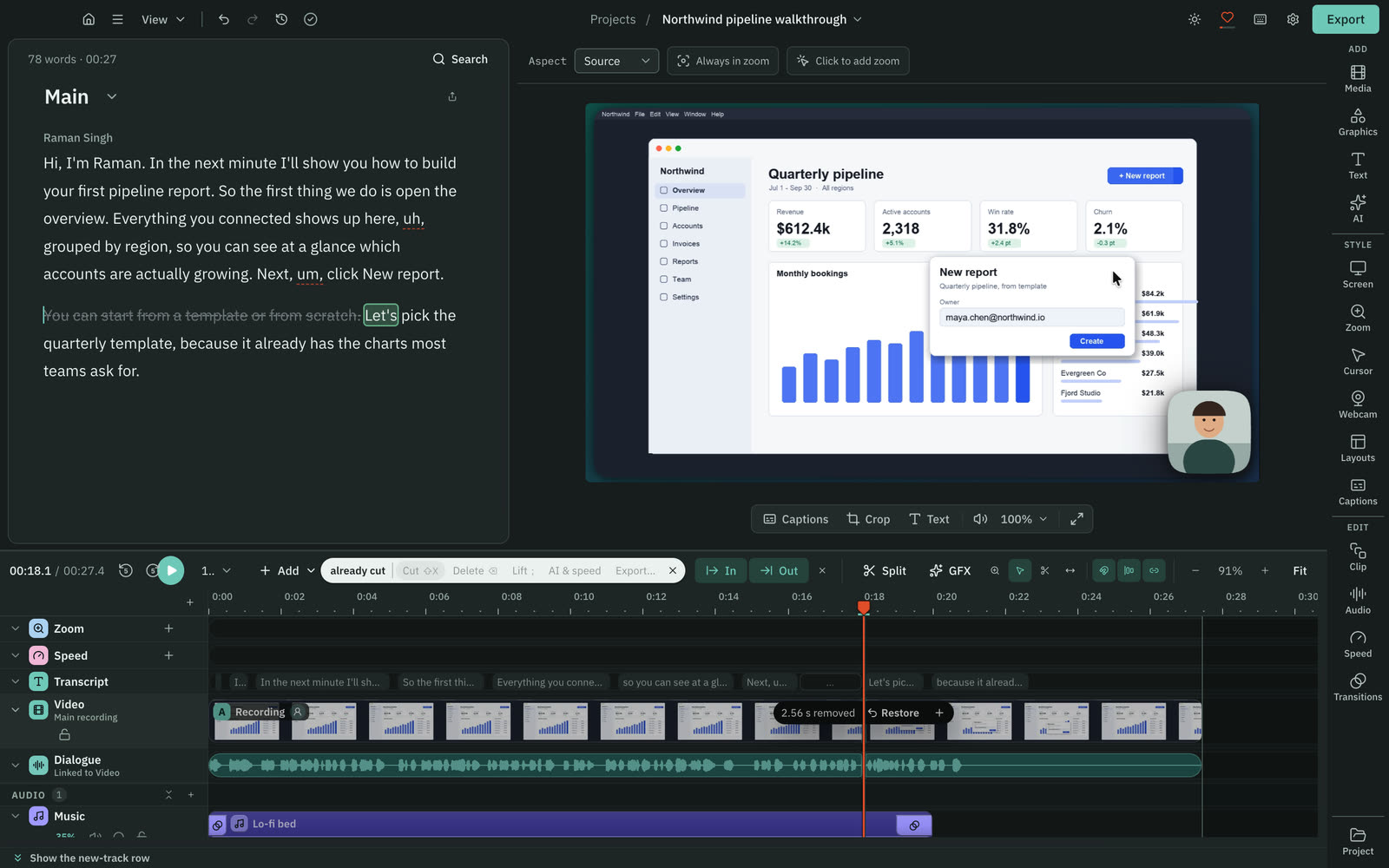
Both cut by deleting words. Cutscript does it in the desktop app, and Cap does it in its web editor.
CutscriptThe script is the editor
CapTranscript editing on the web, a cut action on the desktop
| What | Cutscript | Cap |
|---|---|---|
| Where it happens | YesDesktop app, Mac and Windows | PartlyWeb editor. Desktop: separate Cut video action |
| Filler words | YesFound on your computer, no AI. Editable word list | PartlyHighlighted in the web transcript editor |
| Long pauses | YesOver 0.8 s cut to 0.3 s by default, one or all | NoNot offered. Auto-Edit is tagged SOON |
| Edit after you share | NoNot offered. Edit and export again | YesTrim, split, cut from the share page, no re-upload |
| Plan needed | YesFree and Pro. Cloud transcript billed by provider | Not found in their docsPlan not stated. Transcriptions listed under Pro |
More detail
Cutscript
- Select words and press Delete. The picture and sound are cut, every cut can be restored, and your media stays untouched.
- Fillers, long pauses and repeated phrases are found on your computer with no AI. Remove one, or all in one undo step.
- Fix a misheard word without touching the audio, and search the script to delete every match.
- You need a transcript first. Editing by text works offline once it exists.
- Making a transcript offline needs Whisper, which is free, on an Apple silicon Mac. Otherwise it takes a cloud key.
Cap
- The web editor has a transcript sidebar synced word by word. Deleting words removes the footage, and cuts show on the timeline.
- Filler words are highlighted in the web editor for quick removal.
- On desktop, deleting words in the Captions panel edits caption text only. A separate Cut video action cuts the footage.
- From a share page you can trim, split and cut. Edits render on the server, with no re-upload for viewers.
Timeline and transitions
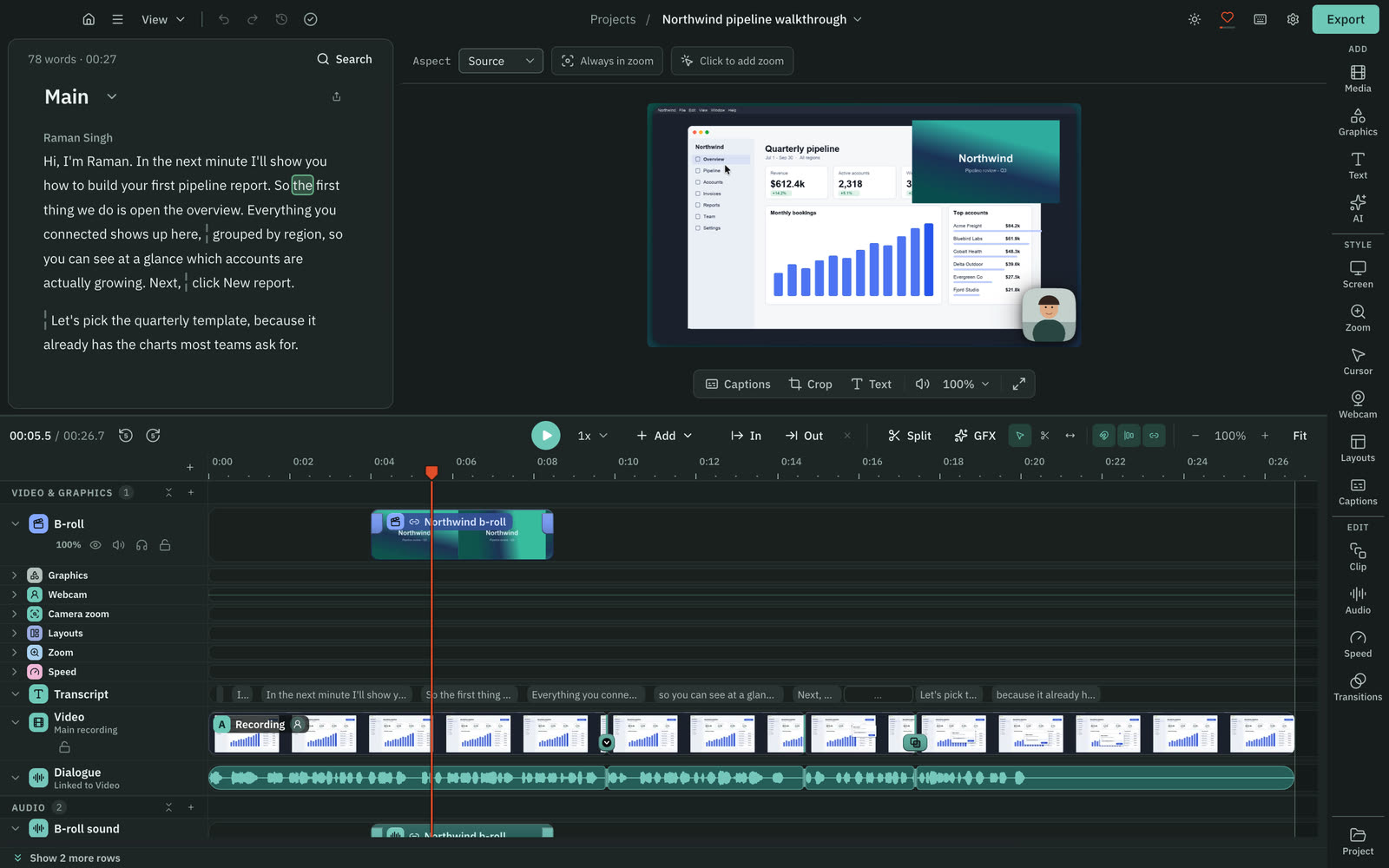
Cutscript has a general multitrack timeline. Cap has more effect track types, built for screen recordings.
CutscriptA multitrack timeline for video, images and audio
CapA Studio timeline with a lane for each kind of effect
| What | Cutscript | Cap |
|---|---|---|
| Speed | Yes0.25x to 4x, pitch kept or sound muted | YesSet steps from 0.25x to 8x, pitch choice |
| Transitions | Yes10 picture transitions, 2 audio crossfades, 0.1 to 4 s | YesCrossfade and fade through black, 0.25 to 1.5 s |
| Looks for part of a video | YesPer clip, with Copy look and Paste look | YesStyle tracks change background, camera or cursor |
| 3D camera shots | PartlyNot for the recording. Some graphics draw 3D | Yes3D tracks with automatic or custom shots |
| Keystrokes on screen | NoNot offered | YesKeyboard track (beta). Not on imported MP4s |
More detail
Cutscript
- Tracks can be hidden, muted, soloed, locked, reordered and renamed.
- Select, Razor and Slip tools, In and Out ranges, markers and snapping.
- Unlink audio from the picture, or pin clips to the script so they follow their words when you cut.
- Compositions keep several edits of one video in one project, each with its own cuts, captions and aspect.
- Per clip: screen, cursor, camera, captions, sound and Colors. Cursor styling needs a Mac take, and Colors is on a Mac now.
Cap
- Tracks for zoom, scenes (with their own transitions), masks, text, captions, keyboard (beta) and several audio lanes.
- Cap 0.6 adds style tracks (background, camera or cursor for part of a video), image tracks for logos, and 3D tracks.
- Clips can be trimmed, split, deleted, reordered and renamed. You can merge earlier Studio recordings into a project.
- Studio presets save editor settings for reuse and keep the project's timeline and clips when applied.
Zooms, cursor and backgrounds
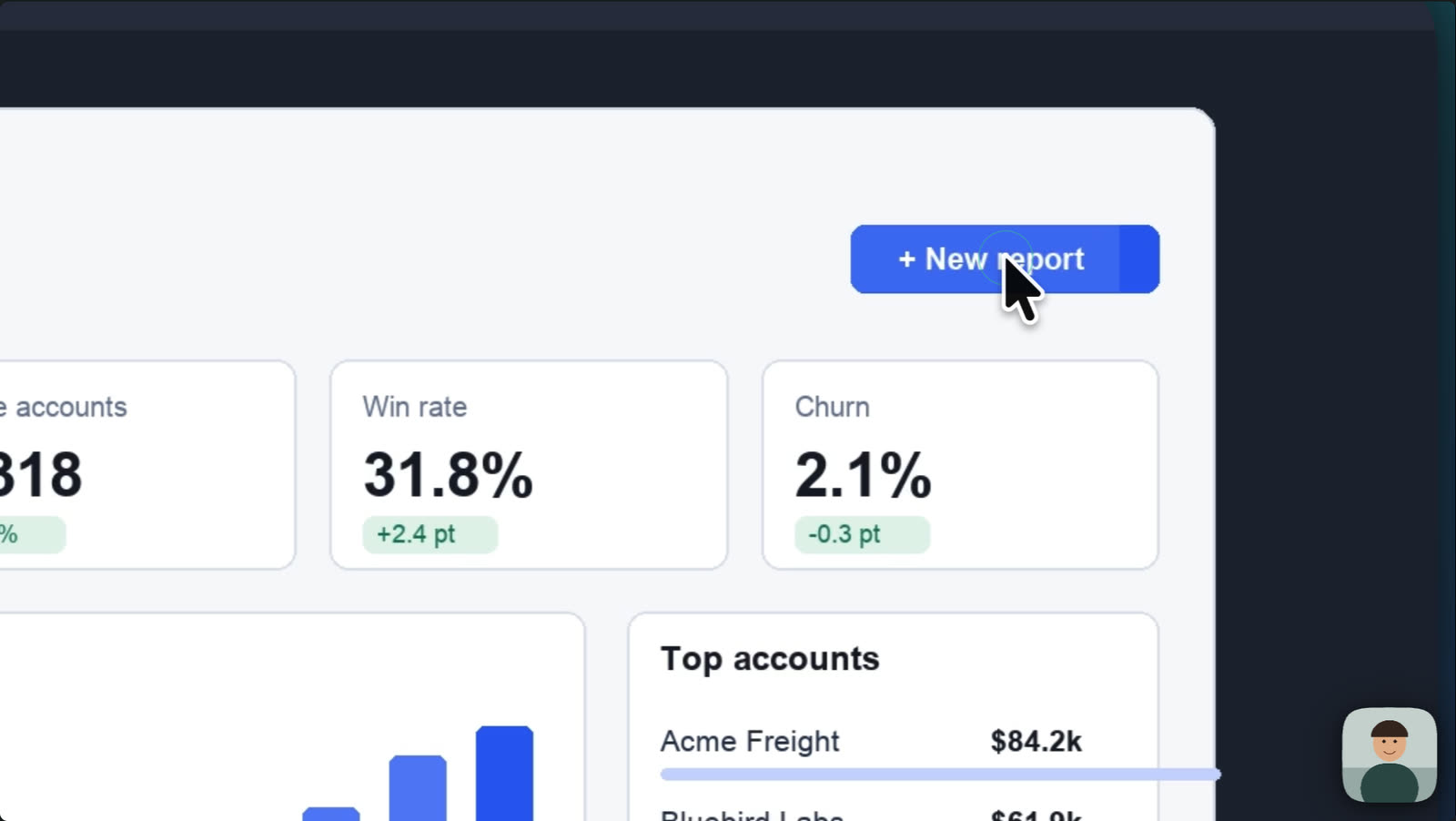
Both add auto zooms, styled pointers and backgrounds. Cap adds window frames and moving backgrounds. Cutscript's click zooms need a Mac take.
CutscriptClick zooms on a Mac, backgrounds everywhere
CapAuto zoom, smoothed cursors, frames and scenes
| What | Cutscript | Cap |
|---|---|---|
| Automatic zooms | PartlyMac takes only, from recorded clicks | YesAuto mode, around recorded clicks |
| On imported video | PartlyZooms by hand. Cursor styling off | PartlyManual zoom only, no cursor effects |
| Cursor styles | PartlyMac only: six bundled plus your Mac's own | YesmacOS, Tahoe, Windows or circle cursors |
| Click effects and sounds | PartlyMac only: six effects, five sounds | PartlyClick ripple. Click sounds not found |
| Window and device frames | PartlyPhone and laptop mockups. No window frame | YesWindow, browser (editable URL) and MacBook frames |
| Moving backgrounds | NoNot offered. Colours, gradients and images | YesAnimated gradients, since 0.6.0 |
| Camera background | PartlyChroma key only. Does not find people | PartlyBlur or remove on macOS, preview and export |
| Camera bubble shapes | YesCircle, pill, oval, wide, tall, diamond, hexagon and more | YesCircle, square or source shape, with corners and shadow |
More detail
Cutscript
- On a Mac, zooms are added from your clicks (Fewer, Balanced or More). On any video you can add zooms by hand, 1x to 5x.
- On a Mac, restyle the pointer after the take: six bundled styles plus your Mac's own, size 0.5x to 10x, movement presets.
- On a Mac, click effects and click sounds go into the export.
- Gradient, image and colour backgrounds with padding, corners and shadow. Desktop wallpapers on a Mac.
- A camera bubble with a two-colour border, and layouts of 2, 3 or 4 panels.
Cap
- Auto mode zooms around recorded clicks. Manual zooms run 1x to 4.5x, and you pick the focal point.
- Cursor: show or hide, size and tilt, hide when idle, and smoothing with presets or custom tension, friction and mass.
- Solid, gradient, wallpaper or custom image backgrounds with blur, plus padding, corners, motion blur, border and shadow.
- Camera scenes: Default, Camera Only, Hide Camera, Split Screen and Floating.
- Aspect ratios: Auto, 16:9, 9:16, 1:1, 4:3 and 3:4.
Captions
Both burn in styled captions and save subtitle files. Cap transcribes on your machine with no key. Cutscript needs a key, or Whisper on Apple silicon.
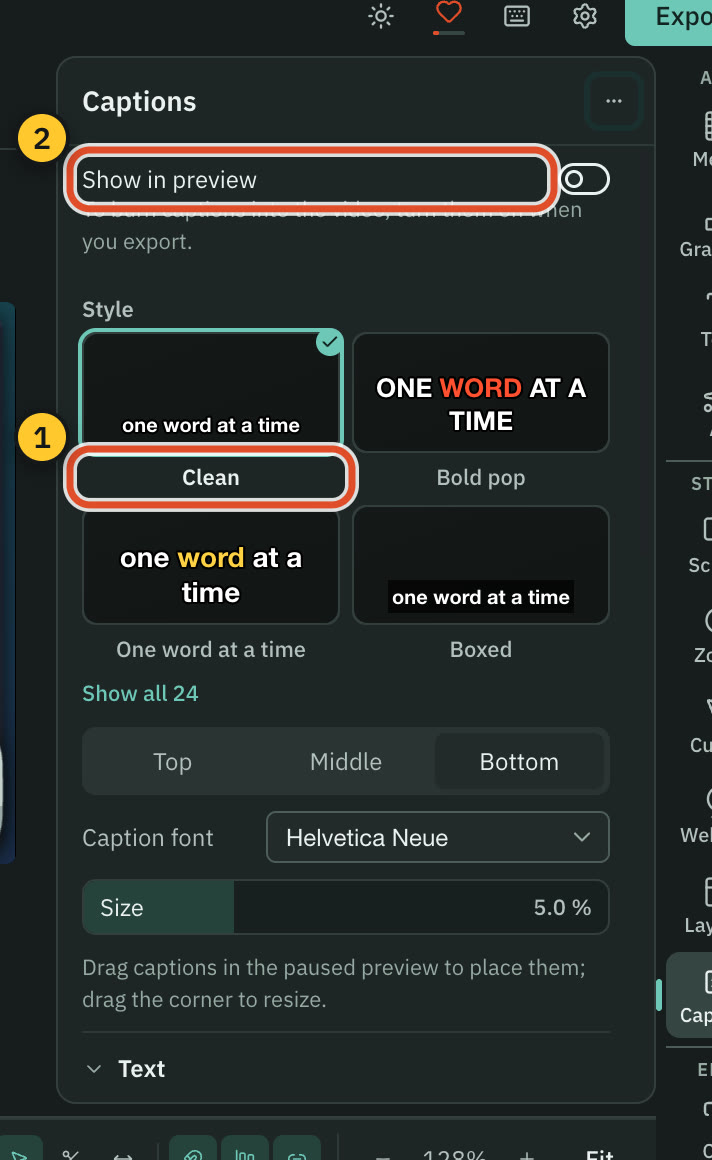
Cutscript24 styles, from a transcript you supply
CapCaptions made on your machine, labelled Beta
| What | Cutscript | Cap |
|---|---|---|
| Transcribe with no AI key | PartlyWhisper on Apple silicon. Otherwise a key | YesStudio captions run on your machine |
| Languages | YesScribe v2: 90+. Whisper on Apple silicon: 99 | Yes19 for local captions, per the home page |
| Word highlighting | YesSix animation choices, including none | YesHighlighting and animation in caption styling |
| Subtitle files | YesSRT or VTT, timed to the edited video | YesSRT or WebVTT |
| Translated captions for viewers | NoNot offered. No player for viewers | YesViewers pick a language. Listed under Pro |
More detail
Cutscript
- 24 presets such as Clean, Bold pop and Karaoke. Every setting stays editable, and one clip can have its own style.
- Highlight the word being said, reveal words as spoken, or show only the active word.
- Any installed font, Outline or Box backgrounds, and you drag captions on the preview to place them.
- Transcribe with ElevenLabs, fal.ai or OpenRouter on your key, or Whisper on Apple silicon. Intel Macs and Windows need a key.
- Whisper is slower than the cloud and has no speaker labels or sound tags.
Cap
- Transcribed on your machine with a model you pick (Whisper or Parakeet). Intel Macs use Whisper. The docs label it Beta.
- The home page says 19 languages.
- Edit text and timing. Style with presets, font, size, weight, uppercase, colours, background, position, highlight and animation.
- Pricing lists Transcriptions as Pro only, which seems to mean the cloud transcript. Docs name no plan for desktop captions.
Colors, Face and blur
Both grade footage and blur parts of it. Cutscript adds .cube looks, scopes, Face and tracked blur. Colors and Face: Mac now, Windows with the next Store update.
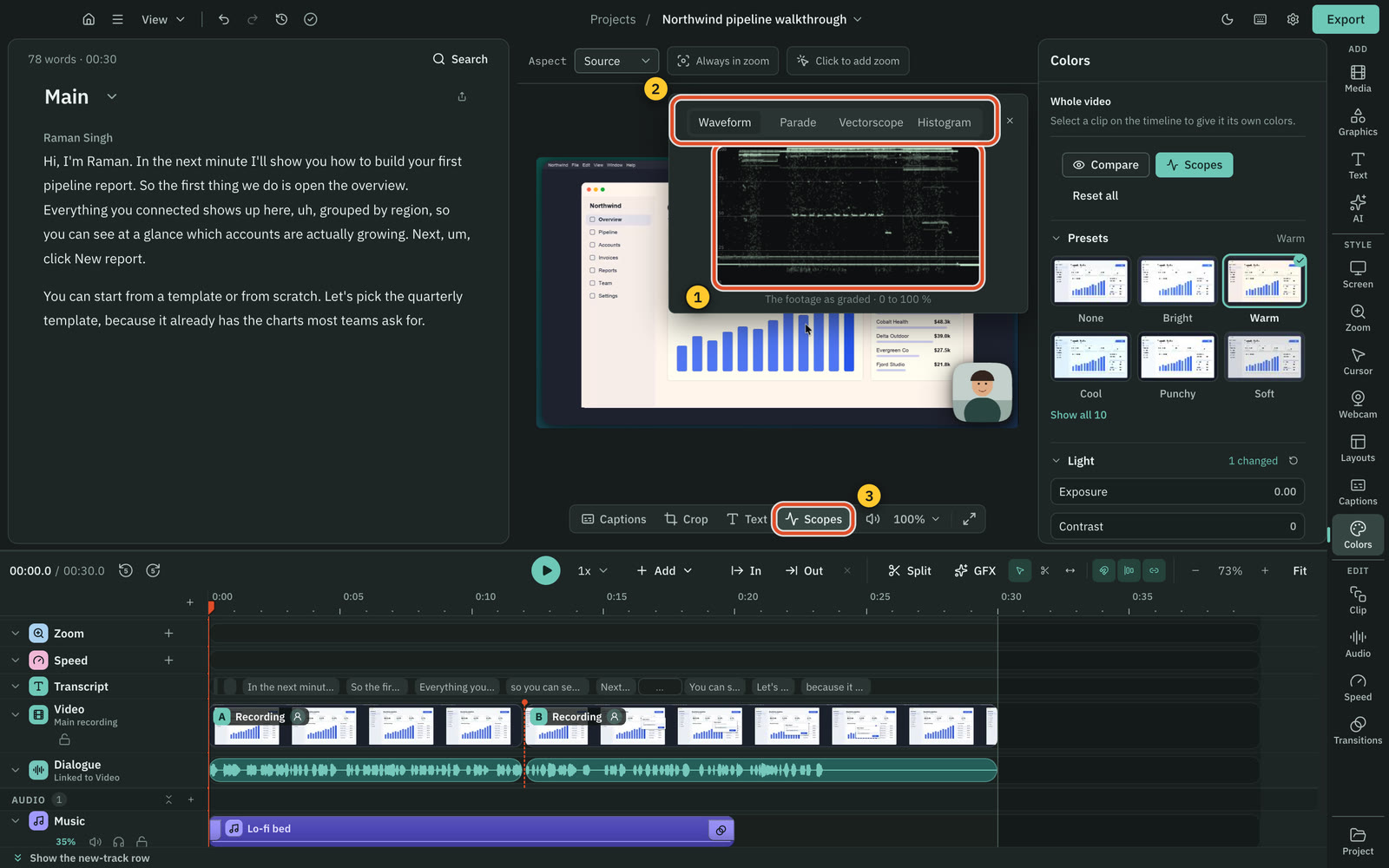
CutscriptGrading with scopes, and blur that can follow
CapColour presets and grading, plus masks you place
| What | Cutscript | Cap |
|---|---|---|
| Presets and sliders | PartlyTen presets, then light and colour sliders. Mac now | YesPresets and grading controls |
| Screen and camera graded apart | PartlyRecording only. Camera bubble keeps its colours. Mac now | YesTuned separately for screen and camera |
| .cube looks (LUTs) | PartlyImport with intensity. A copy stays in the project. Mac now | Not found in their docsNot found in their docs |
| Scopes | PartlyFour, in a window you can move. Mac now | Not found in their docsNot found in their docs |
| Grade with AI | PartlyUp to four frames, your AI account, price first. Mac now | Not found in their docsNot found in their docs |
| Face colours | PartlyPresets and sliders, or ask the AI. Mac now | Not found in their docsNot found in their docs |
| Blur that follows moving things | YesPixel lock on Mac and Windows, Vision on a Mac | NoNot offered. Docs say masks stay put |
| Find every face or email | PartlyMac only: one button, then review each | Not found in their docsNot found in their docs |
More detail
Cutscript
- Ten presets, light and colour sliders, three colour wheels, a vignette, and .cube looks with an intensity control.
- Four scopes, Waveform, Parade, Vectorscope and Histogram, sit in a window you can move over the preview.
- Click a face to give it its own colours, or detach it as a bubble that follows the person. Faces are found on your computer.
- A blur applies on export, so your original keeps its pixels. Share the exported video, not a project package with its media.
- Colors and Face are on a Mac now, and on Windows with the next Microsoft Store update. Finding faces and emails is Mac only.
Cap
- Desktop 0.6.0 added colour correction tuned separately for screen and camera, with presets and grading controls.
- The home page lists Cinematic, Noir, Vintage and Golden, plus exposure, contrast, saturation and vignette.
- Masks are rectangles you place and time: Sensitive (blur or pixelate) or Highlight (keeps the area visible, darkens the rest).
- The docs say masks stay in their placed region and do not follow moving content.
AI
Cutscript's AI edits inside the app on your own accounts. Cap's AI writes titles and summaries, and outside agents can use its library.
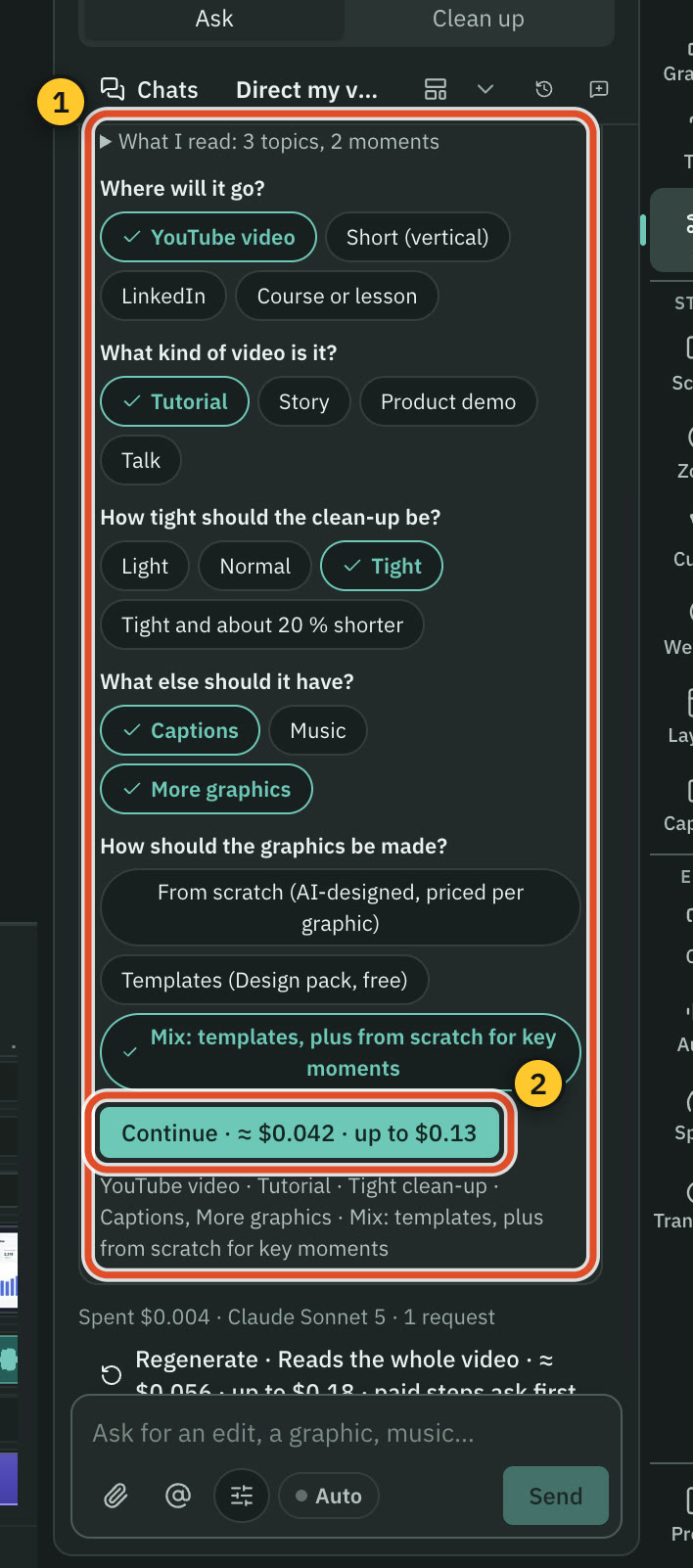
CutscriptAn AI editor on your own accounts
CapAI for titles and summaries, and agents for your library
| What | Cutscript | Cap |
|---|---|---|
| Ask for an edit in your own words | YesOne AI in the app, on your own AI account | Not found in their docsNot found in their docs |
| AI plans a whole edit | YesDirect my video: questions, priced plan, your approval | Not found in their docsNot found in their docs. Auto-Edit is tagged SOON |
| Short clips from a long video | YesUp to ten scored clips. Needs a transcript | Not found in their docsNot found in their docs. Manual 9:16 canvas |
| Titles, summaries and chapters | PartlyChapters for videos of about five minutes or more | YesTitles, summaries and chapters on Pro |
| Outside agents | NoNot offered. The AI works inside the app | YesCLI, skill and local MCP. Home page says 76 tools |
| Your own ChatGPT or Claude plan | YesChatGPT Plus or Pro. Claude via Claude Code on a Mac | Not found in their docsNot found in their docs |
| Your own API keys | YesOpenRouter, ElevenLabs, fal.ai, OpenAI, encrypted locally | PartlySelf-hosted web. Desktop app: not found in their docs |
| Local models | YesOllama on Mac and Windows. Whisper and voices: Apple silicon | PartlyCaptions and camera blur on device. Ollama self-hosted |
More detail
Cutscript
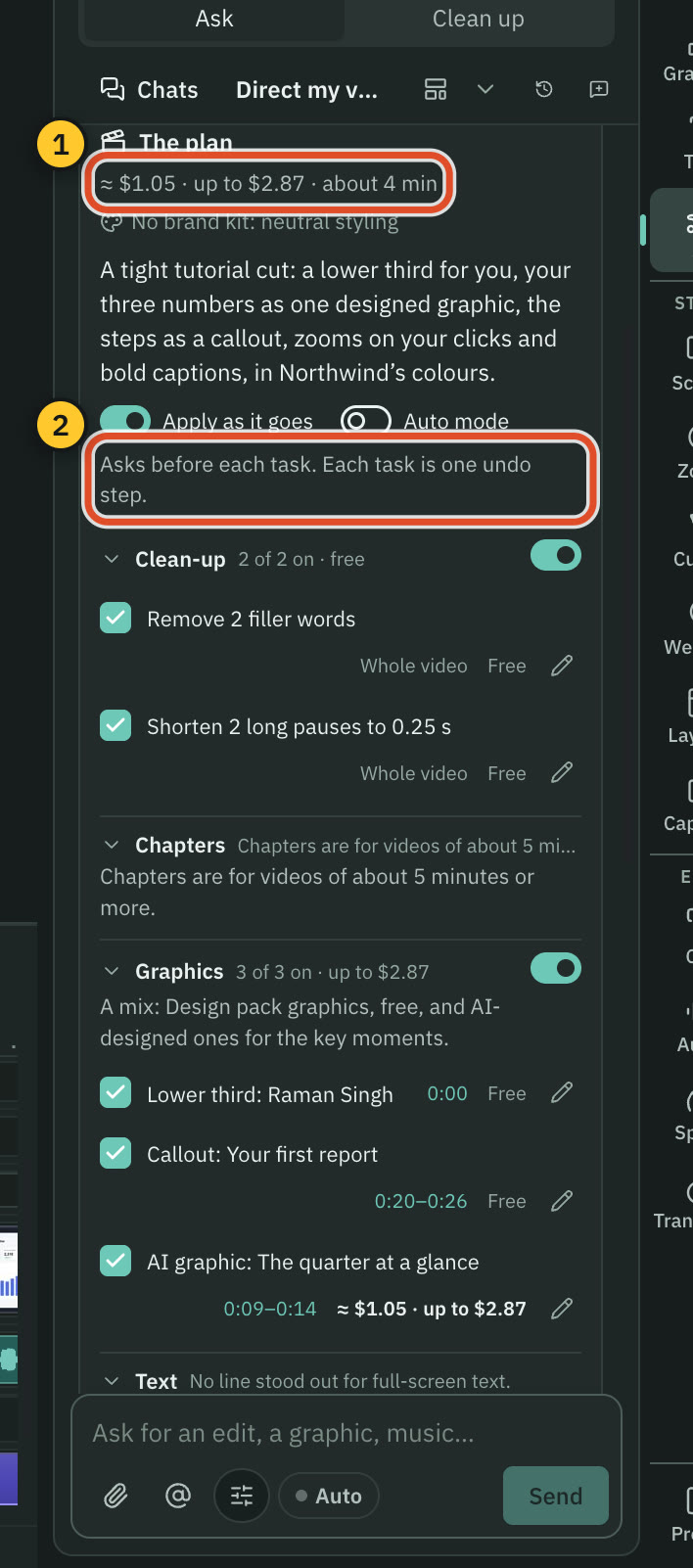
- One AI takes edits in plain words, across the script, timeline and look. Changes arrive as cards, and Apply is one undo step.
- Direct my video asks a few questions, then writes a plan with a price on each item. Nothing changes until you approve.
- Make short clips finds up to ten scored clips. They follow a face on a Mac, and the pointer or a still crop on Windows.
- Pro has no AI credits. Connect a ChatGPT plan, a Claude plan (on a Mac), your own keys or local models. Providers bill you.
- A plan covers text only: it cannot transcribe or make pictures. The AI does not record, export or run code.
Cap
- Pro includes AI titles, summaries, chapters and transcriptions. The FAQ says Cap AI has no usage limits.
- On Cap Cloud, Groq with an OpenAI fallback writes titles, summaries and chapters, and AssemblyAI transcribes.
- Cap for Agents is a CLI, a skill and a local MCP server for Codex, Claude Code, OpenCode, Cursor and other agents.
- Agents can search, record, export, upload, share and comment after you confirm. The agent docs do not describe cutting video.
- A hosted connector gives assistants such as Claude and Grok read-only access to your recordings by OAuth, which you can revoke.
Voice, music and graphics
Cutscript generates voice, music and graphics on your own accounts. Cap has an audio library, noise reduction and animated text.
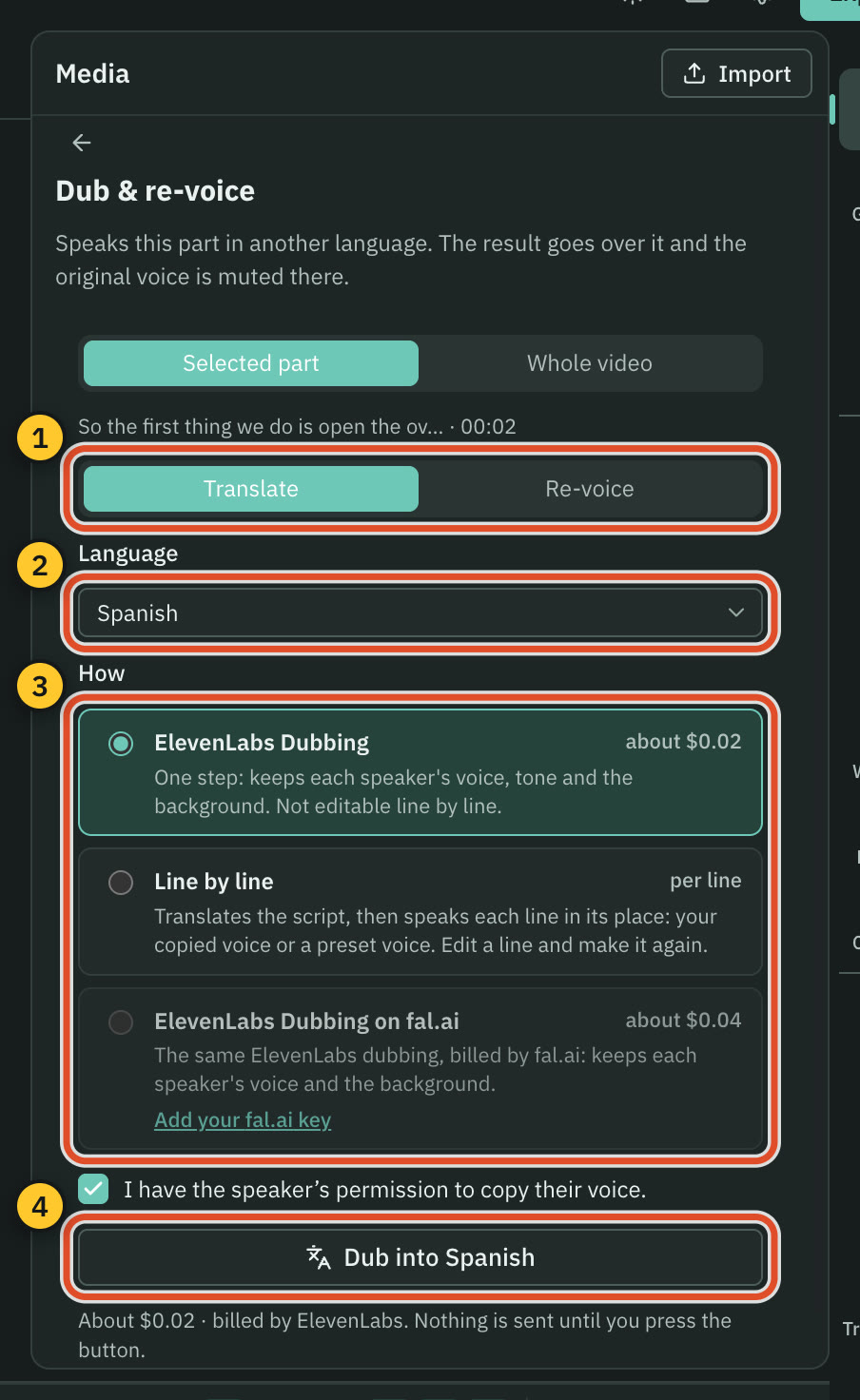
CutscriptGenerate audio and graphics, billed by your provider
CapNoise reduction, an audio library and animated text
| What | Cutscript | Cap |
|---|---|---|
| Voice clean-up | YesFree on your computer, or cloud on your key | YesStudio Sound at three strengths |
| Voiceover from text | YesOn your key, or a local voice on Apple silicon | Not found in their docsNot found in their docs |
| Dubbing and voice cloning | YesOn your key. Local voice on Apple silicon | Not found in their docsNot found in their docs |
| Built-in audio library | NoNot offered. Bring files or generate audio | YesBuilt-in audio library |
| Music and effects from a prompt | YesElevenLabs, fal.ai or OpenRouter, on your key | Not found in their docsNot found in their docs |
| Lower thirds, charts and maps | YesDesign pack, plus AI-made charts and maps | Not found in their docsNot found in their docs |
| Brand kits | YesOne kit: colours, fonts, logos, brand voice notes | PartlyCustom Branding and presets. One kit not found |
More detail
Cutscript
- Enhance voice: built-in clean-up is free and offline, Apple Voice Isolation is on a Mac, and ElevenLabs and fal.ai use your key.
- Voiceover from text, cloned voices, dubbing and re-voicing run on your keys. Voices on your computer need an Apple silicon Mac.
- Music and sound effects from a prompt, on your key. Cutscript ships no music library.
- A Design pack of 31 motion graphics works offline with no AI. The design director makes new ones from a description, priced first.
- Brand kits hold up to 16 colours, four fonts and logos, and can be read from a website.
Cap
- Studio Sound (0.6.0) reduces mic noise at three strengths. The features page still lists Noise Reduction as SOON.
- A built-in audio library, plus MP3, WAV, M4A, OGG, FLAC or AAC on several audio lanes, with per-segment volume and fades.
- Text layers with any installed font, presets and entry and exit animations, plus title cards, callouts and image tracks.
- A Custom Branding card (logo, colours, custom backgrounds), and brand colours in backgrounds, gradients and captions.
Import and export
Both write a local video file at up to 4K. Cutscript adds timeline hand-off on Pro and link downloads. Cap adds GIF and a faster export mode.
CutscriptFour video formats, and a Pro timeline for editors
CapMP4, GIF and a transparent cursor layer, on every plan
| What | Cutscript | Cap |
|---|---|---|
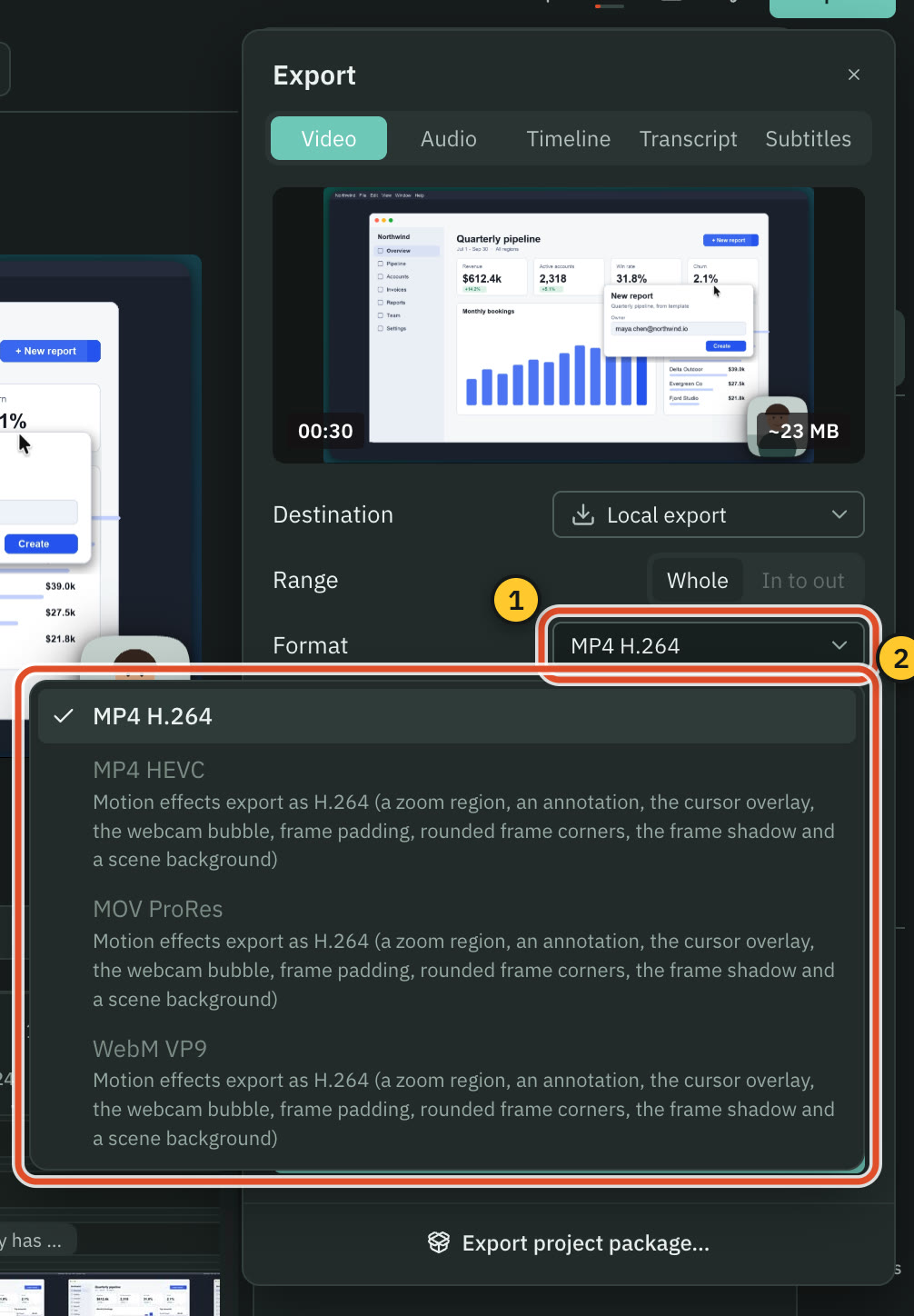
| Video formats | PartlyMP4 H.264, plus HEVC, ProRes, WebM without effects | YesMP4, GIF and cursor-only MOV |
| Highest resolution | Yes4K at up to 60 fps | Yes4K at 60 fps |
| No watermark on the free plan | NoMoving watermark on free video exports. Pro removes it | YesCap says none on any plan |
| Hand-off to other editors | YesPro only: Final Cut, Premiere, Resolve or EDL | Not found in their docsNot found in their docs |
| Import from a link | YesYouTube, Instagram, TikTok, Vimeo, X, Reddit and more | PartlyLoom links. YouTube and social: not found |
| Import files | YesVideo, audio and images. HEIC on a Mac only | YesMP4 or Cap recording; dashboard paste-to-import |
| Transparent video | NoNot offered. No alpha channel in exports | PartlyCursor-only MOV is transparent |
| Project file | YesA .csproj package, moves between Mac and Windows | Yes.cap project file |
More detail
Cutscript
- MP4 H.264, MP4 HEVC, MOV ProRes and WebM VP9. With zooms, cursor or background effects, only MP4 H.264 is offered.
- Source or 480p to 4K, at 24 to 60 fps, never scaled up. Audio exports as M4A, WAV, MP3 or FLAC.
- Timeline export is Pro only. It holds your cuts and audio clips, not motion effects, for Final Cut, Premiere, Resolve or an EDL.
- Download from link brings in video from YouTube, TikTok, Vimeo and others, for videos you have the right to use.
- Free video exports carry a moving watermark. Pro removes it. Audio, subtitle and transcript exports have none.
Cap
- The Studio docs list MP4 (720p, 1080p, 4K at 15, 30 or 60 fps), GIF (720p or 1080p) and a transparent cursor-only MOV.
- The features page says MP4, WebM, MOV, GIF and more, so Cap's two pages differ.
- The pricing page includes 4K/60fps and export to any format on every plan.
- A Turbo toggle (0.6.2) uses every CPU core. Cap says MP4 exports finish about 2 to 2.8 times faster.
- Loom links import on Pro, one at a time or by a CSV of up to 500 rows.
Sharing and teams
Cap is ahead here. Cutscript ends at a file you post yourself, while Cap is built around links, comments and teams.
CutscriptNo sharing layer. You post the file yourself
CapLinks, comments, analytics and team spaces
| What | Cutscript | Cap |
|---|---|---|
| Share links | NoNot offered | YesFree: 5 min each. License: 20 a month. Pro: unlimited |
| Comments and reactions | NoNot offered | YesTimestamped comments, replies, emoji reactions |
| Viewer analytics | NoNot offered | YesOn Pro |
| Password shares and custom domain | NoNot offered | YesOn Pro |
| Team workspaces and roles | NoNot offered | YesOwner, Admin, Member roles. Workspaces on all plans |
| Single sign-on | NoNot offered. Email, Google or GitHub sign-in | YesSAML SSO $199 a month flat. SCIM can be arranged |
| Compliance | NoNone listed. Files stay on your computer | YesSOC 2 Type II, ISO 27001. BAA $99 a month, needs Pro |
| Moving from Loom | NoNot offered. No Loom importer | YesPro: Loom links, CSV of 500 rows, concierge migration |
More detail
Cutscript
- Export writes a file to your computer. Local export is the only destination today.
- Cutscript uploads nothing for you. There are no share links, embeds, comments or viewer analytics.
- There are no team workspaces or roles.
- You can move a project to another computer as one .csproj file.
Cap
- Share pages can show captions, transcript, summary, chapters, and timestamped comments with replies and reactions, by plan.
- Links can be public (no viewer account), private, password-protected or by emailed invite. Viewers sign in to comment.
- Free links run up to 5 minutes each, with a monthly allowance (no number given). Desktop License: 20 a month. Pro: unlimited.
- Slack links show an inline player, and Pro owners can add a call-to-action end screen. Viewers can watch an Instant upload live.
- Organisations have Owner, Admin and Member roles, spaces, folders, and analytics by geography, browser, OS and device.
Price
Prices checked 31 October 2026. The plans do not line up: Cutscript Pro removes the watermark, and Cap's paid plans add rights and cloud features.
CutscriptFree with a watermark, or Pro on one computer at a time
CapFree for personal use, then a licence or Pro
| What | Cutscript | Cap |
|---|---|---|
| Free plan | YesEvery feature except timeline export. Free account needed | YesFull editor and 4K/60fps export. Personal use only |
| Lowest paid price | Yes$4.17 a month paid yearly ($49.99 a year), or $9.99 monthly | YesDesktop License $29 a year, or $58 once |
| One-off price | NoNot offered. Monthly or yearly only | Yes$58 once, never renews |
| Paid plan with cloud and AI | NoNot offered. No hosting, and no AI credits in Pro | YesPro $8.16 per user a month billed yearly, $12 monthly |
| AI in the price | NoNot included. Providers bill you, or use local models | YesOn Pro: titles, summaries, chapters, transcriptions |
| What a paid plan covers | YesOne computer at a time | YesLicense: one user. Pro: per user, discounts over 10 |
| Discounts | YesYearly saves 58% against monthly | YesYearly saves 32%, students 30%, MIGRATE20 20% off Pro |
More detail
Cutscript
- Free: every feature except timeline export, with a free account. Video exports carry a moving watermark.
- Pro: $4.17 a month paid yearly ($49.99 a year), or $9.99 monthly, on one computer at a time, Mac or PC.
- Pro removes the watermark and adds timeline export.
- Neither plan includes AI credits. Your providers bill you directly, unless you use local models.
- A review of Cutscript on X earns two video exports without the watermark.
Cap
- Free: $0, personal use only. Full Studio editor and 4K/60fps export, but no AI titles, transcriptions or viewer analytics.
- Desktop License: $29 a year or $58 once, for one user. It adds commercial rights and 20 cloud links a month.
- Cap Pro: $12 per user a month, or $8.16 billed yearly. Adds unlimited links, AI, analytics, custom domain, S3 and Drive.
- Self-hosted: free AGPLv3 software. You pay for hosting and supply AI keys, and Cap gives no direct support for it.
- Cap's pages differ on limits for local recording on Free, so check before you rely on it.
Platforms and where files live
Cap runs in more places, including Linux, Chrome and a browser. Files stay on your computer in Cutscript, and in Cap's Studio Mode until you share.
CutscriptMac and Windows, with files on your computer
CapMore platforms, and open code you can host
| What | Cutscript | Cap |
|---|---|---|
| Mac | YesApple silicon and Intel. macOS 14 to open, 15 to record | YesApple silicon and Intel. 13.1+ recommended |
| Windows | PartlyWindows 10 (1809+) or 11. Area, drawing, clicks: Mac only | YesWindows 10/11. One download option says Beta |
| Linux | NoIn testing. Not ready to download yet | YesDEB, RPM, AppImage and Arch packages |
| Sign-in | YesRequired once, on Free too | Not found in their docsQuickstart lists sign in. No-account use not found |
| Works offline | YesRecording, timeline and export work offline | PartlyDesktop License says so. Free not stated |
| Self-hosting | NoNot offered. Source code is not public | YesDocker Compose stack. Cap gives no direct support |
| Your own storage | PartlyFolders on your computer. No cloud storage | YesS3 or Google Drive on Pro, or self-hosted |
More detail
Cutscript
- Macs with Apple silicon or Intel, on macOS 14 or later. Recording needs macOS 15 or later.
- 64-bit Windows 10 (1809 or later) or 11, from the Microsoft Store. No browser or phone app, and Linux is in testing.
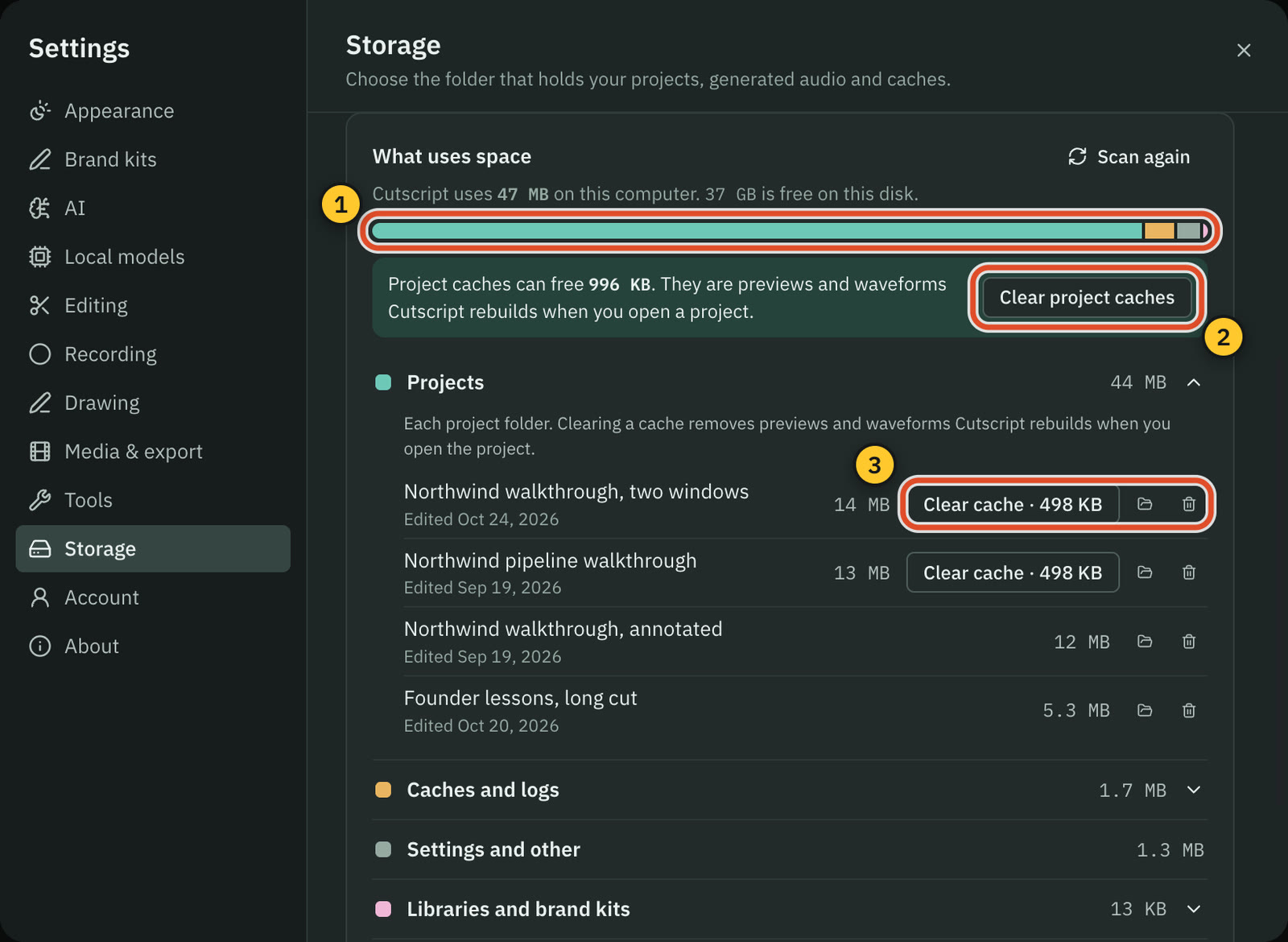
- Projects live on your computer, in a folder you choose in Settings › Storage. Imported media stays where it is.
- Cloud AI steps send the text, audio or still frames they need to the provider you pick. Local models send nothing.
- Recording, the timeline and export work offline once you sign in, and your plan is checked at least every 14 days.
Cap
- macOS on Apple silicon and Intel (13.1+ recommended), Windows 10/11, and Linux packages that need glibc 2.39 or newer.
- A Chrome extension, a web recorder and a CLI you install separately. The iOS app's App Store release is unconfirmed.
- Studio Mode uploads nothing unless you pick a share link. Instant Mode uploads as you record.
- Cloud storage can be Cap Cloud, an S3-compatible bucket or a Google Drive folder (S3 and Drive are Pro), or your own stack.
- Most code is AGPLv3, with about 24.2k GitHub stars. The latest desktop release is 0.6.2, dated 28 Oct 2026.
Where Cap is the better pick
Sharing is built in
Cap gives you a link as you record, with comments, reactions, embeds and password (Pro) or invite access. Cutscript has none: you post a file.
Open source and self-hosting
Most of Cap is AGPLv3, and you can run the stack with Docker Compose or store recordings in your own S3 or Google Drive on Pro. Cutscript's source is not public.
Teams and compliance
Roles, spaces, folders, SAML SSO as an add-on, SOC 2 Type II, ISO 27001 and signed BAAs for HIPAA. Cutscript has none of these.
No watermark, and a one-off price
Cap says exports carry no watermark on any plan, Free included, and a one-off $58 Desktop License covers commercial use. Cutscript's free video exports carry a watermark.
More places to record
Linux packages, a Chrome extension and a web recorder sit next to macOS and Windows. Cutscript is Mac and Windows, with Linux in testing.
Studio extras
A teleprompter, keystroke track, 3D camera shots, moving backgrounds, window frames and an audio library. Cutscript has no teleprompter, keystroke track or music library.
Moving from Cap to Cutscript
- Install Cutscript (Mac download or Microsoft Store) and sign in once with a free cutscript.dev account.
- In Cap, export each video you want to keep working on as an MP4.
- In Cutscript, press Import in the Media panel, or drop the file on the home screen.
- Cutscript cannot open .cap files. Cap's zooms, cursor settings and masks are baked into the MP4.
- An imported video has no pointer data, so add zooms by hand. Click zooms need a take recorded on a Mac.
- To edit by text or add captions, connect a transcription key, or download Whisper on an Apple silicon Mac.
Questions
Is Cutscript better than Cap?
It depends on what happens after you stop recording. If you send videos as links to a team, pick Cap, because Cutscript has no sharing. If you edit by text on the desktop, use AI on your own accounts and post the file yourself, pick Cutscript.
Is Cutscript open source like Cap?
No. Cutscript's source code is not public, so you cannot host it yourself. Most of Cap's code is AGPLv3, and you can self-host it with Docker Compose, though Cap gives no direct support for that.
Does Cutscript have share links like Cap?
No. Cutscript exports a file to your computer and uploads nothing for you, so you post it yourself. Cap gives you a link, with comments on the share page and viewer analytics on Pro.
Does Cap add a watermark?
Cap says no, on any plan. Cutscript's free plan adds a moving watermark to video exports, and Pro removes it. Audio, subtitle and transcript exports have none.
Can I use Cap's free plan for work?
Cap's pricing page says Free is for personal use. Its licence page counts content that promotes an employer's product, and talk between team members, as commercial use. You need the Desktop License or Cap Pro, and it covers Cap's own binaries, not builds you compile.
Do I pay for AI in each one?
In Cutscript you pay each provider directly, and Pro has no AI credits. A ChatGPT plan or a Claude plan (on a Mac) covers the AI's text, and local models are free. Cap Pro includes AI titles, summaries, chapters and transcriptions, and self-hosters bring their own keys.
Which one runs on Linux?
Cap does, with DEB, RPM, AppImage and Arch packages, and it needs glibc 2.39 or newer. Cutscript's Linux version is in testing and is not ready to download yet.
Try it on your own video.
Free with a Cutscript account. Video exports have a watermark, and Pro removes it.
Download CutscriptFirst published 31 October 2026, last checked 31 October 2026. Prices and features change, so check before you decide. The people in our screenshots are stock footage and do not use or endorse Cutscript. Screenshots show Cutscript 0.1 beta. Seen something wrong or out of date? Tell us and we will fix it.