Cutscriptvs OpusClip
Cutscript is a 0.1 beta screen recorder and editor: pick it for tutorials and demos with files kept on your computer. Pick OpusClip for many short clips from long videos, posted from a browser.
Written by the people who make Cutscript. Checked 31 October 2026. OpusClip and its logo are trademarks of their owner, and Cutscript is not affiliated with or endorsed by them.
Pick Cutscript if
- You record tutorials or demos: voice, sound and camera each get their own track
- You polish screen takes: Mac pointer and click zooms, plus backgrounds and rounded corners
- You grade colour by hand in Colors. On a Mac now, Windows with the next Store update
- You want projects on your own disk, kept until you remove them
- You want a flat price and your own AI: Pro is $4.17 a month paid yearly ($49.99 a year)
Pick OpusClip if
- You need many short clips from long videos, found with prompts and scored for virality
- You want posting in the same tool: nine platforms and a scheduling calendar
- You work in a team: shared workspace, credits and brand templates. Business adds SSO
- You want to work in a browser or on a phone, with nothing to install
- You want a product that ships often: ten changelog entries, 3 Sep to 21 Oct 2026
At a glance
| What | Cutscript | OpusClip |
|---|---|---|
| Best for | Tutorials and demos: record, cut by text, polish | Many short captioned clips from long video, then posting |
| Maturity | 0.1 beta. Expect rough edges | Updated often: ten changelog entries, 3 Sep to 21 Oct 2026 |
| Price (checked 31 Oct 2026) | Free, or Pro at $4.17 a month paid yearly ($49.99 a year), or $9.99 monthly | Free. Starter $15 a month. Pro $29 monthly, or $14.50 a month paid yearly ($174 a year). Business custom |
| Free plan | YesEvery feature except timeline export. Free account needed | Partly60 credits a month, 9:16 only, no text editing, files last 3 days |
| Watermark | PartlyA moving watermark on free video exports. Pro removes it | PartlyOpusClip logo on free and trial clips. Paid plans remove it |
| Platforms | PartlyMac and Windows. Recording on a Mac needs macOS 15 | PartlyBrowser, iPhone and Android. No desktop app found |
| Where files live | YesOn your computer | PartlyOn their servers. Projects expire by plan |
| Screen recorder | YesBuilt in. Area, drawing and click data on a Mac | Not found in their docsNot found in their docs |
| Sharing | NoYou get a file and post it yourself | YesPosts to nine platforms, schedules, shares by link |
| Editing by text | YesOn both plans, once you have a transcript | YesStarter and up, not Free |
| AI | Your ChatGPT plan, a Claude plan on a Mac, your keys, or local models | Credits in the plan. AI Producer plans on your Claude or ChatGPT plan |
| Offline | YesRecording, timeline and export work offline up to 14 days between plan checks | Not found in their docsNot found in their docs |
YesPartlyNoNot found in their docs
Recording
Cutscript records screen, sound and camera. We found no screen recorder in OpusClip's docs.
CutscriptA recorder inside the app
OpusClipNo screen recorder found in their docs
| What | Cutscript | OpusClip |
|---|---|---|
| Screen recorder | YesDisplay or window. Area recording on a Mac | Not found in their docsNot found in their docs |
| System sound | YesAll system sound. One app's sound is experimental on a Mac | Not found in their docsNot found in their docs |
| Several sources in one take | YesUp to three pictures. The extra ones have no sound | Not found in their docsNot found in their docs |
| Drawing while recording | PartlyPen, arrows, shapes, laser pointer. Mac only | Not found in their docsNot found in their docs |
| Camera | YesIts own track, a webcam bubble you can restyle later | PartlyiPhone app: drop or record a long video |
| Live streams | NoNot offered. Links work only after a stream ends | PartlyLive Clipping, private beta, about 1 credit a minute |
More detail
Cutscript
- Record a display or window with your voice, system sound and camera. Each is saved as its own track.
- Record up to three sources in one take. On Windows you can add displays and windows only.
- On a Mac you can also record an area, draw on screen and keep click data for zooms and click effects.
- Recording works offline for up to 14 days between plan checks. On a Mac it needs macOS 15 or later.
OpusClip
- Product-demo page: bring in a Loom, Zoom, Riverside or StreamYard recording by link, or upload a file up to 10GB.
- The iPhone app listing says drop or record a long video. The Android page lists import and upload, and does not mention recording.
- AI Producer's page says screen recordings are not yet supported.
- Live Clipping, in private beta, records a live stream while it airs and cuts it into clips.
Clips from long videos
OpusClip is ahead here: clipping is its core product. Cutscript's clipper needs a transcript and an AI source.
CutscriptAsk for clips, review a plan, edit each one
OpusClipFinds highlight moments, makes captioned shorts
| What | Cutscript | OpusClip |
|---|---|---|
| How you start | YesLink, file or project, then ask in plain words | YesFile or link, then natural-language prompts |
| Link sources | YesPublic videos only: YouTube, TikTok, Instagram, X and more | YesAbout 18, such as Drive, Zoom, Loom. Public or unlisted |
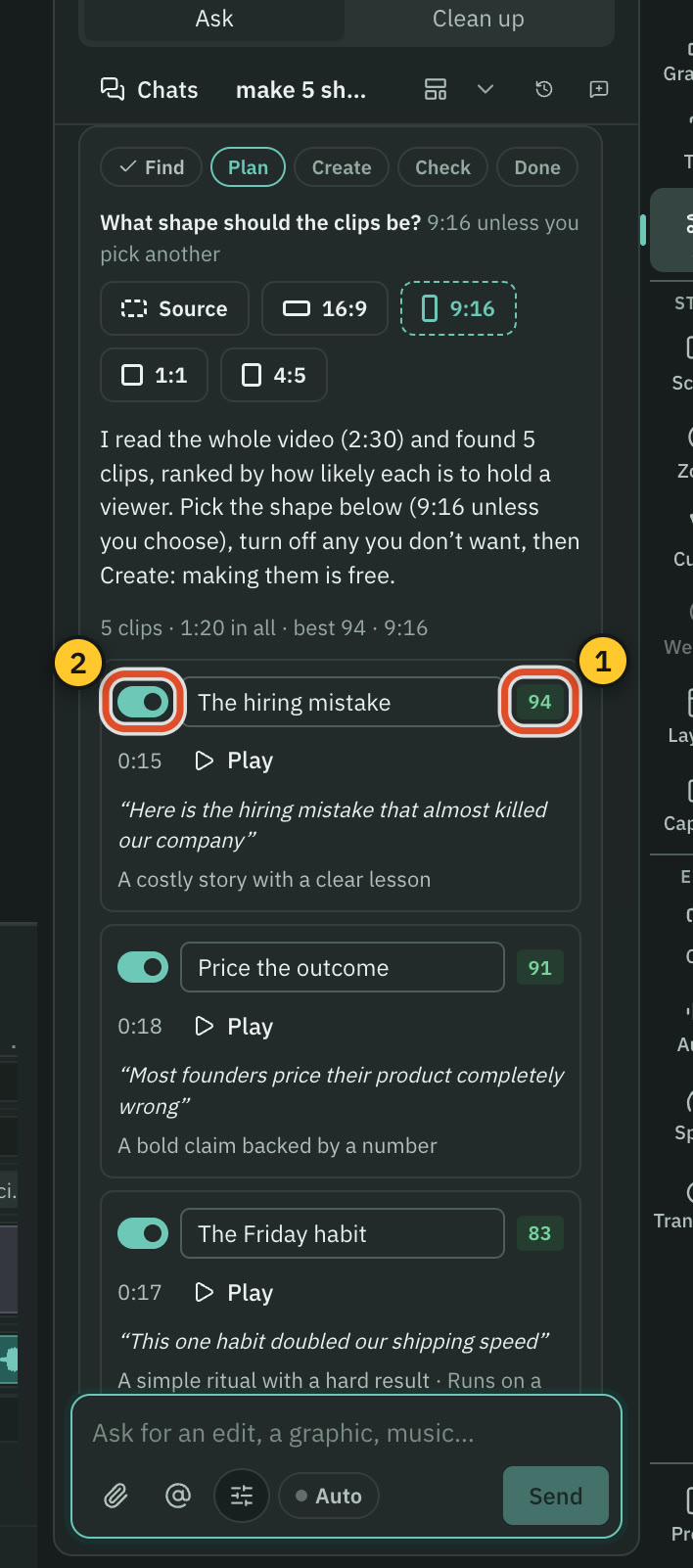
| Clip score | Yes0 to 100, how likely a clip holds a viewer | YesVirality Score 0 to 99. Not on Free |
| What you set up first | PartlyA transcript source and an AI source | YesIncluded. 1 credit per minute of imported video |
| Following a speaker | PartlyFace-follow on a Mac. AI picks Follow, Split or Wide | YesAutomatic mode follows one active speaker |
| Framing by hand | YesDrag a fixed or keyframed window on the preview | YesPick a scene, click Tracker, click a subject |
| Shapes | YesSource, 16:9, 9:16, 1:1 or 4:5, on both plans | Partly9:16 only on Free and Starter. 1:1 and 16:9 on Pro |
| On the free plan | YesClipper works. Watermark on video exports | Partly60 credits a month, watermark, no Virality Score |
More detail
Cutscript
- Ask in the AI panel or on the home screen. You get up to ten clips, 15 to 60 seconds by default.
- Each clip has a score, its hook and the reason it was picked. It becomes its own composition with its own cut and captions.
- Finding the clips is priced on the Send line, or runs on your plan. Making them is free.
- A clip follows a face only on a Mac. On Windows it follows the pointer or uses a still crop.
- You need a transcript first (a key, or Whisper on an Apple silicon Mac) and an AI source.
OpusClip
- ClipAnything finds moments in any genre from prompts. Clips are reformatted and captioned, with a publish step.
- Virality Score from 0 to 99, on Starter and Pro, not Free.
- About 18 link sources, plus local uploads up to 10GB and 10 hours. Pro imports up to 30GB.
- Automatic mode follows one active speaker. The manual Tracker follows people, products, animals, vehicles or text.
- Free and Starter output 9:16 only. Pro and Business add 1:1 and 16:9, and their aspect-ratio page also lists 4:5.
Editing by text
Both cut by deleting words and remove fillers. Cutscript does it on the free plan, OpusClip from the Starter plan.
CutscriptScript and multitrack timeline, both plans
OpusClipTranscript and timeline editing from Starter
| What | Cutscript | OpusClip |
|---|---|---|
| Cut by deleting text | YesBoth plans, once you have a transcript | YesStarter and up, not Free |
| Fillers and pauses | YesEditable list. Pauses over 0.8 s shorten to 0.3 s by default | YesSpeech Cleanup from Starter. Silences over 0.5 s by default |
| Repeated takes | YesPhrases said twice in a row. Keeps your last take | YesBad-take removal on Pro and Business |
| Video and audio tracks | YesMultitrack for video, images and audio | Not found in their docsNot found in their docs |
| Transitions | YesDissolve, dip, push, slide, wipe, iris and more | YesAuto and six manual effects. Pro and Business |
| Editing on the free plan | YesEverything above works on Free | NoNot offered on Free: text editing, timeline, transitions |
More detail
Cutscript
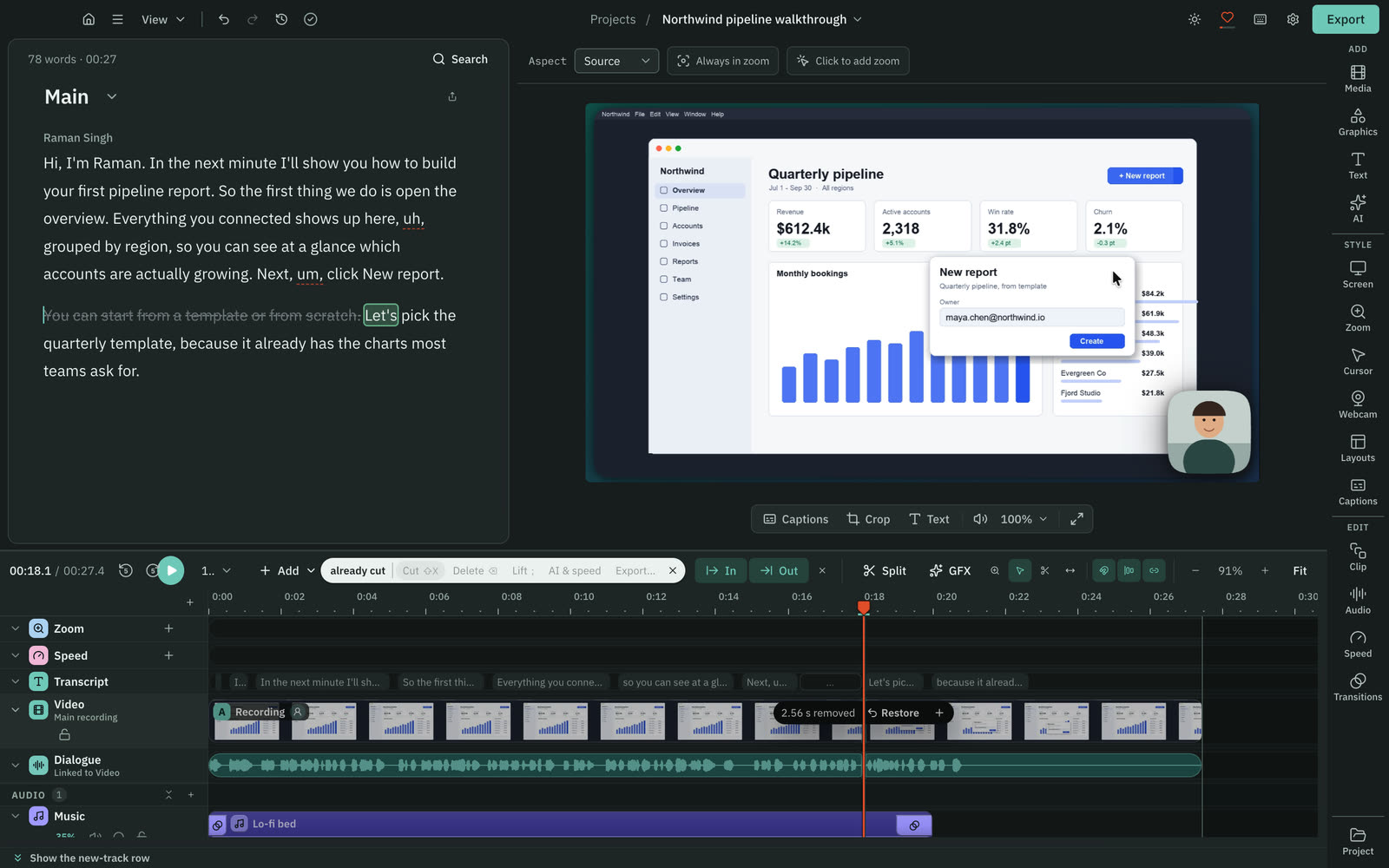
- Delete words in the script and the video follows. It needs a transcript first: a key, or Whisper on an Apple silicon Mac.
- Your original media stays untouched. Editing by text works offline once the transcript exists.
- Filler, gap and repeat removal runs on your computer with no AI and costs nothing. The word list is editable.
- The timeline has tracks for video, images and audio. You can hide, mute, solo, lock, reorder and rename them.
- Select, Razor and Slip tools, snapping, In and Out ranges, and speed from 0.25x to 4x.
OpusClip
- Select text in the transcript and click Delete, or drag a segment's edges in the timeline.
- Speech Cleanup removes fillers, stutters and silences over 0.5 s by default. Detect now finds retakes and repeated phrases.
- Drag scenes into a new order and split with a shortcut. Snap Editing is on by default.
- Up to 5 text overlays, each on its own track.
- Separate video and audio tracks: not found in their docs.
Zooms, cursor and layouts
Cutscript's controls suit screen recordings. OpusClip's layouts suit speakers and vertical video.
CutscriptZooms, pointer, background and camera bubble
OpusClipAuto Zoom and seven layouts
| What | Cutscript | OpusClip |
|---|---|---|
| Automatic zoom | PartlyFrom your clicks on a Mac. Otherwise by hand | YesTargets key moments. Pro and above |
| Pointer styles and click effects | PartlyOn a Mac: six styles, six click effects, click sounds | Not found in their docsNot found in their docs |
| Background, corners and shadow | YesGradient, image or colour, padding, corners, shadow | Not found in their docsOnly padding for Fit found in their docs |
| Camera bubble shapes | YesCircle, pill, oval, diamond, hexagon and more | Not found in their docsNot found in their docs |
| Chroma key | YesRemoves one solid colour. Does not find people | Not found in their docsNot found in their docs |
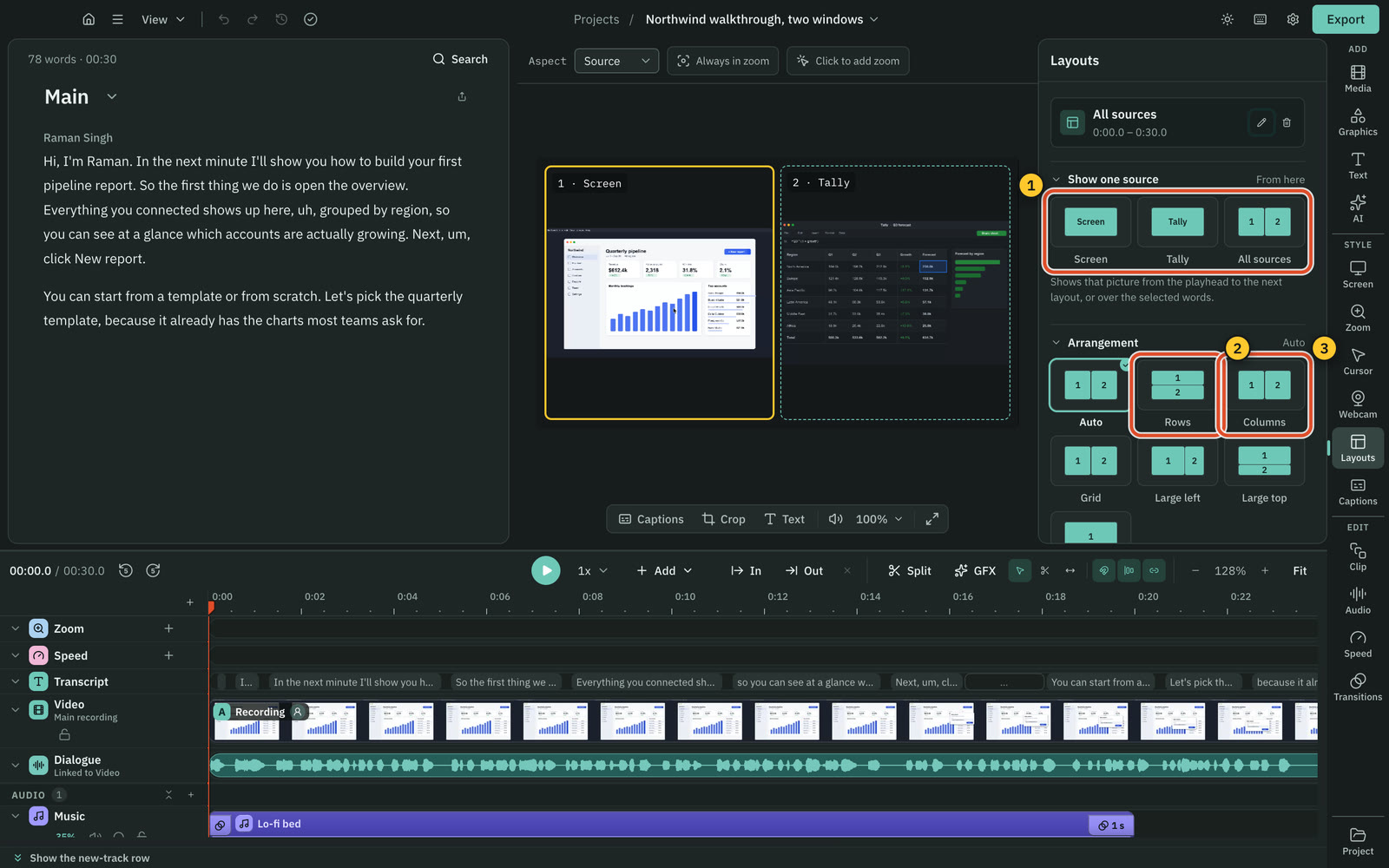
| Multi-panel layouts | Yes2, 3 or 4 panels: auto, rows, columns, grid, large | YesSplit, Three, Four, Screenshare, Gameplay |
| Eye contact correction | NoNot offered | YesPro, Max and Business |
More detail
Cutscript
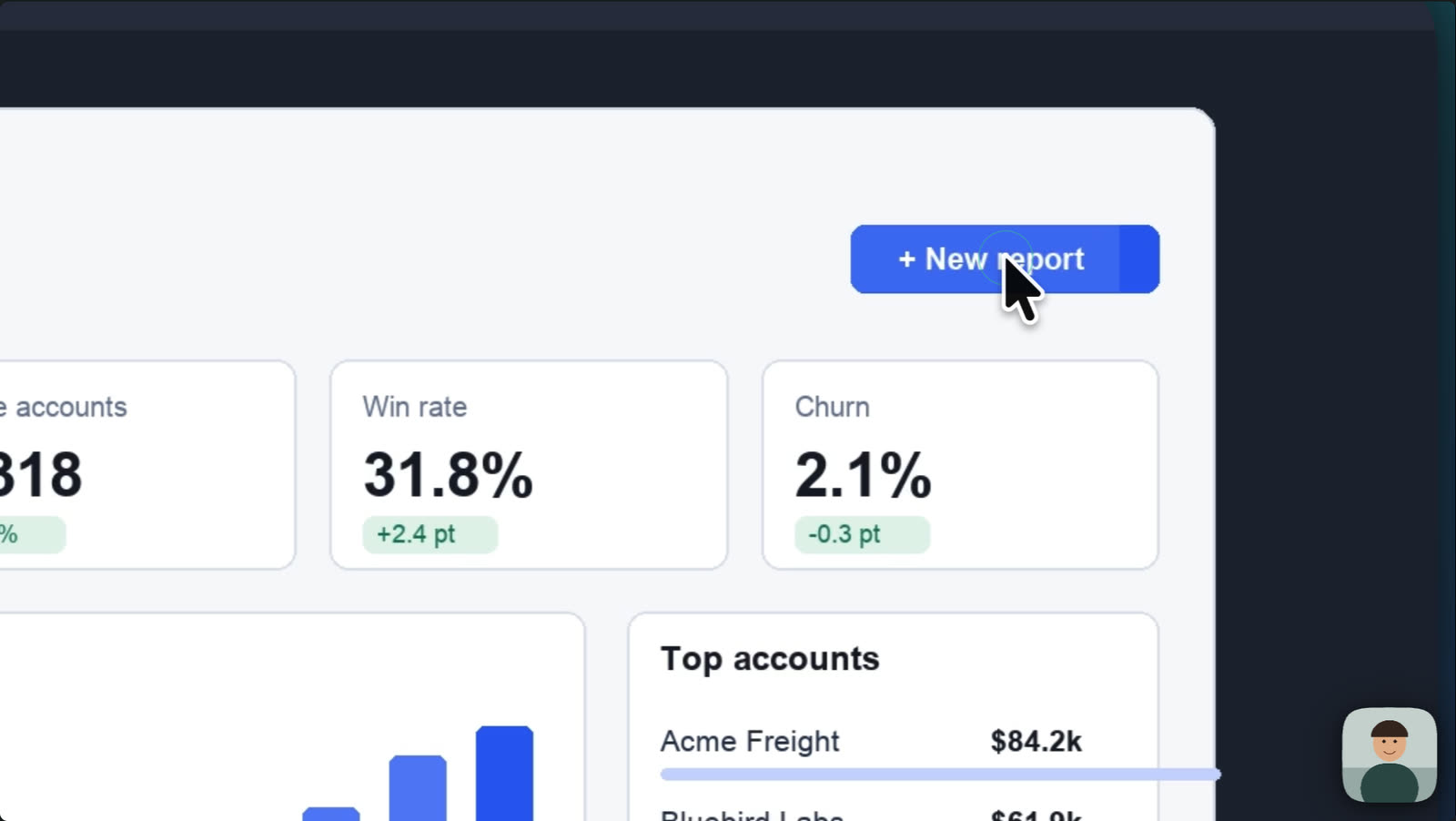
- On a Mac, zooms come from your clicks, set to Fewer, Balanced or More. On either system add them by hand, 1x to 5x.
- On a Mac, the pointer stays editable: six styles plus your Mac's own, movement presets, click effects and click sounds.
- Backgrounds can be a gradient, an image or a colour (desktop wallpapers on a Mac), with padding, corners and a shadow.
- The camera bubble comes as a circle, pill, oval, diamond or hexagon, with a two-colour border.
- Layouts of 2, 3 or 4 panels can show the screen, the webcam or other media.
OpusClip
- Auto Zoom targets key moments. Each zoom is a block you can move, trim or delete. Pro and above.
- Seven layouts: Fill, Fit, Split, Three, Four, Screenshare and Gameplay.
- Eye contact correction redirects gaze to the camera, in Fill and Split layouts, on Pro, Max and Business.
- Not found in their docs: cursor styles, click effects, background fills, rounded corners, bubble shapes or chroma key.
Captions
Both caption speech and let you style it. Cutscript covers more speech languages. OpusClip's captions need no setup.
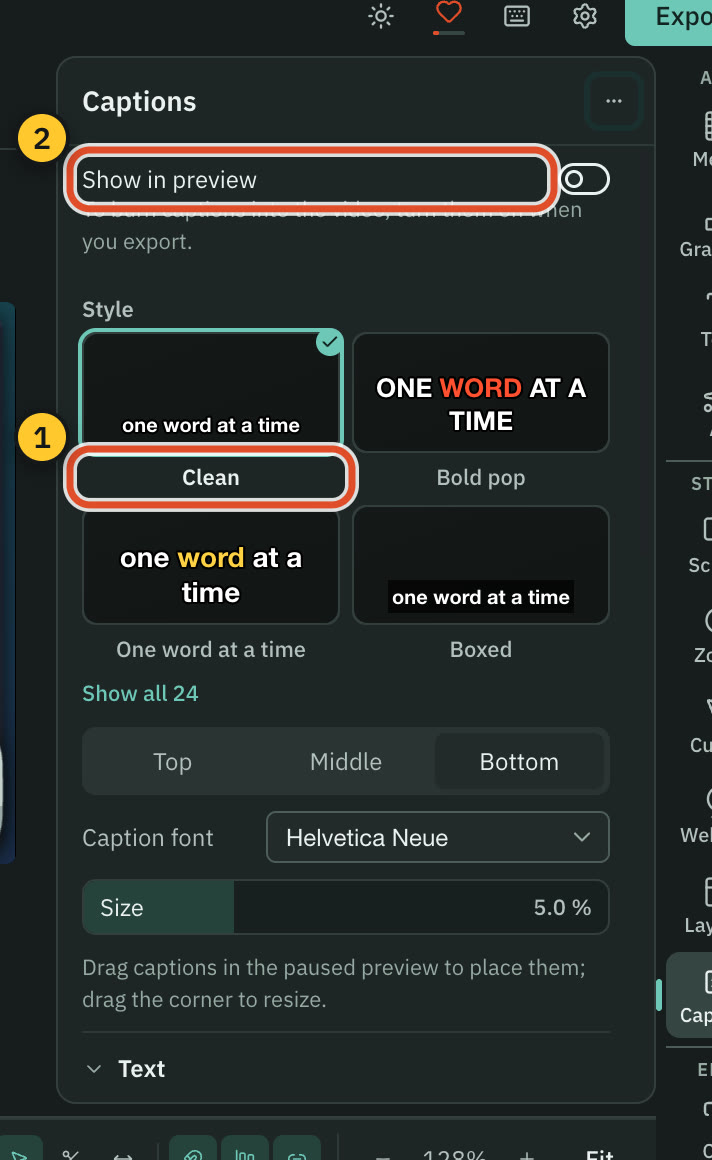
Cutscript24 styles, from a transcript you bring
OpusClipAI captions in 25 languages
| What | Cutscript | OpusClip |
|---|---|---|
| Style presets | Yes24, all editable | YesAnimated templates, count not found |
| Highlighting the active word | YesHighlight, underline, reveal or active word only | Not found in their docsNot found in their docs |
| Speech languages | Yes90+ with Scribe v2. 99 with Whisper on Apple silicon | Yes25: five fully supported, 20 in beta |
| Translating captions | NoNot offered. Line by line dubbing translates the script | PartlyEnglish is the only target language today |
| Subtitle files | YesSRT or VTT, on both plans | PartlyAn .srt in the Pro XML zip. No other found |
| What it costs | YesYour provider bills it. Whisper on Apple silicon is free | YesIncluded. 1 credit per minute of imported video |
More detail
Cutscript
- 24 presets such as Bold pop, Karaoke and Word reveal. Every setting stays editable.
- Highlight the word being said, reveal words as they are spoken, or show only the active word.
- Any installed font, an Outline or Box background, and drag to place. One clip can have its own style.
- Burn them into the video, or export SRT or VTT timed to your edit.
- The transcript comes from your own key, or from Whisper on an Apple silicon Mac.
OpusClip
- Edit the text, font, size, colour, stroke and shadow, set upper or lower case, and drag captions on the canvas.
- 25 languages: English, German, Spanish, French and Portuguese are fully supported, and 20 more are in beta.
- Subtitle translation is set before clipping, and English is the only target language today.
- Animated caption templates are on Free, with a watermark.
- They state accuracy of over 97%, and one page says over 99%.
Colour and blur
Cutscript has grading, scopes and tracked blur. We found only automatic colour correction in OpusClip, and no visual blur tool.
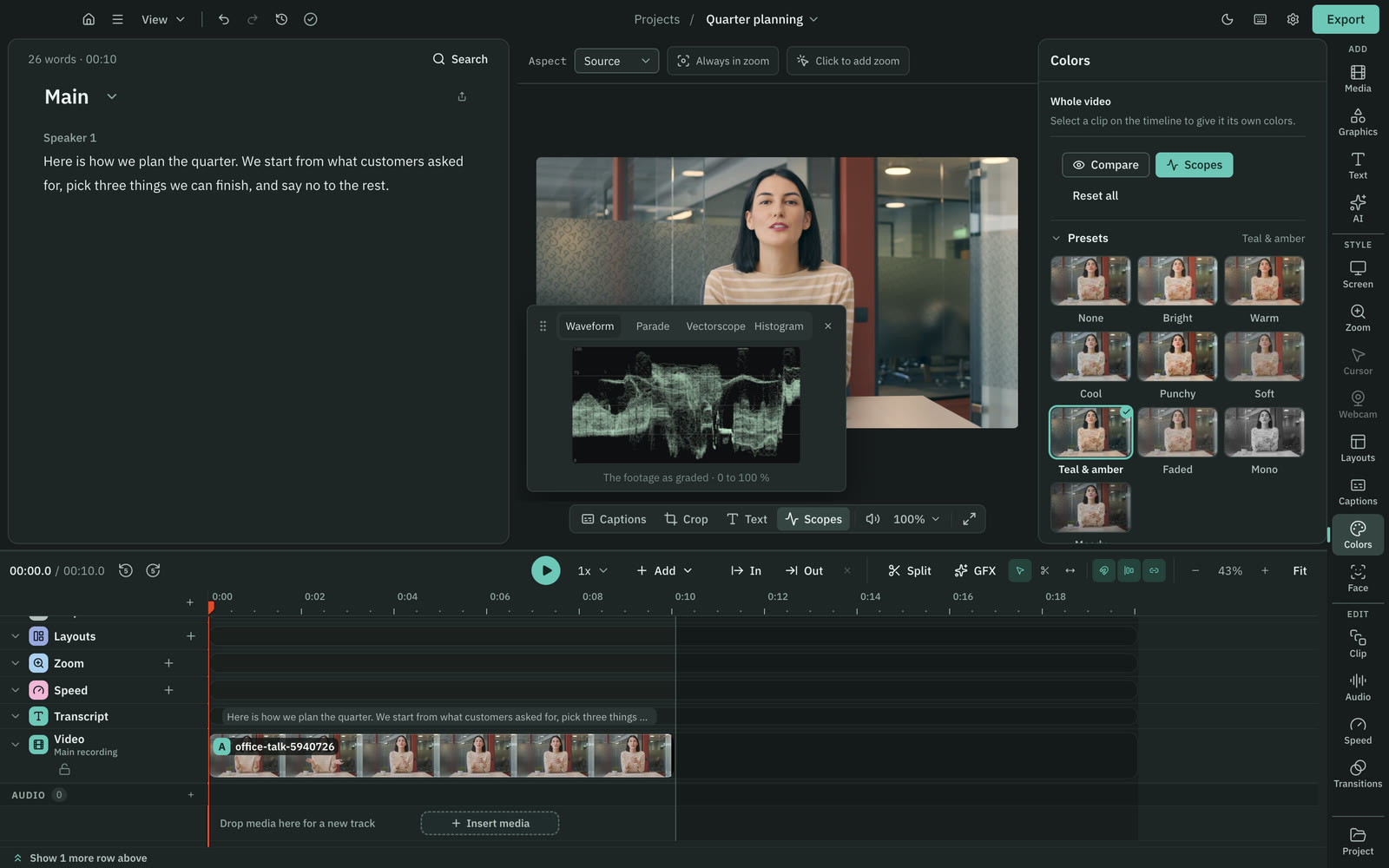
CutscriptGrading, scopes, looks and tracked blur
OpusClipAuto color correction, and a Censor tool for words
| What | Cutscript | OpusClip |
|---|---|---|
| Automatic colour | PartlyGrade with AI. Mac now, Windows next Store update | YesAuto color correction, 1 credit |
| Manual grading | PartlySliders, wheels. Mac now, Windows next Store update | Not found in their docsNot found in their docs |
| LUTs | PartlyImport a .cube look. Mac now, Windows next Store update | Not found in their docsNot found in their docs |
| Scopes | PartlyFour scopes. Mac now, Windows next Store update | Not found in their docsNot found in their docs |
| Face-only colour | PartlyLocal face finding. Mac now, Windows next Store update | Not found in their docsNot found in their docs |
| Visual blur | YesTracked blur or pixelate. Faces and emails on a Mac | Not found in their docsNot found in their docs |
| Censoring words | NoNot offered. You can cut the word in the script | YesBleep, mute or replace curse words |
More detail
Cutscript
- Light sliders, colour wheels, a vignette and presets that preview your own frame, with Compare.
- Import a .cube look and set its intensity. Scopes are Waveform, Parade, Vectorscope and Histogram.
- Face finds faces on your computer and gives one its own colours. Colors and Face: Mac now, Windows with the next Store update.
- Blur or pixelate an area and make it follow what it covers. On a Mac, one button blurs all faces or all emails on screen.
- Blur is applied at export. Your original recording file still holds the footage underneath.
OpusClip
- Auto color correction sets white balance, brightness and contrast with one slider. 1 credit, on Trial, Pro, Max and Business.
- LUTs, scopes and face-only colour: not found in their docs.
- The Censor tool bleeps, mutes or replaces curse words in audio and captions. Their pages differ on which plans get it.
- A visual blur tool: not found in their docs. Only the Censor page's title and meta text mention blurring.
AI and billing
Cutscript sells no AI and runs on your accounts or local models. OpusClip charges credits and has an AI Producer agent.
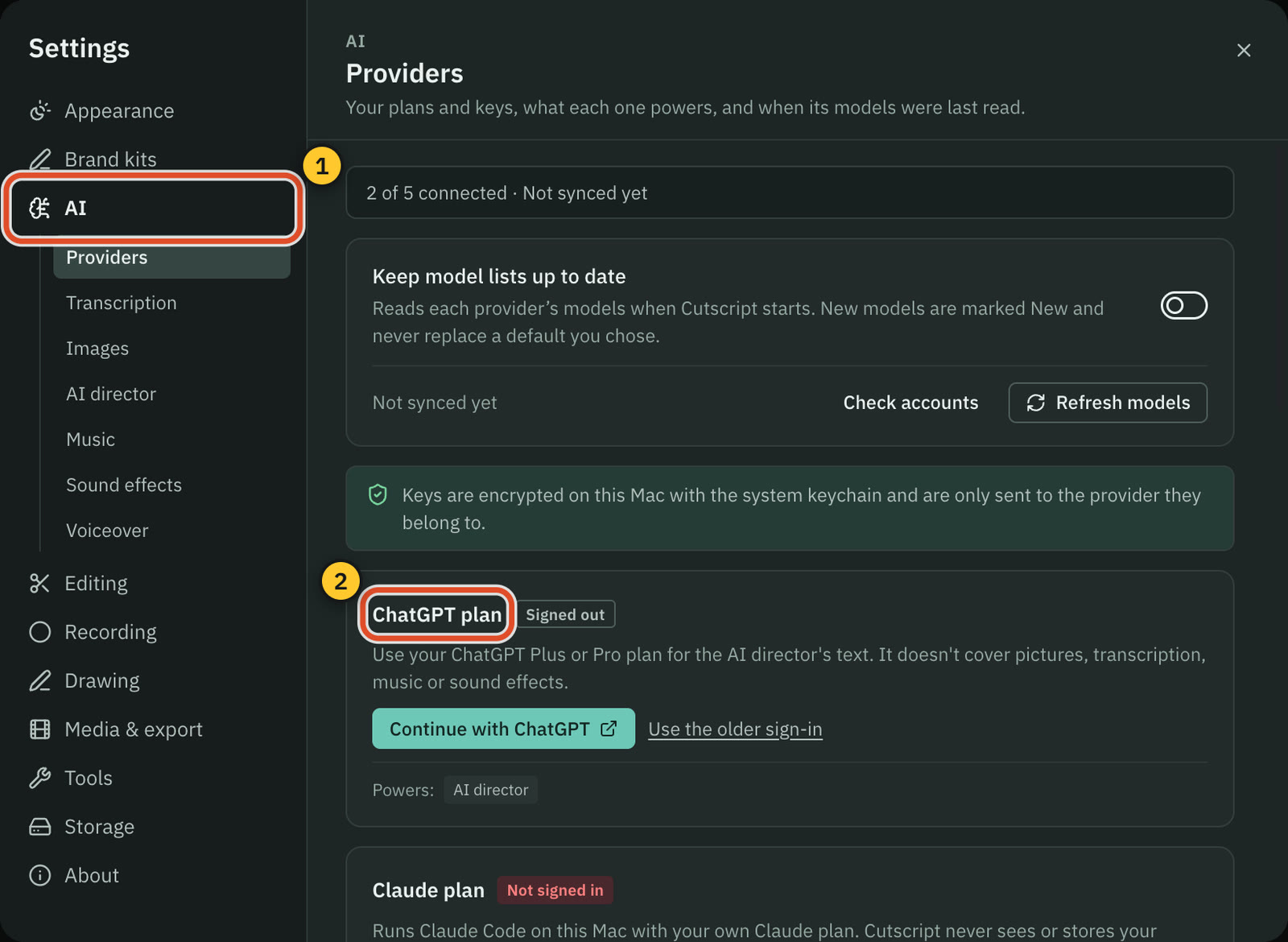
CutscriptYour plan, your keys or a local model
OpusClipCredits, an agent in Claude or ChatGPT, and an API
| What | Cutscript | OpusClip |
|---|---|---|
| Your ChatGPT or Claude plan | YesChatGPT Plus or Pro. A Claude plan on a Mac | YesAI Producer plans on your plan, some steps use credits |
| Your own API keys | YesOpenRouter, ElevenLabs, fal.ai and OpenAI | Not found in their docsNot found in their docs |
| Local models | YesOllama on Mac and Windows. Whisper on Apple silicon | Not found in their docsNot found in their docs |
| AI included in the price | NoNot offered. Your provider bills the AI | YesCredits: 150 a month on Starter, 300 on Pro |
| Editing by chat | YesAI panel. You apply changes unless Auto mode is on | YesAI Producer, plus plain-language revisions |
| Planning a whole edit | YesDirect my video: a priced plan you approve | YesOne pass with an edit log, single-speaker videos |
| Knowing the cost | YesTypical and maximum price before most paid steps | YesCredit costs listed by feature |
| API, MCP and Zapier | NoNot offered | YesAll three. MCP calls need Pro Beta, Max or Business |
More detail
Cutscript
- Text AI runs on a ChatGPT plan, a Claude plan through Claude Code on a Mac, an OpenRouter key, or Ollama on your computer.
- A transcript needs an ElevenLabs, fal.ai or OpenRouter key, or Whisper on an Apple silicon Mac. A plan alone cannot transcribe.
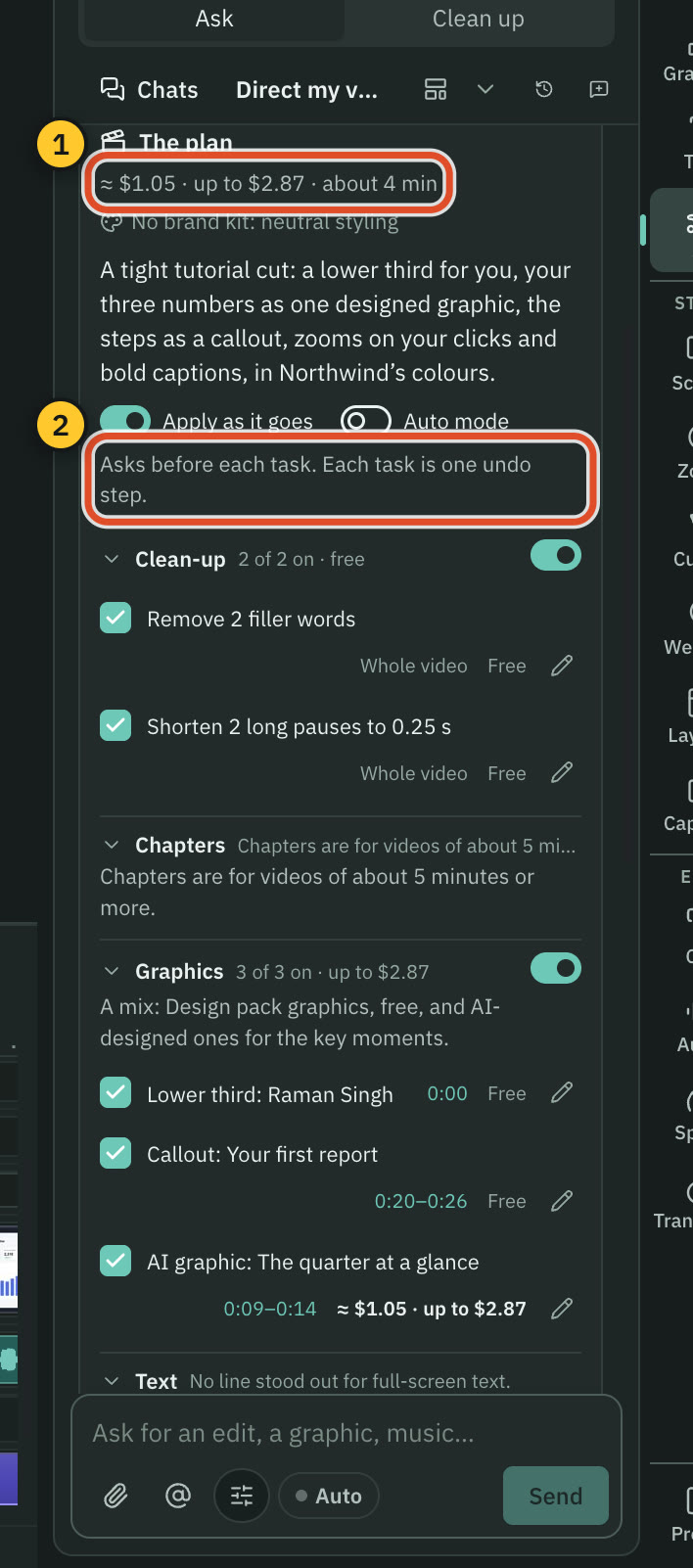
- The AI chat edits the script, the timeline and the look. Changes arrive as cards, and Apply is one undo step.
- Direct my video gives a priced plan to approve: clean-up, chapters, graphics, text, zooms, captions, transitions and sound.
- Most paid steps show a price first, but not Transcribe, automatic transcripts, home-screen projects or brand kit analysis.
OpusClip
- AI Producer takes one person talking to camera. You direct edits in Claude or ChatGPT, planned on your plan.
- Some AI Producer editing steps use OpusClip credits. It gives one MP4 up to 1080p and 30 fps.
- AI Producer does not support multi-camera edits or screen recordings yet.
- The AI video editor adds captions, B-roll, music and SFX in one pass with an edit log, for single-speaker videos.
- For automation: API, webhooks, Zapier, a hosted MCP server, a Claude connector (11 Sep 2026) and a Claude Code skill.
Voice and sound
Both dub, speak text and add music. OpusClip includes a music library and plan credits. Cutscript uses providers you connect.
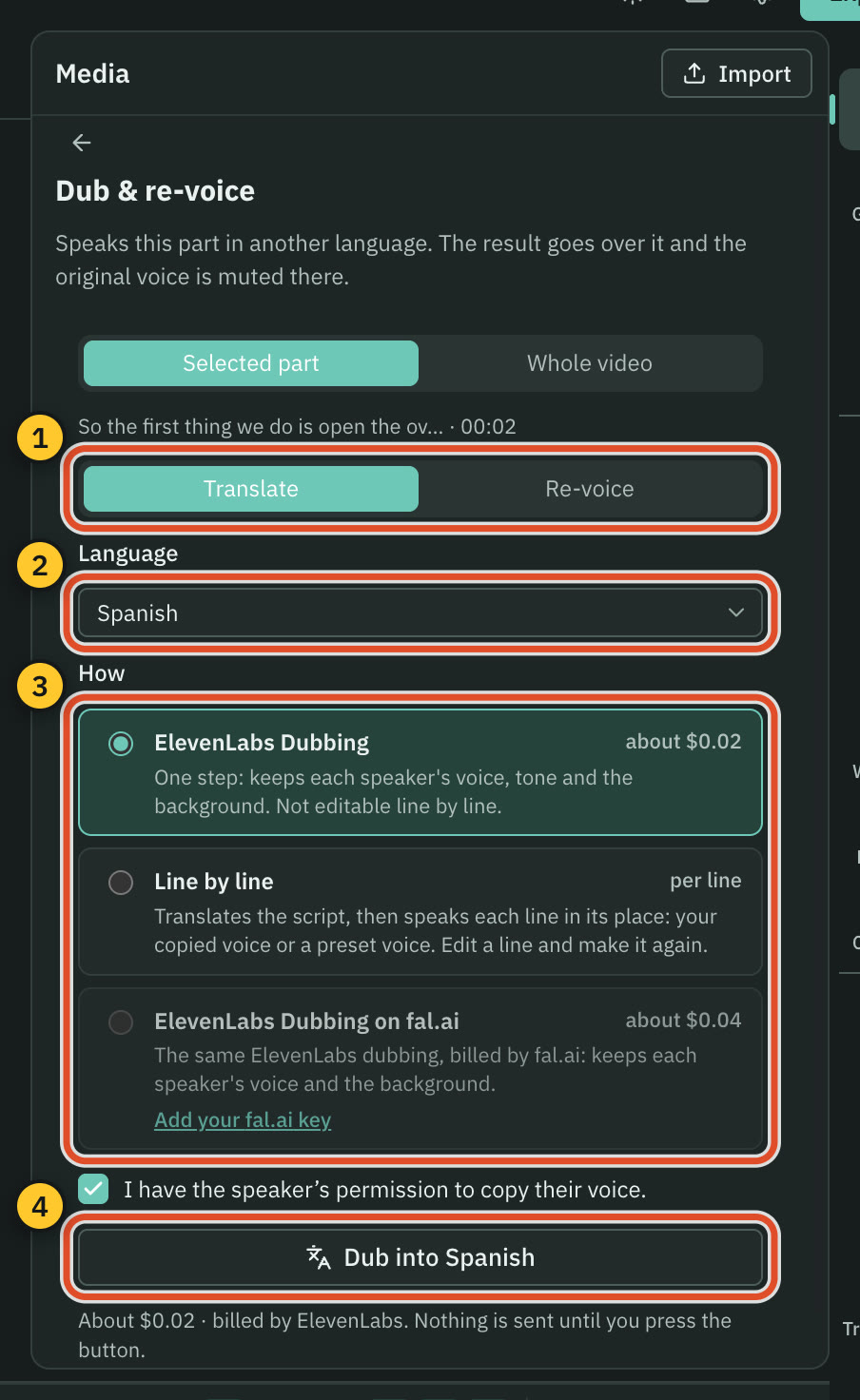
CutscriptDubbing, voiceover and audio on your accounts
OpusClipDubbing, voices and a music library in the plan
| What | Cutscript | OpusClip |
|---|---|---|
| Dubbing | YesElevenLabs, Line by line, or a voice on Apple silicon | Yes25 languages. Pro and Business, 10 credits a minute |
| Speakers in a dub | YesElevenLabs Dubbing keeps each speaker's voice | PartlyAll speakers get the primary speaker's voice |
| Voiceover from text | YesFour providers, or a voice on an Apple silicon Mac | Yes20+ voices, beta. Their pages disagree on Free |
| Voice cloning | YesNeeds a key: ElevenLabs clones, or Fish from a sample | PartlyFrom the video's speaker in dubbing. Agent Opus lists clones |
| Music library | NoNot offered. Use your own files or generate music | YesCopyright-free and licensed. Pro and Business |
| Generated music | YesFrom a prompt, through ElevenLabs, fal.ai or OpenRouter | PartlyOn their MCP server. Not in the editor docs |
| Sound effects | YesGenerated from a prompt on your key | YesAuto SFX from a library, Pro and up |
| Voice clean-up | YesBuilt in, offline. Apple Voice Isolation on a Mac | YesSpeech Enhancement, noise and voice sliders |
More detail
Cutscript
- ElevenLabs Dubbing keeps each speaker's voice and background sound. Line by line translates your script and speaks it.
- Voiceover comes from ElevenLabs, fal.ai, OpenRouter, OpenAI, or a voice on an Apple silicon Mac that sends nothing.
- Music and sound effects are generated from a prompt on your key. Cutscript has no library, so otherwise use your own files.
- Voice clean-up is built in and offline. Apple Voice Isolation on a Mac, and ElevenLabs or fal.ai on your key.
- The panel shows an estimate, and nothing is sent until you press the button.
OpusClip
- Dubbing goes into 25 languages with a voice cloned from the source video. Pro and Business, 10 credits per minute.
- In a dub, all speakers use the primary speaker's cloned voice.
- AI Voiceover has 20+ voices, optimised for English. In beta: 20 voiceovers a day, 2,000 characters each.
- Music comes from a library of copyright-free and licensed tracks, or your own upload or link, on Pro and Business.
- Auto SFX picks from a curated library at 7 credits per minute, on Pro and up.
Graphics
Both add motion graphics. OpusClip is ahead on generated B-roll and video. Cutscript includes a free design pack.
CutscriptHand-made designs, plus an AI that builds new ones
OpusClipMotion graphics, AI B-roll and generated video
| What | Cutscript | OpusClip |
|---|---|---|
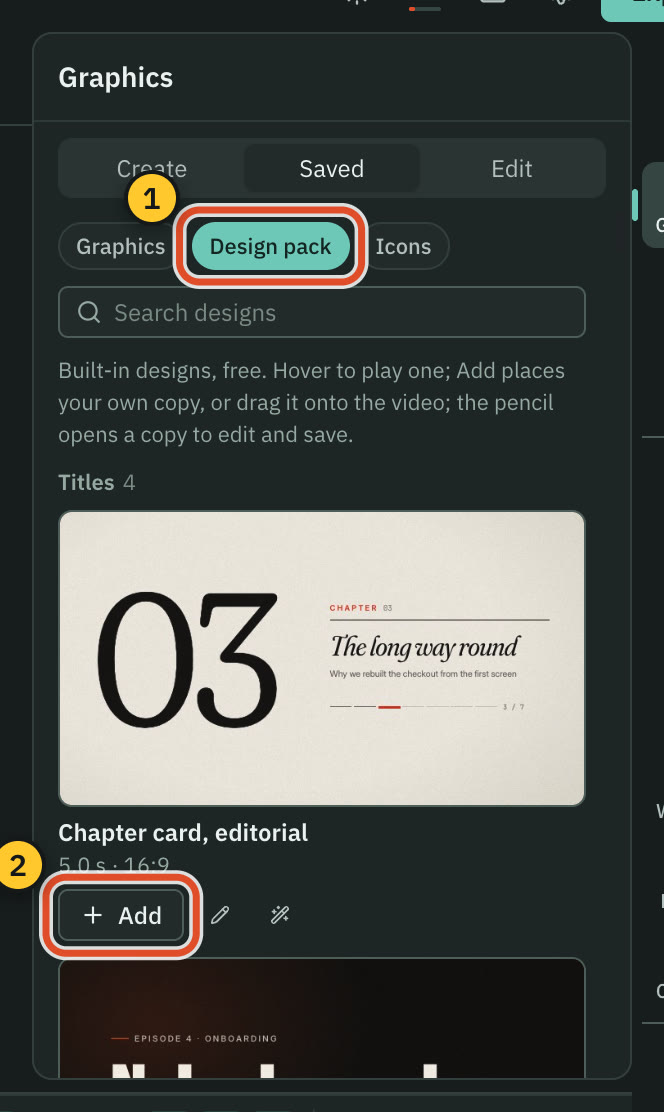
| Ready-made graphics | Yes31 in the Design pack, offline, both plans | YesText, data, social, promo. Trial, Pro and up |
| AI-made graphics | YesDesign director, storyboard and price first | YesMotion Studio, in beta, for credits |
| Charts | Yes29 types from your data. Needs an AI source | YesBig number, bar chart, trend line, gauge |
| Stock B-roll | NoNot offered | YesStarter 3 clips a month, Pro unlimited |
| AI B-roll | PartlyAI pictures in graphics on your key. No AI video | YesAI image from Starter, AI video from Pro |
| Video from scratch | NoNot offered | YesAgent Opus builds scenes, not real footage |
| Filling a new ratio with AI | NoNot offered. Frame, crop or set a background | YesAI Expand, beta, clips of 4 to 90 seconds |
| Brand kits | YesUp to 16 colours, four fonts, logos. Website import | YesLogo, styles, intro, outro, fonts. Pro 4 kits, Starter 1 |
More detail
Cutscript
- The Design pack has 31 motion graphics: titles, maps, charts and more. It works offline with no AI, and each one is editable.
- The Design director shows a storyboard and a price first, then builds a graphic of 1 to 60 seconds and checks its own work.
- Charts from your data in 29 types, route maps, and infographics with over 13,000 icons. These need an AI source.
- Brand kits hold up to 16 colours, four fonts and logos.
- There is no stock or AI video B-roll. You bring your own clips.
OpusClip
- Graphics are on Trial, Pro, Max and Business. Auto Edit adds them at 6 credits per minute, and adding them by hand is free.
- B-roll: AI image and stock on Starter, plus AI video on Pro, Max and Business.
- Motion Studio, in beta, turns a written idea and references into a shot plan and a generated video, for credits.
- Multi-Angle adds AI-generated shots to one recording at 480p or 720p. AI Expand, in beta, generates extra picture area.
- Agent Opus, a separate product, builds scenes from ideas, scripts, audio and up to 8 images, not real footage.
Export and posting
OpusClip posts and schedules for you. Cutscript writes a file and you post it. Both hand an edit to another editor on their Pro plans.
CutscriptFiles on your computer, posted by you
OpusClipMP4 clips, and posting to nine platforms
| What | Cutscript | OpusClip |
|---|---|---|
| Posting to social accounts | NoNot offered. You post the file yourself | YesNine platforms |
| Scheduling | NoNot offered | YesCalendar, plus Pro Bulk Scheduler (YouTube only) |
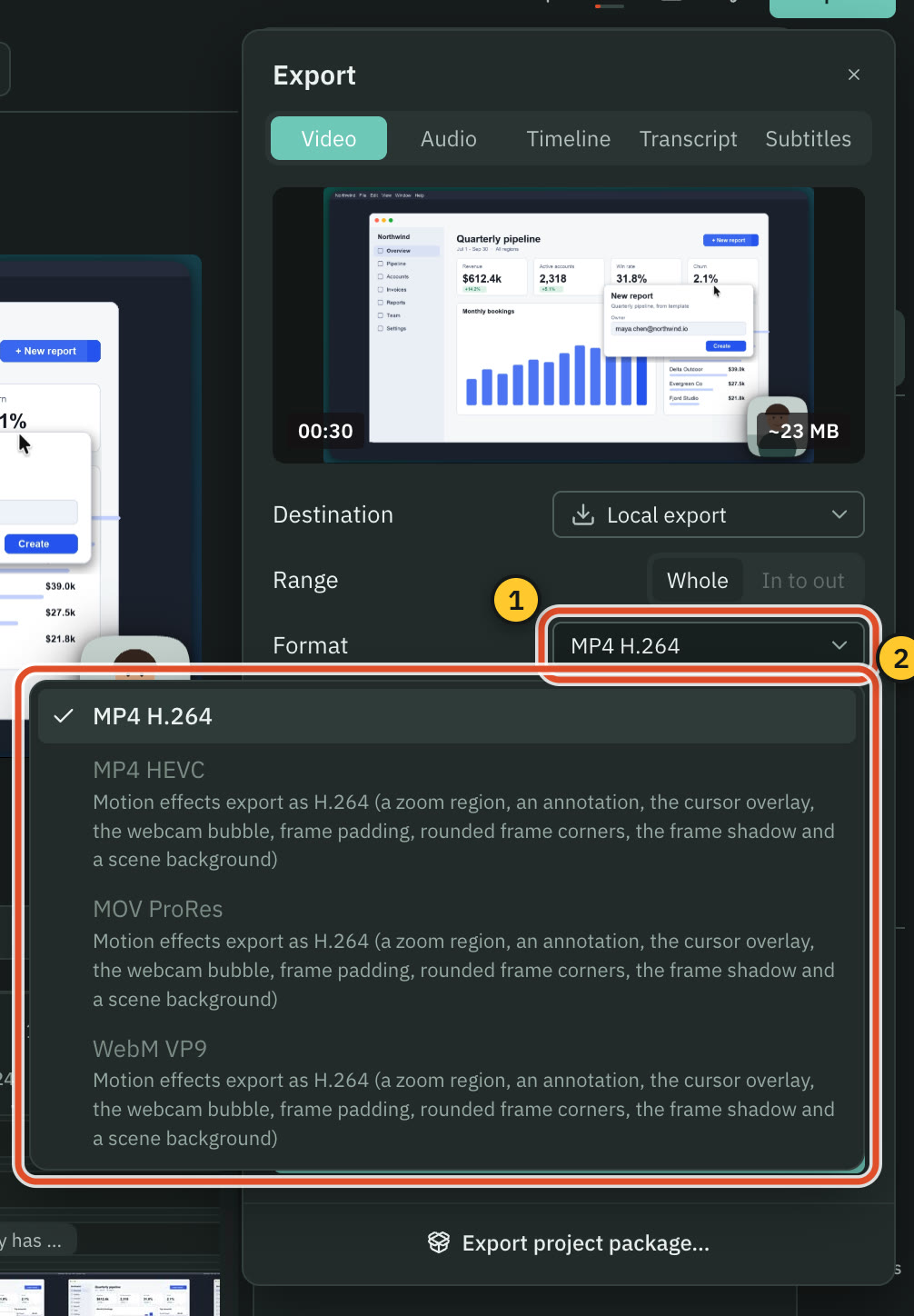
| Video formats | PartlyH.264. HEVC, ProRes, VP9 only without motion effects | YesMP4 |
| Top resolution | Yes4K on both plans, never scaled up | Yes1080p on Free. 4K on Pro, true 4K source |
| AI upscaling | NoNot offered | YesUp to 5 minutes. Pro and up, pages differ on Starter |
| Hand-off to Premiere and Resolve | YesXML on Pro: cuts and audio clips only | YesXML on Pro: clip, captions, reframe, B-roll, .srt |
| Hand-off to Final Cut Pro | YesFCPXML on Pro | Not found in their docsNot found in their docs. They recommend Premiere Pro |
More detail
Cutscript
- MP4 H.264, MP4 HEVC, MOV ProRes or WebM VP9, from 480p to 4K at 24 to 60 fps. Export never scales up.
- With motion effects such as zooms, the camera bubble or padding, only MP4 H.264 is offered.
- You can export several compositions at once, one MP4 H.264 each.
- Timeline export is Pro only: a timeline file for Final Cut Pro, Premiere Pro or DaVinci Resolve, or an EDL.
- The file carries cuts and audio clips, not zooms, captions or graphics. Cutscript does not upload or post for you.
OpusClip
- Autoposting: YouTube, Instagram Reels, TikTok, Facebook Page, LinkedIn Business, X, Pinterest, Threads and Bluesky.
- The Bulk Scheduler is Pro only and supports YouTube only for now. Several accounts per platform is also Pro.
- Export is MP4. Free renders up to 1080p. 4K is on Pro and Enterprise and needs a true 4K source.
- Export to XML, on Pro, gives a zip with the video, an .xml (clip, captions, reframe, B-roll) and an .srt.
- XML captions arrive as non-editable overlays. Videos up to 1.5 hours, shorts one at a time.
Platforms and storage
Cutscript runs on your computer and keeps files there. OpusClip runs in a browser and on phones, with cloud projects and teams.
CutscriptAn app on your Mac or Windows PC
OpusClipA browser app, phone apps and cloud storage
| What | Cutscript | OpusClip |
|---|---|---|
| Install | YesA download on a Mac, the Microsoft Store on Windows | YesNothing to install in the browser |
| Phone | NoNot offered | YesiPhone and Android, fewer features than web |
| Offline | YesRecording, timeline and export work offline up to 14 days | Not found in their docsNot found in their docs |
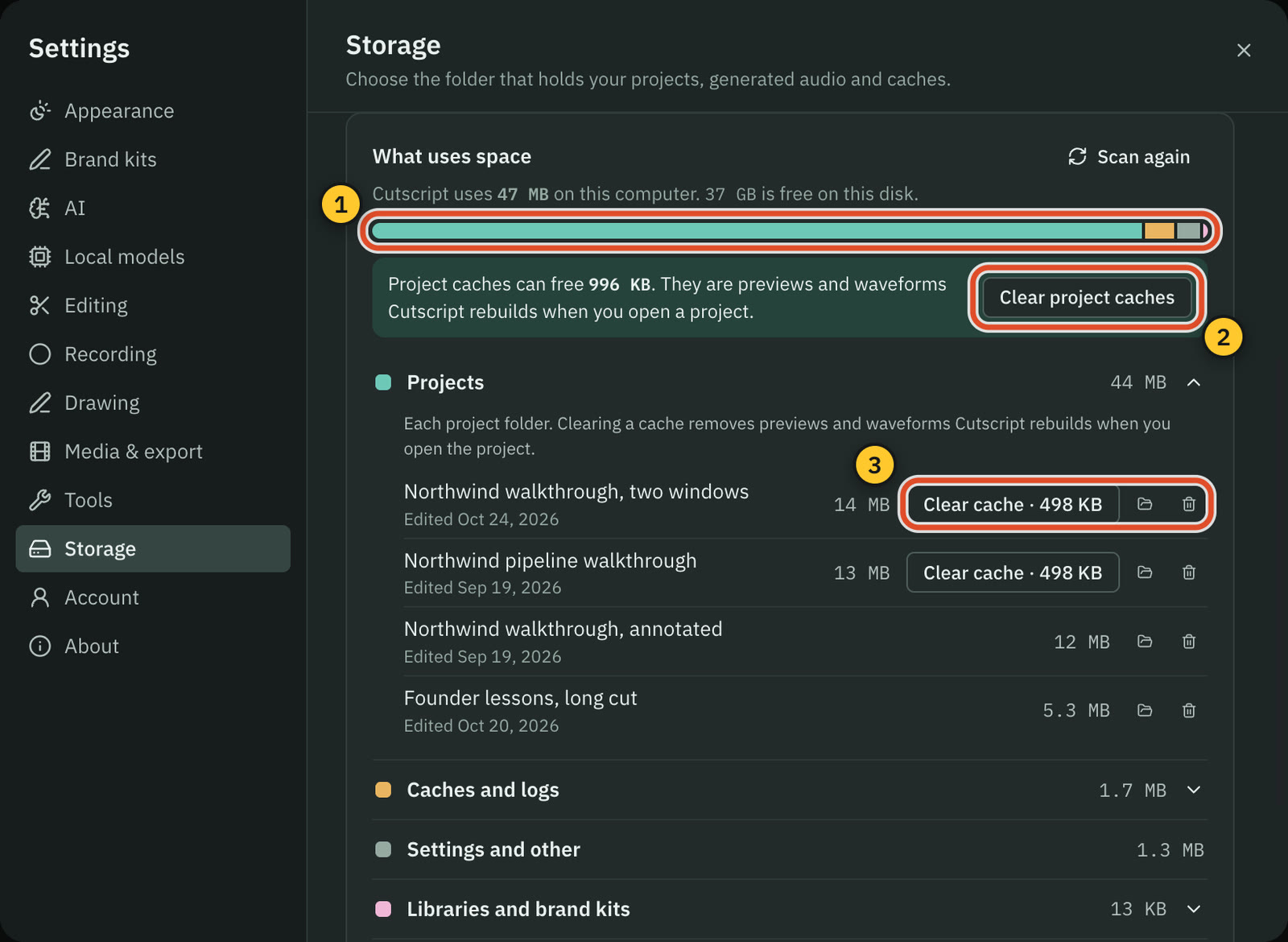
| Where projects live | YesOn your computer, in a folder you can change | YesOn their servers. Docs advise saving a local copy |
| How long projects stay | YesOn your disk until you remove them | PartlyTrial 7 days, Free 3, Starter 30, Pro 30 or saved |
| Your data and AI | YesFiles stay local. Cloud AI steps send what they need | PartlyIndividual data may improve models, personal info stripped |
| Team workspace | NoNot offered | YesFrom Pro. No comments or team chat yet |
| Sharing a link | NoNot offered. You send a file or project package | YesPublic link for a project |
More detail
Cutscript
- Mac (Apple silicon or Intel, macOS 14 or later; recording needs macOS 15) and 64-bit Windows 10 1809 or later or Windows 11.
- Cutscript does not upload your videos. Cloud AI steps send the text, audio or still frames they need to the provider you pick.
- Recording, the timeline and export work offline once you are signed in, for up to 14 days on the last plan check.
- Editing by text works offline once the transcript exists. Making a transcript offline needs Whisper on an Apple silicon Mac.
- A project package moves a project between a Mac and a PC as one file. Cutscript sends no analytics or crash reports.
OpusClip
- It runs in the browser with nothing to install. Chrome is recommended, and Safari 18.2 and above may cause data loss or crashes.
- The iPhone app clips, captions, brands and posts. Android has no editor or posting. Detailed editing needs a desktop browser.
- Teams have Owner and Member roles, with shared credits, brand templates and social accounts. Business adds SSO and sub-teams.
- They state SOC 2 Type II compliance, audited yearly. A separate help page says certification was in progress.
- Individual users' data may train their AI models, with personal information stripped. They say enterprise data does not.
Price
Cutscript's price buys the app and your provider bills the AI. OpusClip's includes monthly credits, so compare with your AI use.
Cutscript$4.17 a month paid yearly ($49.99 a year)
OpusClip$0, $15 or $29 a month, with credits included
| What | Cutscript | OpusClip |
|---|---|---|
| Free plan | YesEvery feature except timeline export. Free account needed | Partly60 credits a month, 9:16 only, no text editing |
| Removing the watermark | YesPro. Or an honest review on X for two exports | YesAny paid plan, also for existing projects |
| First paid plan | Yes$9.99 monthly, or $4.17 paid yearly ($49.99 a year) | YesStarter, $15 a month, monthly only |
| Yearly price | Yes$49.99 a year, saving 58% on monthly | YesPro $14.50 a month paid yearly ($174 a year) |
| Higher plans | NoNot offered. Two plans only | YesPro $29 or $14.50 paid yearly. Business custom |
| AI in the price | NoNot offered. Your provider bills the AI | YesCredits: 150 a month on Starter, 300 on Pro |
| Processing a video | YesYour provider's price. Whisper on Apple silicon is free | Yes1 credit per minute of imported video |
| Computers and seats | PartlyOne computer at a time | YesPro up to 4 seats with add-on packs. Business unlimited |
More detail
Cutscript
- Free, or Pro at $4.17 a month paid yearly ($49.99 a year), or $9.99 monthly. Pro covers one computer at a time.
- The free plan has every feature except timeline export, and needs a free account.
- Free video exports carry a moving watermark. Audio, subtitle and transcript exports have no watermark. Pro removes it.
- Neither plan includes AI credits. Transcripts and AI steps are billed by your provider, unless you use a local model.
- A ChatGPT or Claude plan covers text only, so a transcript still needs a key or Whisper on an Apple silicon Mac.
OpusClip
- Free: $0, 60 credits a month, 9:16 only, watermark, files last 3 days. New users get a 7-day Pro trial, no card.
- Starter: $15 a month, paid monthly only, 150 credits, no watermark. Adds text and timeline editing.
- Pro: $29 paid monthly, or $14.50 a month paid yearly ($174 a year), 300 credits. Unused credits roll over for 2 months.
- Pro adds more ratios, XML export, 100GB storage, a team workspace, music, transitions and dubbing. Business is custom.
- Processing costs 1 credit per minute of imported video. Yearly credits are issued up front and expire after 12 months.
Where OpusClip is the better pick
A more mature clipper
ClipAnything finds moments from prompts, with a Virality Score, reframing and subject tracking. Cutscript's clipper is one feature of an editor.
Posting is built in
Autoposting to nine platforms, a scheduling calendar and a Pro bulk scheduler (YouTube only for now). Cutscript writes a file and you post it.
Teams, security and support
Shared credits, roles and public links. Business adds SSO and priority Slack support. They state SOC 2 Type II. Cutscript has no team workspace.
Browser, phones and imports
Nothing to install, with iPhone and Android apps. Links from about 18 sources and uploads up to 10GB. Cutscript needs a Mac or Windows PC.
Generated extras and dubbing
OpusClip generates B-roll and video, expands the frame, fixes eye contact and upscales, and dubs on plan credits. Cutscript dubs on your own key.
Automation and live streams
An API, webhooks, Zapier, MCP and a Claude connector, plus Live Clipping in private beta. Cutscript takes a live stream only after it ends.
Moving from OpusClip to Cutscript
- Download what you want to keep from OpusClip first. Projects expire by plan: 3 days on Free, 30 on Starter.
- Install Cutscript on a Mac or from the Microsoft Store on Windows. Sign in with a free cutscript.dev account.
- Connect a transcript source (a key, or Whisper on Apple silicon) and an AI source (a plan, a key or Ollama).
- Bring in your video as a file or a link. Private or signed-in videos cannot be fetched, so save those first.
- No importer for OpusClip projects: set up captions and a brand kit again. A kit can import from your website.
- Ask for clips in the AI panel, then export and post them yourself. Cutscript does not post or schedule.
Questions
Is Cutscript a replacement for OpusClip?
For part of the job. If you record and edit your own tutorials or demos and want your files on your computer, Cutscript does that. For many short clips from long videos, posted on a schedule from a browser, OpusClip is built for it.
Can Cutscript make short clips like OpusClip?
Yes, in a smaller form. The clipper finds up to ten clips in a long video, scores each 0 to 100, and makes each an editable composition. It needs a transcript and an AI source. A clip follows a face only on a Mac, otherwise the pointer or a still crop.
Does OpusClip have a screen recorder?
We did not find one in their docs. Their product-demo page describes bringing in a recording by link or file, and their iPhone listing says drop or record a long video. AI Producer's page says screen recordings are not yet supported.
Which one costs less?
Depends on your AI use. Cutscript Pro: $4.17 a month paid yearly ($49.99 a year), or $9.99 monthly, plus your AI provider. OpusClip: Starter $15 a month, Pro $29 monthly or $14.50 paid yearly ($174 a year), credits included. Checked 31 Oct 2026.
Can Cutscript post to TikTok or YouTube for me?
No. Cutscript writes the file to your computer and you post it yourself. OpusClip autoposts to nine platforms, including YouTube, TikTok and Instagram Reels, and has a scheduling calendar.
Do I have to upload my video?
With OpusClip, yes: you upload a file or paste a link, and projects live on its servers. Cutscript does not upload your video files. Cloud AI steps send the text, audio or still frames they need to the provider you pick.
Does Cutscript work offline?
Recording, the timeline and export work offline for up to 14 days between plan checks. Editing by text works offline once the transcript exists, and making a transcript offline needs Whisper on an Apple silicon Mac. We did not find an offline mode for OpusClip.
Try it on your own video.
Free with a Cutscript account. Video exports have a watermark, and Pro removes it.
Download CutscriptFirst published 31 October 2026, last checked 31 October 2026. Prices and features change, so check before you decide. The people in our screenshots are stock footage and do not use or endorse Cutscript. Screenshots show Cutscript 0.1 beta. Seen something wrong or out of date? Tell us and we will fix it.