Cutscriptvs Loom
Loom
Pick Loom if you want to send a video by link and see who watches. Pick Cutscript, a 0.1 beta screen recorder and editor, if you want to edit on your computer and post the file yourself.
Written by the people who make Cutscript. Checked 31 October 2026. Loom and its logo are trademarks of their owner, and Cutscript is not affiliated with or endorsed by them.
Pick Cutscript if
- You want to edit by deleting words, on the free plan
- You want a multitrack timeline for video, images and audio
- You want zooms made from your clicks, in takes recorded on a Mac
- You want the finished video as a file on your computer
- You want your own AI plan, your own keys or local models
Pick Loom if
- You want to send a video as a link, with comments and viewer insights
- You need to record on a phone or in Chrome
- You run a team and want spaces, search, @mentions and SSO
- You work in Jira, Confluence or Slack
- You want a mature product backed by Atlassian
At a glance
| What | Cutscript | Loom |
|---|---|---|
| Best for | Demos, tutorials and talks cut by their words | Quick video messages and bug reports shared by link |
| Maturity | 0.1 beta. Expect rough edges | Part of Atlassian. Enterprise has a 99.95% uptime SLA |
| Price (checked 31 Oct 2026) | Free, or Pro at $4.17 a month paid yearly ($49.99 a year), or $9.99 monthly | Starter $0, Business $18, Business + AI $24 per user a month. Enterprise custom |
| Free plan | YesEvery feature except timeline export. Free account needed | PartlyStarter: 25 videos, 5-minute screen recordings, up to 720p |
| Watermark | PartlyA moving watermark on free video exports. Pro removes it | PartlyNone on the recording. Loom branding on the video page until Business |
| Platforms | PartlyMac and Windows. Recording on a Mac needs macOS 15 | YesMac, Windows, Chrome, iOS and Android |
| Where files live | On your computer | In Loom's cloud. New workspaces pick Germany or the US |
| Sharing | NoYou get a file and post it yourself | YesLink, comments, reactions and viewer insights on all plans |
| Editing | YesEdit by text, multitrack timeline, transitions, zooms | PartlyTrim and stitch on paid plans. Edit by transcript on Business + AI |
| AI | YesA chat that edits the video, on your own plan, keys or local models | YesSummaries, chapters, documents, tickets. Business + AI and Enterprise |
| Transcripts | PartlyYour own key, or Whisper on an Apple silicon Mac | YesIncluded on all plans, 50+ languages |
| Timeline export | YesPro only: Final Cut, Premiere, Resolve or EDL | Not found in their docsNot found in their docs. MP4 download on paid plans |
YesPartlyNoNot found in their docs
Sharing, comments and teams
Loom is ahead here. It hosts the video, and people watch, react and comment through a link. Cutscript ends in a file.
CutscriptYou get a file and post it yourself
LoomHosted video with comments, reactions and insights
| What | Cutscript | Loom |
|---|---|---|
| Hosted video | NoNot offered. You post the file yourself | YesUploaded to Loom's cloud and shared online |
| Comments and reactions | NoNot offered | YesOn every plan, Starter included |
| Viewer data | NoNot offered. Numbers come from where you post | YesViewer insights on all plans, engagement from Business |
| Team library and spaces | NoNot offered | Yes1 on Starter, 3 more on Business, unlimited on Enterprise |
| SSO and admin | NoNot offered | YesSSO, SCIM, roles, activity log and retention on Enterprise |
| Meeting recording and notes | NoNot offered | YesStores Zoom, Meet and Teams meetings, with action items |
| Where files live | YesOn your computer, in a folder you choose | YesLoom's cloud. New workspaces can pick Germany or US |
| Offline use and local copies | YesRecording, timeline and export work offline | Not found in their docsNot found in their docs |
More detail
Cutscript
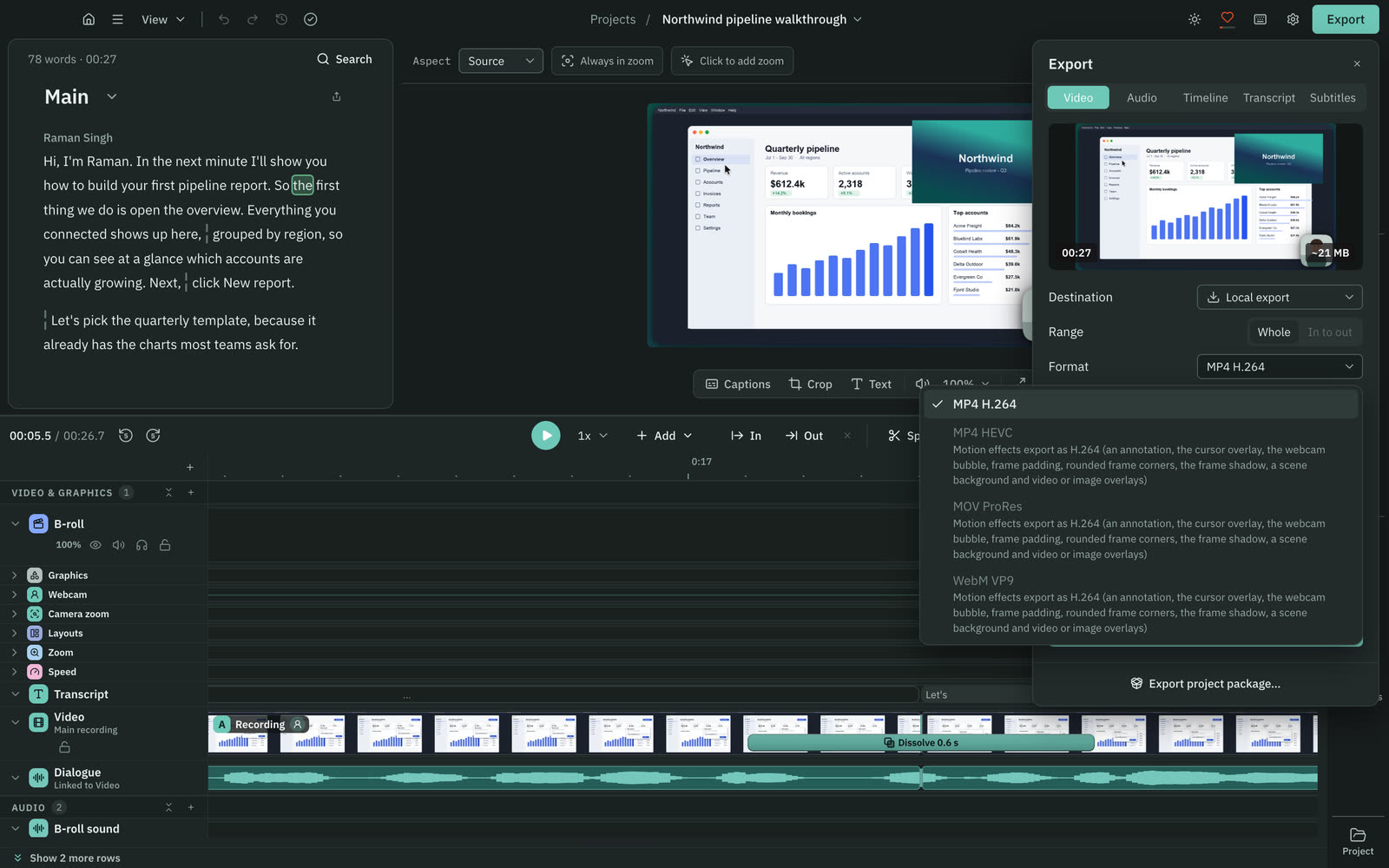
- Cutscript uploads no video and has no share links, comments, reactions or view counts. Destination reads Local export.
- Pro covers one computer at a time. A second computer on the same account runs on the free plan until you remove the first.
- Recording, timeline and export work offline once you are signed in. The plan check needs a connection at least every 14 days.
- Editing by text works offline once the transcript exists. Making a transcript offline needs Whisper on an Apple silicon Mac.
- Files stay on your computer. Cloud AI steps send the text, audio or still frames they need to the provider you pick.
Loom
- Comments, emoji reactions, viewer insights, folders and transcriptions are on every plan, Starter at $0 included.
- Business adds engagement insights and password-protected videos.
- Library search by title, person, tag or transcript word, with @mentions in comments.
- Integrations include Slack, Jira, Confluence, GitHub, Gmail and Upwork, with embeds for Notion, FigJam and others.
- Enterprise adds SSO (SAML), SCIM, custom retention, download restriction and a 99.95% uptime SLA.
Recording
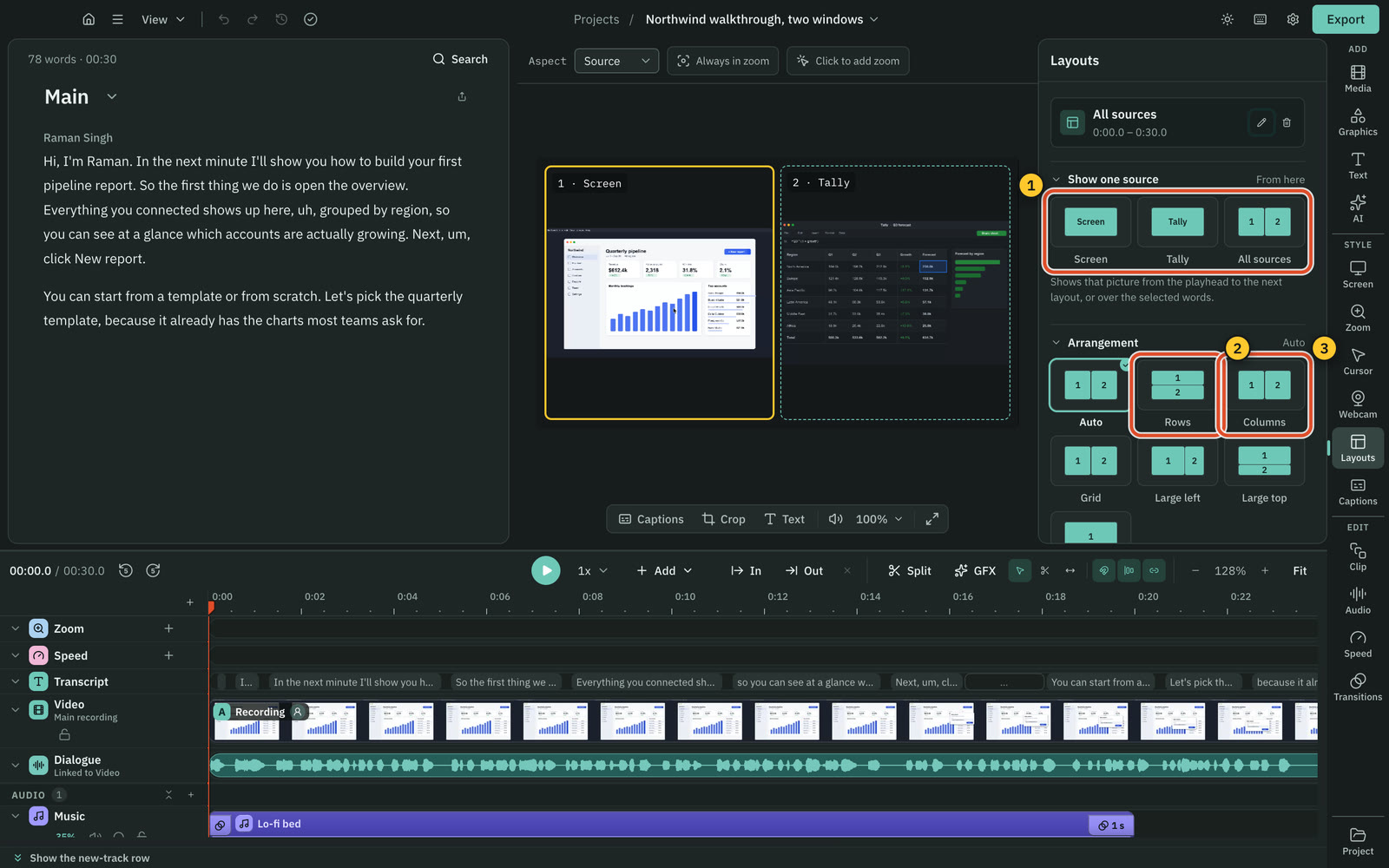
Loom records on more devices, including Chrome and phones. Cutscript captures up to three screens or windows in one take, on Mac and Windows only.
CutscriptMac and Windows, each input saved as its own track
LoomDesktop, Chrome and phone apps, ending in a hosted video
| What | Cutscript | Loom |
|---|---|---|
| Desktop apps | YesMac and Windows. Recording on a Mac needs macOS 15 | YesMac and Windows. macOS minimum varies by Loom page |
| Browser and phone | PartlyExperimental only: cabled iPhone or iPad on a Mac | YesChrome extension, iOS and Android apps |
| More than one screen in a take | YesUp to three. Added sources record no sound | NoOne monitor at a time |
| System sound | YesAll system sound or none. One app only: Mac, experimental | YesDesktop: any app. Chrome: one tab, not Zoom or Teams |
| Quality | Yes30 or 60 fps maximum, on both plans | YesDesktop up to 4K, 30 fps target. Chrome 1080p. Starter 720p |
| Length | YesNo set limit. Needs 5 GB free, stops at 500 MB | PartlyStarter 5 min. Business unlimited, or 6 hours per older FAQ |
| Drawing during a take | PartlyOn a Mac: pen, highlighter, arrows, shapes, laser | PartlyDrawing tool and mouse emphasis on Business and up |
| Prompter and tidy desktop | PartlyHide desktop icons on a Mac. No teleprompter | PartlyTeleprompter and declutter in the new Mac app |
More detail
Cutscript
- Record a display or a window. On a Mac you can also drag an area: free, 16:9, 9:16, 4:3 or 1:1.
- Up to three pictures in one take, each saved to its own file. On Windows you add displays and windows only.
- On a Mac, a cabled iPhone or iPad can be recorded: experimental, off by default, not yet checked on real hardware.
- Runs on Mac (Apple silicon or Intel, macOS 14 or later) and 64-bit Windows. Recording on a Mac needs macOS 15 or later.
- Picture, voice, system sound and camera stay separate, so each one can change later.
Loom
- Mac desktop app: display, window, custom-size area or camera only. Windows: full screen, window or custom size.
- Chrome extension: full screen, window, current tab or camera only.
- iOS: screen, camera or audio only. Android: those three, plus screen and camera together.
- You pick one monitor and cannot record two at once or switch mid-recording. Windows does not support more than two monitors.
- The new Mac app, announced 7 Oct 2026 for macOS 15+, has 4K capture, a teleprompter and automatic desktop declutter.
Editing by text
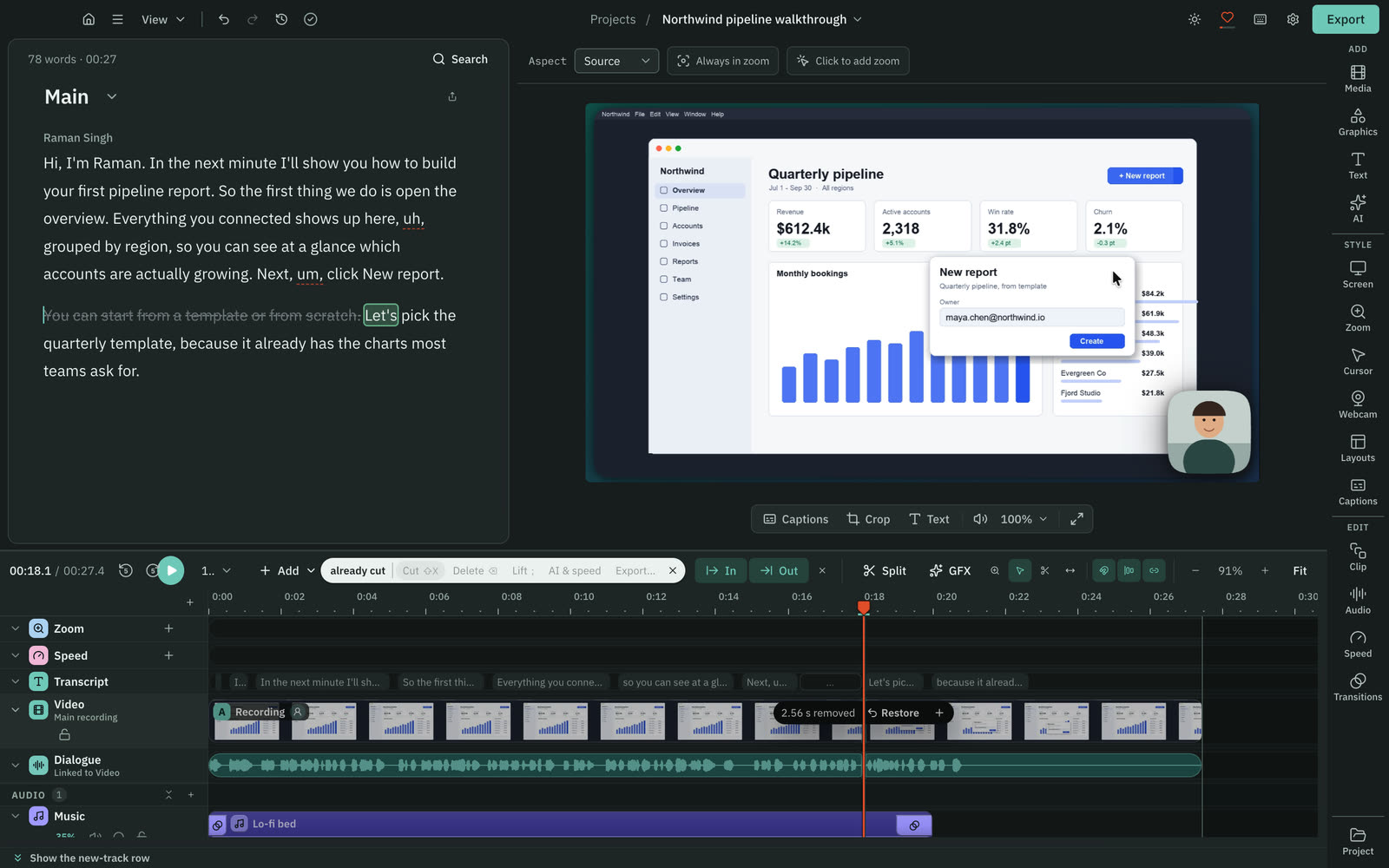
Both cut video by deleting words. Cutscript has it on Free and Pro, but you bring the transcript. Loom's needs Business + AI.
CutscriptDelete words and the video is cut, on Free and Pro
LoomEdit by transcript on Business + AI and Enterprise
| What | Cutscript | Loom |
|---|---|---|
| Cut by deleting words | YesFree and Pro. Needs a transcript | YesBusiness + AI at $24 per user a month, or Enterprise |
| Getting the transcript | PartlyProvider key, or free Whisper on an Apple silicon Mac | YesIncluded on all plans |
| Filler words | YesFree, on your computer, with an editable word list | PartlyBusiness + AI, by toggle. English only |
| Pauses | YesShorten or remove pauses over a length you set | YesSilence removal on Business + AI, by toggle |
| Repeated takes | YesKeeps your last take of phrases up to 8 words | PartlyWider setting covers rambles and repeats |
| Fix a spoken mistake | PartlyVoiceover from text. Needs a key, or Apple silicon Mac | PartlyText-to-speech fix (beta) in your voice |
| Clean-up in the downloaded file | YesThe export applies every cut | PartlyLoom's pages disagree on whether it stays |
More detail
Cutscript
- Select words in the script and press Delete. The preview and the timeline follow, and every cut can be restored.
- Your original media is never changed.
- Filler words, long pauses and repeated takes are found on your computer, with no AI and no cost.
- The filler list starts in English and you can change it. A filler the transcript missed cannot be found.
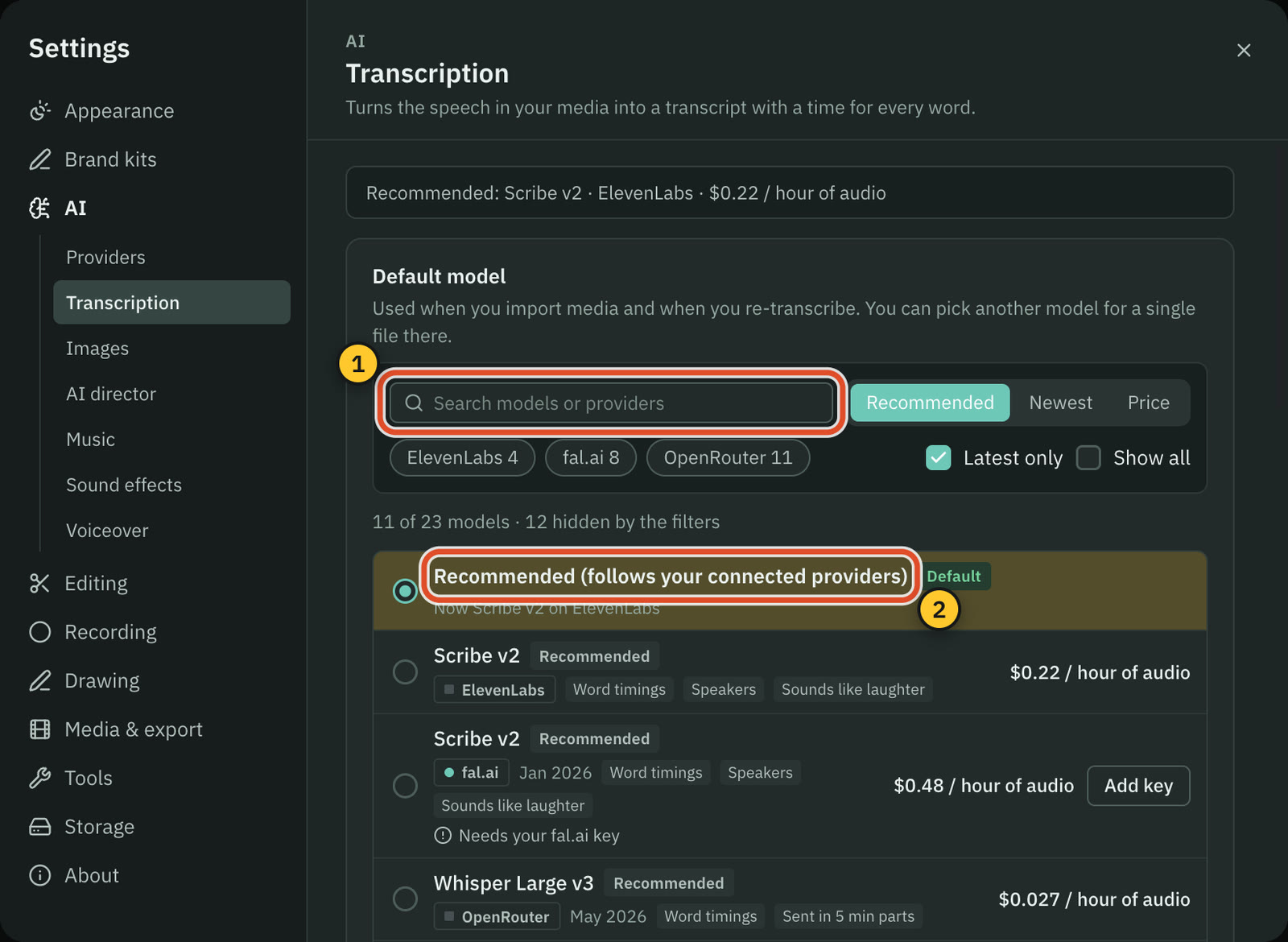
- You need a transcript first: an ElevenLabs, fal.ai or OpenRouter key, or Whisper on an Apple silicon Mac.
Loom
- Highlight words and trim. Launched 10 Jan 2024 for Business, now listed under Business + AI and Enterprise.
- A toggle removes filler words and silences, with a narrow setting for ums and ahs and a wider one for rambles and repeats.
- Filler removal is English only and depends on the transcript, so words missed there are not removed.
- Text-to-speech fix (beta) swaps a mistake for typed text in your voice: similar length, up to 10, English only.
- Transcripts come with every plan, Starter included.
Timeline and trimming
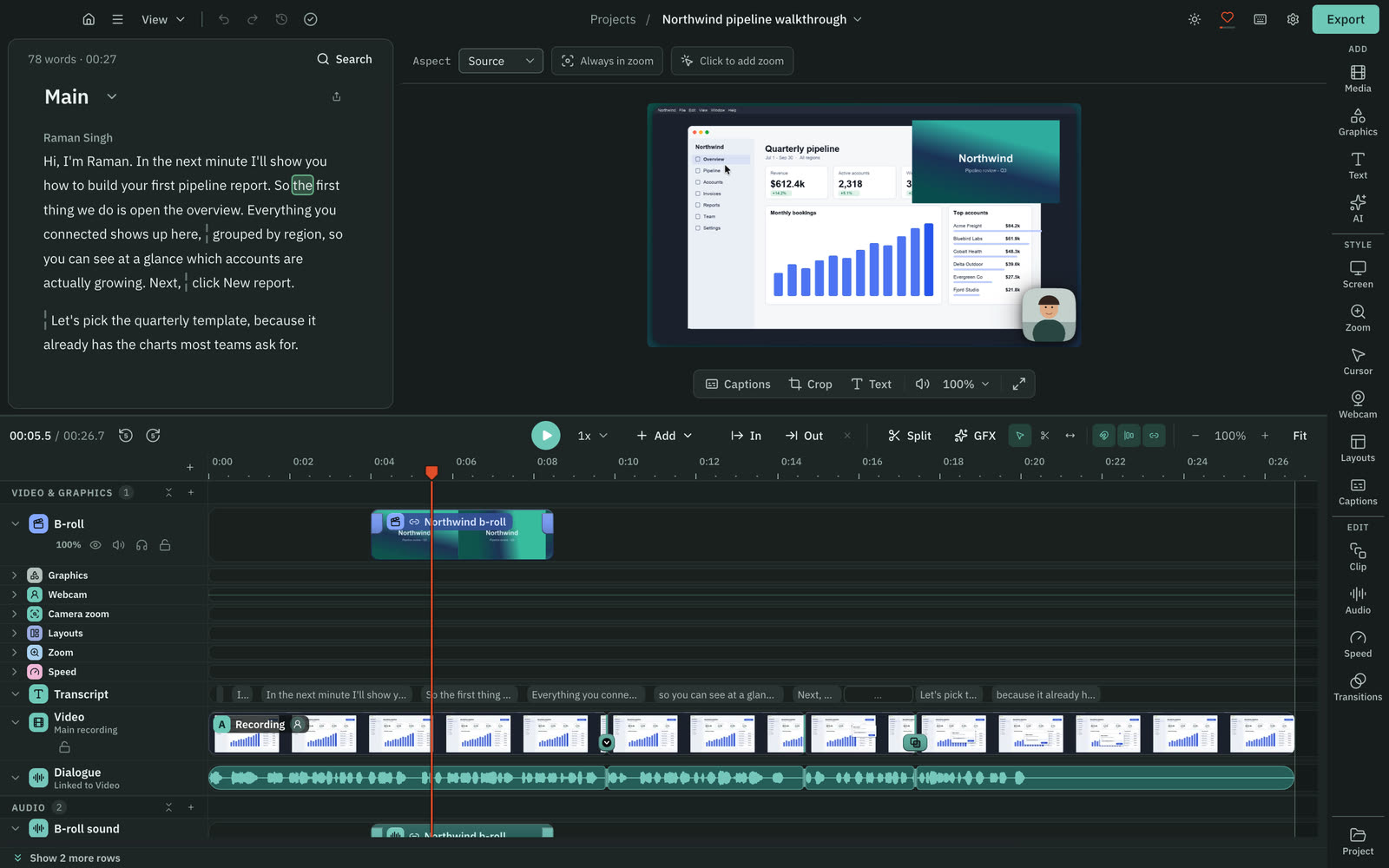
Cutscript has a multitrack timeline. Loom has a waveform trimmer that stitches in other Looms.
CutscriptMultitrack timeline for video, images and audio
LoomWaveform trim and stitch on paid plans
| What | Cutscript | Loom |
|---|---|---|
| Multitrack timeline | YesOn Free and Pro | Not found in their docsNot found in their docs |
| Trim | YesSelect, Razor and Slip tools, on both plans | YesWaveform trim on Business and up, 500 per clip |
| Join other videos | YesAdd video, audio and images to tracks | YesStitch other Looms on Business and up |
| Transitions | YesDissolve, dip, push, slide, wipe, iris and more | Not found in their docsNot found in their docs |
| Redo a part mid-take | PartlyPause, resume or discard. Pause removes paused time | YesLive rewind re-records a section |
| Bring in existing video | YesImport MP4, MOV, MKV and more | YesUpload on Business and up: 4 GB or 12 hours |
| Bring in video from a link | YesDownload from YouTube, Vimeo and more, if you have rights | Not found in their docsNot found in their docs |
More detail
Cutscript
- Split, trim, move and slip clips, with snapping to cuts, markers and the playhead.
- Tracks can be hidden, muted, soloed, locked, reordered and renamed.
- Transitions and audio crossfades run from 0.1 to 4 seconds.
- Speed any part from 0.25x to 4x, and keep several edits of one video as compositions.
Loom
- Up to 500 trims per clip, on videos of five hours or less.
- Stitch from recent Looms, by keyword search or a pasted Loom URL. Creator Lite totals are capped at five minutes.
- Trim and stitch are exclusive to paid plans.
- Live rewind re-records a section while you are recording.
- Upload on Business and up takes 4 GB or 12 hours: MP4, MOV, WebM, M4V, WMV or AVI.
Zooms, cursor and backgrounds
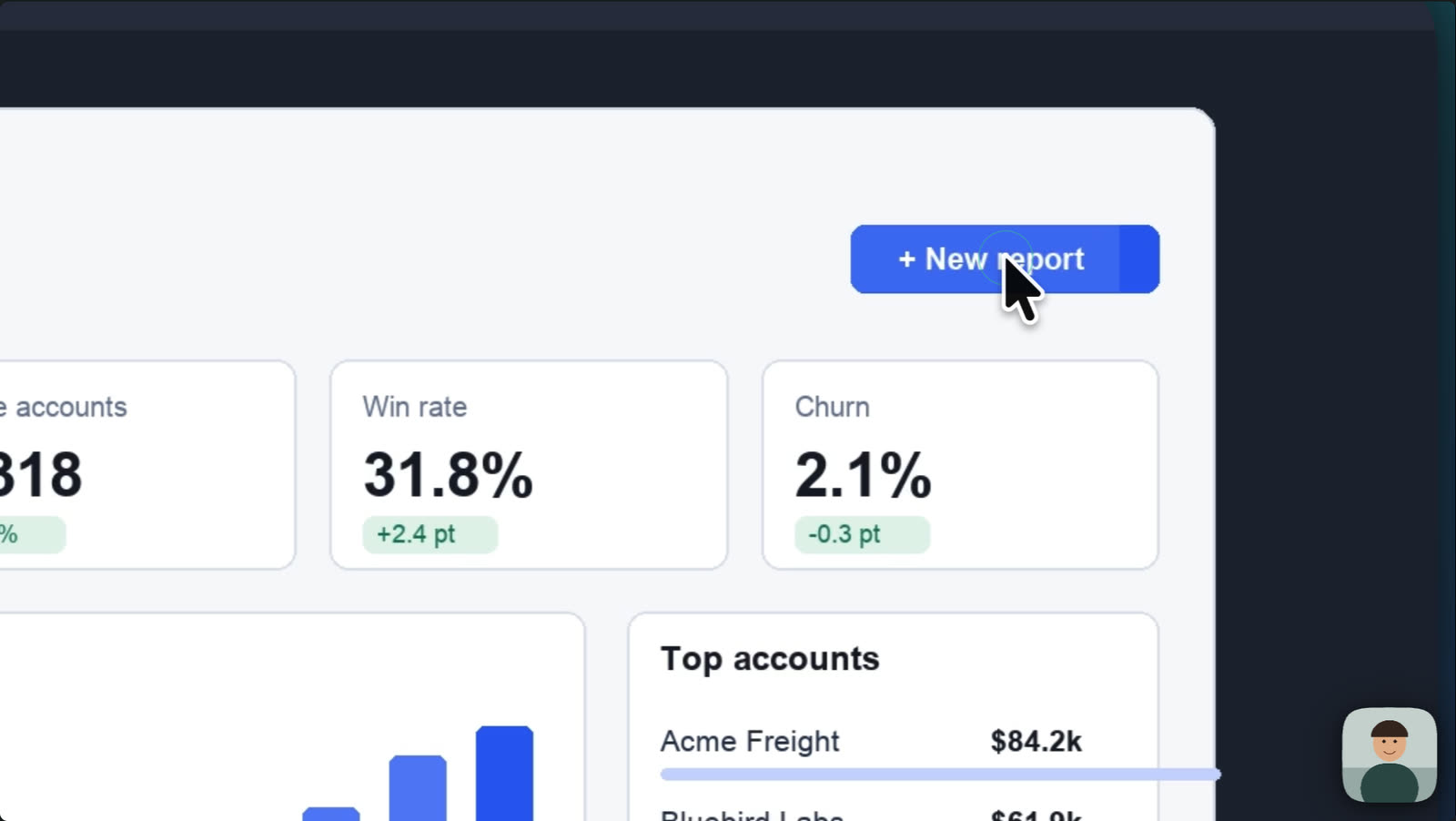
Cutscript makes zooms from your clicks in takes recorded on a Mac. Loom lists auto-zoom as coming soon, with no date.
CutscriptClick zooms and an editable pointer, from Mac takes
LoomAuto-zoom coming soon. A click highlight exists today
| What | Cutscript | Loom |
|---|---|---|
| Automatic zoom on clicks | PartlyOn a Mac. On Windows, add zooms by hand | Not found in their docsListed as coming soon, no date |
| Click effects | PartlyOn a Mac: Spotlight, Ripple, Echo and more, plus sounds | PartlyHighlight clicks, set before recording, on paid plans |
| Pointer after recording | PartlyOn a Mac: style, size, movement or hide it | Not found in their docsNot found in their docs |
| Background behind the screen | YesGradients, images, colours. Wallpapers on a Mac | PartlyBackground frame on paid plans, not kept in downloads |
| Padding and corners | YesPadding 0 to 100%, corners 0 to 50%, shadow to 200% | Not found in their docsNot found in their docs |
| Reframe for 9:16 | Yes16:9, 9:16, 1:1, 4:3, 4:5 or 16:10 | Not found in their docsNot found in their docs |
More detail
Cutscript
- On a Mac, your clicks become zooms when the take opens: Fewer, Balanced or More.
- On Windows a take has no click data, so you add zooms by hand. Depth runs from 1x to 5x.
- On a Mac you restyle the pointer after recording: six styles plus your Mac's own, size 0.5x to 10x, four movement presets.
- Backgrounds, padding, corners and shadow work on both. New recordings open on the Studio look.
- Reframe to 16:9, 9:16, 1:1, 4:3, 4:5 or 16:10. In a Cutscript take with pointer data, the frame can follow the pointer.
Loom
- Auto-zoom sits under "New features coming soon" on the editing page, with no date and no plan.
- Highlight mouse clicks is a desktop-app setting saved for future recordings. It is not in the Chrome extension.
- It is on Education, Business, Business + AI and Enterprise.
- A background frame can be added in the editor on paid plans. It does not persist in downloaded videos.
- A background frame cannot go on a camera bubble or a camera-only recording.
Camera bubble
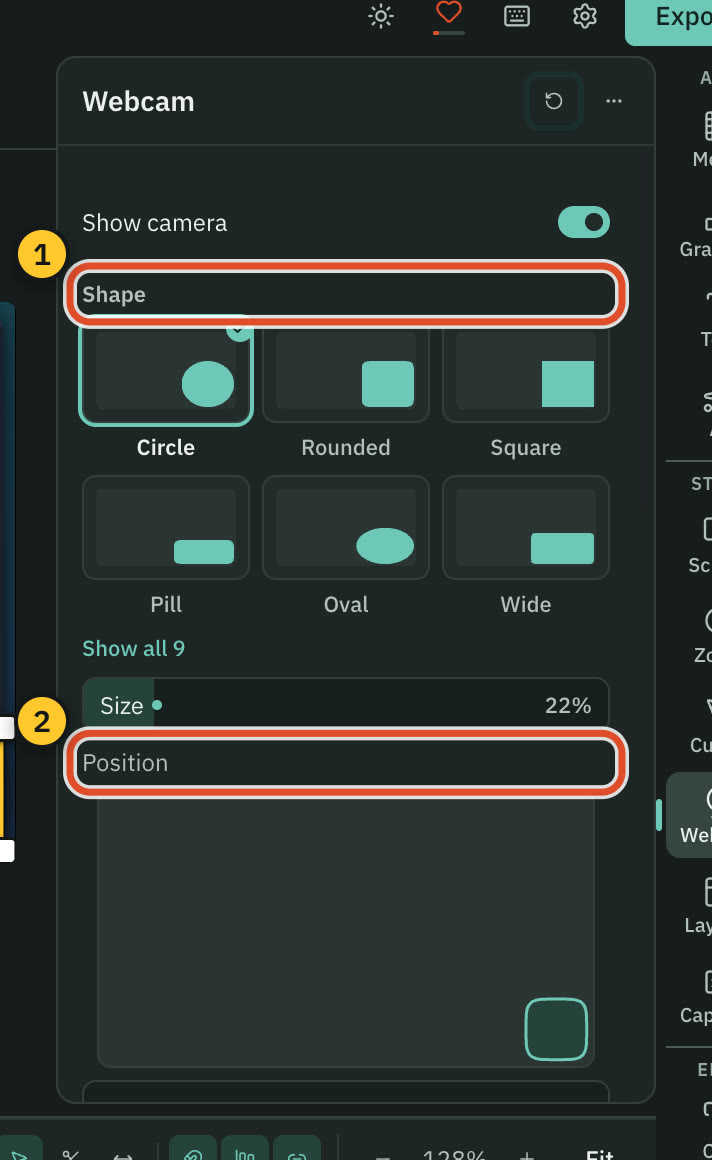
Loom's camera tools work live while you record. Cutscript's work afterwards, on a camera track. Pick by when you want to change it.
CutscriptCamera is its own track, styled after recording
LoomVirtual backgrounds and touch-up on the live feed
| What | Cutscript | Loom |
|---|---|---|
| Background behind you, live | PartlyChroma key removes one colour after the take | YesPreset images, blur, solid colour. Custom upload not listed |
| Touch-up and low light | PartlyAfterwards. On a Mac now, Windows with next Store update | YesTouch Up My Appearance and low-light adjustment |
| Bubble shapes | YesNine shapes plus cutouts, on Mac and Windows | PartlyCircle, squircle, portrait, landscape on new Mac app |
| Bubble size | Yes10 to 100% of the picture's short side | YesThree set sizes in the Chrome extension |
| Camera only | PartlyCamera full screen for a passage. No camera-only take | YesMac app, Chrome, iOS and Android. Not listed on Windows |
| Camera tools on the free plan | YesEvery camera tool is on both plans | YesCamera frames and virtual backgrounds on Starter |
More detail
Cutscript
- Nine shapes, such as Circle, Pill, Oval and Tall, with a border that can blend two colours.
- Chroma key removes one solid colour. It does not find people in the picture.
- Put the camera full screen, hide it or zoom it for one passage. Layouts split the frame into 2, 3 or 4 panels.
- Face grades a face on its own or detaches it as a bubble. On a Mac now, on Windows with the next Microsoft Store update.
Loom
- Virtual backgrounds for the bubble: preset images, blur or solid colour, in screen and camera mode on desktop and Chrome.
- Touch Up My Appearance softens the camera focus. Low-light adjustment brightens a dim feed.
- The new Mac app adds squircle, portrait and landscape frames beside the circle, with edge-snapping that avoids key content.
- On the Chrome extension the bubble cannot be recorded when you capture an app other than Chrome.
Captions and transcripts
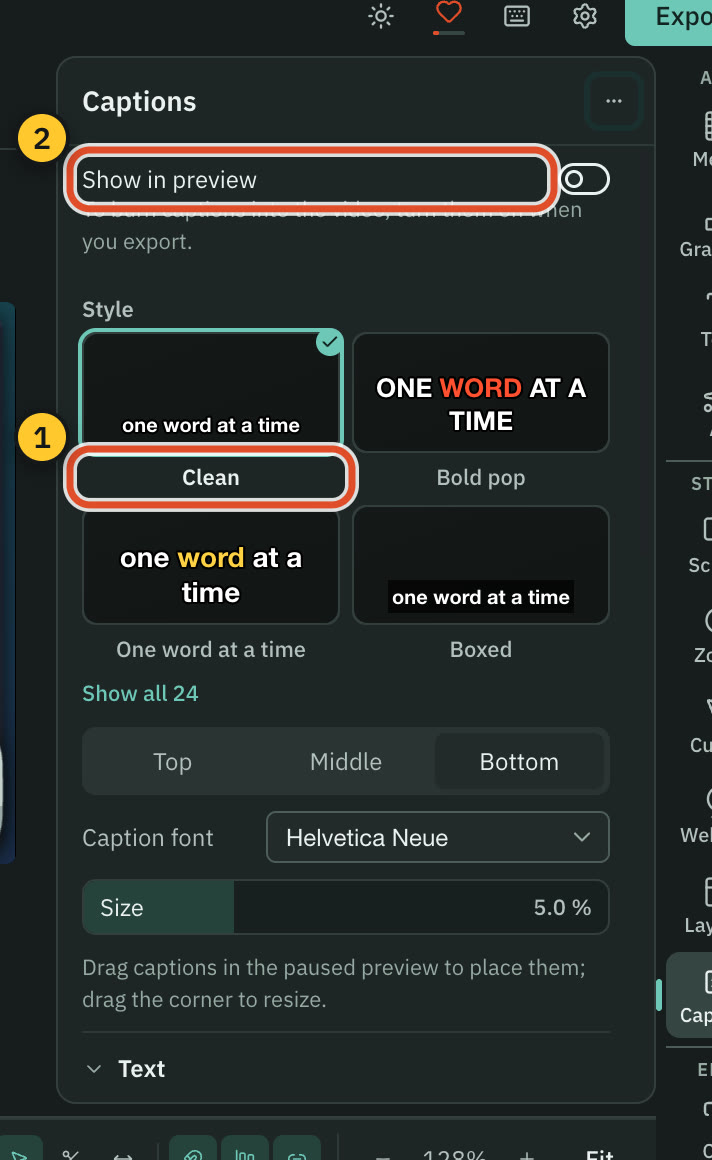
Loom gives viewers closed captions they can translate. Cutscript has 24 caption styles you can burn into the file.
Cutscript24 caption styles you can burn into the video
LoomClosed captions in 50+ languages on Starter
| What | Cutscript | Loom |
|---|---|---|
| Transcript on the free plan | PartlyYour own key, or Whisper on an Apple silicon Mac | YesIncluded |
| Languages | Yes90+ with Scribe v2, 99 with Whisper. Auto-detects | Yes50+. Loom does not translate transcripts |
| Caption styles | Yes24 presets, every setting editable | PartlyStylised, one colour, on Business + AI and Enterprise |
| Captions in the exported file | YesBurn in on export, same layout as the preview | NoLeft out of the downloaded MP4 |
| Captions the viewer controls | PartlySubtitle file export. Cutscript has no player | YesClosed captions viewers can translate with AI |
| Subtitle files | YesSRT or VTT on both plans, no watermark | PartlySRT on Business and up. No external uploads |
More detail
Cutscript
- Highlight the word being said, reveal words as spoken, use any installed font, and drag captions to place them.
- Burned-in captions travel with the file and fit portrait and square exports.
- Export SRT or VTT, timed to the edited video.
- Scribe v2 covers 90+ languages. Whisper on an Apple silicon Mac covers 99 for free, with no speaker labels.
- A cloud transcript is billed by your provider. Whisper on an Apple silicon Mac is free.
Loom
- Transcripts are on all plans, and closed captions are listed on Starter.
- Viewers can translate captions with AI, unless the creator's workspace does not allow AI.
- Stylised captions are on Business + AI and Enterprise, in one colour with no further customisation.
- SRT download is on Business and up. You cannot upload an external subtitle file.
- Loom lists captions as not included in the downloaded MP4.
Blur private details
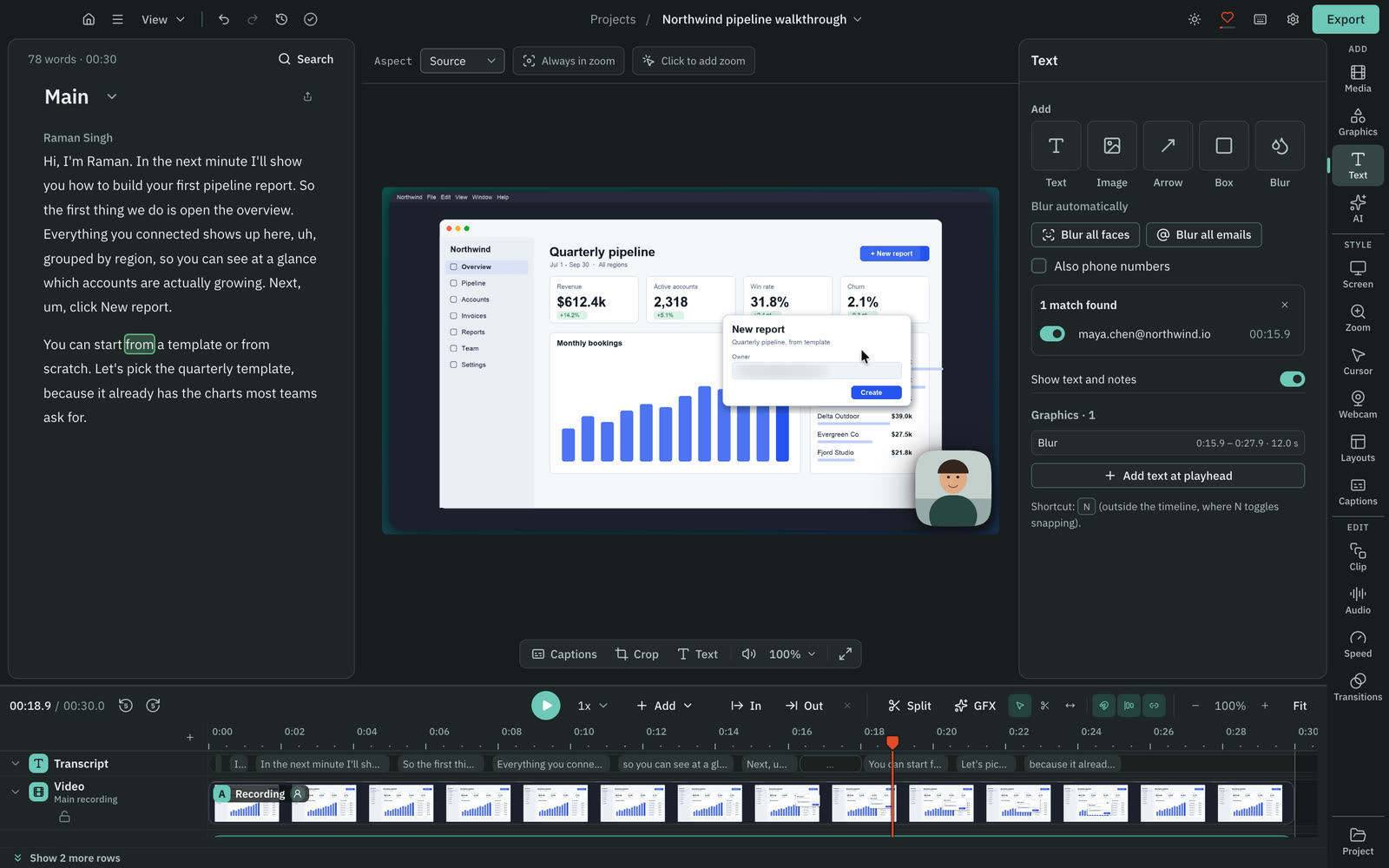
Both can blur. Cutscript blurs in the editor after the take. Loom's blur tool runs in the Chrome extension, before or during recording.
CutscriptBlur in the editor, and it can follow what moves
LoomBlur in the Chrome extension, before or during recording
| What | Cutscript | Loom |
|---|---|---|
| Blur after recording | YesAny point in the editor | PartlyOnly overlay boxes, on Business + AI and Enterprise |
| Follows moving things | YesPixel lock. Apple Vision tracking on a Mac | Not found in their docsNot found in their docs |
| Finds faces and emails itself | PartlyMac only. On Windows you place each blur by hand | Not found in their docsNot found in their docs |
| What it works on | YesAny picture in the project, imported video too | PartlyPage elements in the Chrome extension |
| Plan | YesFree and Pro | YesBusiness, Business + AI or Enterprise |
More detail
Cutscript
- Blur or pixelate any area on both platforms, strength 1 to 100. Pixel lock keeps it on moving text and windows.
- On a Mac, Blur all faces and Blur all emails find them for you with Apple Vision, and you review the list.
- Emails are read from the picture, so an address that is only spoken is not found.
- The blur is applied in the export. The project still holds the original pixels, so share the video, not the project package.
Loom
- For Creators and Admins on Business, Business + AI or Enterprise, in Chrome extension 5.3.38 or later. Not in the desktop app.
- It hides page elements on DOM-based sites, not Google Docs, Notion, Figma or FigJam.
- It cannot be added after recording.
- Overlay boxes on Business + AI and Enterprise can be transparent or blurred.
Colors, graphics and voice
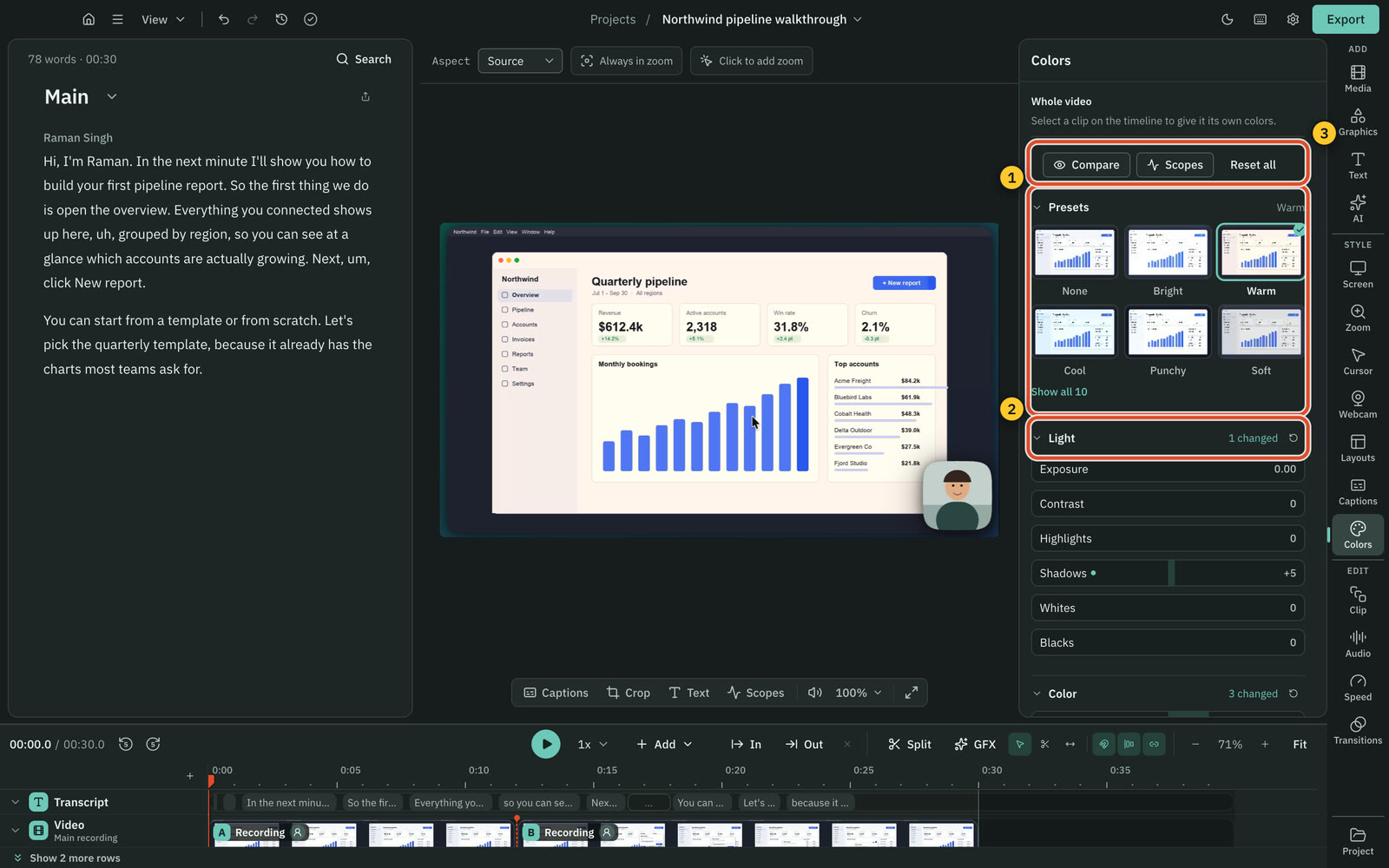
Cutscript has colour grading, motion graphics and voice tools. Loom has overlays, auto enhancement and a short voice fix.
CutscriptColour grade, motion graphics and voice tools
LoomOverlays, player branding and a short voice fix
| What | Cutscript | Loom |
|---|---|---|
| Colour grading, LUTs and scopes | PartlyOn a Mac now. Windows with the next Store update | Not found in their docsNot found in their docs |
| Motion graphics | Yes31 in the Design pack, plus AI-made on your account | Not found in their docsNot found in their docs |
| Text and shapes over the video | YesTitles, arrows, boxes and pictures, on both plans | YesText, arrow and box overlays on Business + AI |
| Brand kit | YesUp to 16 colours, four fonts and logos | Not found in their docsNot found in their docs |
| Voiceover from text | YesYour keys: ElevenLabs, fal.ai, OpenRouter or OpenAI | PartlyShort fix in your voice (beta). AI voices coming soon |
| Dubbing | YesOn your keys: ElevenLabs Dubbing or line by line | Not found in their docsNot found in their docs |
| Music and sound effects | YesGenerated from a prompt, on your own key | Not found in their docsNot found in their docs |
More detail
Cutscript
- Colors has sliders, wheels, .cube looks and scopes. On a Mac now, on Windows with the next Microsoft Store update.
- The Design pack has 31 motion graphics that work offline with no AI. Brand kits hold colours, fonts and logos.
- Enhance voice runs on your computer with the built-in clean-up. On a Mac it can also use Apple Voice Isolation.
- Voiceover, music, sound effects and dubbing run on your own provider keys. Local voices need an Apple silicon Mac.
Loom
- Text, arrow and box overlays on Business + AI and Enterprise. They carry over to downloaded videos.
- Auto video enhancement is listed under Business + AI.
- Custom branding is a player logo and colours on Business and up. The logo appears in the player, not in the video.
- A standalone AI voices feature and AI avatars are listed as coming soon.
- Text overlays do not support character-based languages.
AI features
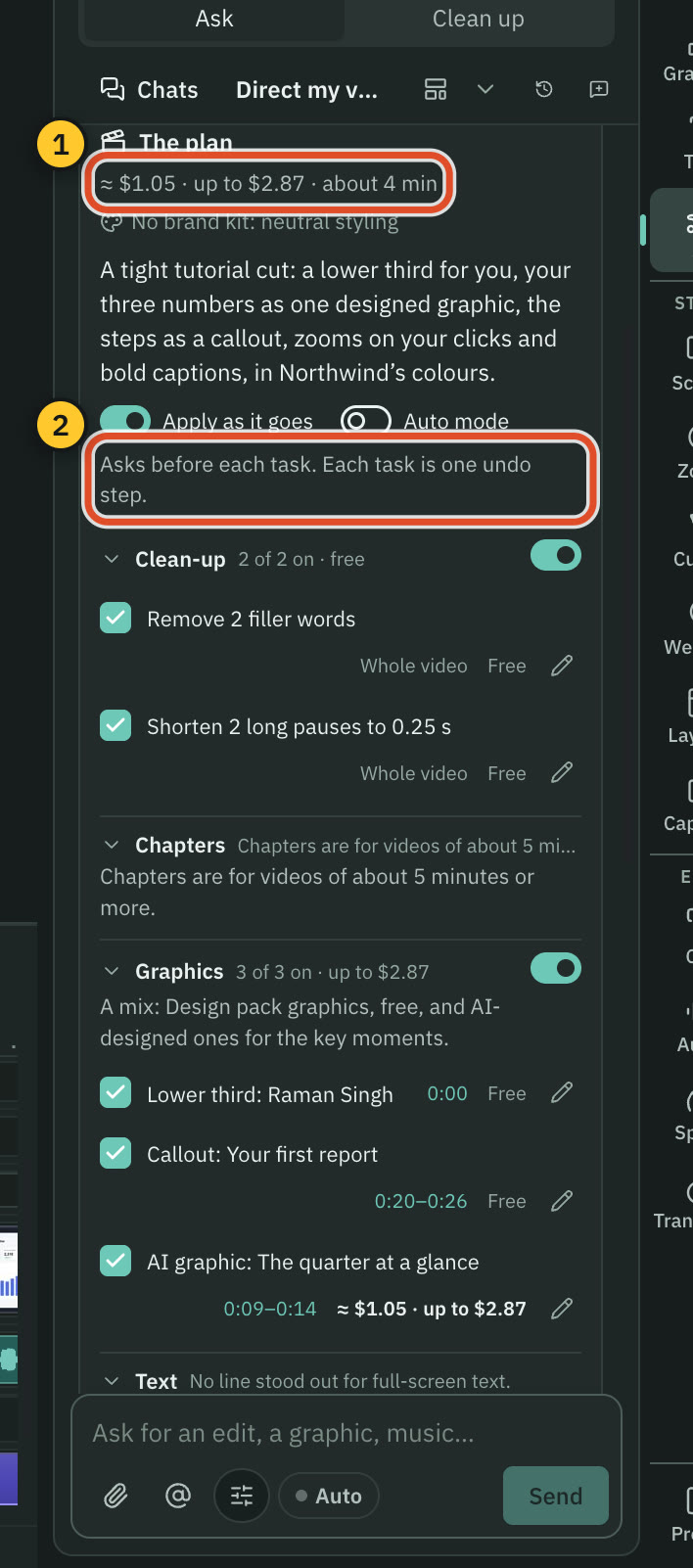
Loom AI works on the recording: summaries, documents and tickets. Cutscript's AI works on the edit, on accounts you already have.
CutscriptA chat that edits the video, on your own AI account
LoomLoom AI for summaries, documents and tickets
| What | Cutscript | Loom |
|---|---|---|
| AI that edits from a chat | YesOne AI with cards you apply or discard | Not found in their docsNot found in their docs |
| AI that plans a whole edit | YesDirect my video: questions, then a priced plan | Not found in their docsNot found in their docs |
| Summaries and chapters | PartlyChapters only, on videos of about five minutes or more | YesTitles, summaries, chapters. 50+ languages |
| Documents and tickets from video | NoNot offered | YesSOPs, PR descriptions, QA steps, Jira or Linear issues |
| Tools for outside agents | NoNot offered | YesRecord for agents (beta) and Atlassian MCP tools |
| Short clips from a long video | YesUp to ten scored clips, each its own composition | Not found in their docsNot found in their docs |
| Own plan, own keys, local models | YesChatGPT plan, Claude plan on a Mac, keys, Ollama | Not found in their docsNot found in their docs |
| Who pays | YesYou pay each provider, or nothing for local models | YesPart of Business + AI at $24 per user a month |
More detail
Cutscript
- You ask in plain words and get cards back. With Auto mode off, the default, nothing changes until you apply one.
- Direct my video reads the transcript, asks a few questions and writes a priced plan you approve.
- Make short clips finds up to ten scored clips. Faces are followed on a Mac only. Windows follows the pointer or a still crop.
- It runs on a ChatGPT plan, a Claude plan (on a Mac, through Claude Code), an OpenRouter key or Ollama models on your computer.
- Neither plan includes AI credits. Providers bill you directly, and a plan covers text only, with no transcripts or pictures.
Loom
- On Business + AI and Enterprise: auto titles, summaries, chapters, tasks, filler and silence removal, meeting notes.
- AI workflows turn a recording into an SOP, PR description, QA steps, code docs, a Jira or Linear issue, or a message.
- Workflow documents are English only, and workflows are not in the mobile apps.
- Record for agents (open beta) turns a narrated recording into an agent prompt: five minutes at most, camera off.
- Atlassian's MCP Server gives outside agents tools to read transcripts, comment, share and upload.
Export and download
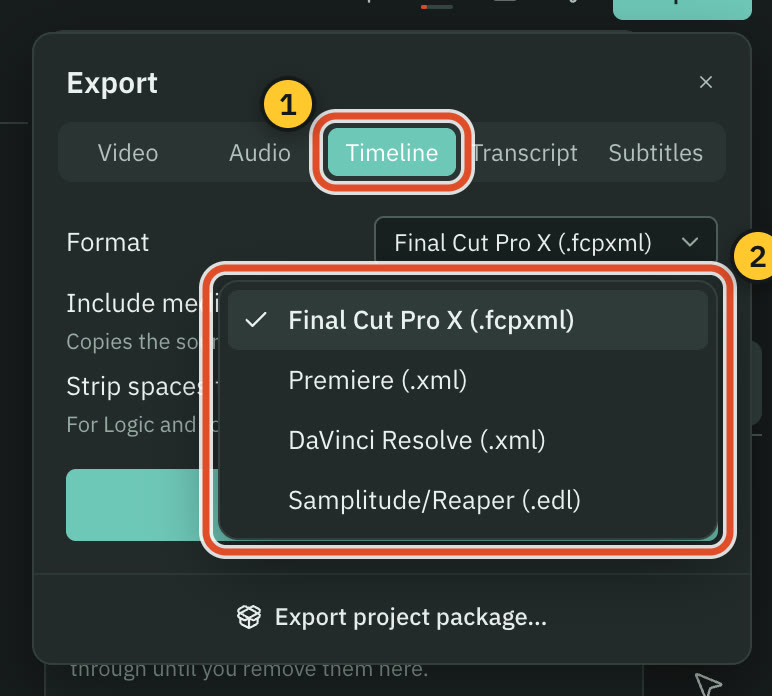
Cutscript ends in a file on your computer. Loom keeps videos in its cloud, and a download is an MP4 on paid plans.
CutscriptFour video formats, plus audio, text and timeline files
LoomAn MP4 download on paid plans
| What | Cutscript | Loom |
|---|---|---|
| Download on the free plan | PartlyWith a watermark on video exports | NoNot offered on Starter |
| Video formats | YesMP4 H.264 always. HEVC, ProRes, WebM without effects | PartlyMP4 |
| Download resolution | YesSource or 480p to 4K, never scaled up | Not found in their docsNot found in their docs |
| Text files | YesTranscript in five formats, subtitles as SRT or VTT | PartlySRT on Business and up |
| Handing off to an editor | YesPro only: Final Cut, Premiere, Resolve or EDL | Not found in their docsNot found in their docs |
| Watermark on the file | PartlyA moving watermark on free video exports. Pro removes it | PartlyNone on the recording. Page branding stays until Business |
More detail
Cutscript
- MP4 H.264, MP4 HEVC, MOV ProRes or WebM VP9. With zooms or the camera bubble, only MP4 H.264 is offered.
- Source or 480p to 4K, at 24 to 60 fps, never scaled up. On Windows, HEVC needs a graphics card encoder.
- Audio as M4A, WAV, MP3 or FLAC, transcripts as Word, Markdown, HTML, TXT or RTF, subtitles as SRT or VTT.
- Timeline export is Pro only: Final Cut Pro, Premiere Pro, DaVinci Resolve or EDL. It carries cuts and audio clips, not effects.
- Free video exports carry a watermark that moves around the frame. Pro removes it. Audio, subtitles and transcripts have none.
Loom
- Downloads are MP4 in the original aspect ratio.
- Starter cannot download, and Creator Lite users cannot either.
- Trims are kept. Captions, CTAs, chapters and filler or silence removal are listed as not included. Overlays do carry over.
- Videos over 20 GB and videos with Variables cannot be downloaded.
Price and plans
Prices as listed on 31 October 2026. Loom charges per user and puts AI in its $24 plan. Cutscript Pro covers one computer at a time and includes no AI.
CutscriptFree, or Pro at $4.17 a month ($49.99 a year)
LoomStarter at $0, then $18 or $24 per user a month
| What | Cutscript | Loom |
|---|---|---|
| Free plan | YesEvery feature except timeline export. Free account needed | YesStarter at $0, with limits |
| Number of videos on free | YesPlan page lists no cap | Partly25, and archived videos count |
| Length and quality on free | YesSame as Pro | Partly5 minutes per screen recording, up to 720p |
| Watermark on free | PartlyA moving watermark on video exports. Pro removes it | PartlyNone on the recording. Page branding stays until Business |
| Lowest paid price | YesPro $4.17 a month paid yearly ($49.99), or $9.99 monthly | YesBusiness at $18 per user a month |
| AI in the price | NoNot included. Providers bill you, or use local models | YesIncluded in Business + AI at $24 per user a month |
| How seats work | PartlyOne computer at a time. No team billing | YesPer user. Starter: 50 members, 10 if tied to Atlassian |
| Trying the paid plan | PartlySame features, but a watermark and no timeline export | YesBusiness + AI free for 14 days. No uploads in the trial |
More detail
Cutscript
- Free has every feature except timeline export. A free account is needed.
- Free video exports carry a watermark that moves around the frame. Pro removes it. Audio, subtitles and transcripts have none.
- A review of Cutscript on X, good or bad, earns two video exports without the watermark.
- Pro is $4.17 a month paid yearly ($49.99 a year), or $9.99 paid monthly. It adds timeline export.
- Same plan and price on a Mac or a Windows PC, on one computer at a time.
Loom
- Starter $0: 25 videos, 5-minute recordings, 720p. At the limit you cannot record more until you upgrade, but nothing is deleted.
- Business, $18 per user a month: unlimited videos, up to 4K, trim and stitch, upload and download, Loom branding removed.
- Business + AI, $24 per user a month: everything in Business plus Loom AI.
- Enterprise: custom, through sales.
- Paying annually saves 17%, per Loom. We could not find the yearly per-user price.
Where Loom is the better pick
A link people can act on
Loom hosts the video. Viewers comment and react, and you see viewer insights, on every plan including Starter. Cutscript has none of this.
Phones and the browser
Loom has iOS and Android apps and a Chrome extension. Android records screen and camera together. Cutscript has no phone app or browser extension.
Team and admin tools
Spaces, library search and @mentions. Enterprise adds roles, SSO and SCIM. New workspaces can store in Germany or the US. Cutscript has no team features.
Jira, Slack and work tools
Loom connects to Jira, Confluence and Slack. AI workflows turn a recording into an SOP, a PR description or a Jira or Linear issue on Business + AI and Enterprise.
What Starter includes
Starter has transcripts, closed captions in 50+ languages and no watermark on the recording, up to 25 videos. Cutscript's free video exports carry a watermark.
Live camera and quick fixes
Virtual backgrounds, Touch Up My Appearance and low light work on the live camera. Live rewind re-records a section, and a text-to-speech fix repairs a mistake.
Moving from Loom to Cutscript
- Download each Loom as MP4 on a paid plan, since Starter cannot. Captions and CTAs are not included.
- Install Cutscript from cutscript.dev (Mac) or the Microsoft Store (Windows), then sign in once.
- Choose File › New Project… and pick each MP4. With no Loom import, comments and viewer data stay in Loom.
- To edit by text and add captions, transcribe with a key (Settings › AI) or Whisper on an Apple silicon Mac.
- Add zooms by hand. Imported video has no click data, so automatic zooms need a take recorded on a Mac.
- Post the exported file where your viewers are. Keep Loom for hosted videos and comments if you want them.
Questions
Can Cutscript replace Loom for messages to my team?
Not for sharing: Cutscript has no share links, comments or viewer data, so you export a file and post it where your team already looks. Use Loom if the message needs a link and replies, and Cutscript if it is a video you want to edit first. You can use both.
Is Cutscript a free alternative to Loom?
For making the video, partly. Cutscript's free plan has every feature except timeline export and needs a free account, and its video exports carry a watermark. It has no hosting, share links, comments or viewer data, so it does not replace those parts of Loom.
Does Loom's free plan have a watermark?
Loom says it adds no watermark to the recording itself, though Loom branding stays on the video page and player until Business. Cutscript's free video exports carry a watermark that moves around the frame. Pro removes it, and audio, subtitles and transcripts have none.
Can I move my Loom videos into Cutscript?
Yes, as files. Download each one as an MP4 on a paid Loom plan, then start a Cutscript project from it. Starter cannot download, and comments and viewer data stay in Loom.
Does Cutscript work on a phone, in a browser or on a Chromebook?
No. Cutscript runs on Mac (Apple silicon or Intel, macOS 14 or later; recording needs macOS 15) and 64-bit Windows from the Microsoft Store, with no browser or phone app. Loom has iOS and Android apps and a Chrome extension, and says Linux and Chrome OS are not supported.
Do I have to pay for AI in Cutscript?
Cutscript Pro includes no AI credits. AI runs on your ChatGPT or Claude plan (Claude on a Mac), your own keys or local models, and each cloud provider bills you. A transcript needs a key, or Whisper on an Apple silicon Mac. Loom AI is part of its $24 Business + AI plan.
Does Cutscript upload my videos?
No. Your files stay on your computer and you post them yourself. Cloud AI steps send the text, audio or still frames they need to the provider you pick.
Try it on your own video.
Free with a Cutscript account. Video exports have a watermark, and Pro removes it.
Download CutscriptFirst published 31 October 2026, last checked 31 October 2026. Prices and features change, so check before you decide. The people in our screenshots are stock footage and do not use or endorse Cutscript. Screenshots show Cutscript 0.1 beta. Seen something wrong or out of date? Tell us and we will fix it.