Cutscriptvs Descript
Both cut video when you edit its transcript. Pick Cutscript, a 0.1 beta screen recorder and editor, to keep files on your computer and run AI on your own accounts. Pick Descript for remote guests, team editing and hosted AI.
Written by the people who make Cutscript. Checked 31 October 2026. Descript and its logo are trademarks of their owner, and Cutscript is not affiliated with or endorsed by them.
Pick Cutscript if
- You make screen demos and want zooms made from your clicks, from a take recorded on a Mac
- You want files on your computer, and recording, timeline and export offline once signed in
- You have a ChatGPT or Claude plan (Claude on a Mac), or want your own keys or local models
- You want .cube looks or face-only colours. Mac now, Windows with the next Store update
- You want no media minutes to count. Pro is $4.17 a month paid yearly ($49.99 a year)
Pick Descript if
- You record remote guests. Rooms records each person locally in up to 4K
- You edit with others: shared drive, comments on words, @mentions and live collaboration
- You want AI paid for in one place, with credits and transcription in every plan
- You share by link. Share pages open without an account
- You want a large user base. Descript claims over 6 million creators and teams
At a glance
| What | Cutscript | Descript |
|---|---|---|
| Best for | Screen demos and tutorials, cut by text, kept on your computer | Creators, podcasters and teams who edit by text in a shared cloud |
| Maturity | 0.1 beta. Expect rough edges | Established, claims over 6 million creators and teams |
| Price (checked 31 Oct 2026) | Free, or Pro at $4.17 a month paid yearly ($49.99 a year), or $9.99 monthly | Free, or $16, $24 or $50 a person a month paid yearly, $24, $35 or $65 monthly. Enterprise custom |
| Free plan | YesEvery feature except timeline export. Free account needed | Partly60 media minutes a month, 100 AI credits once, 720p export |
| Watermark | PartlyA moving watermark on free video exports. Pro removes it | PartlyBottom-right watermark on free exports and web links. Paid plans remove it |
| Platforms | YesMac and Windows. Recording on a Mac needs macOS 15 | YesMac, Windows and a browser. Phones not officially supported |
| Where files live | On your computer | In the cloud, on Amazon S3 or Google Cloud. No offline editing |
| Sharing | NoYou get a file and post it yourself | YesShare pages by link, plus publishing guides for YouTube and podcast hosts |
| Editing | PartlyEdit by text. Transcript needs your key or Whisper on Apple silicon | YesEdit by text. Transcription on every plan, 25 languages |
| AI | YesYour ChatGPT plan, Claude plan on a Mac, your keys, or local models | YesHosted Underlord, paid with AI credits from your plan |
| Screen demos | YesClick zooms and pointer styles on a Mac. Backgrounds on Mac and Windows | PartlyKeyframed zoom and a click circle. Auto zoom not found in their docs |
| Guests and teams | NoNot offered. No guests, shared drive or comments | YesRooms for guests, shared drive, comments, live editing |
YesPartlyNoNot found in their docs
Recording
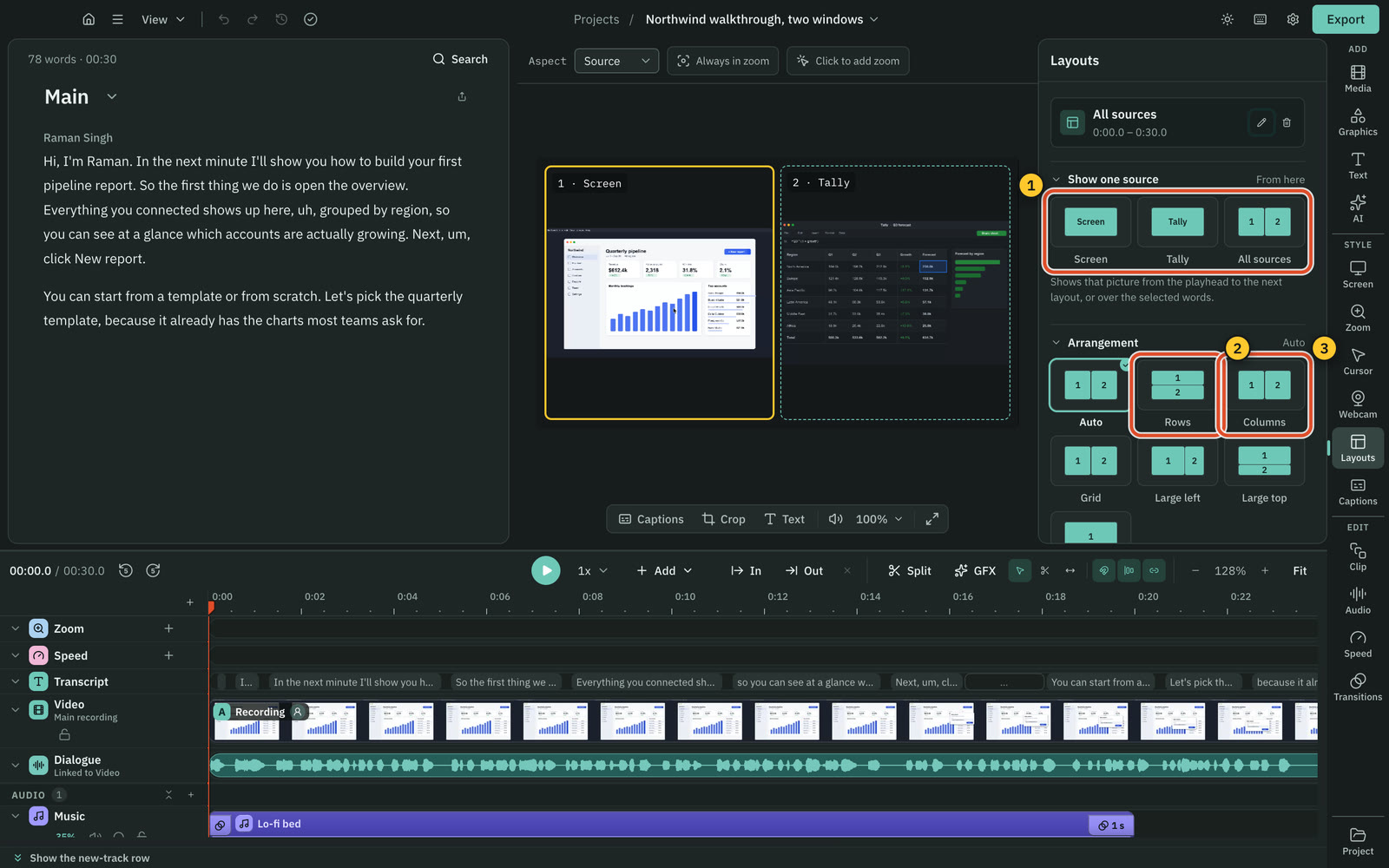
Both record screen, camera and microphone. Cutscript can draw on screen during a take on a Mac. Only Descript records remote guests.
CutscriptA recorder bar with a separate track per input
DescriptA screen recorder, plus Rooms for remote guests
| What | Cutscript | Descript |
|---|---|---|
| Screen recording | YesMac and Windows. Area mode on a Mac | YesMac, Windows, or a browser (not Firefox) |
| Length of a take | YesNo set limit, stops at 500 MB free disk | YesUp to 4 hours |
| Pause and resume | YesMac and Windows | PartlyNot supported on Windows |
| Computer sound | YesAll apps or none. One app on a Mac, experimental | YesOn desktop with screen recording. One tab in a browser |
| Several pictures at once | YesUp to three, each its own file | PartlyUp to 2 screens in Rooms |
| Draw while recording | YesOn a Mac | Not found in their docsNot found in their docs |
| Remote guests | NoNot offered | YesRooms, 10 participants on every plan |
| Phone or tablet | PartlyCabled iPhone or iPad on a Mac, experimental | PartlyQR code upload in Labs. No Rooms on mobile |
More detail
Cutscript
- Display or window on Mac and Windows. Area mode and a cabled iPhone or iPad are Mac only, and the iPhone mode is experimental.
- One take holds up to three pictures, each saved to its own file. On Windows you can add displays and windows.
- Voice, system sound and camera are separate tracks, and the camera preview stays out of the video. On a Mac the pointer is too.
- On a Mac you can draw during the take: pen, arrows, step numbers, laser pointer, spotlight and privacy boxes.
- Recording works offline once you are signed in. A Mac needs macOS 15 or later to record. There is no remote guest recording.
Descript
- The Screen Recorder runs on Mac and Windows, up to 4 hours a recording. Windows has no 4K screen recording or pause and resume.
- With Quick Share off, inputs open on separate tracks. With it on, they merge into one track and go to a share page.
- The camera preview is a Dock Window. Descript warns it shows in the final recording, which matters for full-screen captures.
- Rooms records each remote person locally in up to 4K, with a file per person. Producers get a Control Room with push-to-talk.
- Recording and uploading use media minutes. A 1-hour Rooms session uses 60 minutes, however many people join.
Editing by text
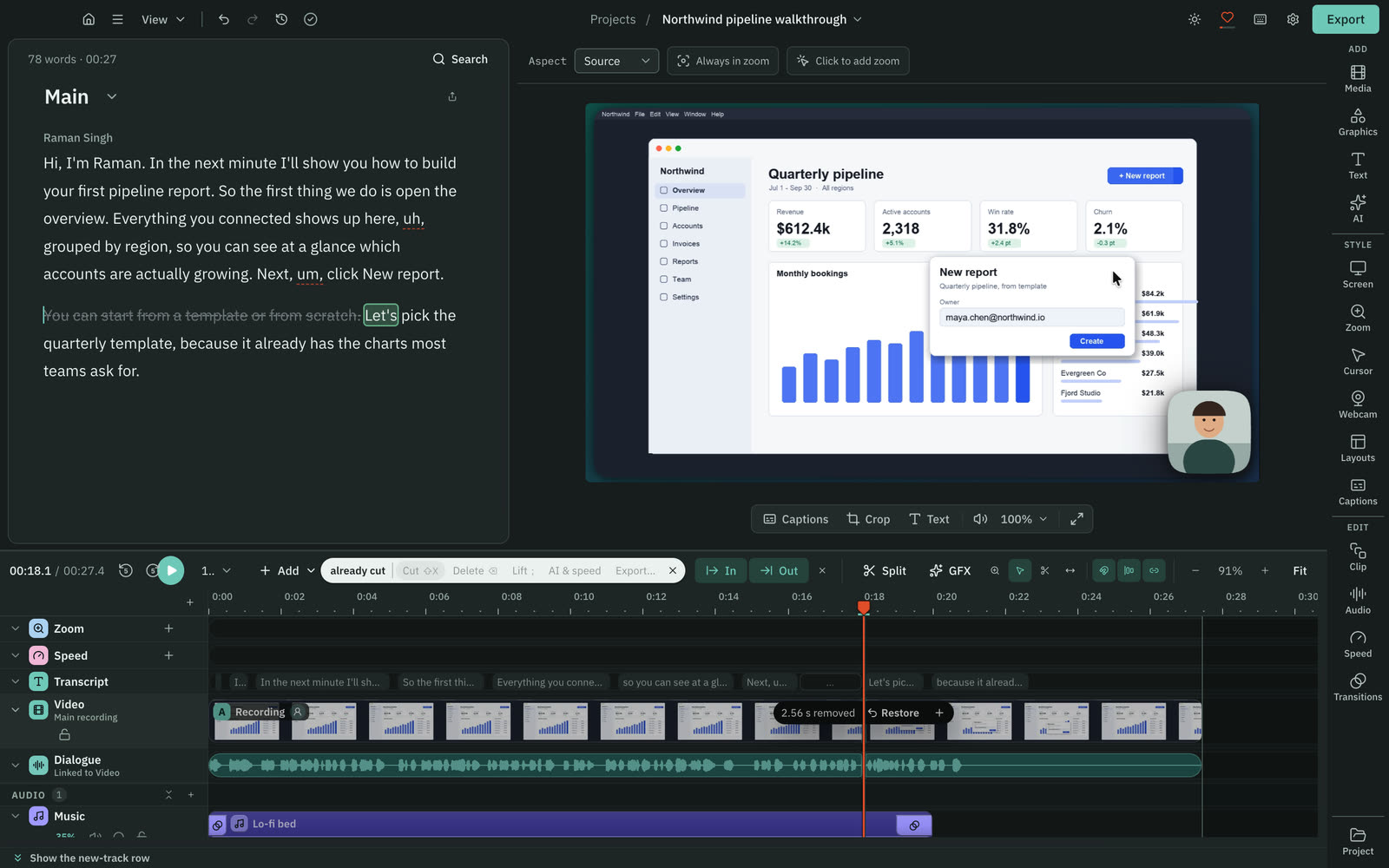
Both cut video from a transcript. Descript includes the transcript in every plan. Cutscript's clean-up tools run free on your computer.
CutscriptThe script cuts the video, once you set up a transcript
DescriptThe transcript cuts the video, on every plan
| What | Cutscript | Descript |
|---|---|---|
| Transcript included in the plan | PartlyYour key, or free Whisper on an Apple silicon Mac | YesEvery plan |
| Transcription languages | Yes90+ with Scribe v2 (key), 99 with Whisper (Apple silicon) | Yes25 languages |
| Speaker labels | PartlyCloud models marked Speakers. Not in Whisper on your Mac | YesDetects 8 or more speakers |
| Remove filler words | YesFree, on your computer. Word list you edit | YesIn AI Tools. Uses AI credits |
| Shorten pauses | YesFree. Pauses over 0.8 s go to 0.3 s by default | Not found in their docsOnly the name Shorten Word Gaps found |
| Remove repeated phrases | YesFree. Keeps your last take | Not found in their docsNot found in their docs |
| Multitrack | YesTimeline: hide, mute, solo, lock and reorder tracks | YesSequences edited from the script |
| Transitions | YesDissolve, dip, push, slide, wipe, iris, crossfades | YesScene and clip transitions, Smart Transition by default |
More detail
Cutscript
- Delete words and the picture and sound go with them. Your original media is never changed, and any cut can be restored.
- Transcript: ElevenLabs, fal.ai or OpenRouter on your key, or Whisper on an Apple silicon Mac. A ChatGPT or Claude plan cannot.
- Whisper on your Mac is free and slower than the cloud, with no speaker labels. On Windows the transcript comes from the cloud.
- Editing by text works offline once the transcript exists. Making a transcript offline needs Whisper on an Apple silicon Mac.
- Filler words, long pauses and repeated phrases are found on your computer, with no AI and no cost.
Descript
- Text is linked to media. Delete a word and it leaves the audio or video. Cut and paste text and the media moves.
- Deleted media is hidden, not erased, and you can restore it from the edit boundary.
- Every plan includes 25 transcription languages, detection of 8 or more speakers, and multitrack transcription.
- Remove Filler Words uses AI credits. August 2026 notes add Spanish, German, French, Portuguese and Italian to English.
- Sequences link several tracks so script edits apply to all of them. Multicam angles are a listed use.
Zooms, cursor and screen styling
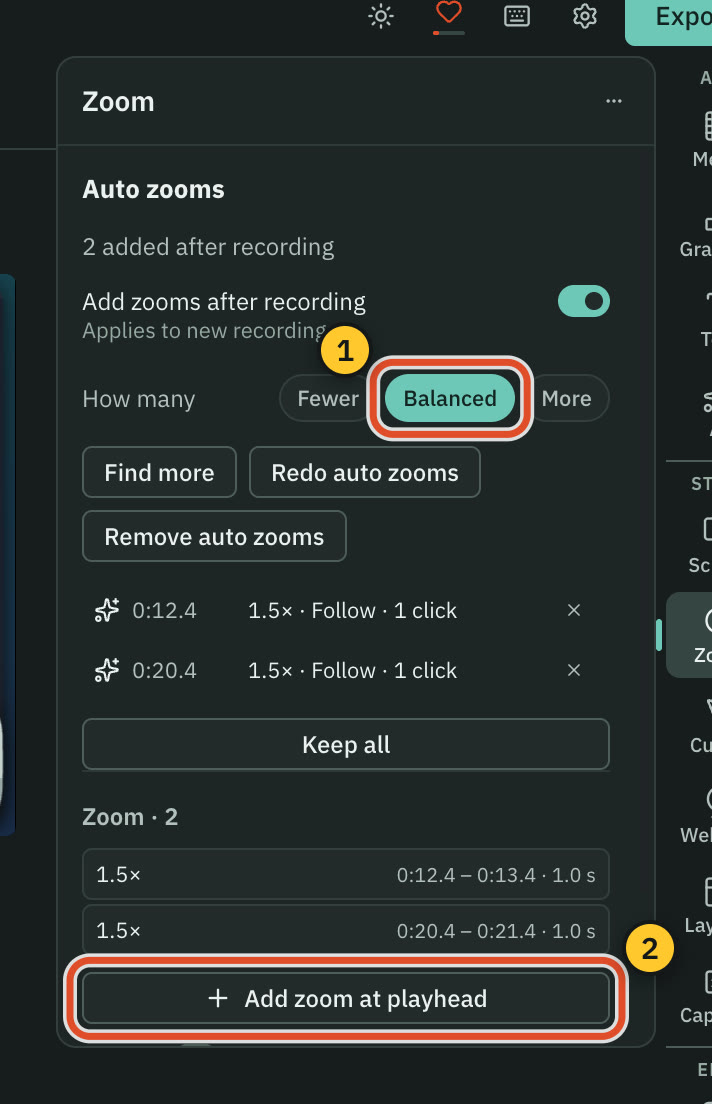
Cutscript's docs list more screen-demo tools, but its click tools need a take recorded on a Mac. Descript's docs show manual zoom only.
CutscriptClick zooms on a Mac, backgrounds on Mac and Windows
DescriptZoom by keyframe, a click highlight, layer controls
| What | Cutscript | Descript |
|---|---|---|
| Zoom by hand | YesPress Z or drag the Zoom lane. Depth 1x to 5x | YesKeyframes, with an optional easing curve |
| Automatic zoom on clicks | YesOn a Mac | Not found in their docsNot found in their docs |
| Restyle pointer after recording | YesOn a Mac: style, size and smoothing | Not found in their docsNot found in their docs |
| Click effects and sounds | YesOn a Mac: six effects, five sounds | PartlyHighlight circle. Sounds not found in their docs |
| Backgrounds | YesGradient, image or colour. Wallpapers on a Mac | PartlyBase colour. Image or gradient not found in their docs |
| Padding and corners | YesPadding 0 to 100%, corners 0 to 50%, shadow | PartlyLayer corners. Padding not found in their docs |
| Blur that follows movement | YesPixel lock on Mac and Windows | Not found in their docsNot found in their docs |
| Find faces or emails to blur | YesOn a Mac | Not found in their docsNot found in their docs |
More detail
Cutscript
- On a Mac, clicks become zooms. Pick Fewer, Balanced or More, then redo, review or remove them. On Windows you add zooms by hand.
- On a Mac you can restyle the pointer after the take: six bundled styles plus your Mac's own, size 0.5x to 10x, movement presets.
- Click effects and click sounds also need a take recorded on a Mac.
- On Mac and Windows: gradient, image or colour backgrounds, padding, rounded corners and shadow.
- Blur or pixelate an area and make it follow with Pixel lock. On a Mac, Blur all faces and Blur all emails use Apple Vision.
Descript
- Their docs show manual zoom only. Custom animation or Zoom and pan adds start and end keyframes, with an optional easing curve.
- The one cursor setting we found is Highlight mouse click when recording. It adds a circle around the cursor when you click.
- The layer toolbar covers size, position, rotation, cropping and corner rounding. A scene background is the scene's base colour.
- Blur Out covers faces, plates and text, and does not say if it tracks. Blur speaker background (beta) uses AI credits.
- We read their docs, not the logged-in app, so there may be more.
Camera bubble and layouts
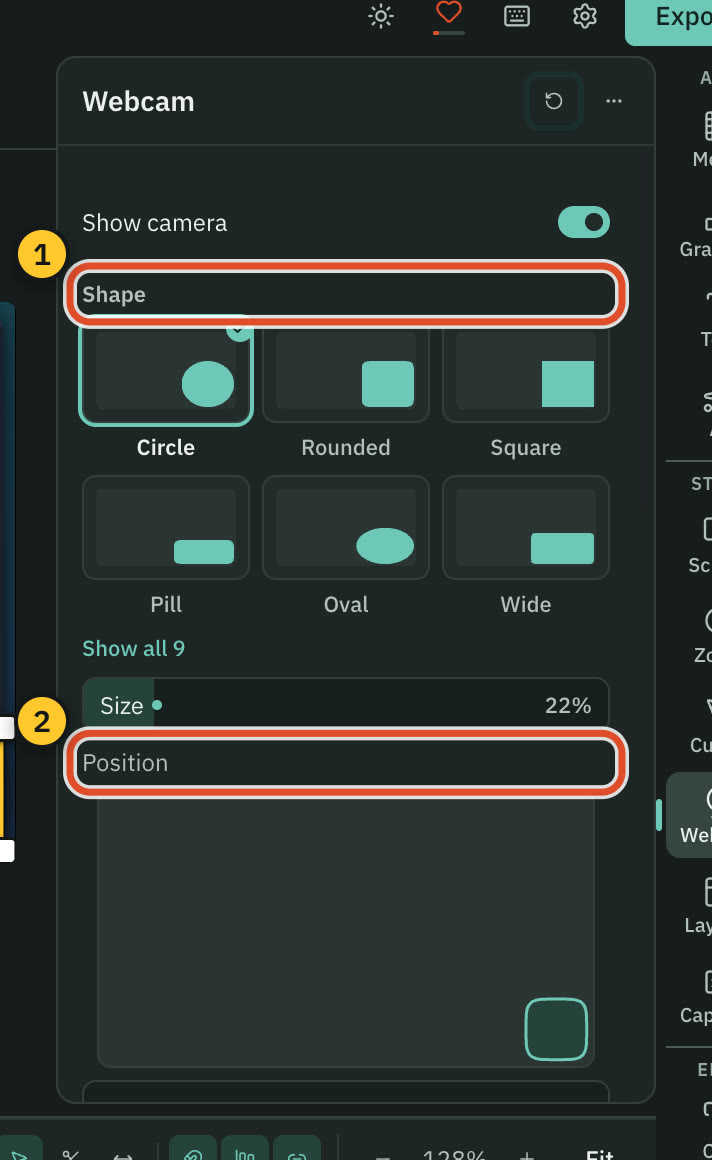
Cutscript styles the camera bubble after the take. Descript has Eye Contact, Green Screen and layout packs.
CutscriptA camera bubble you shape and move after recording
DescriptA Dock Window while recording, then layout packs
| What | Cutscript | Descript |
|---|---|---|
| Camera shapes | YesNine tiles, plus Diamond and Hexagon | PartlySquare-to-circle slider. Shape count not found |
| Camera border | YesOne or two colours, can flow | Not found in their docsNot found in their docs |
| Background removal | PartlyChroma key, one solid colour | YesGreen Screen. Limited on Free, paid plans include it |
| Eye contact correction | NoNot offered | YesEye Contact. Limited on Free, paid plans include it |
| Side-by-side layouts | Yes2, 3 or 4 panels | PartlyLayouts and layout packs. Side-by-side not found |
| Reuse a look | PartlyCopy and paste the screen look, not the bubble | YesCustom layout packs, on paid plans |
| Face as a bubble, from a video | YesMac now. Windows with the next Store update | Not found in their docsNot found in their docs |
More detail
Cutscript
- Nine shape tiles from Circle to Full screen, plus Diamond and Hexagon cutouts. The border can use one or two colours.
- Chroma key removes one solid colour from camera video. It does not find people in the picture.
- Set the camera to full screen, hidden or zoomed for a passage, picked by words or by In and Out.
- Layouts of 2, 3 or 4 panels, each showing the screen, the camera or other media.
- Detach a face from a video as a bubble that follows the person. Face is on a Mac now, Windows with the next Store update.
Descript
- While you record, the camera preview is a Dock Window, and a settings slider changes its frame from square to circular.
- Layout packs group layouts by type, such as Camera and Media. A layout can set speaker framing, fonts, colours, media and audio.
- Custom layout packs need a paid plan. Upload brand files and a prompt, pick one of four AI directions, and edit the pack.
- Eye Contact and Green Screen are Limited on Free and included on paid plans.
Colour grading: LUTs and scopes
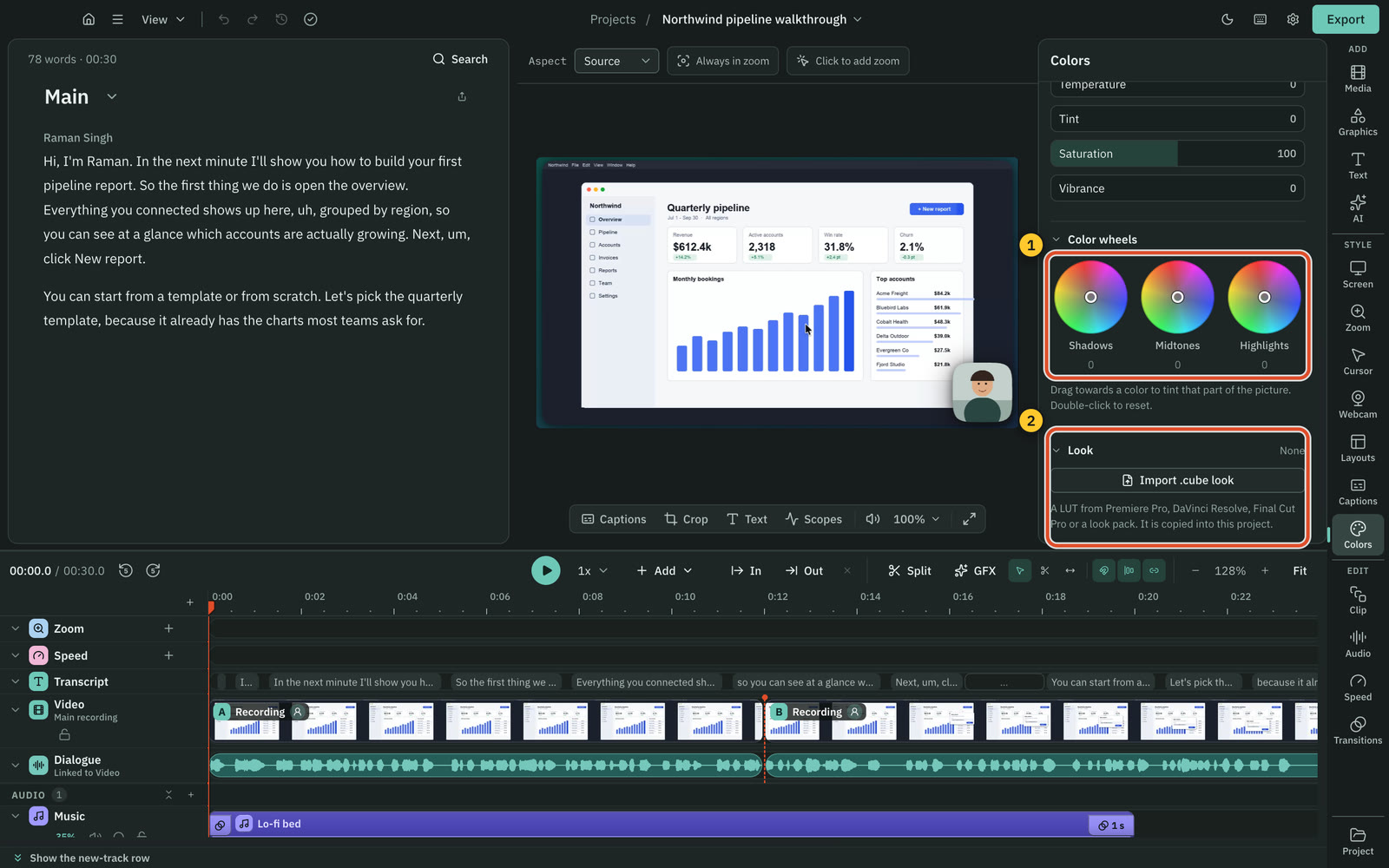
Cutscript's docs list wheels, LUTs, scopes and face-only colours. Descript's docs list sliders, a white balance picker and six filters.
CutscriptSliders, wheels, .cube looks and scopes
DescriptSeven sliders, a white balance picker, six filters
| What | Cutscript | Descript |
|---|---|---|
| Light and colour sliders | YesTen sliders, with Compare | YesSeven sliders and a white balance picker |
| Presets | YesPreviewed on your own frame | YesSix filters, one at a time |
| Colour wheels | YesShadows, midtones and highlights | Not found in their docsNot found in their docs |
| Import a LUT | Yes.cube, with intensity | Not found in their docsNot found in their docs. A 2022 request is still open |
| Video scopes | YesFour types | Not found in their docsNot found in their docs |
| Colours for the face only | YesColors and Face: Mac now, Windows with the next Store update | Not found in their docsNot found in their docs |
| Grade with AI | YesUp to four frames, checks its own grade. Price first | Not found in their docsNot found in their docs |
More detail
Cutscript
- Exposure, contrast, highlights, shadows, whites, blacks, temperature, tint, saturation and vibrance, with Compare.
- Presets preview on your own frame. Wheels tint shadows, midtones and highlights, and a vignette darkens or lightens edges.
- Import a .cube look and set its intensity. A copy is kept in the project.
- Waveform, Parade, Vectorscope with a skin-tone line, and Histogram.
- Face colours: faces are found on your computer, nothing uploaded. Colors and Face: Mac now, Windows with the next Store update.
Descript
- Sliders under More controls: exposure, contrast, highlights, shadows, temperature, tint and saturation.
- A white balance picker.
- Six preset filters, one at a time: Neutral, Warm, Cool, Black and white, Pop and Invert.
- Its page does not mention LUTs or scopes. A custom LUT request posted in 2022 is still listed as under consideration.
Captions, voice and dubbing
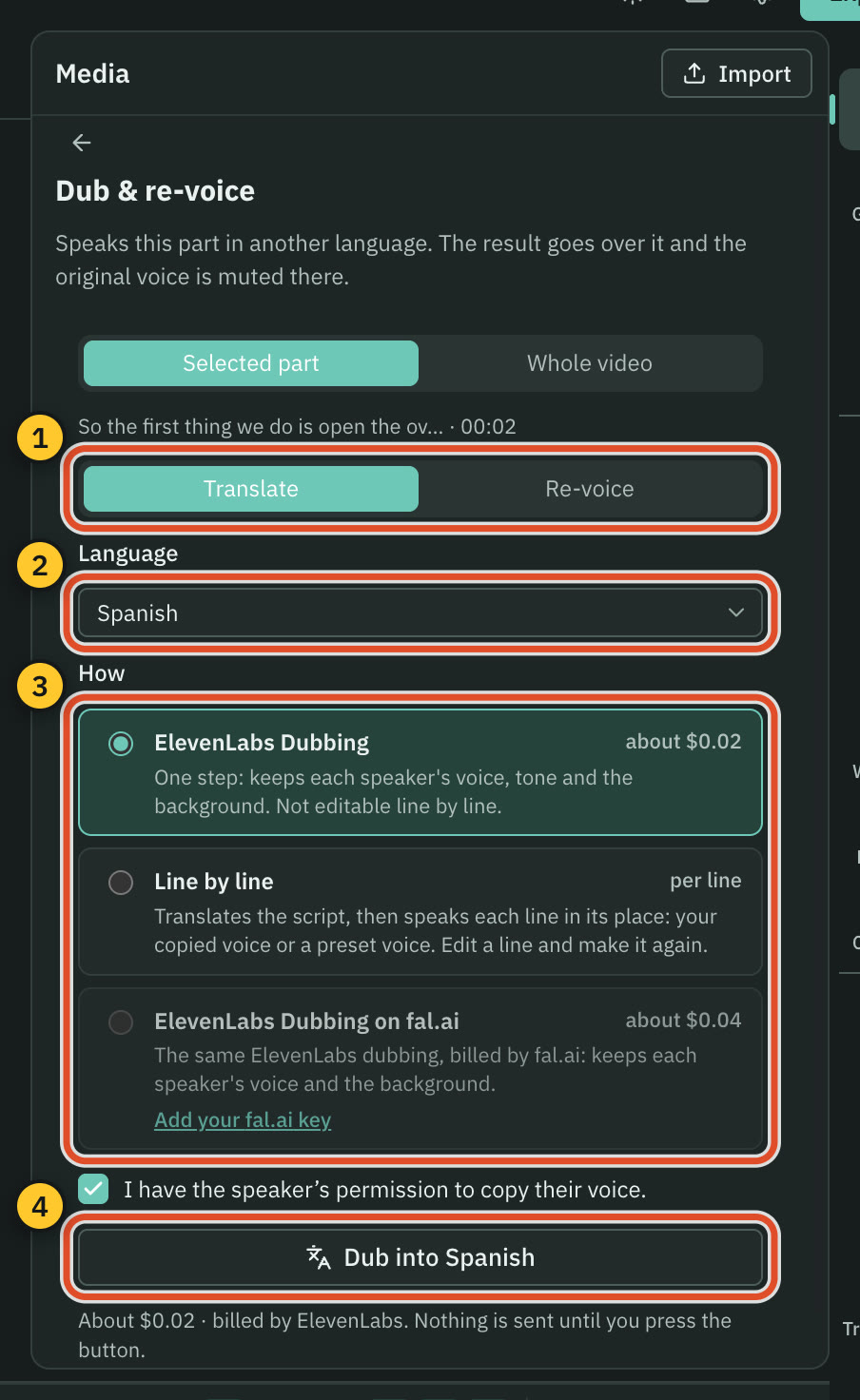
Both have word-by-word captions and AI voices. Descript is ahead on translation, and Cutscript runs voices on your own accounts.
CutscriptCaptions built in, voices and dubs on your accounts
DescriptCaptions, AI speech, cloning and dubbing in the plan
| What | Cutscript | Descript |
|---|---|---|
| Word-by-word captions | Yes24 styles. Needs a transcript | YesPresets, 15 text animations. Unlimited on every plan |
| Caption translation | NoNot offered | Yes61 languages from Hobbyist. Limited on Free |
| Text to speech | YesOn your key, or a voice on an Apple silicon Mac | Yes19 languages. Limited on Free, paid plans include it |
| Voice cloning | YesElevenLabs clones, or Fish from a 10 to 30 second sample | YesYour own voice, from about 60 seconds. Limited on Free |
| Dubbing | YesElevenLabs Dubbing or line by line, on your key | Yes28 to 30 languages, stock voices. Limited on Free |
| Lip sync | NoNot offered | YesCreator and up |
| Voice clean-up | YesFree on your computer, or on your key | YesStudio Sound. Limited on Free, paid plans include it |
| Music and sound effects | YesFrom a prompt, on your key | YesFrom a prompt, uses AI credits |
More detail
Cutscript
- 24 caption styles, spoken-word highlight, any installed font, and burn-in that matches the preview. Needs a transcript.
- Voiceover through ElevenLabs, fal.ai, OpenRouter or OpenAI, or a voice on an Apple silicon Mac.
- Cloned voices come from your ElevenLabs account, or from Fish copying a 10 to 30 second sample.
- ElevenLabs Dubbing keeps each speaker's voice and the background sound. You can also dub line by line from your script.
- Music and sound effects come from a prompt on your own key. There is no bundled music library.
Descript
- Captions come from the script, with a layer per speaker. September 2026 added 18 presets and 10 text animations.
- AI speech uses three ElevenLabs models in 19 languages. You can clone only your own voice, from about 60 seconds.
- Caption translation covers 61 languages and dubbing 30, though the dubbing page lists 28. Lip sync starts at Creator.
- Studio Sound is Limited on Free and included on paid plans.
- Music and sound effects come from a text prompt and use AI credits.
AI editing and billing
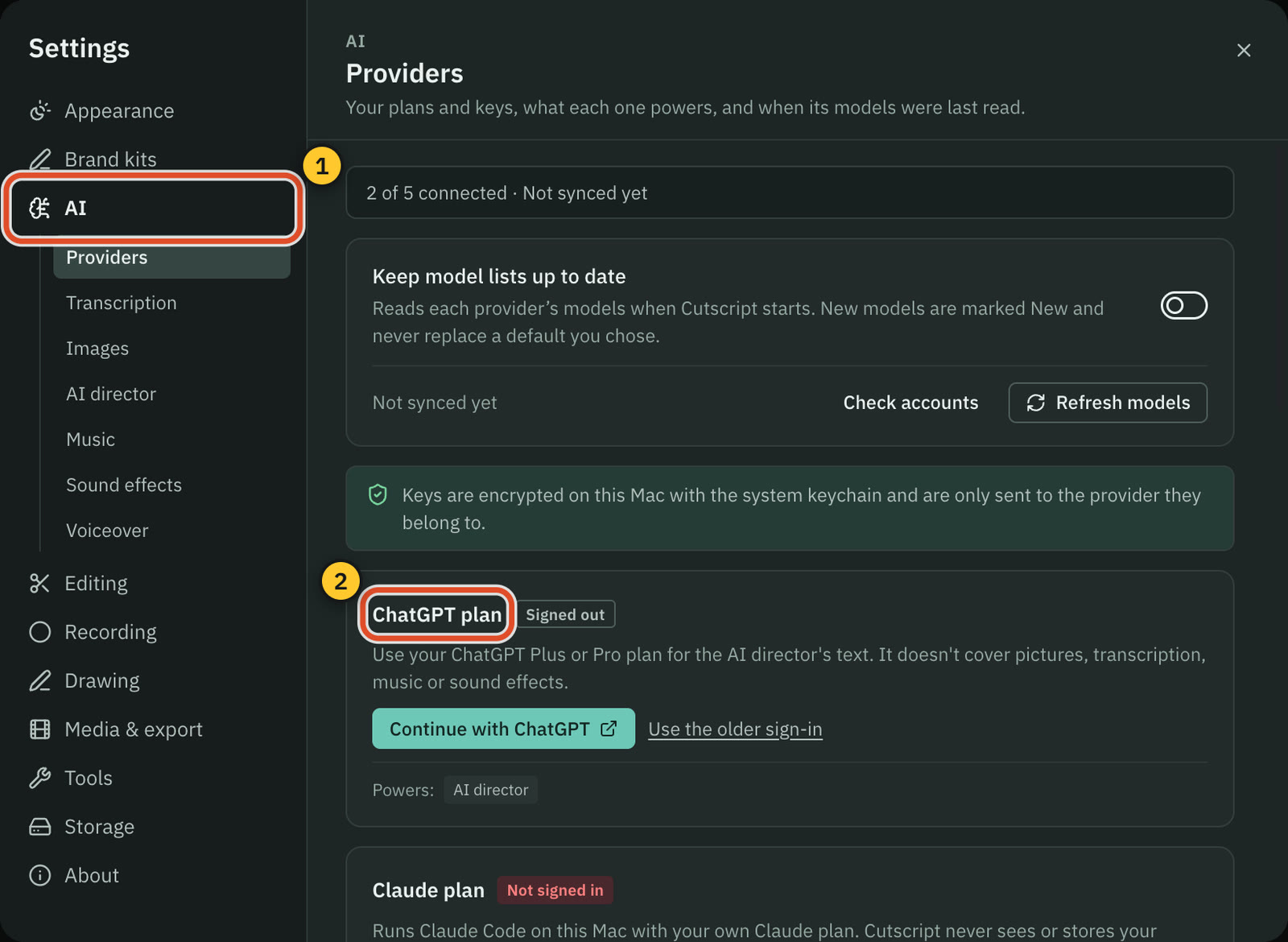
Both have a chat that edits your video and plans a whole edit. Cutscript bills through your AI accounts. Descript uses plan credits.
CutscriptOne AI, on your plan, your keys or your computer
DescriptUnderlord, on hosted models and your AI credits
| What | Cutscript | Descript |
|---|---|---|
| Chat that edits | YesOne AI, with cards to apply or discard | YesUnderlord (beta). Limited on Free |
| Plan a whole edit | YesDirect my video, priced item by item | YesUnderlord plans, in plain language |
| AI included in the plan | NoNot included. Cutscript sells no AI | Yes100 credits once on Free, then 400 to 1,500 a month |
| Your ChatGPT or Claude plan | YesFor AI text. Claude plan on a Mac | Not found in their docsNot found in their docs |
| Your own API keys | YesOpenRouter, ElevenLabs, fal.ai and OpenAI | Not found in their docsNot found in their docs |
| Models on your computer | YesOllama. Whisper and voices on an Apple silicon Mac | Not found in their docsNot found in their docs |
| See the cost before a run | PartlyOn most paid steps | Not found in their docsUsage tab after a run. Up-front price not found |
| Drive it from outside the editor | NoNot offered | YesAn API, a Zapier app and an MCP connector |
More detail
Cutscript
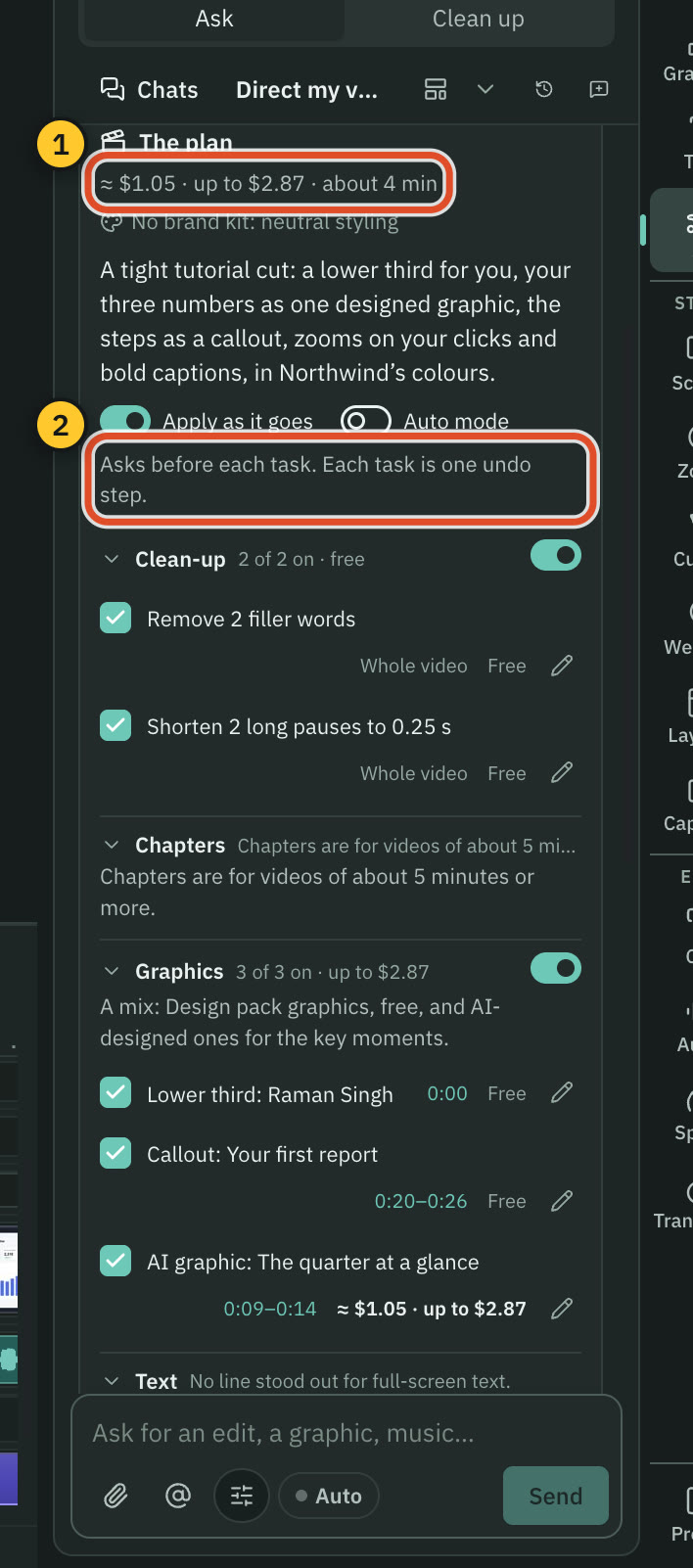
- Ask for edits in plain words. Cards show each change, and by default nothing happens until you press Apply (one undo step).
- Direct my video reads the whole video, asks a few questions and writes a plan with a price on every item. You approve it first.
- AI text runs on a ChatGPT plan, a Claude plan (Mac, through Claude Code you install), an OpenRouter key, or Ollama.
- A plan covers text only. Pictures need a key, and a transcript needs a key or Whisper on an Apple silicon Mac.
- Cutscript shows the price before most paid steps. Transcribing and projects made from the home screen start without one.
Descript
- Underlord (beta) is a chat co-editor in the right sidebar of any project. You can save repeated instructions as a skill.
- It searches the public web for current facts, and it cannot open a linked page.
- The model picker covers GPT, Claude, Gemini and Grok families. Premium models need a paid plan.
- Each prompt uses credits, more if it runs a tool. The same prompt can cost different amounts, shown in the Usage tab.
- AI Video Maker builds an editable video from a prompt, a rough script or footage, with voiceover and an optional avatar.
Graphics and brand kits
Cutscript has motion graphics that need no AI. Descript has Brand Studio on Business and Enterprise, and AI tools that make whole videos.
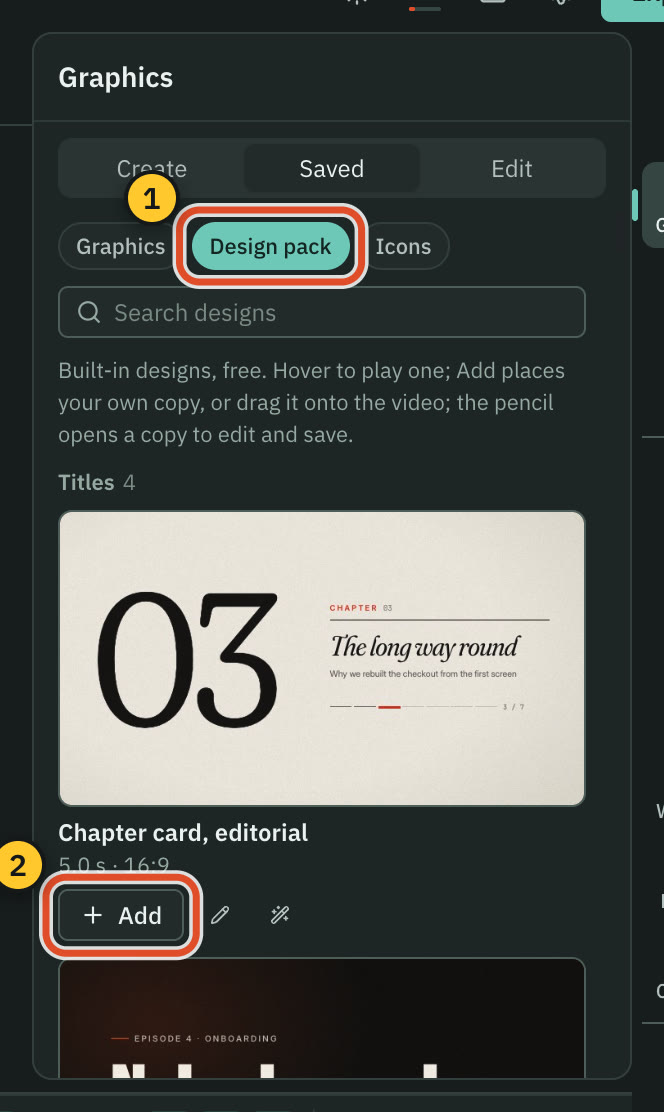
CutscriptDesign pack, AI design director, brand kits on both plans
DescriptWorkflow templates, AI generation and Brand Studio
| What | Cutscript | Descript |
|---|---|---|
| Graphics with no AI | Yes31 in the Design pack, offline | PartlyChapter and Intro layouts. Animated graphics not found |
| Charts and maps | Yes29 chart types and route maps, with AI | Not found in their docsNot found in their docs |
| Make something from a prompt | PartlyGraphics of 1 to 60 seconds. Storyboard and price first | YesWhole videos from AI Video Maker. Uses AI credits |
| AI avatars | NoNot offered | YesOptional in AI Video Maker |
| Brand kit | YesOn Free and Pro | YesBrand Studio: Business and up. Page branding: Creator |
| Start a kit for you | YesImport from a website, no AI | YesA layout pack built with AI from brand files |
| Shared assets for a team | NoNot offered | YesUp to 500 assets in Brand Studio |
More detail
Cutscript
- The Design pack has 31 motion graphics, including titles, maps, charts and countdowns. It works offline with no AI.
- You can edit any graphic by hand: words, colours, numbers, pictures and timing.
- The design director shows a storyboard and a price first, then builds the graphic. It needs an AI source.
- Charts from your data in 29 types, route maps on a flat map or globe, and infographics with over 13,000 icons all use AI.
- Brand kits hold up to 16 colours, four fonts and logos. You can import one from a website with no AI.
Descript
- Underlord workflows include an animated video from a style and a prompt, an avatar video, a promo video and audiograms.
- Help articles cover an AI YouTube thumbnail generator and editing images with AI.
- Brand Studio (Business and Enterprise) holds fonts, colours, a logo, layout packs and up to 500 shared assets, one kit per drive.
- Descript can build a branded layout pack with AI from brand files you upload.
- No animated chart, map or motion graphics library was found in their docs.
Short clips and link import
Both find clips in a long video. Cutscript takes pasted links, and Descript imports from Zoom and Google Drive.
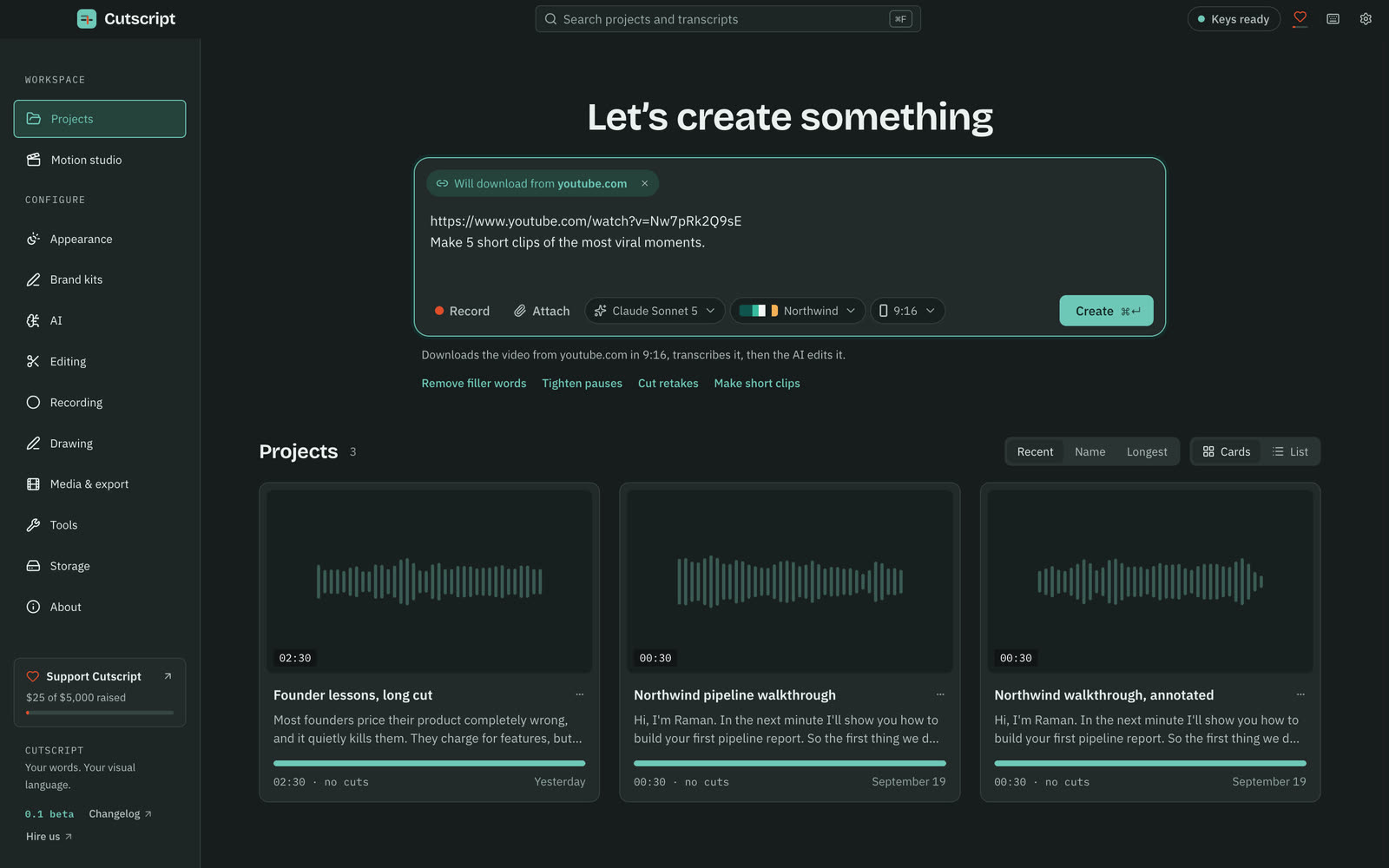
CutscriptA scored clip plan, from a file or a link
DescriptCreate Clips, a speaker tool and imports
| What | Cutscript | Descript |
|---|---|---|
| Clips in one run | YesUp to ten | Yes1 to 20 |
| Clip length | YesYou set it. 15 to 60 seconds by default | Yes10 seconds to 5 minutes |
| A score for each clip | Yes0 to 100, with its hook and the reason | Not found in their docsNot found in their docs |
| Follow the speaker | PartlyFace on a Mac. Pointer or still crop on Windows | PartlyCenter active speaker (beta). Not for multi-track |
| Tall and square shapes | Yes9:16, 1:1, 4:5, 4:3, 16:10 and 16:9 | Yes9:16, 1:1, 16:9 and a custom ratio |
| Paste a YouTube or social link | YesIn the app, after a one-time downloader set-up | Not found in their docsNot found in their docs. API says YouTube is unsupported |
| Zoom or Google Drive import | NoNot offered. Import the file | YesZoom cloud recordings, Google Drive on web |
More detail
Cutscript
- Up to ten clips, each with a score out of 100, a title and a hook. Finding them is priced on the Send line. Making them is free.
- Each clip is its own composition, framed on the face or pointer on a Mac. On Windows it follows the pointer or uses a still crop.
- The clipper needs a transcript and an AI source.
- Paste a link from YouTube, Instagram, TikTok, Vimeo, X, Reddit and more. Private and signed-in videos cannot be fetched.
- Download only videos you have the right to use.
Descript
- Create clips scans a composition and makes 1 to 20 clips of 10 seconds to 5 minutes. You can steer it with a topic or goal.
- Clips arrive as editable compositions in their own folder, with portrait and square layout presets.
- Create Clips is Limited on Free and included from Hobbyist.
- Center active speaker (beta) keeps the speaker centred and uses AI credits. It needs a single clip, not multi-track sequences.
- Imports cover your computer, Zoom cloud recordings, Google Drive (web only), PDF slide decks and automation.
Export, sharing and hand-off
Both export video and hand a timeline to other editors on a paid plan. Descript also shares by link and publishes to other services.
CutscriptA file on your disk, in the format you pick
DescriptA file, a share page, or a publish to other services
| What | Cutscript | Descript |
|---|---|---|
| Video formats | PartlyMP4 H.264. HEVC, ProRes, VP9 only with no effects | YesMP4 or GIF |
| Top resolution on the free plan | YesUp to 4K, with the watermark | Partly720p, with the watermark |
| Top resolution on paid plans | YesUp to 4K | Yes1080p on Hobbyist, 4K on Creator and up |
| Share by link | NoNot offered. You post the file yourself | YesShare pages, with comments and access options |
| Publish to other services | NoNot offered | YesYouTube, Wistia, HubSpot, podcast hosts and more |
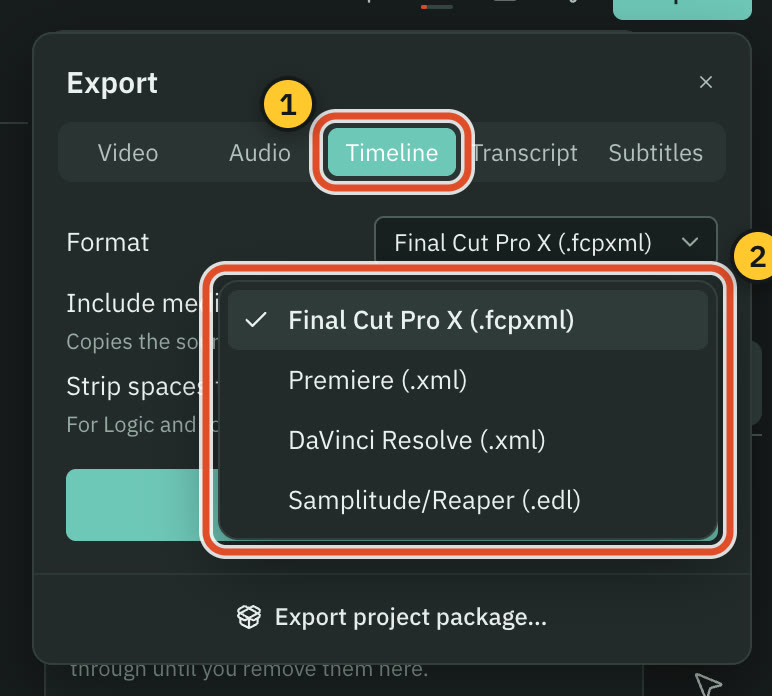
| Timeline export | YesPro only: Final Cut, Premiere, Resolve or EDL | YesCreator and up, plus Premiere .prproj (beta), SESX, AAF |
| Subtitles | YesSRT or VTT | YesSubtitle export, or an embedded SRT track |
More detail
Cutscript
- MP4 H.264, MP4 HEVC, MOV ProRes or WebM VP9. HEVC on Windows needs a graphics card encoder.
- A project with effects such as zooms or the webcam bubble exports as MP4 H.264 only.
- Source or 480p to 4K, 24 to 60 fps, on both plans. It never scales up.
- Audio as M4A, WAV, MP3 or FLAC with loudness targets. Transcripts as Word, Markdown, HTML, TXT or RTF, subtitles as SRT or VTT.
- Pro only: a timeline file for Final Cut, Premiere, Resolve or an EDL. It carries cuts and audio clips, not the look.
Descript
- Local export is MP4 or GIF at 480p, 720p, 1080p or 4K. Free is 720p, Hobbyist 1080p, Creator and Business 4K.
- Share pages open without an account, with public, link-only or project-only access, an optional transcript and comments.
- Share page videos go audio-only past 1 hour (Free, Hobbyist) or 3 hours (Creator, Business). Unpublishing deletes comments.
- Descript has guides for publishing to YouTube, HubSpot, Wistia, VideoAsk, eWebinar, Google Drive and many podcast hosts.
- Timeline export is on Creator and up. Transitions, effects, speed, titles and scenes do not carry in the XML formats.
Price
The plans are built differently. Cutscript charges for the app and your AI provider bills you. Descript charges per person and includes minutes, credits and storage.
CutscriptTwo plans, one computer at a time, no AI credits
DescriptFive plans, per person, with minutes and credits
| What | Cutscript | Descript |
|---|---|---|
| Free plan | Yes$0 | Yes$0 |
| Lowest paid price, paid yearly | Yes$4.17 a month ($49.99 a year) | Yes$16 a person a month, on Hobbyist |
| Lowest paid price, paid monthly | Yes$9.99 a month | Yes$24 a person a month, on Hobbyist |
| Media minutes | YesMinutes are not counted | Yes60 to 2,400 a month, by plan |
| AI credits | NoNone. You pay your provider | Yes100 once on Free, then 400 to 1,500 a month |
| Cloud storage | NoNone. Files stay on your computer | Yes5GB to 2TB, by plan |
| People or computers | PartlyOne computer at a time | Yes1 to 5 seats, by plan |
More detail
Cutscript
- Free has every feature except timeline export. It needs a free account.
- Free video exports carry a watermark that moves. Audio, subtitle and transcript exports have none. Pro removes it.
- Pro is $4.17 a month paid yearly ($49.99 a year), or $9.99 monthly. It runs on one computer at a time and adds timeline export.
- AI is separate, and Cutscript sells none. Your provider bills you, or you use a plan you already have, or free local models.
- A review of Cutscript on X earns two video exports without the watermark.
Descript
- Free is $0: 60 media minutes a month, 100 AI credits once, 720p export with a watermark, 5GB storage.
- Hobbyist is $16 a person a month paid yearly, or $24 monthly: 600 minutes, 400 AI credits a month, 1080p, 100GB.
- Creator is $24 paid yearly or $35 monthly: 1,800 minutes, 800 AI credits a month, 4K, 1TB, timeline export.
- Business is $50 paid yearly or $65 monthly: 2,400 minutes, 1,500 AI credits a month, 4K, 2TB. Enterprise is custom.
- Top-ups on Creator and Business, such as 350 AI credits for $35. Unused monthly minutes and credits do not roll over.
Files, offline and teamwork
Cutscript works offline on files you keep. Descript needs a connection and gives a team one shared place to work.
CutscriptOn your computer, for one editor
DescriptIn the cloud, with a drive your team shares
| What | Cutscript | Descript |
|---|---|---|
| Offline editing | YesOnce signed in: recording, timeline, export | NoNot offered |
| Where projects are stored | YesYour disk | YesAmazon S3 or Google Cloud |
| Desktop systems | YesmacOS 14 or later (15 to record), Windows 10 or 11 | YesmacOS 14 or later, Windows 11 or later |
| In a browser | NoNot offered | YesThe full editor. Chromium browsers recommended |
| Phones and tablets | NoNot offered | NoNot officially supported |
| Comments and live collaboration | NoNot offered. Script notes travel with the project | YesOn every plan |
| Enterprise controls | NoSSO, SCIM and audit logs not offered | YesSSO, SCIM and audit logs on Enterprise |
| Your data and AI | YesGoes to your AI provider. Local models send nothing | YesA Share data toggle. Off and locked on Enterprise |
More detail
Cutscript
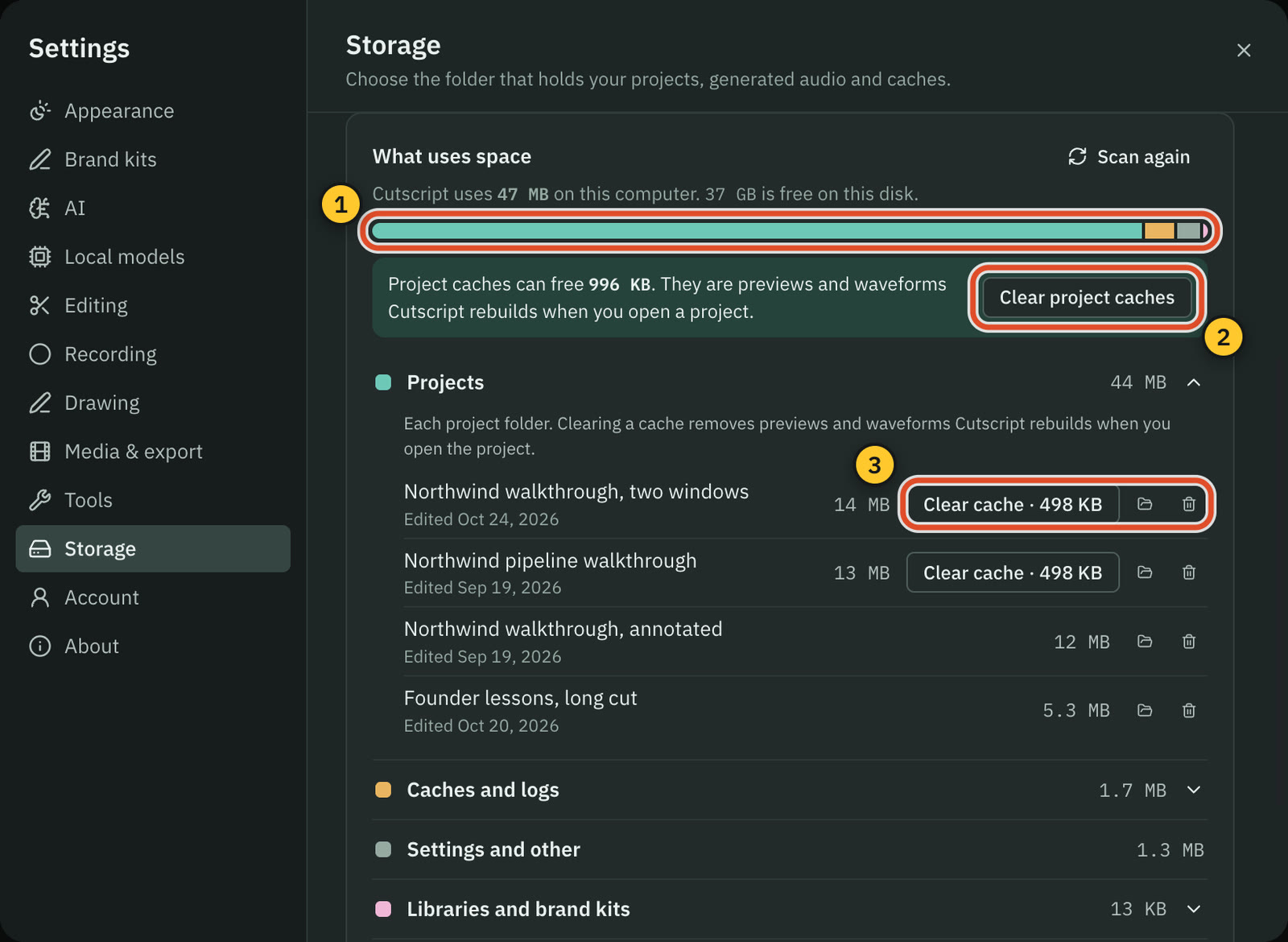
- Projects and recordings stay on your disk, in a folder you can change in Settings. Cutscript sends no analytics or crash reports.
- Recording, the timeline and export work offline once you are signed in.
- Editing by text works offline once the transcript exists. Making a transcript offline needs Whisper on an Apple silicon Mac.
- You need the internet to sign in, for a plan check at least every 14 days, and for cloud AI.
- Cloud AI steps send the text, audio or still frames they need to the provider you pick. A cloud transcript sends audio, not video.
Descript
- There is no Save button. Edits are written to the cloud as you make them, and Descript does not support offline editing.
- Media and transcripts are stored on Amazon S3 or Google Cloud. Descript asks for at least 50 Mbps down and 10 Mbps up.
- Comments attach to transcript words, and @mentions email a collaborator. Commenting and live collaboration are on every plan.
- Descript states SOC 2 Type II, AES-256 at rest and TLS 1.2 in transit. SSO, SCIM and audit logs are on Enterprise.
- A Share data toggle sets whether your data is used for internal R&D. Descript says current production AI models use none.
Where Descript is the better pick
A larger user base
Descript claims over 6 million creators and teams, and 4.6 from 837 G2 reviews. These are its own figures. The newest release notes we read are dated 12 October 2026.
Recording remote guests
Rooms records each person locally in up to 4K, one file per person, and uploads as the session runs. Producers get push-to-talk. Cutscript has no guest recording.
Working as a team
A shared drive gives people one place to work. Comments sit on transcript words, @mentions email the person, and live collaboration is on every plan. Cutscript has none.
Sharing by link
A share page opens without an account, and you choose who sees it. Descript also has guides for YouTube, Wistia, HubSpot and podcast hosts. Cutscript gives you a file.
AI, translation and lip sync in the plan
Transcription and AI credits come with each plan, and Underlord opens in any project. Caption translation covers 61 languages, dubbing 28 to 30, lip sync from Creator.
Browser, API and enterprise controls
The full editor runs in a browser tab. It has an API, a Zapier app and an MCP connector, and states SOC 2 Type II, with SSO and SCIM on Enterprise.
Moving from Descript to Cutscript
- Export video or audio from Descript first. Free exports are 720p with a watermark.
- Cutscript opens media files, not Descript projects. Edits, scenes, layout packs and comments stay behind.
- Install Cutscript on a Mac, or from the Microsoft Store on Windows, and sign in with a free account.
- Drop files on the home screen, or use File › New Project…. It reads MP4, MOV, MKV, WebM, WAV, MP3, FLAC.
- Set up a transcript again: an ElevenLabs, fal.ai or OpenRouter key, or Whisper on an Apple silicon Mac.
- Then connect an AI source, import your brand kit from a site, and on a Mac turn on click tracking for zooms.
Questions
Is Cutscript a free alternative to Descript?
Cutscript's free plan has every feature except timeline export, and needs a free account. Video exports carry a moving watermark, and transcripts need your key or Whisper on an Apple silicon Mac. Descript's free plan has 60 media minutes a month and 720p exports with a watermark.
Does Cutscript edit video by editing text, like Descript?
Yes. Delete words in the script and the video is cut to match, with any cut restorable. Cutscript needs a transcript first, from your own key or Whisper on an Apple silicon Mac, while Descript has transcription on every plan.
Can I use my ChatGPT or Claude plan with Descript?
Descript's MCP connector lets Claude and ChatGPT work in Descript, and that draws on Descript's media minutes and AI credits. We found no way to pay with your own plan or API keys in their docs. In Cutscript your ChatGPT plan, or your Claude plan on a Mac, runs the AI text.
Does either one work offline?
In Cutscript, recording, the timeline and export work offline once you are signed in. Editing by text works offline once the transcript exists, and making a transcript offline needs Whisper on an Apple silicon Mac. Descript does not support offline editing.
Can I move my Descript projects to Cutscript?
Not as projects. Export your video or audio from Descript, bring the files into Cutscript and transcribe them again. Your script edits, scenes and comments stay in Descript.
Which one costs less?
It depends on your AI use and team size. Cutscript Pro is $4.17 a month paid yearly ($49.99 a year) on one computer at a time, plus your AI provider's bill. Descript Hobbyist is $16 a person a month paid yearly ($24 monthly) with 600 media minutes and 400 AI credits.
Can Cutscript record remote guests or work with a team?
No. Cutscript has no guest recording, shared drive or comments from others, and you hand a project over as a .csproj package. If guests or a team are central to your work, Rooms and Descript's shared drive are built for that.
Try it on your own video.
Free with a Cutscript account. Video exports have a watermark, and Pro removes it.
Download CutscriptFirst published 31 October 2026, last checked 31 October 2026. Prices and features change, so check before you decide. The people in our screenshots are stock footage and do not use or endorse Cutscript. Screenshots show Cutscript 0.1 beta. Seen something wrong or out of date? Tell us and we will fix it.