Cutscriptvs OBS Studio
Pick Cutscript, a 0.1 beta screen recorder and editor, to record and cut a take by its words in one app. Pick OBS Studio to stream live, or to record for free and edit elsewhere.
Written by the people who make Cutscript. Checked 31 October 2026. OBS Studio and its logo are trademarks of their owner, and Cutscript is not affiliated with or endorsed by them.
Pick Cutscript if
- You want to record and cut a take in one app, by deleting words
- You make Mac demos and want automatic zooms and a pointer you can restyle
- You want captions built in, and drawing on a Mac, not added as plugins
- You want AI edits on your own plan, your keys or local models
- You want vertical 9:16 video and short clips from a long recording
Pick OBS Studio if
- You stream live to services such as Twitch and YouTube
- You switch scenes live, or send video into Zoom with a virtual camera
- You record Windows games, capture cards or Blackmagic devices
- You want free, open source software with no watermark
- You want a mature app: version 33.0.1, released 29 Oct 2026
At a glance
| What | Cutscript | OBS Studio |
|---|---|---|
| Best for | Demos and tutorials, cut by their words in one app | Live streaming, scenes, and recording you edit elsewhere |
| Maturity | 0.1 beta. Expect rough edges | Established: version 33.0.1, 78.6k GitHub stars |
| Price (checked 31 Oct 2026) | Free, or Pro at $4.17 a month paid yearly ($49.99 a year), or $9.99 monthly | Free. Donations are optional, no paid tier found |
| Free plan | PartlyEvery feature except timeline export. Free account needed | YesThe whole app, per their help page |
| Watermark | PartlyA moving watermark on free video exports. Pro removes it | YesNone, per their help page |
| Platforms | PartlyMac and Windows. Recording on a Mac needs macOS 15 | YesWindows 10 and 11, macOS 13 or newer, and Linux |
| Where files live | On your computer | A local folder you set |
| Sharing | NoYou get a file and post it yourself | PartlyStreams live to Twitch and YouTube. Share links not found |
| Editing | YesEdit by text and a multitrack timeline | Not found in their docsNot found in their docs, which point to other editors |
| AI | YesYour ChatGPT or Claude plan (Claude on a Mac), your keys, or local models | Not found in their docsOnly NVIDIA RTX effects found. AI editing not found in their docs |
| Live streaming | NoNot offered | YesWHIP/WebRTC, with SRT and RIST guides |
| Source code | NoNot public | YesPublic, GPL v2 or any later version |
YesPartlyNoNot found in their docs
Recording
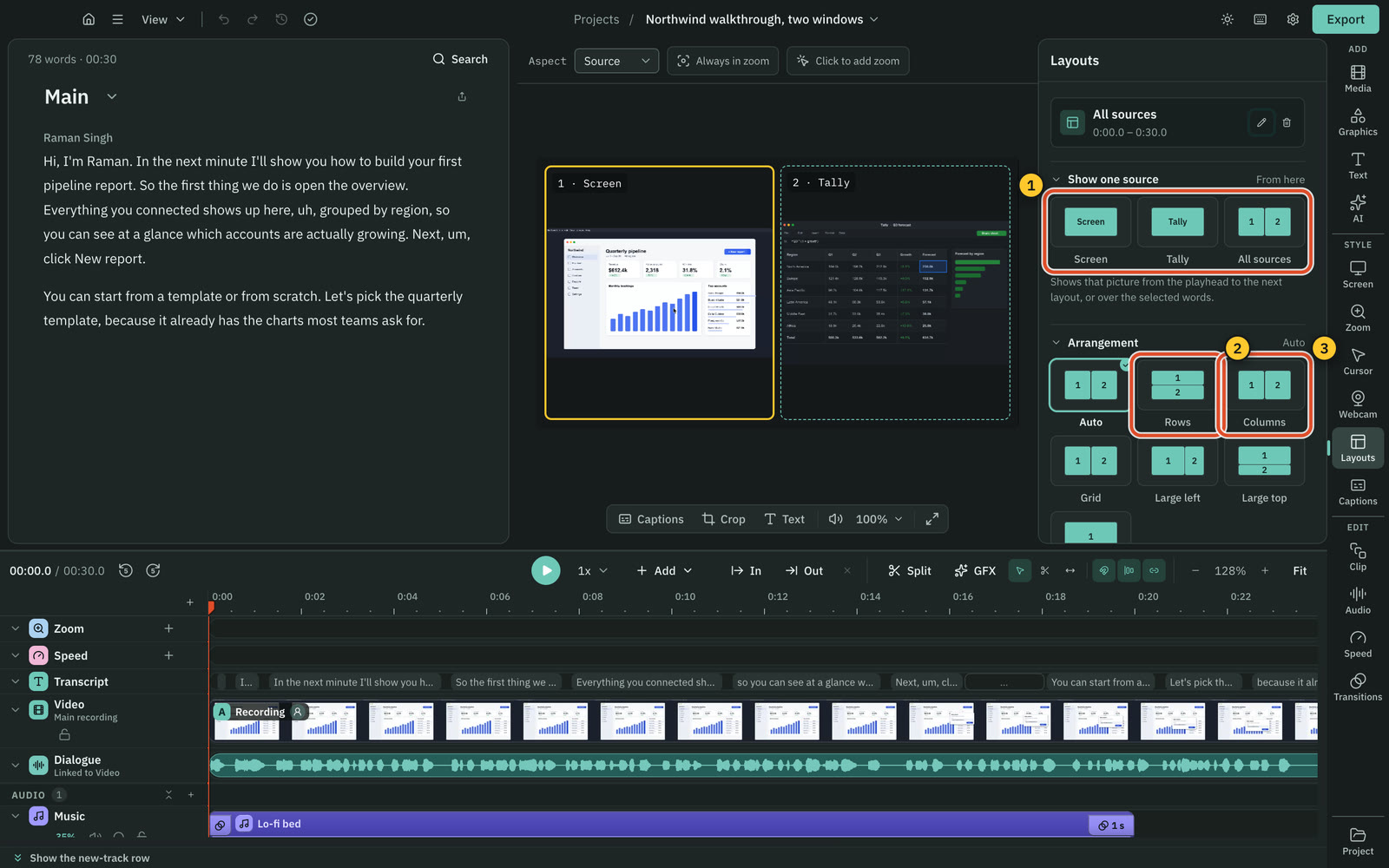
Both record screen and camera. OBS Studio takes more kinds of source, and Cutscript keeps each input on its own track.
CutscriptEach input saved as its own track
OBS StudioMany kinds of source in one scene
| What | Cutscript | OBS Studio |
|---|---|---|
| Display and window capture | YesHover and click on a Mac, pick from a list on Windows | YesDisplay and Window Capture, plus macOS Screen Capture |
| Record an area of the screen | PartlyOn a Mac: free, preset ratio or exact size | Not found in their docsNot found in their docs |
| Game capture | NoNot offered | PartlyWindows only |
| Capture cards and Blackmagic | PartlyCards your computer lists as a camera. No Blackmagic source | YesVideo Capture Device, Blackmagic Device |
| Several pictures at once | YesUp to three, each in its own file | YesStacked sources in a scene |
| Each input on its own track | YesPicture, voice, system sound and camera | PartlySeveral audio tracks. Separate video not found |
| Phone or tablet | PartlyCabled screen on a Mac. Experimental | PartlyAs a camera, through third-party apps |
| Recover an interrupted recording | YesTurn the saved files into a project | YesHybrid MP4 and MOV stay recoverable |
More detail
Cutscript
- Record a display or window with your microphone, system sound and camera. Each is saved as its own track.
- Record up to three pictures in one take, each to its own file. On Windows you can add displays and windows only.
- Record an area, or a cabled iPhone or iPad, on a Mac only. The iPhone and iPad mode is experimental and off until you turn it on.
- Choose 30 or 60 fps. Recording works offline once you are signed in. On a Mac it needs macOS 15.
- The take opens as a project when you stop. After a crash or restart, you can turn the saved files into a project.
OBS Studio
- Capture with Display Capture, Window Capture and Game Capture (Windows only). macOS 13 and later adds macOS Screen Capture.
- Webcams and capture cards use Video Capture Device on Windows and macOS, V4L2 on Linux. Blackmagic Device is listed for all three.
- Unlimited scenes of stacked sources. Not found in their docs: area recording (Crop/Pad works on sources), separate video tracks.
- A phone works as a camera through third-party apps or Continuity Camera. No OBS-made phone app found in their docs.
- Hybrid MP4 and MOV stay recoverable if writing aborts, though chapter markers are lost. Default for new profiles since OBS 32.0.
Live streaming and scenes
OBS Studio is built for live work. Cutscript makes a file, and you post it yourself.
CutscriptNo live output
OBS StudioStreaming, live scenes and a virtual camera
| What | Cutscript | OBS Studio |
|---|---|---|
| Live streaming | NoNot offered | YesWHIP/WebRTC, plus SRT and RIST guides |
| Streaming service logins | NoNot offered | YesTwitch and YouTube |
| Switch scenes during a take | NoNot offered. Layouts are set in the edit | YesUnlimited scenes, Studio Mode to preview |
| Monitor several scenes | NoNot offered | YesMultiview of 8 scenes |
| Transitions that run live | NoNot offered. Transitions are set in the edit | YesFade, Cut, Swipe, Slide, Luma Wipe, stingers |
| Virtual camera | NoNot offered | YesProgram, Preview, a scene or a source |
| Replay buffer | NoNot offered | YesStart, stop and save hotkeys |
| Remote control | PartlyGlobal stop and pause shortcuts only | Yesobs-websocket built in |
More detail
Cutscript
- Cutscript does not stream, switch scenes during a take or have a virtual camera.
- Export writes a file to your computer. Local export is the only destination today, so you post it yourself.
- Layouts and source switches are set in the edit, after the take.
- Shortcuts stop and pause a recording from any app.
OBS Studio
- WHIP/WebRTC to Cloudflare, Twitch and Broadcast Box, with 1 to 4 simulcast layers from OBS 32.1.0. SRT and RIST have guides.
- Unlimited scenes, previewed in Studio Mode before they go live, with multiview of 8 at once.
- Fade, Cut, Swipe, Slide, Fade to color, Luma Wipe and stinger transitions run live while you record or stream.
- Virtual Camera sends the Program, Preview, a scene or a source to Zoom, Skype, Discord and other webcam apps.
- obs-websocket is built in since OBS 28, and clients such as Streamer.bot and Touch Portal can use it.
Editing
Cutscript edits in the app. OBS Studio's docs point you to separate programs.
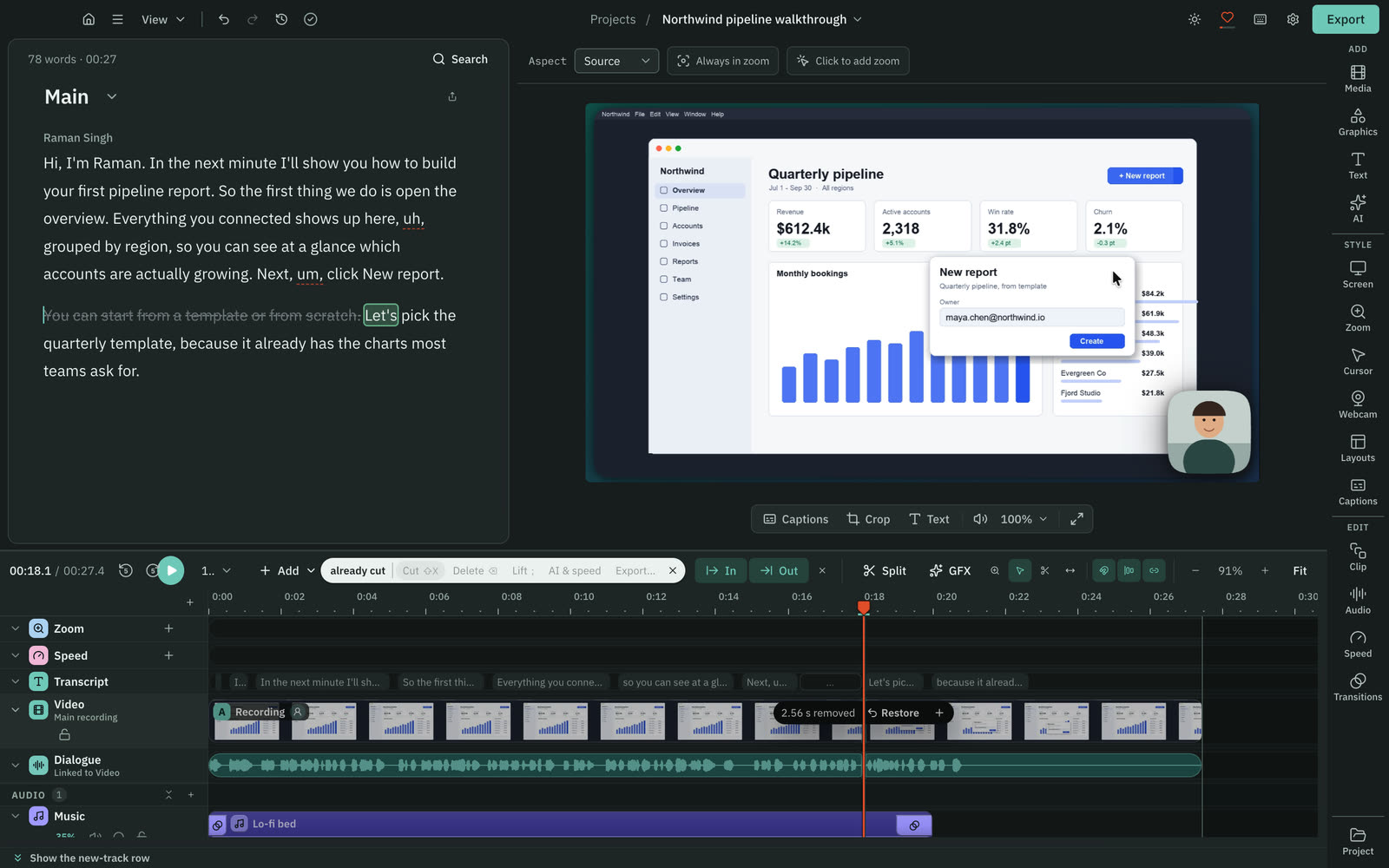
CutscriptEdit the words, and the video follows
OBS StudioTheir docs point to other editors
| What | Cutscript | OBS Studio |
|---|---|---|
| Edit by deleting words | YesNeeds a transcript. Offline once it exists | Not found in their docsNot found in their docs |
| Remove fillers and pauses | YesOn your computer, no AI. Needs a transcript | Not found in their docsNot found in their docs |
| Video timeline | YesMultitrack: video, images and audio | Not found in their docsNot found in their docs |
| Several edits of one video | YesCompositions with own cuts, captions, aspect | Not found in their docsNot found in their docs |
| Speed changes | Yes0.25x to 4x, keep the pitch or mute | Not found in their docsNot found in their docs |
| Transitions on cuts | YesDissolve, push, wipe, iris and more | PartlyLive scene transitions. Cut transitions not found |
More detail
Cutscript
- Stopping a take opens a project. Delete words in the script and the picture and sound are cut to match. Any cut can be restored.
- Your original media stays untouched.
- Filler words, long pauses and repeats each come out in one step, on your computer, with no AI.
- A multitrack timeline does the rest: split, trim, slip, markers, speed 0.25x to 4x, and transitions 0.1 to 4 seconds long.
- Editing by text needs a transcript, from a provider key or Whisper on an Apple silicon Mac. It works offline once one exists.
OBS Studio
- The Post Production Tools article lists DaVinci Resolve, Kdenlive, Shotcut, OpenShot, Blender and others.
- Not found in their docs: a built-in video editor, a video timeline, transcript editing, or filler and pause removal.
- OBS records several audio tracks, with each source assigned to tracks. This is audio, not a video timeline.
Transcripts and captions
Cutscript builds captions from a transcript. OBS Studio lists no caption filter, and a third-party plugin adds live ones.
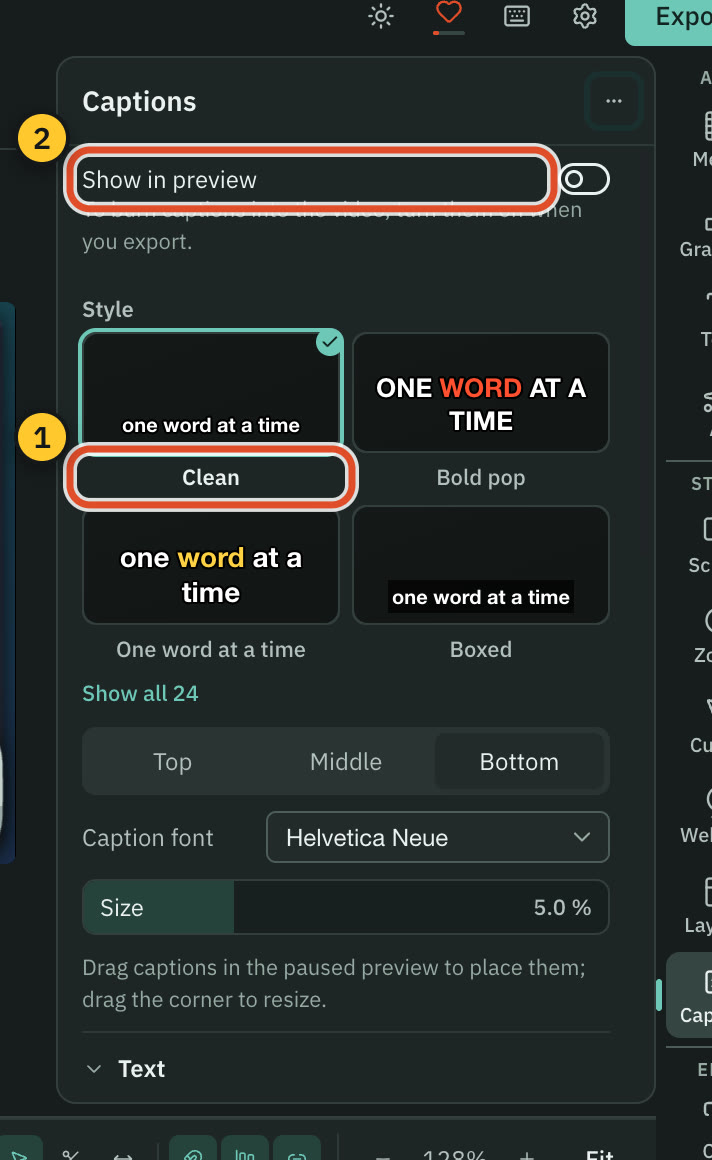
Cutscript24 caption styles, from your transcript
OBS StudioLive captions through a third-party plugin
| What | Cutscript | OBS Studio |
|---|---|---|
| Transcript with word times | YesNeeds a key, or Whisper on an Apple silicon Mac | Not found in their docsNot found in their docs |
| Styled word-by-word captions | Yes24 styles, burned in at export if you choose | Not found in their docsNot found in their docs |
| Live captions | NoNot offered | PartlyThird-party plugin: Pixelion Captions |
| Subtitle files | YesSRT or VTT, timed to the edited video | Not found in their docsNot found in their docs |
| Translation | YesDubs speech into another language, on your key | PartlyThird-party Pixelion Pro plan. No other found |
More detail
Cutscript
- A transcript gives every word a time. ElevenLabs, fal.ai or OpenRouter bill you. Whisper on Apple silicon is free.
- Whisper on an Apple silicon Mac is slower than the cloud, and it has no speaker labels or sound tags.
- Pick from 24 caption styles, highlight the word being said, and burn captions into the video if you want them in the file.
- Export subtitles as SRT or VTT, and the transcript as Word, Markdown, HTML, TXT or RTF.
OBS Studio
- The Filters Guide lists no caption or transcription filter. First-party captions not found in their docs.
- Pixelion Captions (0.1.2, first released 23 Oct 2026) adds live transcription of the program audio into on-screen captions.
- Its listing is titled Free (With Signup) and needs a Pixelion account. Translation needs a paid Pixelion Pro plan.
- It supports Windows and macOS only.
Zooms, pointer, drawing and blur
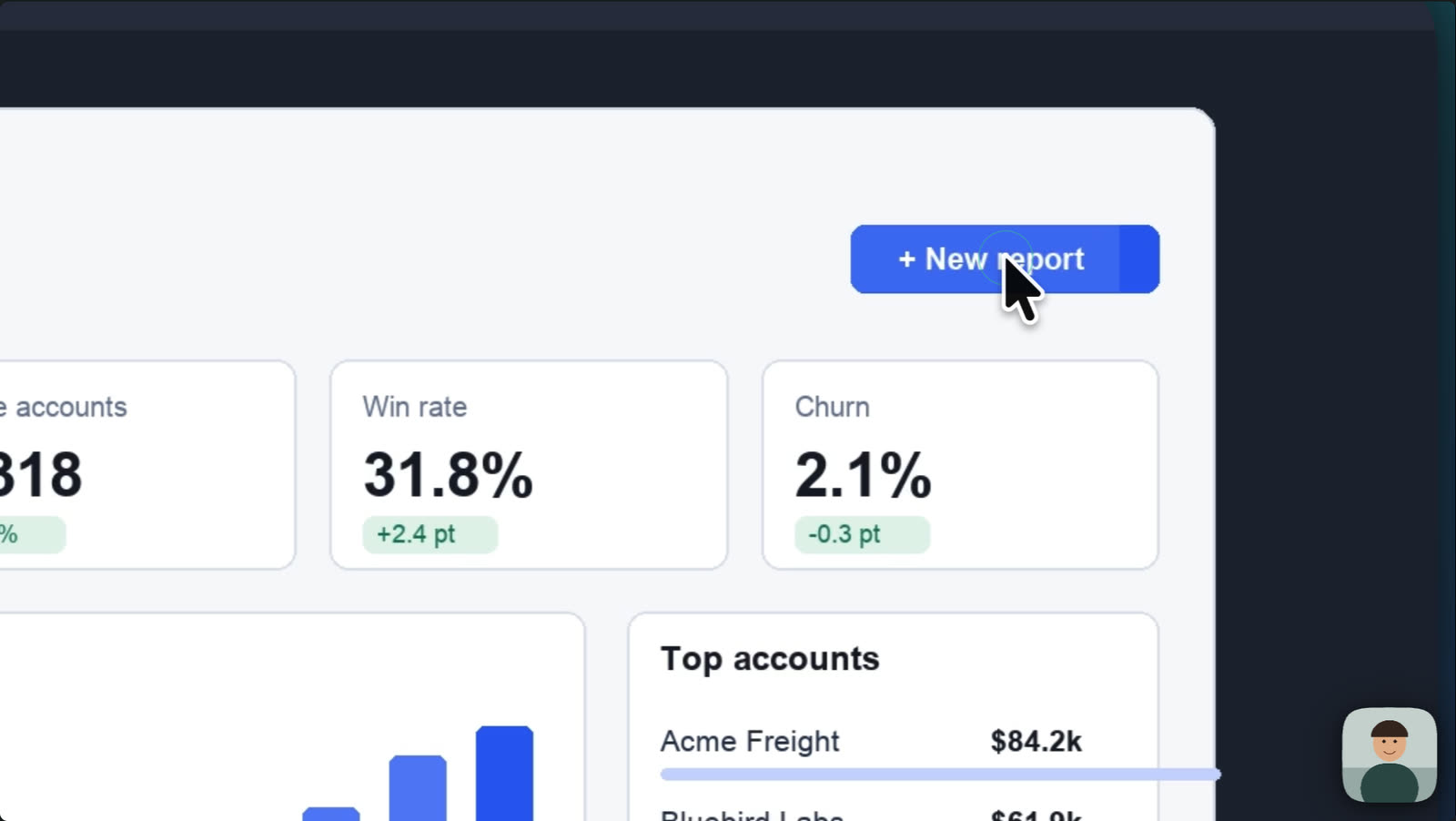
Cutscript builds these in, and most need a Mac. Most of what we found for OBS Studio is a third-party plugin.
CutscriptBuilt in, and most of it on a Mac
OBS StudioA capture toggle, and third-party plugins
| What | Cutscript | OBS Studio |
|---|---|---|
| Automatic zoom on clicks | PartlyOn a Mac | Not found in their docsNot found in their docs |
| Zoom by hand | YesBy key, drag or click. Depth 1x to 5x | PartlyThird-party Zoominator follows the mouse |
| Restyle pointer after recording | PartlyStyle, size and movement, on a Mac | Not found in their docsNot found in their docs |
| Click effects and click sounds | PartlyOn a Mac | Not found in their docsNot found in their docs |
| Draw while recording | PartlyOn a Mac | PartlyThird-party: Smart Black Board |
| Blur an area | YesBlur or pixelate, strength 1 to 100 | PartlyNVIDIA Blur or a plugin. No blur filter listed |
| Blur that follows a moving thing | YesPixel lock, or Apple Vision on a Mac | Not found in their docsNot found in their docs |
| Find faces or emails to blur | PartlyOn a Mac | Not found in their docsNot found in their docs |
More detail
Cutscript
- Clicks become automatic zooms, on a Mac. Choose Fewer, Balanced or More, then redo, review or remove them.
- The pointer is saved as data, on a Mac, so you can restyle it, smooth it and add click effects and sounds after the take.
- Draw while you record, on a Mac: pen, highlighter, arrows, shapes, step numbers, a laser pointer and a spotlight.
- Blur all faces and Blur all emails find them for you, on a Mac. On Mac and Windows, Pixel lock makes a blur track a moving thing.
- Your original file still holds what you blurred, so a project package with media carries it too. Zooms by hand work on both.
OBS Studio
- Windows Window Capture has a Capture Cursor option, on by default. Styling, smoothing and click effects not found in their docs.
- Zoominator, a plugin, follows the mouse and optionally zooms. No click zoom is mentioned. Its author tested only Windows 11.
- Smart Black Board, a third-party plugin, draws on a scene live on Windows, macOS and Linux. It needs OBS 31.1.0 or newer.
- The Filters Guide lists no blur filter. NVIDIA Blur exists, and a plugin named Composite Blur is listed with no description.
- The Zoominator and Smart Black Board pages state no price.
Backgrounds, camera and layouts
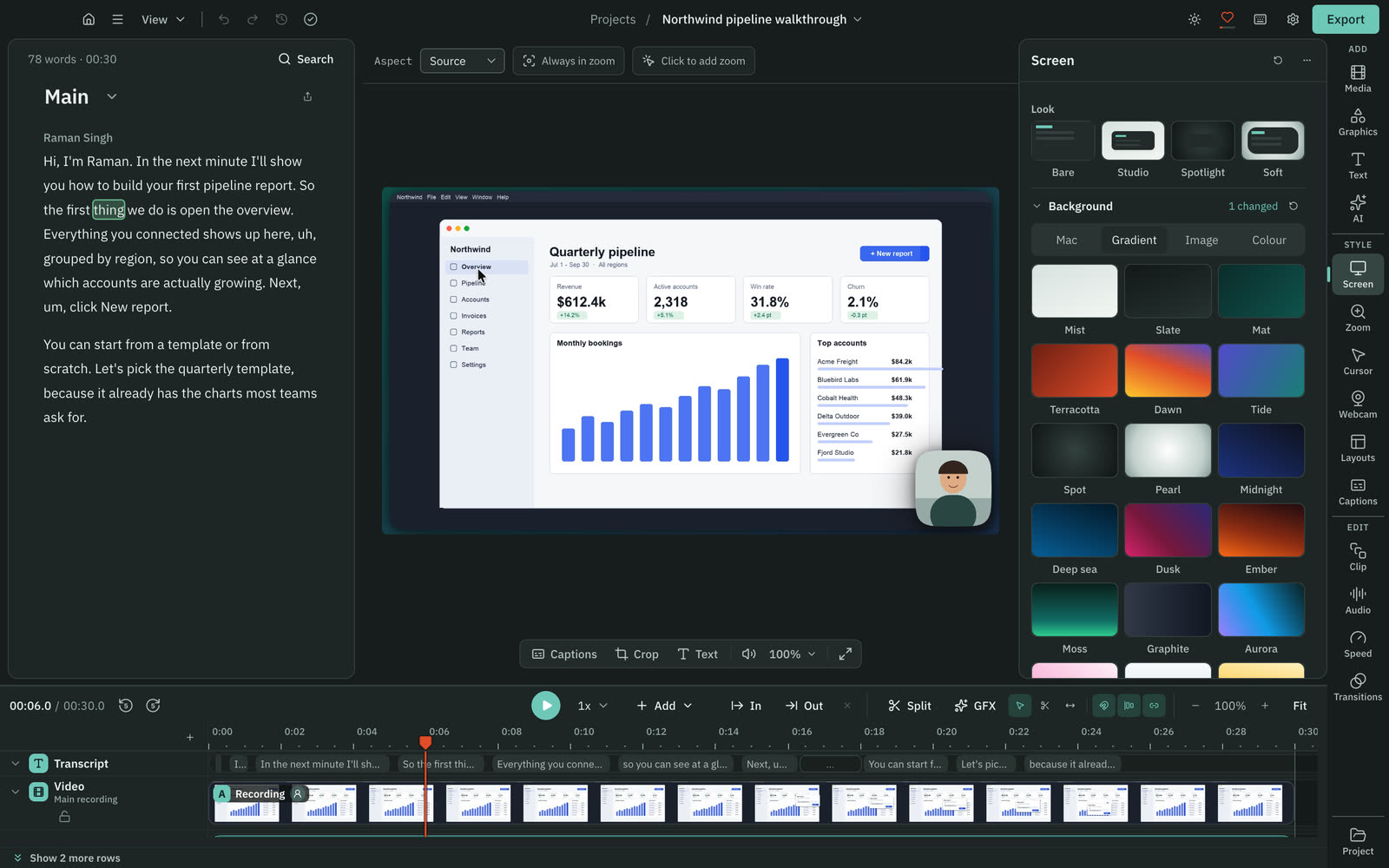
Cutscript has presets and panels for the look of a screen video. OBS Studio gives you sources and filters to arrange yourself.
CutscriptLooks, bubbles and layouts in panels
OBS StudioSources and filters you arrange by hand
| What | Cutscript | OBS Studio |
|---|---|---|
| Backgrounds | YesGradients, images, colours, Mac wallpapers | YesColor and Image sources |
| Padding, corners and shadow | YesSliders, for the whole video or one clip | PartlyPadding via Crop/Pad. Corners, shadow not found |
| Preset camera shapes | YesCircle, rounded, pill, oval, wide, tall and more | Not found in their docsNot found in their docs |
| Green screen | YesCamera video, one colour, spill and edge controls | YesChroma Key: similarity, smoothness, spill |
| Panel layouts | Yes2, 3 or 4 panels: rows, columns, grid | PartlyBy hand in a scene. No templates found |
| Vertical 9:16 video | YesChoose 9:16, then frame clips by hand or AI | PartlyThird-party plugin: Aitum Vertical |
| Titles and motion graphics | Yes31 motion graphics, offline, no AI | PartlyText and Browser sources, no templates found |
| Brand kits | YesUp to 16 colours, four fonts and logos | Not found in their docsNot found in their docs |
More detail
Cutscript
- A new recording opens on the Studio look: a gradient, 20% padding, 8% corners and a soft shadow. An imported video opens unstyled.
- The camera bubble has shapes such as circle, pill and oval, plus a two-colour border that can flow around it.
- Layouts split the frame into 2, 3 or 4 panels of screen, webcam or media.
- Set the video to 16:9, 9:16, 1:1, 4:3, 4:5 or 16:10.
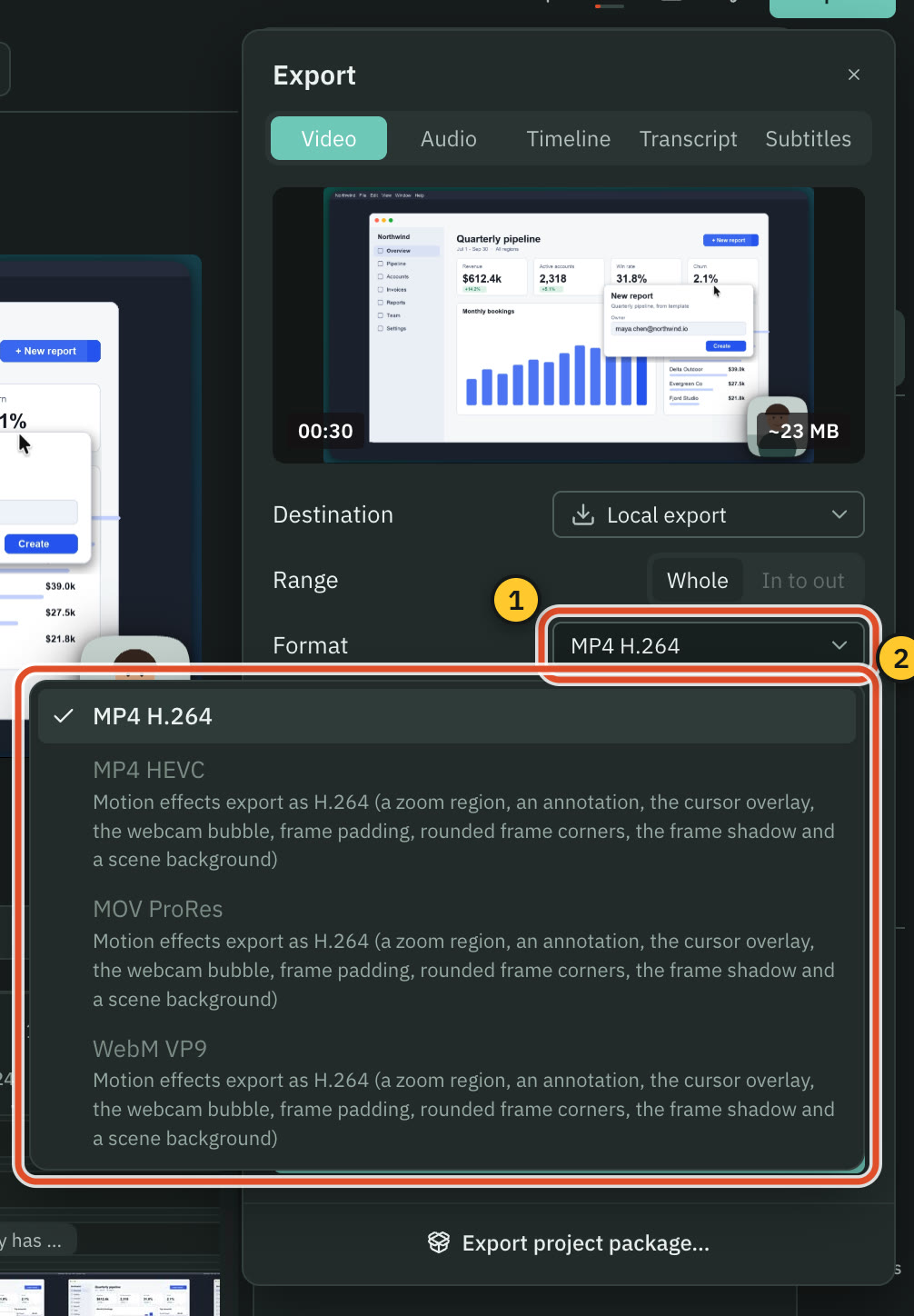
- These effects are drawn frame by frame, so a video that uses them exports as MP4 H.264.
OBS Studio
- Color, Image and Text sources are in the Sources Guide, and a source higher in the list sits on top.
- The Crop/Pad filter pads a source with negative crop values. It changes the base source in every scene where it appears.
- Add a webcam, resize it in Edit Transform and place it yourself. The tutorial suggests 480x270 or 640x360 for 16:9 webcams.
- Image Mask/Blend takes a mask image. Rounded corners, preset camera shapes and layout templates not found in their docs.
- The Aspect Ratio Guide advises 16:9 and skips vertical video. Aitum Vertical, a third-party plugin, adds a vertical canvas.
Colour grading and LUTs
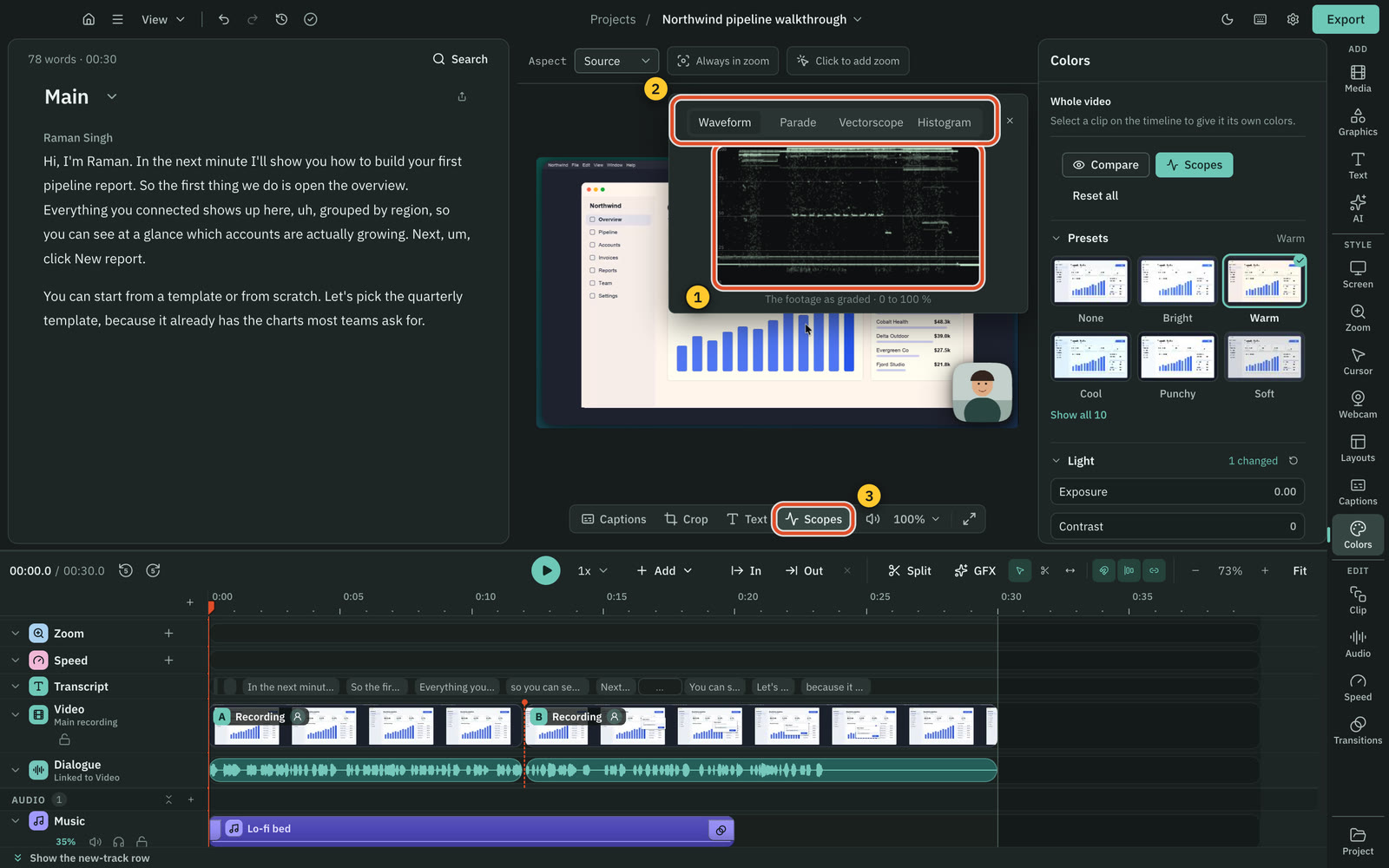
Both apply a .cube LUT. Cutscript also has presets, colour wheels and scopes in Colors, on a Mac now and on Windows with the next Store update.
CutscriptGrading and scopes, with Windows next
OBS StudioLUT and colour correction filters
| What | Cutscript | OBS Studio |
|---|---|---|
| Apply a LUT | PartlyOn a Mac now. Windows with the next Store update | Yes.cube and .png, with Amount |
| Colour sliders | PartlyOn a Mac now. Windows with the next Store update | YesColor Correction filter |
| Presets | PartlyOn a Mac now. Windows with the next Store update | Not found in their docsNot found in their docs |
| Video scopes | PartlyOn a Mac now. Windows with the next Store update | Not found in their docsNot found in their docs |
| Colours for the face only | PartlyOn a Mac now. Windows with the next Store update | Not found in their docsNot found in their docs |
| HDR | NoNot offered. A graded export is Rec. 709 | YesSDR to HDR filter, from OBS 32.2.0 |
More detail
Cutscript
- Sliders for exposure, contrast, highlights, shadows, temperature, tint, saturation and vibrance. Presets preview your frame.
- Colour wheels tint shadows, midtones and highlights. Scopes: Waveform, Parade, Vectorscope with a skin-tone line, Histogram.
- Import a .cube look and set its intensity; a copy stays in the project. AI grading uses up to four frames, price shown first.
- Face colours the face only, or detaches it as a bubble. Faces are found on your computer and nothing is uploaded.
- Colors and Face are on a Mac now, and on Windows with the next Microsoft Store update.
OBS Studio
- Apply LUT takes .cube and .png files, with an Amount from 0.0 (off) to 1.0 (full).
- Color Correction has gamma, contrast, brightness, saturation and hue shift, plus Color Multiply and Color Add.
- OBS 32.2.0 added a filter that composes SDR content into HDR.
- Video scopes, colour wheels and face-only grading not found in their docs.
Audio
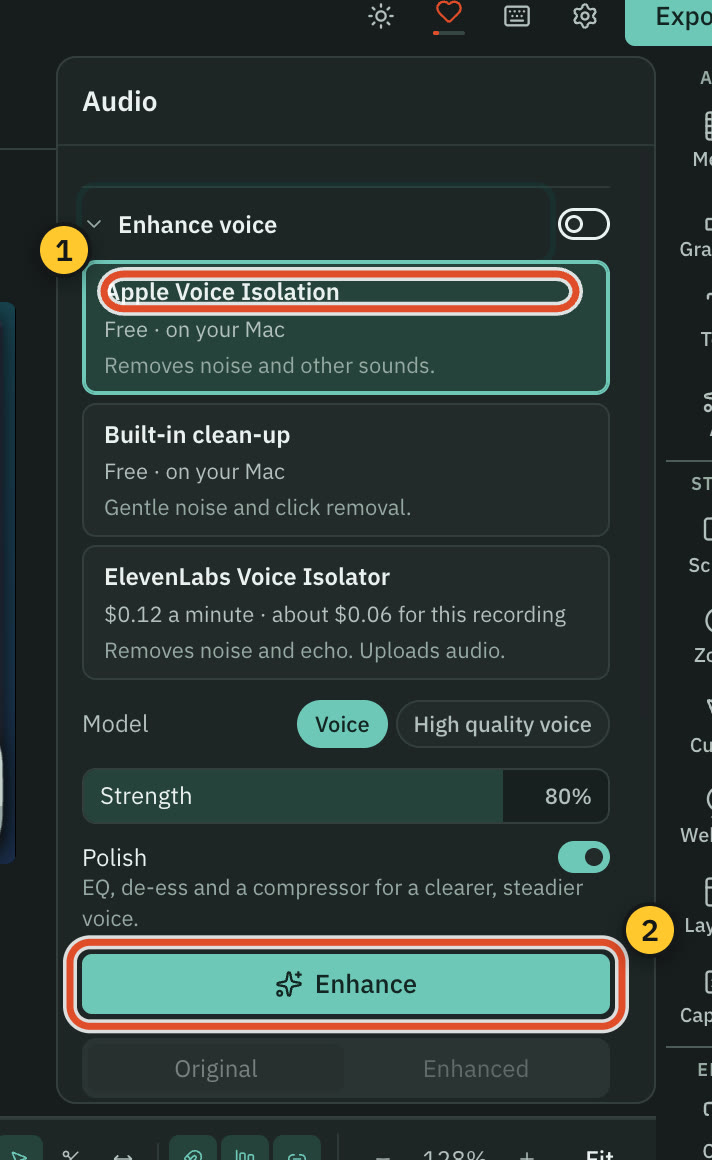
OBS Studio has a mixer, monitoring and audio filters. Cutscript cleans up a recorded voice afterwards.
CutscriptClean up the voice after the take
OBS StudioMixer, monitoring and audio filters
| What | Cutscript | OBS Studio |
|---|---|---|
| Sound from one app | PartlyOn a Mac. Experimental | YesmacOS 13 or later. Windows 10 (2004+) or 11, beta |
| VST plugins | NoNot offered | YesVST 2.x Plugin filter |
| Compressor, gate and limiter | PartlyPolish adds EQ, de-essing and a compressor | YesCompressor with ducking, Noise Gate, Limiter |
| Noise removal | YesBuilt-in, Voice Isolation (Mac), ElevenLabs, fal.ai | YesRNNoise, Speex, NVIDIA Noise Removal |
| Monitor sources while recording | PartlyA microphone level meter | YesPer-source monitoring, with hotkeys |
| Loudness target at export | YesPeak or four LUFS targets | Not found in their docsNot found in their docs |
More detail
Cutscript
- Microphone and system sound are recorded as separate tracks, each with its own level per composition.
- Enhance voice makes a cleaned copy and never changes your recording. The built-in clean-up is free and needs no internet.
- Apple Voice Isolation is free, on a Mac. ElevenLabs and fal.ai use your own key, with the price shown before anything uploads.
- Sound from one app is on a Mac, experimental and off until you turn it on. Windows records all of the computer's sound or none.
- Set loudness at export: Peak, -14, -16, -18 or -23 LUFS.
OBS Studio
- OBS 32.1.0 redid the Audio Mixer with a vertical layout and pinnable sources. OBS 33.0.0 added monitoring hotkeys.
- Filters include Compressor with ducking, Expander, Gain, Limiter, Noise Gate and VST 2.x Plugin.
- Noise Suppression offers RNNoise, Speex and NVIDIA Noise Removal, which needs the NVIDIA Broadcast SDK.
- Record several audio tracks, with each source assigned in Advanced Audio Properties.
- macOS 13+ can capture all audio or one app. Windows 10 (2004+) or 11 can capture one app, in beta.
AI editing and short clips
Cutscript's AI runs on your own accounts or local models. The only AI we found in OBS Studio is NVIDIA RTX effects.
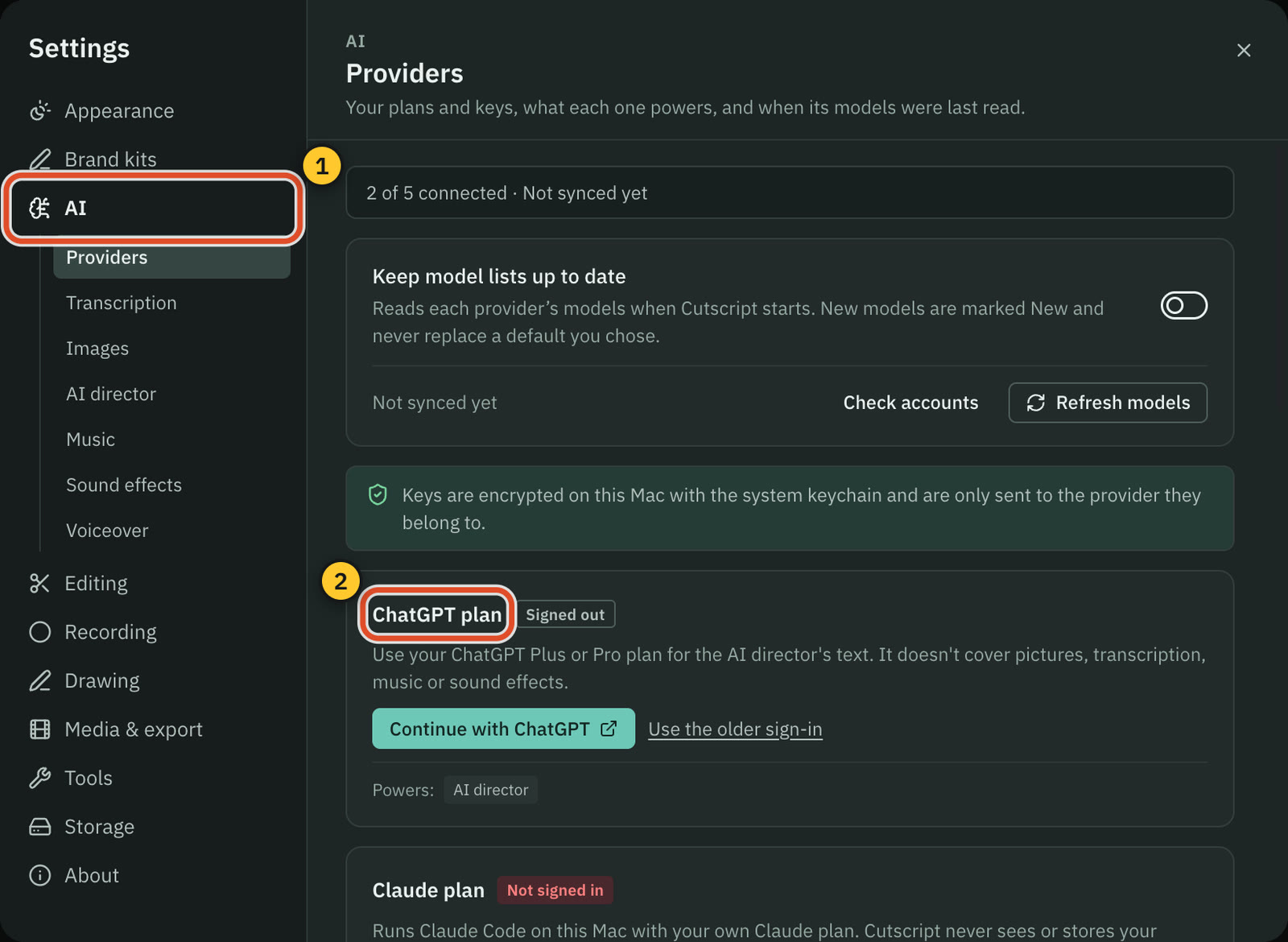
CutscriptRuns on your plan, your keys or local models
OBS StudioNVIDIA RTX effects are the only AI we found
| What | Cutscript | OBS Studio |
|---|---|---|
| AI chat that edits your video | YesNeeds an AI account or Ollama | Not found in their docsNot found in their docs |
| AI that plans a whole edit | YesDirect my video, priced before approval | Not found in their docsNot found in their docs |
| Use your ChatGPT or Claude plan | YesChatGPT Plus or Pro, or Claude on a Mac | Not found in their docsNot found in their docs |
| Your own API keys | YesOpenRouter, ElevenLabs, fal.ai and OpenAI | Not found in their docsNot found in their docs |
| Local AI models | YesOllama for text. Whisper, voices on Apple silicon | Not found in their docsNot found in their docs |
| Short clips from a long video | YesUp to ten. Needs an AI source and transcript | Not found in their docsNot found in their docs |
| Voiceover, dubbing and music | YesYour key. A voice is free on Apple silicon | Not found in their docsNot found in their docs |
| Remove background, no green screen | PartlyVideo: chroma key only. Pictures cut out on a Mac | YesNVIDIA RTX Background Removal, NVIDIA GPU |
More detail
Cutscript
- Ask for edits in plain words in One AI. Changes arrive as cards, and Apply is one undo step.
- Direct my video writes a priced plan for clean-up, graphics, zooms, captions and sound. You approve it first.
- Make short clips finds up to ten scored clips. They follow the speaker's face on a Mac, the pointer or a still crop on Windows.
- Connect a ChatGPT plan, a Claude plan (on a Mac, through your own Claude Code), your own keys, or Ollama models on your computer.
- A plan covers text only, not transcripts or pictures. Neither Cutscript plan includes AI credits, and providers bill you directly.
OBS Studio
- NVIDIA RTX effects cover noise and background removal, on NVIDIA GPUs. OBS 32.0 added Voice Activity Detection and chair removal.
- Not found in their docs: an AI chat or agent that edits video, or AI that plans a whole edit.
- Also not found: using your ChatGPT or Claude plan, your own API keys for AI services, or local AI models for editing.
- A tool that cuts short clips from a long video was not found. A replay buffer captures moments live.
Export and file formats
OBS Studio records in the container and codec you choose, with no watermark. Cutscript renders your edit, and motion effects narrow it to MP4 H.264.
CutscriptA render of your edit
OBS StudioRecording formats you choose
| What | Cutscript | OBS Studio |
|---|---|---|
| H.264 and HEVC | PartlyHEVC not with motion effects, and needs a GPU on Windows | YesHEVC on hardware encoders only |
| AV1 | NoOpens AV1 files, no AV1 export | YesHardware (RX 7000, RTX 40, Arc), or a high-end CPU |
| ProRes | PartlyLT, 422 or 422 HQ. Not with motion effects | PartlyOn Macs |
| Video with no watermark | PartlyWith Pro. Free video exports carry one | YesNone, per their help page |
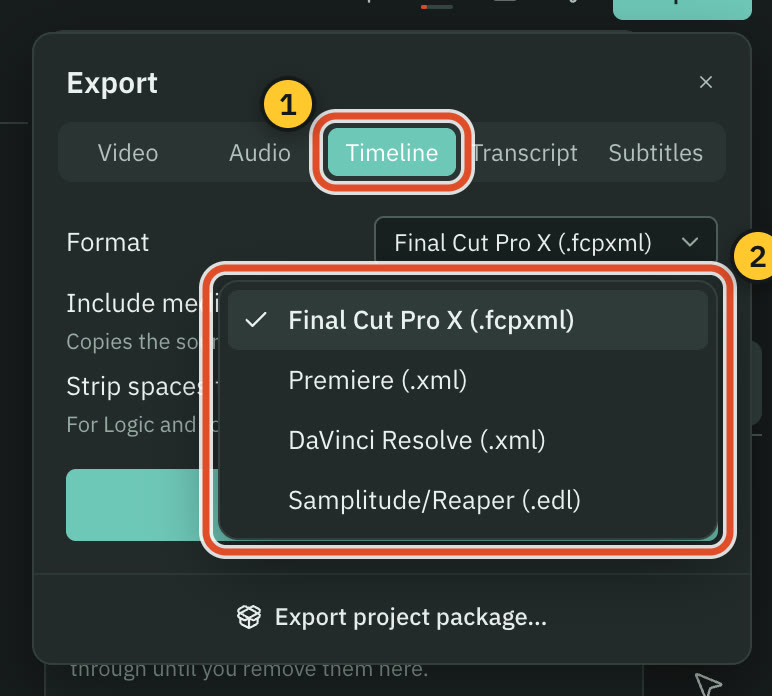
| Timeline for other editors | PartlyPro only: Final Cut, Premiere, Resolve or EDL | Not found in their docsNot found in their docs |
| Share links and upload | NoNot offered. You post the file yourself | Not found in their docsNot found in their docs |
More detail
Cutscript
- MP4 H.264, MP4 HEVC, MOV ProRes and WebM VP9, at Source or 480p to 4K, and 24 to 60 fps. It never scales up.
- Zooms, the camera bubble, padding or other motion effects limit export to MP4 H.264. A new recording opens with padding.
- Free video exports carry a moving watermark. Audio, subtitle and transcript exports have none. Pro removes it.
- Timeline export is Pro only: a file for Final Cut Pro, Premiere Pro or DaVinci Resolve, or an EDL. It leaves motion effects out.
- Exported video has no alpha channel, so transparent graphics are flattened.
OBS Studio
- Containers: MKV, MP4/MOV, Hybrid MP4/MOV, fragmented MP4/MOV, FLV, MPEG-TS and HLS.
- Video: H.264, HEVC on hardware encoders, AV1, and ProRes on Macs. Audio: AAC, ALAC, FLAC, Opus and PCM.
- Simple mode offers Same as stream, High Quality, Indistinguishable and Lossless. Lossless is roughly 7 GB per minute.
- Their guide says editors support MKV poorly, so remuxing may be needed. OBS can remux on stop. Fragmented MP4/MOV suits Resolve.
- The guide gives no resolution or frame-rate limit, and the help page says no watermarks. Export to an editor project not found.
Price and licence
OBS Studio is free and open source, with no watermark. Cutscript is free with a watermark on video exports, or Pro at $4.17 a month paid yearly ($49.99 a year).
CutscriptFree with a watermark, or Pro
OBS StudioFree, funded by donations and sponsors
| What | Cutscript | OBS Studio |
|---|---|---|
| Free to use | PartlyWith a watermark on video exports | YesFree of watermarks and limits, per their help page |
| Paid plan | YesPro: $4.17 a month yearly ($49.99), or $9.99 monthly | Not found in their docsPaid tier not found. Donations optional |
| Public source code | NoNot public | YesGPL v2 or later, on GitHub |
| Use with no account | NoFree account needed, on Free too | Not found in their docsNot found in their docs |
More detail
Cutscript
- Free has every feature except timeline export, which Pro adds. Needs a free account.
- Free video exports carry a watermark that moves around the frame. None on audio, subtitles or transcripts. Pro removes it.
- Pro is $4.17 a month paid yearly ($49.99 a year), or $9.99 paid monthly. Use it on one computer at a time.
- Cloud AI and transcripts cost what your providers charge. Local models are free. The source code is not public.
OBS Studio
- The home page calls it free and open source. No paid tier found on the pages we read.
- The licence is GPL v2 or any later version, with the source on GitHub.
- The help page says no watermarks or other limitations, and no ads or bundled adware.
- Funding comes from voluntary donations through Open Collective or Patreon, and from company sponsorships.
- Plugins are separate: Pixelion translation needs paid Pixelion Pro. Aitum Vertical, Zoominator, Smart Black Board list no price.
Platforms, files and add-ons
OBS Studio runs on Linux too and has many add-ons. Cutscript has no plugins, and its Linux build is still in testing.
CutscriptMac and Windows, with files on your computer
OBS StudioWindows, macOS and Linux, with many add-ons
| What | Cutscript | OBS Studio |
|---|---|---|
| Windows | Yes10 (1809 or later) or 11, from the Microsoft Store | Yes10 and 11, from several channels |
| macOS | Partly14 or later. Recording needs 15 | Yes13.0 or newer |
| Linux | NoIn testing, not ready to download | YesFlatpak on Flathub, plus a PPA for Ubuntu 26.04+ |
| Plugins and scripting | PartlyAI director skills only. No plugins or scripts | YesLua and Python scripts, third-party plugins |
| Files on your own computer | YesProjects and recordings, in folders you can change | YesA local Recording Path |
| Works offline | PartlyRecording, timeline and export work offline | Not found in their docsNot found in their docs |
| Sends crash reports | NoNever. No analytics either | PartlyOpt-in upload on Windows and macOS |
More detail
Cutscript
- Mac: Apple silicon or Intel, macOS 14 or later (recording needs macOS 15). Windows: 64-bit 10 or 11. No browser or phone app.
- No plugins or scripts that drive the app. You can write AI director design skills and edit a graphic's code.
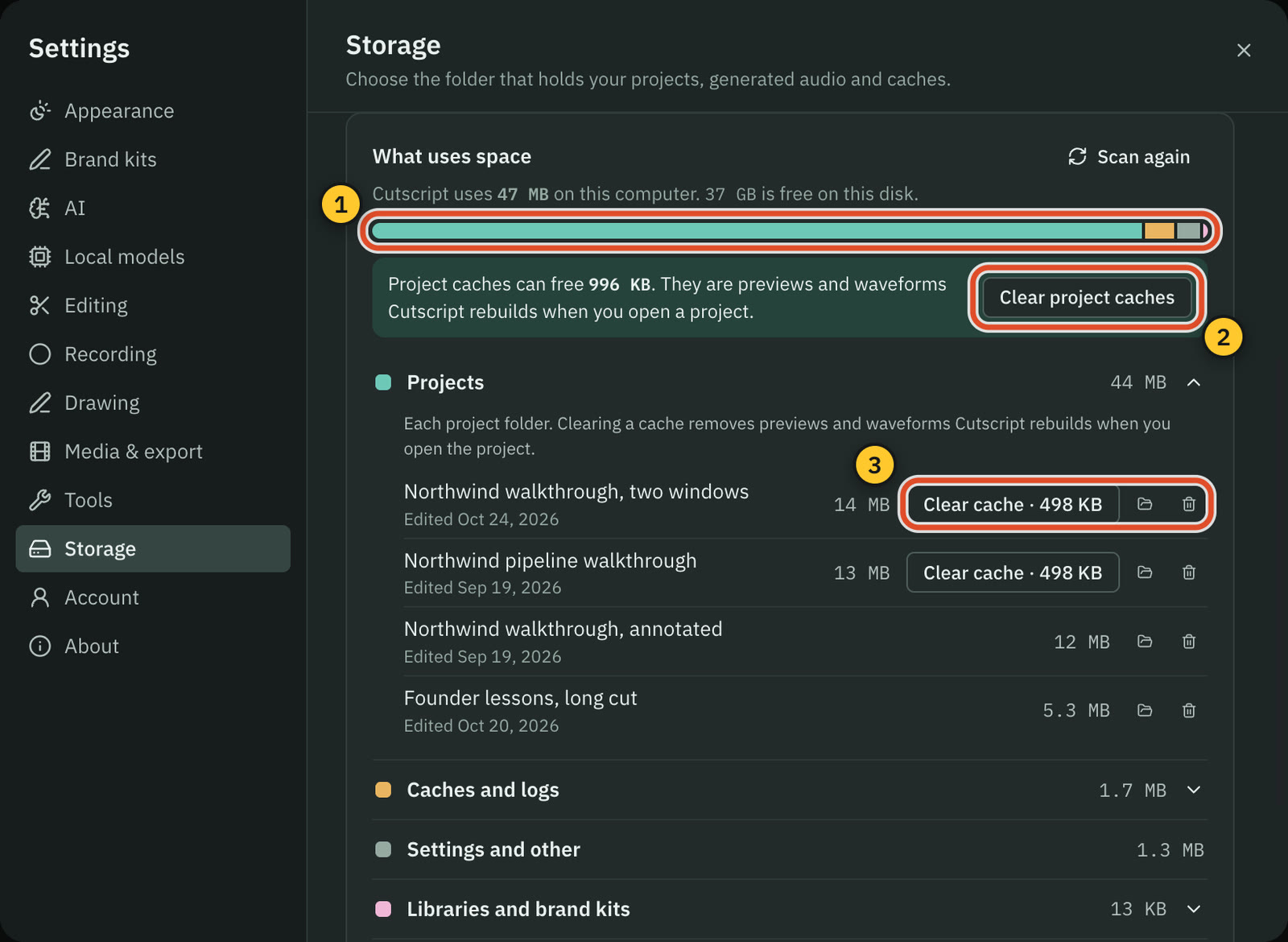
- Projects live on your computer. Cloud AI steps send the text, audio or still frames they need to the provider you pick.
- Recording, the timeline and export work offline once you are signed in. The last plan check holds for up to 14 days offline.
- Editing by text works offline once the transcript exists. Making a transcript offline needs Whisper on an Apple silicon Mac.
OBS Studio
- Windows 10 and 11 (installer, zip, BitTorrent, Microsoft Store, Steam). macOS 13.0 or newer, Intel and Apple Silicon.
- Linux through Flatpak on Flathub, plus a PPA for Ubuntu 26.04 and newer.
- Recordings go to a local folder you set in Settings > Output.
- Lua and Python scripting sit under Tools > Scripts, and obs-websocket handles remote control.
- The forum lists 335 plugins, 385 scripts, 469 tools and 53 themes, all third-party.
Where OBS Studio is the better pick
Live streaming
WHIP/WebRTC with simulcast, SRT and RIST guides, and Twitch and YouTube logins. Cutscript has no live output.
Scenes and a virtual camera
Unlimited scenes, Studio Mode, multiview of 8 and live transitions. Virtual Camera sends the result into Zoom, Skype, Discord or any webcam app.
Free, with no watermark
OBS Studio costs nothing, has no watermark and no paid tier we found. Cutscript's free plan needs an account and puts a watermark on video exports.
Open source and track record
GPL v2 or later, with public source on GitHub. Cutscript's is not public. Version 33.0.1 shipped 29 Oct 2026, and the repository has 78.6k stars.
Capture, formats and audio
Game capture, capture cards, Blackmagic, recoverable Hybrid MP4, AV1, an SDR to HDR filter, a replay buffer, and a mixer with VST plugins.
Add-ons and Linux
Lua and Python scripting, a built-in WebSocket, community plugins, and Linux through Flatpak. Cutscript's Linux build is in testing.
Moving from OBS Studio to Cutscript
- Keep OBS Studio if you stream. Record in OBS and edit in Cutscript.
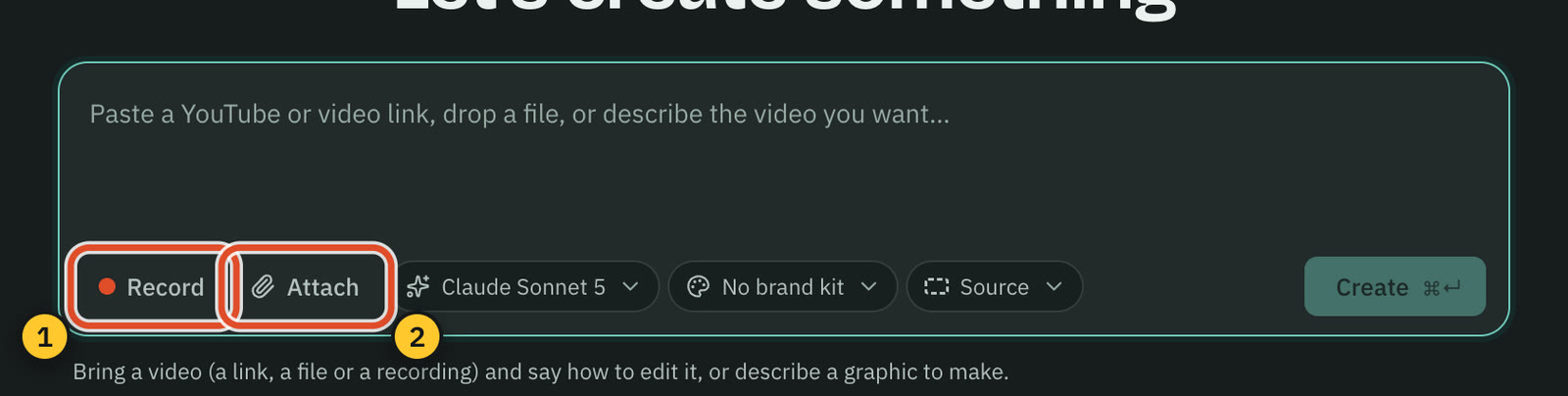
- Drag a recording onto the box under Let's create something, or click Attach. MP4, MOV, MKV and more work.
- If a recording is ProRes, convert it to H.264 or HEVC first. Cutscript cannot draw ProRes on a video track.
- Add a transcript source to edit by text: a provider key, or Whisper on Apple silicon. The timeline needs none.
- Imported footage has no pointer or click data, so add zooms by hand. A new Mac take has that data.
- OBS scenes and filters do not carry over. A .cube LUT goes in Colors: Mac now, Windows with the next update.
Questions
Is Cutscript free like OBS Studio?
Not quite. OBS Studio is free with no watermark or limits, per its help page. Cutscript's free plan needs an account, lacks timeline export and watermarks video. Pro fixes the last two: $4.17 a month paid yearly ($49.99 a year), or $9.99 monthly, on one computer at a time.
Can OBS Studio edit videos?
Its Post Production Tools article points you to separate programs such as DaVinci Resolve, Kdenlive and Shotcut. A built-in video editor was not found in their docs.
Can Cutscript live stream?
No. Cutscript records and edits, and it writes a file to your computer that you post yourself. For live streaming, scene switching or a virtual camera, use OBS Studio.
Can I edit OBS recordings in Cutscript?
Yes. Cutscript imports MP4, MOV, MKV and other common video files, and reads H.264, HEVC, VP9 and AV1. Convert ProRes to H.264 or HEVC first. Imported video has no pointer or click data, so add zooms by hand.
Does OBS Studio have AI features?
The only AI we found is NVIDIA RTX effects for noise and background removal, on NVIDIA GPUs. AI chat or editing was not found in their docs. Cutscript's AI runs on your ChatGPT or Claude plan (Claude on a Mac), your keys or local models.
Does Cutscript run on Linux?
Not yet. Linux is in testing and not ready to download, so today it is Mac and Windows. OBS Studio runs on Windows, macOS and Linux.
Which one should I use for a screen demo?
Use OBS Studio for free recording with no watermark if you edit in another program. Use Cutscript to cut the take in the same app by deleting words. Automatic zooms from clicks and an editable pointer are on a Mac.
Try it on your own video.
Free with a Cutscript account. Video exports have a watermark, and Pro removes it.
Download CutscriptFirst published 31 October 2026, last checked 31 October 2026. Prices and features change, so check before you decide. The people in our screenshots are stock footage and do not use or endorse Cutscript. Screenshots show Cutscript 0.1 beta. Seen something wrong or out of date? Tell us and we will fix it.