Cutscriptvs Tella
Tella
Pick Cutscript, a 0.1 beta screen recorder and editor, for files on your own computer and a free plan. Pick Tella for hosted share links, analytics and teams.
Written by the people who make Cutscript. Checked 31 October 2026. Tella and its logo are trademarks of their owner, and Cutscript is not affiliated with or endorsed by them.
Pick Cutscript if
- You want your video files kept on your own computer
- You want a free plan instead of a 7-day trial
- You want AI billed by your own provider, not in credits
- You want to finish in Final Cut, Premiere or Resolve (Pro only)
- You want voiceover and dubbing on your own accounts
Pick Tella if
- You want viewers to watch by link, with comments and analytics
- You need a team workspace with roles, co-editing, SSO and SCIM
- You want to publish to YouTube, LinkedIn, X, TikTok, Instagram and Facebook
- You want to record in a browser with nothing to install
- You want a deeply documented product with roughly weekly releases
At a glance
| What | Cutscript | Tella |
|---|---|---|
| Best for | Demos, tutorials and talks, cut by their words | Teams that share videos by link and track viewers |
| Maturity | 0.1 beta. Expect rough edges | Roughly weekly releases. Windows app and Agent in beta |
| Price (checked 31 Oct 2026) | Free, or Pro at $4.17 a month paid yearly ($49.99 a year), or $9.99 monthly | Pro $13 and Premium $19 per user a month, paid yearly. Enterprise custom |
| Free plan | YesEvery feature except timeline export. Free account needed | No7-day trial, no credit card |
| Watermark | PartlyA moving watermark on free video exports. Pro removes it | YesNone on exports, per Tella. Premium lists removing page branding |
| Platforms | PartlyMac and Windows. Recording on a Mac needs macOS 15 | YesWeb, Mac, Windows (beta) and Chrome extension |
| Where files live | On your computer | In your Tella workspace. Recordings upload |
| Sharing | NoYou get a file and post it yourself | YesLinks, comments, analytics and direct publishing |
| Editing | YesEdit by text, plus a multitrack timeline | YesEdit by text, plus multi-track effect timelines |
| AI | YesChatGPT plan, Claude plan on a Mac, your keys or local models | YesTella Agent on credits. Needs a paid plan or the trial |
| Transcript | PartlyNeeds a key, or Whisper on an Apple silicon Mac | YesUses no credits |
| Export | YesFour video formats up to 4K 60 fps. Motion effects mean H.264 only | YesMP4 and M4A. 4K and 60 fps need a paid plan |
YesPartlyNoNot found in their docs
Recording
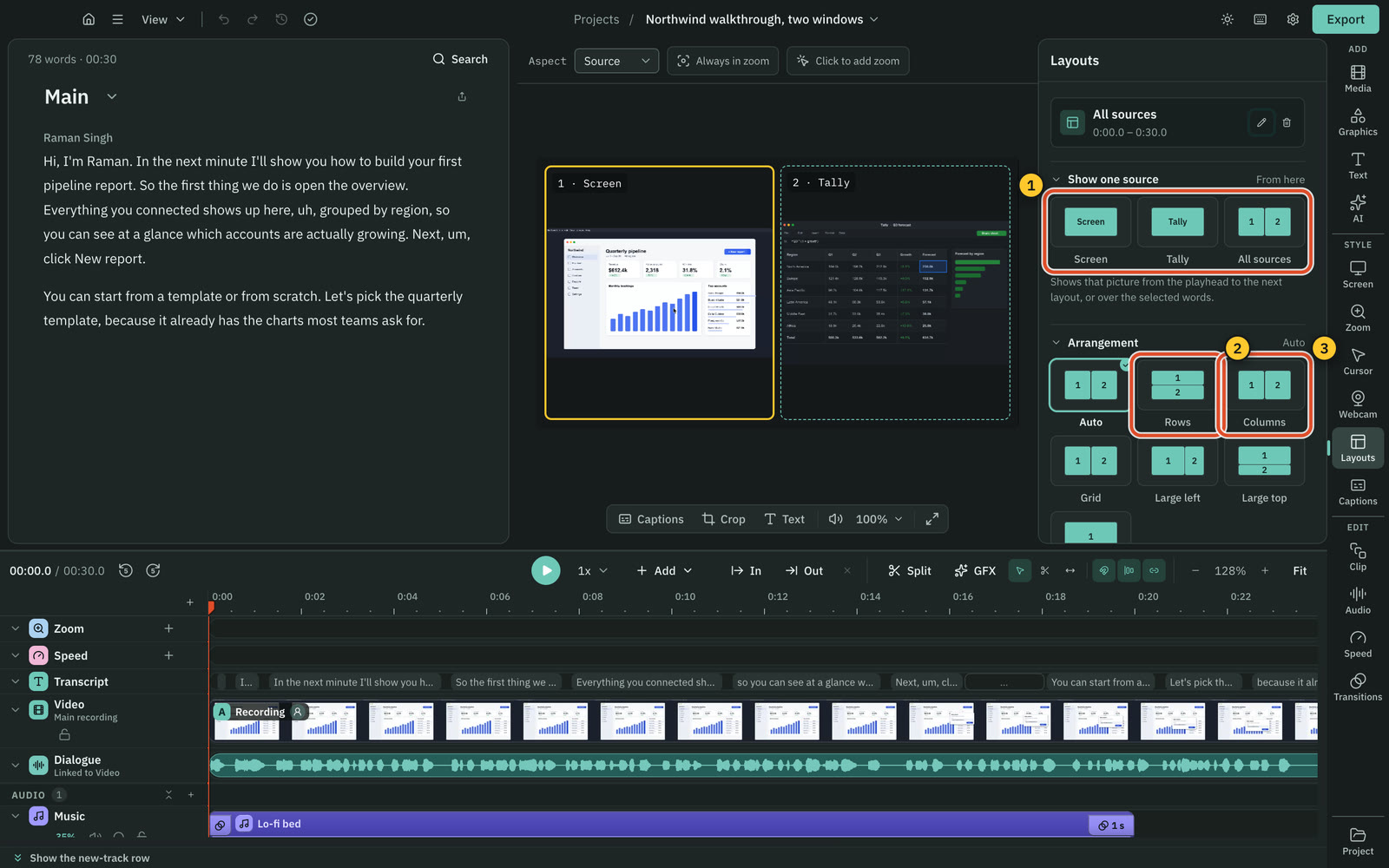
Both record screen and camera. Cutscript is a desktop app, while Tella also records in a browser with nothing to install.
CutscriptDesktop recorder with a track for each input
TellaBrowser, extension, Mac app and Windows app
| What | Cutscript | Tella |
|---|---|---|
| Record with nothing to install | NoNeeds the desktop app | YesWorks in a supported browser |
| Record part of the screen | PartlyMac only. Windows records a display or window | PartlyMac app only. The Windows app has no area |
| System sound | YesWhole computer or none. One app is experimental on a Mac | YesMac on by default, Windows off. Browser: Chrome tab only |
| Several screens in one take | YesUp to three pictures, each in its own file | Not found in their docsNot found in their docs |
| Draw on screen while recording | PartlyOn a Mac only | Not found in their docsNot found in their docs |
| Speaker notes | NoNot offered | YesWeb, Mac and Windows. Hidden from the recording |
| iPhone or iPad screen | PartlyBy cable on a Mac. Experimental | YesBy cable in the Mac app |
| Record with no internet | YesOnce signed in, up to 14 days after a plan check | Not found in their docsNot found in their docs |
More detail
Cutscript
- Records a display or window, offline for up to 14 days. Area recording is Mac only, and recording on a Mac needs macOS 15.
- Picture, voice, system sound and camera are saved as separate tracks, at 30 or 60 fps.
- One take can hold up to three pictures, each in its own file. On Windows you can add displays and windows.
- On a Mac you can draw on screen while recording: pen, arrows, numbered steps, laser and spotlight.
- A cabled iPhone or iPad can be recorded on a Mac. That mode is experimental and off until you turn it on.
Tella
- The web app records a whole screen, a window or a browser tab, with nothing to install.
- The Mac app adds Select area and records screen and camera up to 4K.
- The Windows app is labelled Beta. It records a display or a window, up to 4K, with no area selection.
- The Chrome extension records the screen up to 4K and the camera up to 1080p. Only Chrome tab recordings carry cursor data.
- An iPhone or iPad screen records in the Mac app over a cable. Phone and tablet browsers record quick videos, with no mobile app.
Editing by text
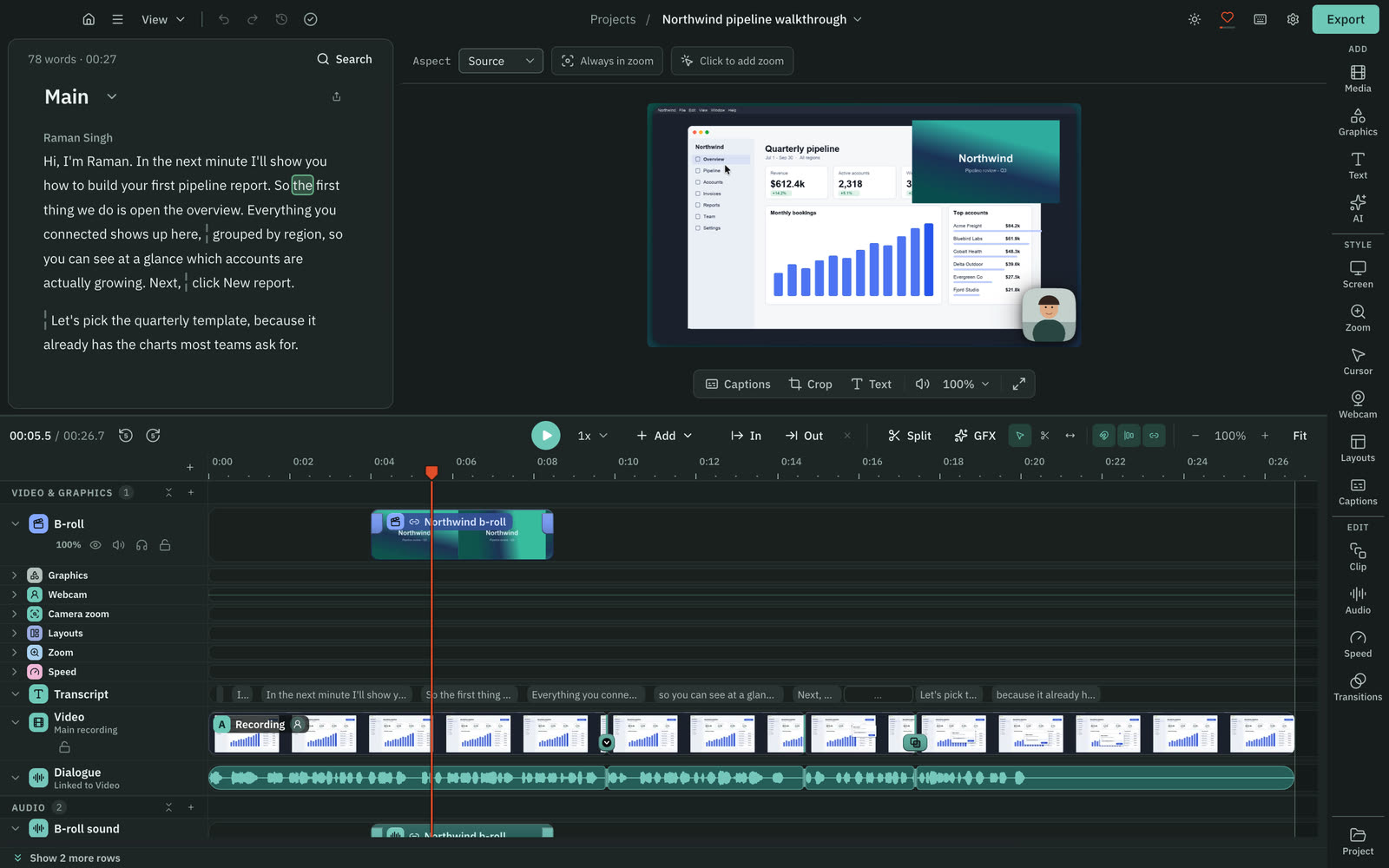
Both cut video by deleting words from a transcript. Cutscript can also correct a word and has a timeline for video, image and audio.
CutscriptA script and a multitrack timeline
TellaScript panel and multi-track effect timelines
| What | Cutscript | Tella |
|---|---|---|
| Cut by deleting words | YesOnce the project has a transcript | YesIn the Script panel |
| Getting the transcript | PartlyYour key, or free Whisper on Apple silicon | YesUses no credits |
| Remove filler words | YesFree, on your computer, editable word list | PartlyThrough Tella Agent, on credits |
| Remove silences and pauses | YesPauses over 0.8 s shorten to 0.3 s, adjustable | YesNatural, Fast and Faster modes |
| Correct a word in the script | YesText changes, audio stays | NoWords can be removed, not reworded |
| Free-form video and audio tracks | YesMute, solo, lock and per-clip fades | Not found in their docsNot found in their docs |
| Transitions | YesDissolve, dip, push, slide, wipe, iris and more | YesHard cut or Smooth, plus animation speed sliders |
| Several edits of one video | YesCompositions, each with its own cuts and aspect | PartlyDuplicate the video, set each canvas size |
More detail
Cutscript
- Delete words in the script and the picture and sound are cut. Your original media stays untouched.
- Filler words, long pauses and repeated phrases are found on your computer, with no AI and no cost.
- You can correct a word's text while the audio stays, and leave notes in the script.
- The timeline holds video, image, audio, music and sound effect tracks, with Select, Razor and Slip tools.
- Editing by text works offline once the transcript exists. An offline transcript needs Whisper on an Apple silicon Mac.
Tella
- Select words in the Script panel and press Backspace to cut that section. Words can be removed but not reworded.
- Remove silences has Natural, Fast and Faster modes and shows the time saved before you click.
- Tella Agent can cut filler words and long pauses. Remove mistakes uses credits.
- Effect and Overlay timelines are multi-track: overlapping cards move to separate tracks, with snapping and group select.
- Clip transitions are Hard cut or Smooth, set video-wide or per clip.
Cursor, zooms and backgrounds
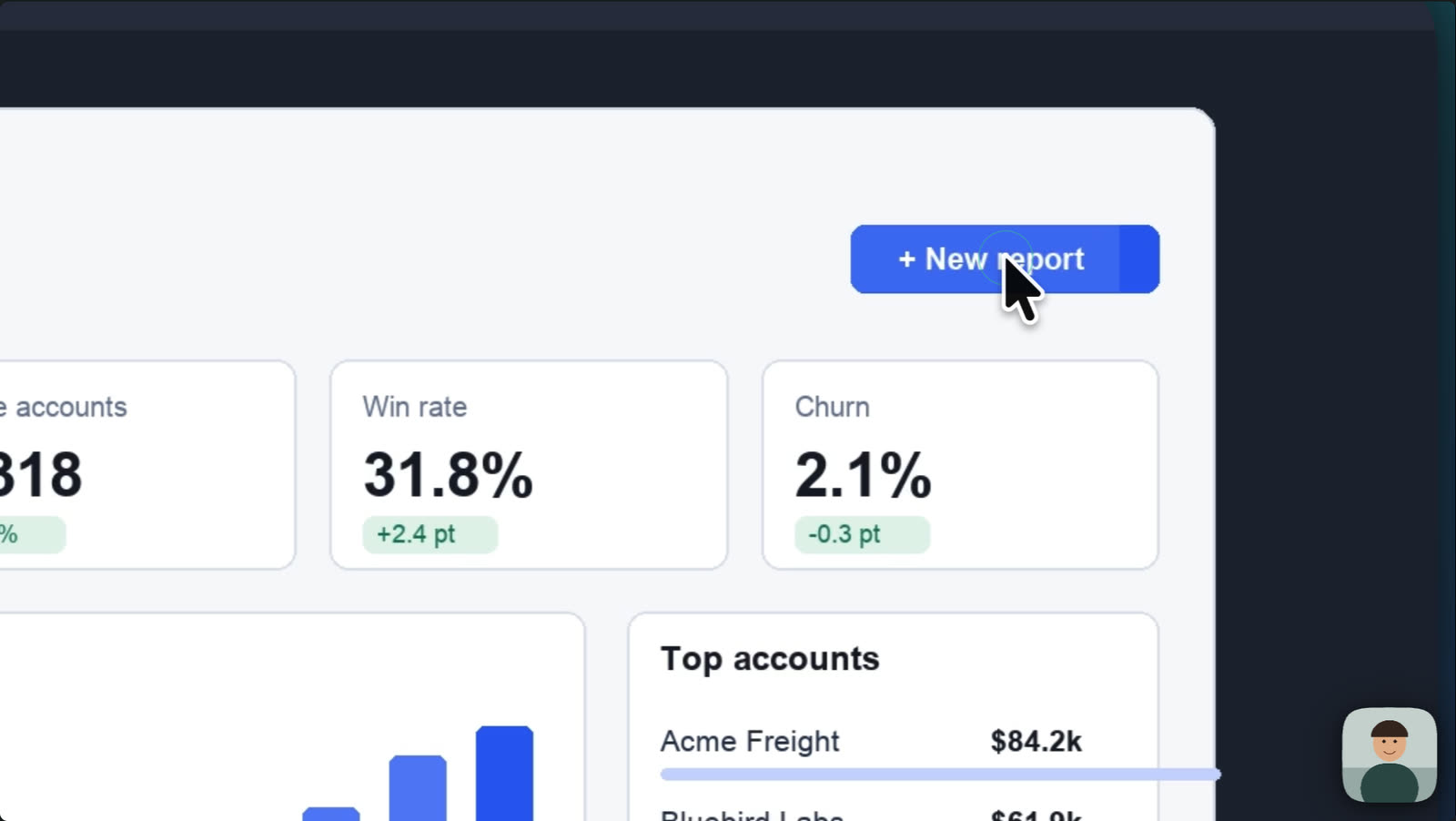
Both redraw the cursor, zoom from clicks and set a background. Tella's cursor tools cover Mac and Windows recordings, Cutscript's only Mac takes.
CutscriptFull cursor and click tools on a Mac
TellaCursor and zoom tools on Mac and Windows
| What | Cutscript | Tella |
|---|---|---|
| Editable cursor on Mac | YesStyles, size and movement presets | YesStyles, size, tilt and ripple in the Mac app |
| Editable cursor on Windows | NoPointer stays in the video | YesIn the Windows app |
| Zooms from clicks | PartlyTakes recorded on a Mac. Fewer, Balanced or More | YesMac, Windows apps and Chrome tabs. Four styles |
| Zoom by hand | YesAny video, depth 1x to 5x | YesManual Scale control |
| Click sounds | PartlyFive sounds on Mac takes, mixed into export | Not found in their docsNot found in their docs |
| Keystroke overlay | NoNot offered | YesMac app recordings |
| Padding and corner sliders | YesPadding 0 to 100%, corners 0 to 50%, shadow 0 to 200% | Not found in their docsNot found in their docs |
| Animated backgrounds | NoNot offered. Gradient, image or colour | YesYour MP4 or MOV up to 20 MB, loops, blurred copy |
More detail
Cutscript
- On a Mac you can restyle the pointer later: six styles plus your Mac's own, size 0.5x to 10x, four movement presets.
- Click effects (Spotlight, Ripple, Echo, Circle, Zoom pop, Highlighter) and five click sounds, on takes recorded on a Mac.
- Automatic zooms from your clicks, on takes recorded on a Mac. Zooms by hand work on any video, on Mac or Windows.
- Looks, gradient, image and colour backgrounds, padding, corners and shadow work on Mac and Windows.
- On Windows the pointer is in the video, and clicks are not recorded.
Tella
- Cursor styles, size, smooth movement, tilt, click spring and ripple, on Mac and Windows app recordings.
- Not available for web recorder or Chrome extension recordings.
- Auto Zoom has Subtle, Moderate, Focused and Intense styles and a motion blur control.
- Show keystrokes, shipped 23 Oct 2026, is for Mac app recordings.
- Backgrounds include colours, gradients, images and animated backgrounds up to 20 MB. Corners are Square, Round or Squircle.
Camera
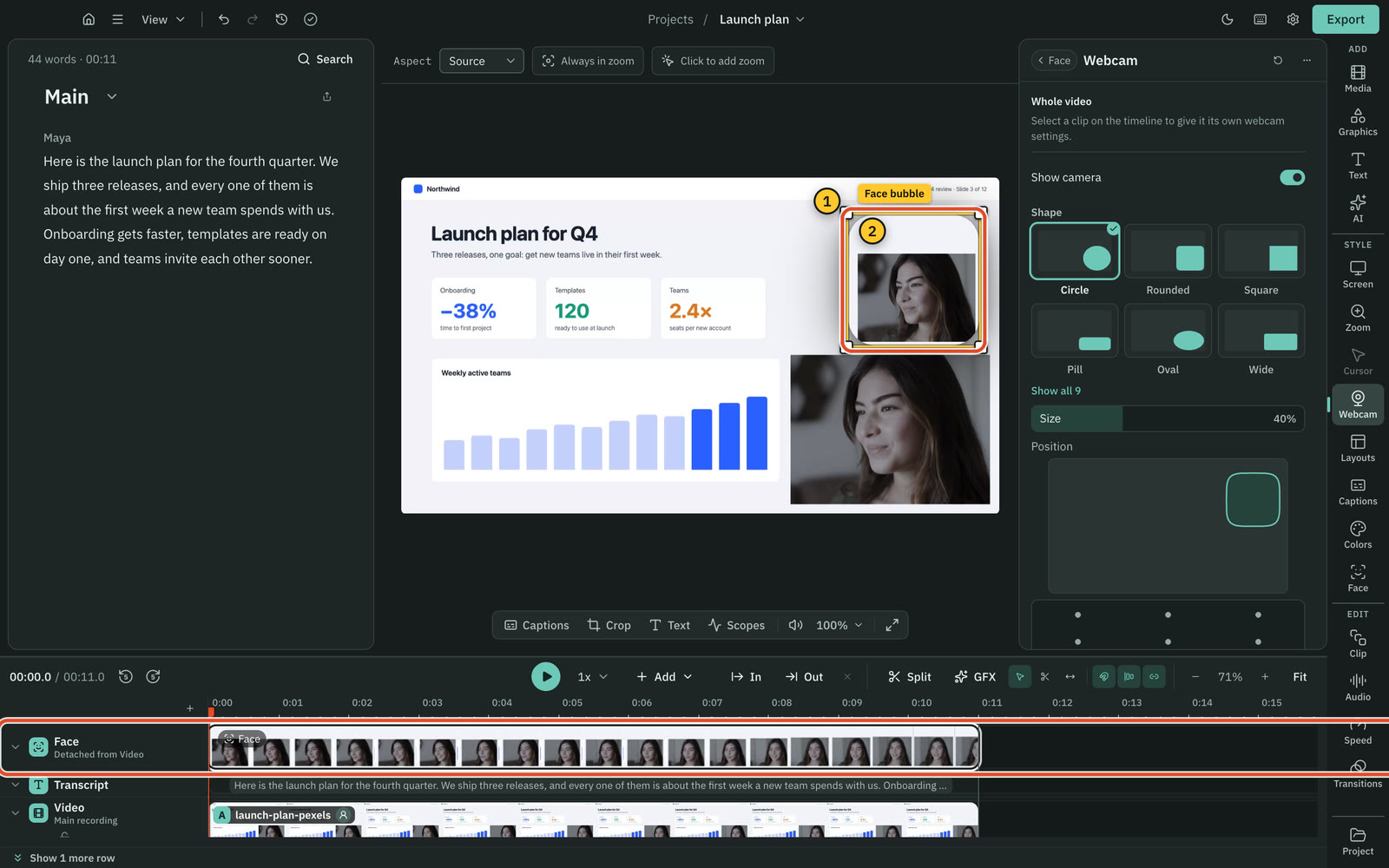
Both put your camera over the screen in shapes and layouts. Tella has cut-out and eye contact. Cutscript has chroma key and Face, which Tella's docs do not mention.
CutscriptBubble shapes, chroma key and panel layouts
TellaCamera styles, cut-out and eye contact
| What | Cutscript | Tella |
|---|---|---|
| Remove a person's background | PartlySolid backdrop only, with chroma key | YesCut out, on camera and uploaded footage |
| Chroma key | YesSpill and edge controls | Not found in their docsNot found in their docs |
| Eye contact correction | NoNot offered | YesEveryone since 30 Oct 2026 |
| Panel layouts | Yes2, 3 or 4 panels: rows, columns, grid or large | YesSide-by-Side, TV Presenter, your own saved |
| Face without a camera track | PartlyMac now, Windows with the next Microsoft Store update | Not found in their docsNot found in their docs |
More detail
Cutscript
- Bubble shapes include Circle, Rounded, Square, Pill, Oval, Wide, Tall and Framed, with a two-colour flowing border.
- Chroma key removes one solid colour from the camera video. It does not find people in the picture.
- For a chosen passage, the camera can go full screen, hide, or zoom from 1x to 4x.
- Layouts of 2, 3 or 4 panels, each showing the screen, the webcam or other media.
- Face finds faces on your computer, nothing uploaded. On a Mac now, and on Windows with the next Microsoft Store update.
Tella
- Camera styles include Circle, Square, Landscape, Portrait and Blob. Blob needs a camera layer.
- Layouts are Camera Bubble, Side-by-Side, TV Presenter, Cut out, Screen-only and Camera-only. You can save your own.
- Cut out removes the background from camera footage of a person. It is not available for screen-only recordings.
- Eye contact correction re-renders webcam video so you appear to look at the lens. It covers the whole video and uses no credits.
- A Pop-out camera effect too. The Windows app has no camera background effects, and two webcams at once are not supported.
Colour grading and blur
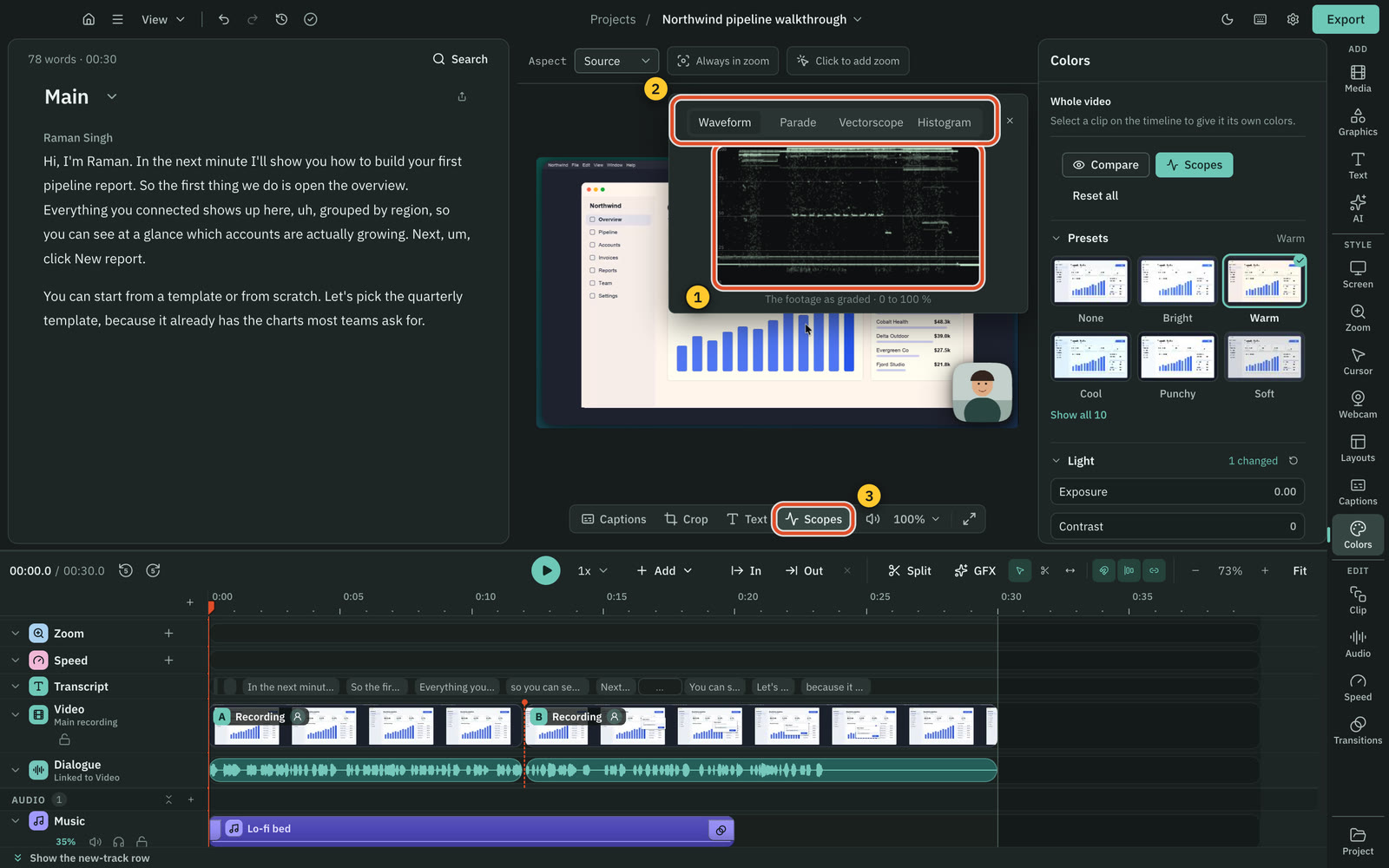
Both grade footage, load a .cube LUT and blur by hand. Cutscript adds scopes and tracked blur, which Tella's docs do not mention.
CutscriptColors with scopes, and a blur that tracks
TellaFilters, LUTs and blur placed by hand
| What | Cutscript | Tella |
|---|---|---|
| Presets and sliders | PartlyTen sliders. Mac now, Windows with next Store update | YesPresets and five sliders |
| Load a .cube LUT | PartlyMac now, Windows with the next Microsoft Store update | YesWith intensity, plus built-in LUTs |
| Grade one part | PartlyOne clip or all. Mac now, Windows with next Store update | YesOne clip, or Camera, Screen or Media |
| Video scopes | PartlyFour scopes. Mac now, Windows with next Store update | Not found in their docsNot found in their docs |
| Colours for the face only | PartlyMac now, Windows with the next Microsoft Store update | Not found in their docsNot found in their docs |
| Blur placed by hand | YesBlur or pixelate, strength 1 to 100 | YesRounded or Circle shapes |
| Blur that follows a moving thing | YesPixel lock; Apple Vision on a Mac | Not found in their docsNot found in their docs |
| Automatic face and email blur | PartlyMac only, free, with a list to review | Not found in their docsNot found in their docs |
More detail
Cutscript
- Colors: presets, ten sliders, three colour wheels, a vignette and .cube import. On a Mac now, Windows with the next Store update.
- Scopes: Waveform, Parade, Vectorscope with a skin-tone line, and Histogram.
- Grade with AI looks at up to four frames, then checks its own grade. The price shows first.
- A blur can follow moving things with Pixel lock, on Mac and Windows. Apple Vision tracking is on a Mac.
- Blur all faces and Blur all emails are on a Mac. Originals keep the pixels under a blur, so share the export, not a package.
Tella
- The Filters panel has presets, five sliders under Advanced, built-in LUTs and your own .cube LUT with intensity.
- Filters can target Camera, Screen or Media sources, or one clip. They shipped 25 Sep 2026.
- Blur and highlight are placed by hand and dragged on the canvas, in Rounded or Circle shapes, as cards on the Effect timeline.
AI and who pays for it
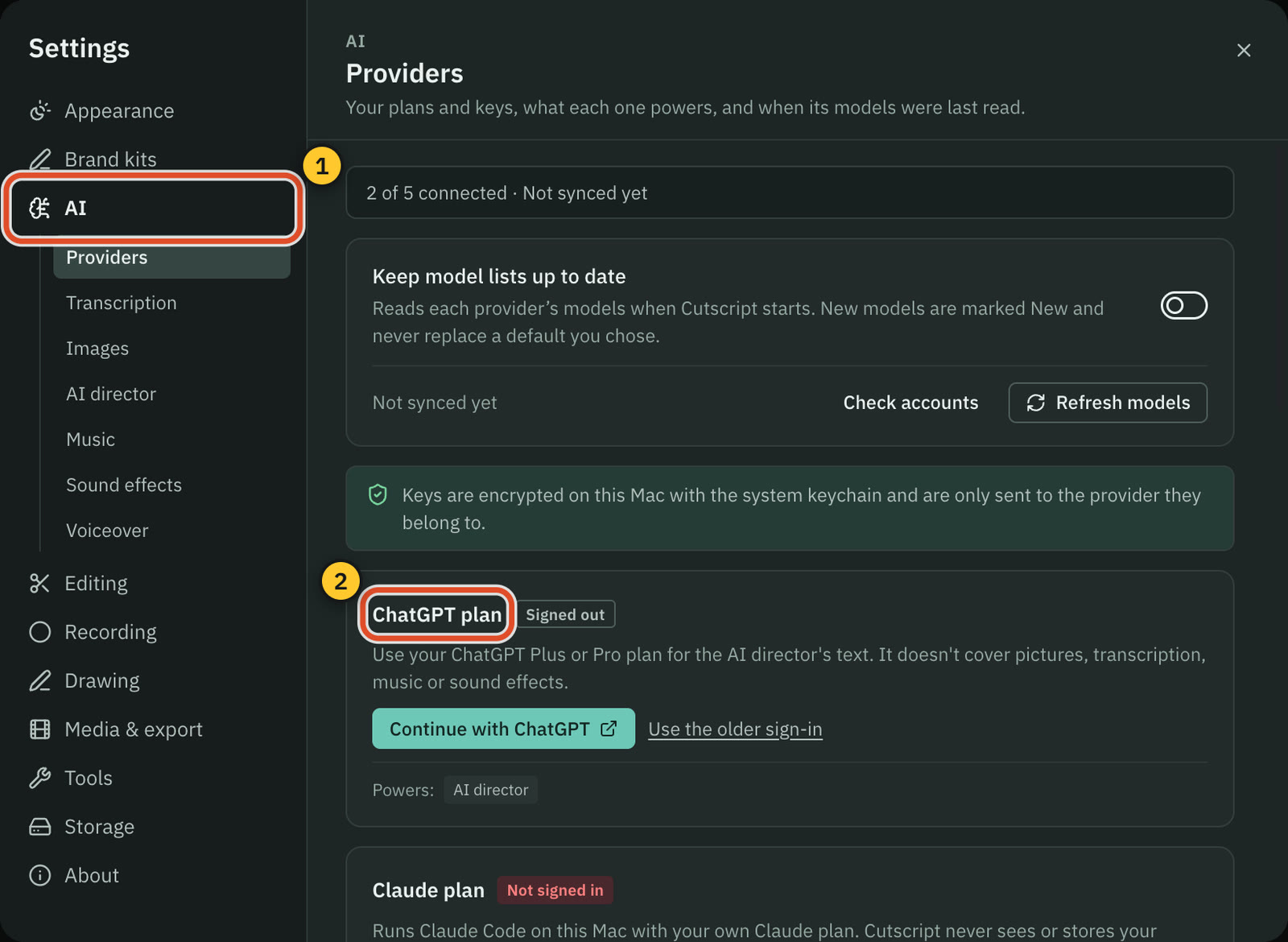
Both have a chat that edits your video and use your ChatGPT or Claude plan (Claude on a Mac in Cutscript). Cutscript is billed by your provider, Tella in credits.
CutscriptOne AI, on accounts you choose
TellaTella Agent, on credits
| What | Cutscript | Tella |
|---|---|---|
| Chat that edits your video | YesOne AI | YesTella Agent |
| ChatGPT or Claude plan | YesBoth. Claude plan needs a Mac. Text only | YesBoth since 16 Oct 2026. Tools use credits |
| Your own API keys | YesOpenRouter, ElevenLabs, fal.ai and OpenAI | Not found in their docsNot found in their docs |
| AI models on your computer | YesOllama. Whisper and voices on Apple silicon Macs | Not found in their docsNot found in their docs |
| AI credits in the plan | NoNone included. Your provider bills you | Yes4,500 on Pro, 9,000 on Premium, per user a month |
| Price shown before a step | YesBefore most paid steps | Not found in their docsNot found in their docs |
| An agent that records for you | NoNot offered. The AI does not record or export | YesAuto Capture: beta, paid plans, public pages |
| Take back an AI change | YesOne undo step, or Restore to before a message | YesAsk the agent to undo it |
More detail
Cutscript
- One AI is one chat for the whole editor: script, timeline, look, graphics and audio. Apply is one undo step.
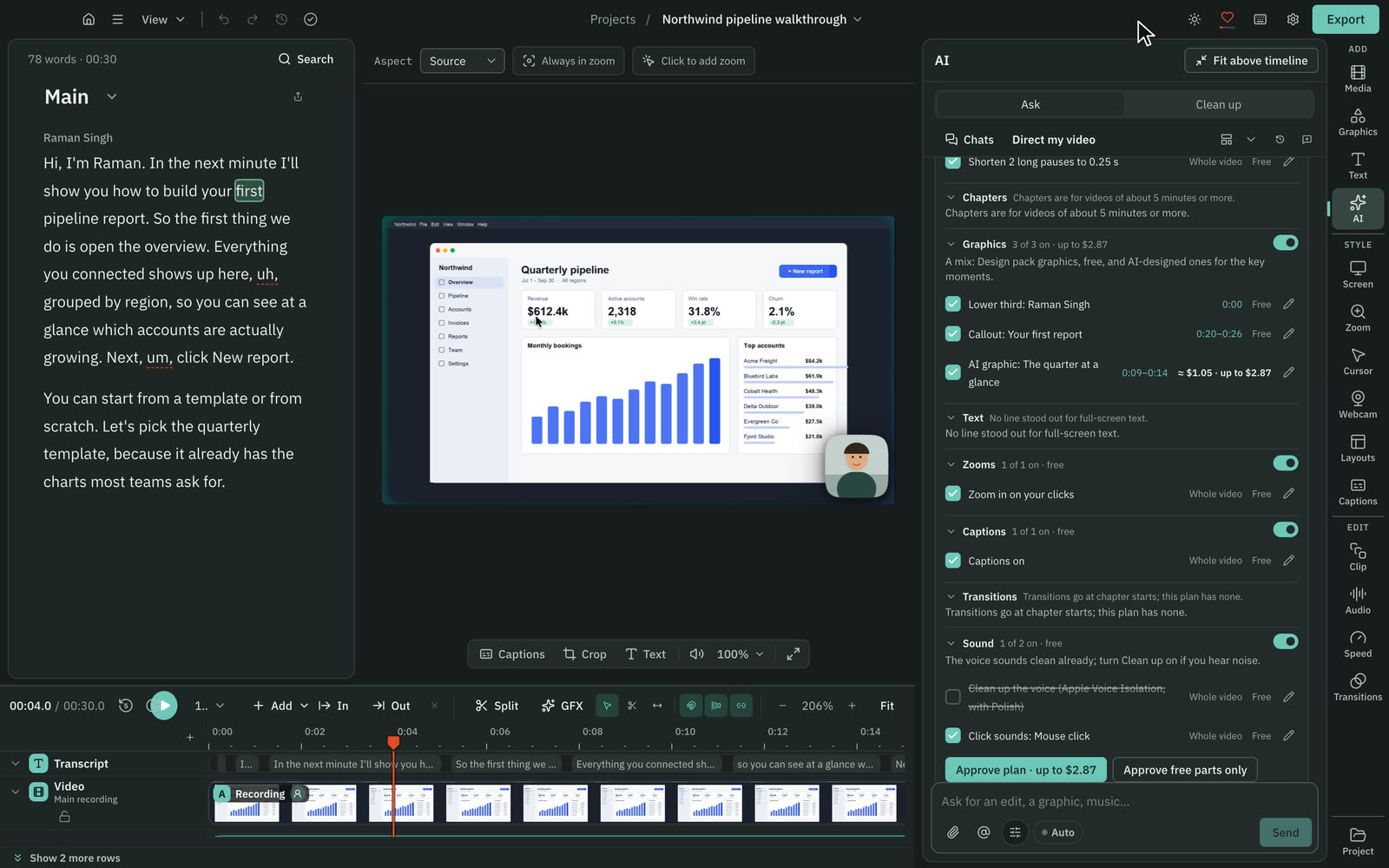
- Direct my video writes a priced plan for the whole video, and you approve it first.
- It runs on a ChatGPT plan, a Claude plan through Claude Code (on a Mac), an OpenRouter key, or Ollama on your computer.
- A plan covers the AI's text only. Transcripts need a key or Whisper on an Apple silicon Mac. Pictures and music need a key.
- The price shows before most paid steps. You can limit the AI director's OpenRouter and fal.ai spending.
Tella
- A chat panel in the editor that uses the same tools you do: cuts, zooms, subtitles, chapters, b-roll and Motion graphics.
- In public beta since 16 Oct 2026. Sending messages needs a paid plan or the free trial.
- A ChatGPT plan or a Claude Pro or Max plan covers the model. Tools still use credits, plus a small amount per message.
- You can attach documents, images, video or audio, and keep editing by hand while it runs.
- Auto Capture (beta, paid plans) records a public web page walkthrough in a cloud browser, on credits. It does not narrate.
Captions, voice and music
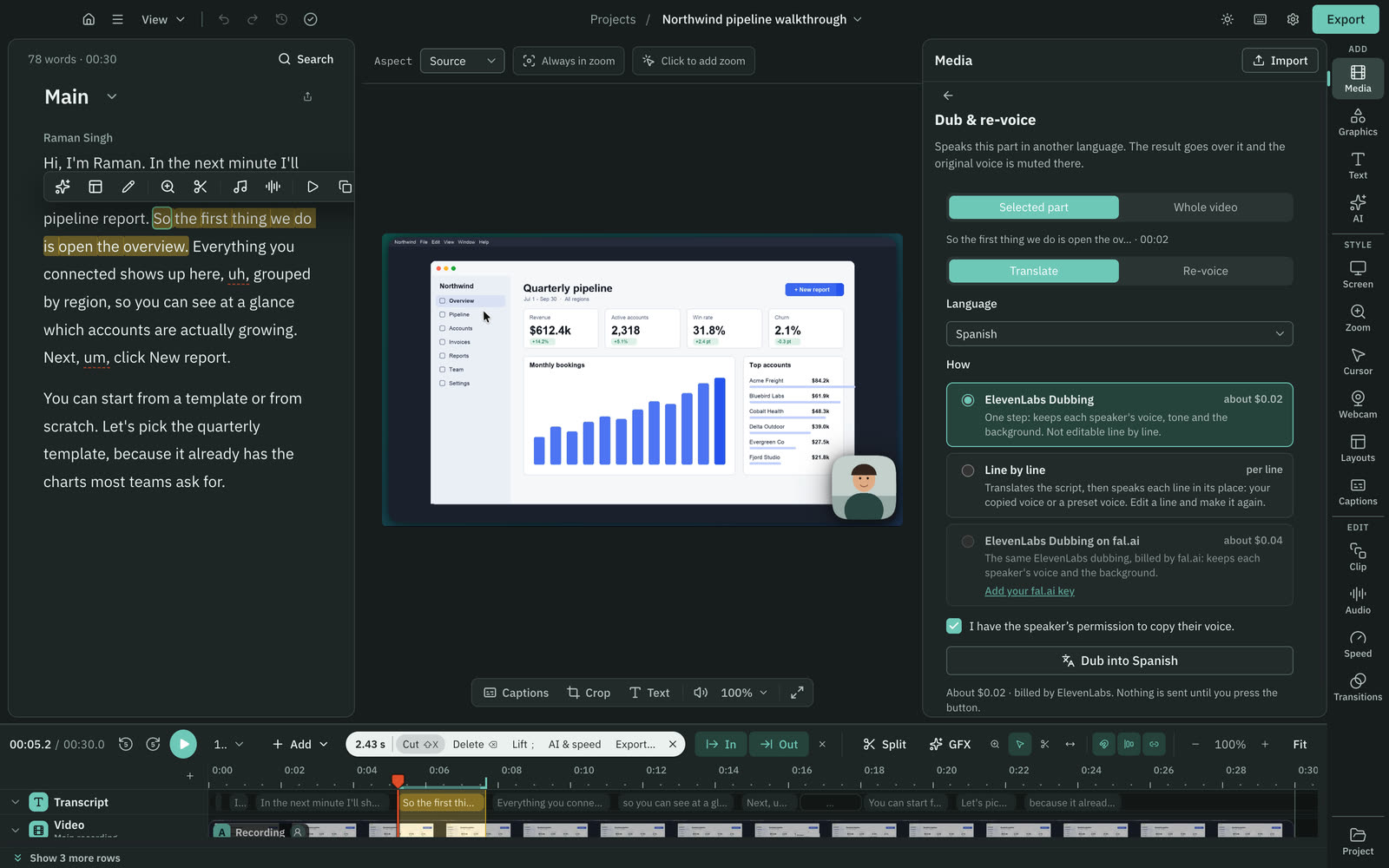
Both style captions and burn them in. Tella translates subtitles and has a music library. Cutscript makes voiceovers, dubs and music on your own accounts.
CutscriptCaptions, plus generated audio on your accounts
TellaSubtitles, translation and a music library
| What | Cutscript | Tella |
|---|---|---|
| Caption styling | Yes24 presets, word highlight, any installed font | YesYour fonts, word highlight, saved presets |
| Translate subtitles | NoNot offered. Dubbing speaks a translated script | YesUp to 10 languages, SRT or WebVTT, paid plans |
| Voiceover from text | YesYour key, including ElevenLabs cloned voices | NoNot offered. Upload audio made elsewhere |
| Audio dubbing | YesOn your key | Not found in their docsNot found in their docs |
| Built-in music library | NoNot offered | YesCalm, Energetic, Focused and Playful |
| Music from a prompt | YesOn your key | Not found in their docsNot found in their docs |
| Sound effects from a prompt | YesOn your key | YesOn a weekly allowance |
| Improve the recorded voice | YesFree clean-up, or ElevenLabs, fal.ai on your key | YesStudio Voice: three levels, no credits |
More detail
Cutscript
- 24 caption styles with word highlighting, any installed font, drag to place, and burn-in on export. Captions need a transcript.
- Voiceover from text through ElevenLabs, fal.ai, OpenRouter or OpenAI, or a voice on an Apple silicon Mac.
- Dub with ElevenLabs Dubbing, which keeps each voice, or Line by line, which translates and speaks your script.
- Music and sound effects from a text prompt, on your own key. Cutscript ships no music or sound-effect library.
- Enhance voice cleans audio for free with the built-in clean-up, or with Apple Voice Isolation on a Mac.
Tella
- Subtitle styling covers fonts including your uploads, active-word highlight, saved presets and burn-in on export.
- Subtitles translate into up to 10 languages per video on paid plans, with SRT or WebVTT download. No credits.
- Studio Voice has Off, Low and High levels and uses no credits.
- Background music is a built-in library or your own upload, one track per video. AI sound effects have a weekly allowance.
- Tella says it cannot generate AI narration or add narration to a finished clip. You can upload audio made elsewhere.
Motion graphics and brand
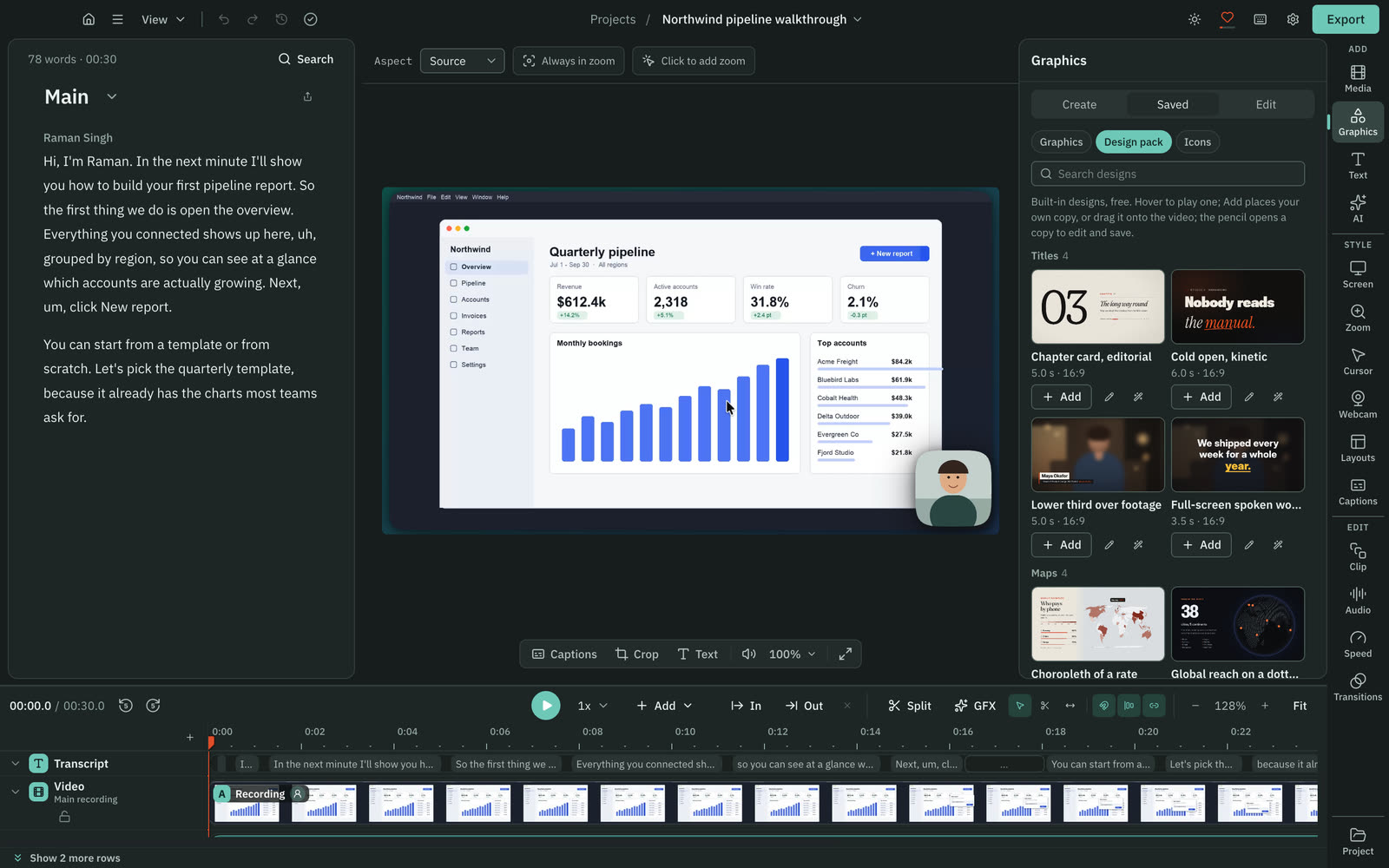
Both make animated graphics from a description. Cutscript has 31 ready graphics you can edit by hand, while Tella Motion changes go through its agent.
CutscriptA design pack, a design director and brand kits
TellaTella Motion, AI video and workspace branding
| What | Cutscript | Tella |
|---|---|---|
| Ready-made graphics, no AI | Yes31 in the Design pack, offline | Not found in their docsNot found in their docs |
| Edit a graphic by hand | YesWords, colours, numbers, timing and code | NoChanges go through the agent |
| A graphic from a description | YesDesign director, storyboard and price first | YesTella Motion, through the agent |
| AI images | YesInside graphics, on your key. Off by default | YesSunburst and Flare, on credits |
| AI video | NoNot offered | YesSeedance models, 720p or 1080p, on credits |
| Brand colours, fonts and logos | YesBrand kits, used by graphics and the AI | PartlyLogo, colour, backgrounds by plan. No brand kit found |
| Brand from a website | YesImport from website, no AI, up to 35 seconds | YesFind from company domain: logo and colour |
| Reusable AI skills | YesOver a hundred guides. Write, import, test your own | YesReusable agent skills since 16 Oct 2026 |
More detail
Cutscript
- The Design pack has 31 motion graphics: titles, maps, charts, countdowns and more. It works offline with no AI.
- You can edit a graphic by hand: words, colours, numbers, timing and code.
- The design director builds a new graphic from your description, with a storyboard and price first. It needs an AI source.
- Through the AI you also get route maps, 29 chart types from your data and infographics with over 13,000 icons.
- Brand kits hold up to 16 colours, four fonts and logos. You can import one from a website with no AI.
Tella
- Tella Motion builds animated titles, charts, diagrams, logos, shapes and lower thirds through the agent.
- It has no keyframe timeline or design controls, so changes go through the agent.
- Every user can use Motion. Directing it through the agent needs a paid plan or the trial.
- AI images (Sunburst, Flare) and AI video (Seedance models, up to 1080p) are made in the media panel and use credits.
- Branding covers logo, theme colour and shared backgrounds, by plan. Find from company domain suggests a logo and colour.
Short clips and vertical video
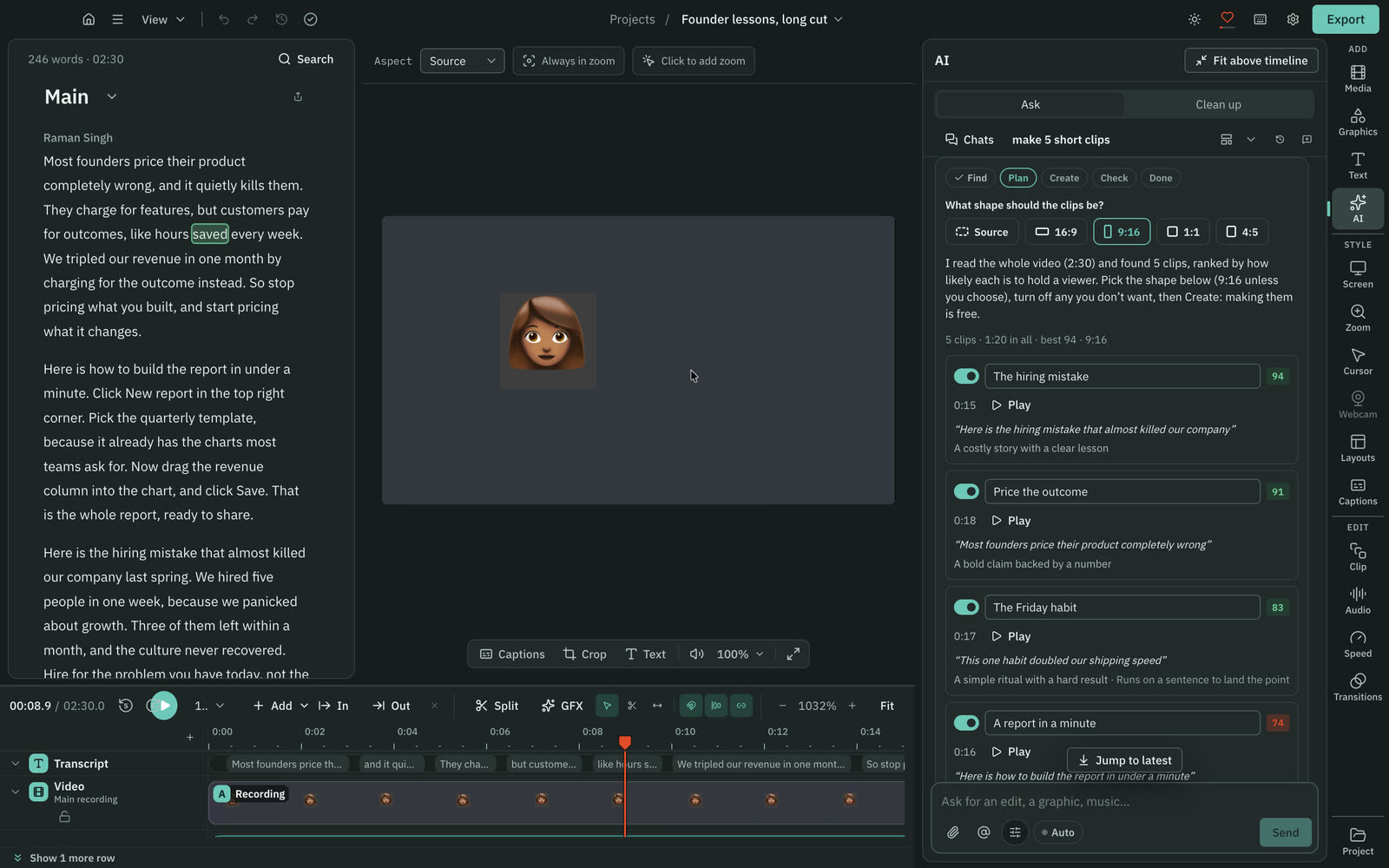
Both cut vertical clips from a long video with AI. Cutscript plans up to ten ranked clips, and Tella's agent picks the strongest 15 to 60 seconds.
CutscriptA clipper that ranks several clips
TellaShorts through the agent
| What | Cutscript | Tella |
|---|---|---|
| Short clips from a long video | YesUp to ten scored clips from one request | YesStrongest 15 to 60 seconds, plan approved first |
| Frame follows the speaker | PartlyMac: the face. Windows: pointer or still crop | Not found in their docsNot found in their docs |
| Canvas shapes | Yes16:9, 9:16, 1:1, 4:3, 4:5 and 16:10 | Yes16:9, 9:16, 1:1, 4:3, 4:5 and 16:10 |
| Social safe zones | PartlyClipper clips only: captions kept in the safe area | YesOverlays for Reels, TikTok, Shorts, LinkedIn |
| Bring in a video from a link | YesYouTube, Instagram, TikTok, Vimeo, X and more | YesYouTube, X, Instagram, TikTok. 2 hours, 1080p |
| Bring in a video file | YesOn both plans | PartlyPaid plans, not the trial. 5 GB per file |
More detail
Cutscript
- Ask for up to ten clips. Each gets a score, a title and its opening hook, and becomes its own composition.
- On a Mac a clip can follow the speaker's face. On Windows it follows the pointer or uses a still crop.
- Finding the clips is priced on the Send line, and making them is free. It needs a transcript and an AI source.
- Aspects are 16:9, 9:16, 1:1, 4:3, 4:5 and 16:10. You can frame a clip by hand, or ask the AI to frame the speakers.
- Download from link takes YouTube, Instagram, TikTok, Vimeo, X, Reddit and more, for videos you have the right to use.
Tella
- Ask the agent for a Short, Reel or TikTok. It picks the strongest 15 to 60 seconds and edits after you approve the plan.
- Output is 1080x1920, and the original video is never changed.
- Canvas presets include 16:9, 1:1, 4:5, 9:16, 16:10 and 4:3, with layouts adjusting to the new ratio.
- Social safe zone overlays cover Reels, TikTok, Shorts and LinkedIn, on 9:16 video only, and are never exported.
- It imports a single public video link from YouTube, X, Instagram or TikTok, up to 2 hours and 1080p.
Export
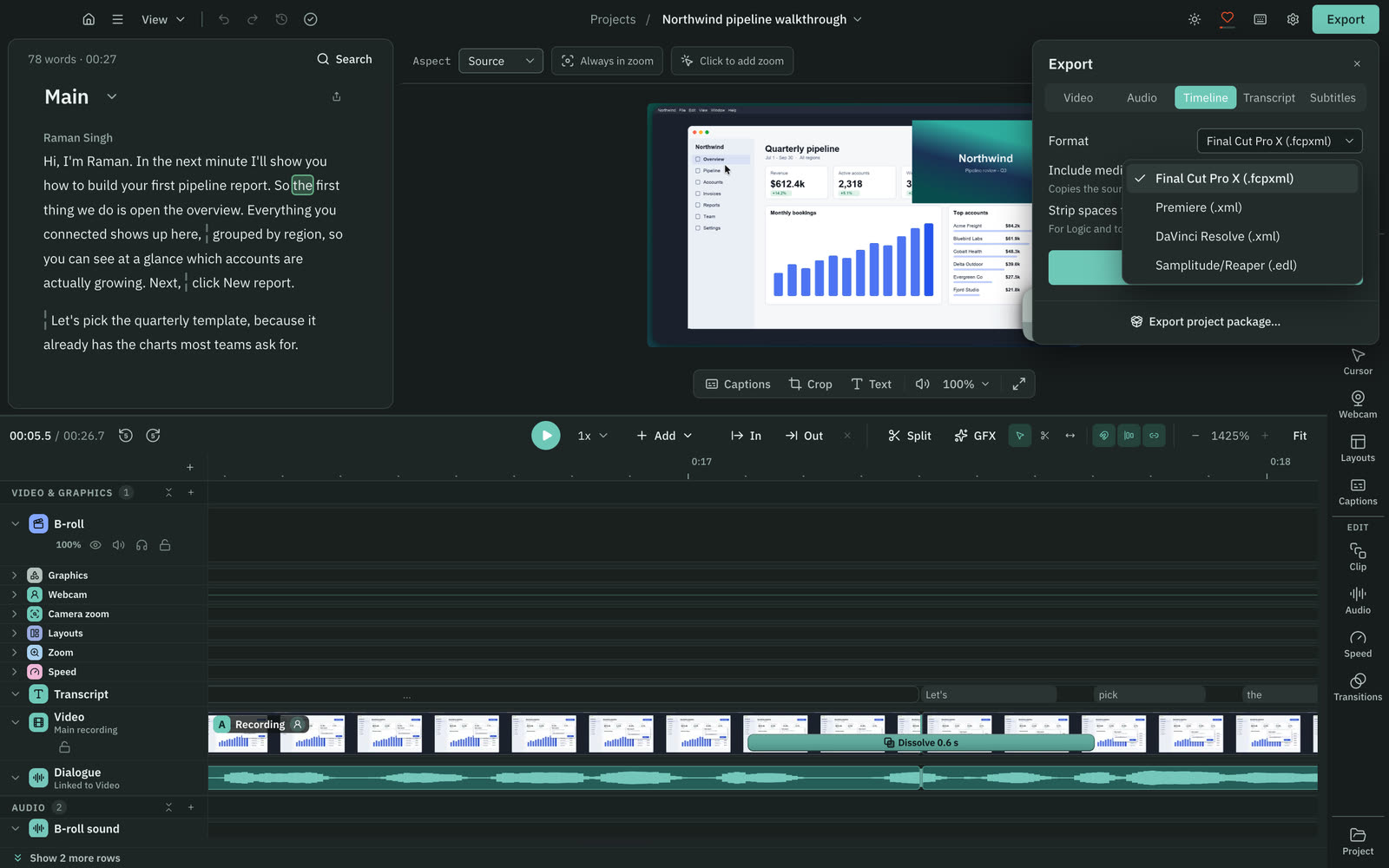
Both give you a video file. Cutscript has four video formats and a Pro timeline file for other editors. Tella has MP4 and, on paid plans, raw recordings.
CutscriptFour video formats and a timeline file
TellaMP4 downloads and raw recordings
| What | Cutscript | Tella |
|---|---|---|
| MP4 up to 4K | YesBoth plans; free exports are watermarked | YesPaid plans. HD on the trial |
| 60 fps export | YesBoth plans | PartlyPaid: 5 minutes on Pro, any length on Premium |
| Other video codecs | PartlyHEVC, ProRes, VP9, without motion effects | Not found in their docsNot found in their docs |
| Timeline for other editors | YesPro only: Final Cut, Premiere, Resolve or EDL | Not found in their docsNot found in their docs |
| Source files for another editor | YesFiles on your computer. Pro copies media beside a timeline | YesRaw recordings, uncut or cut. Paid plans |
| Clean export with no watermark | PartlyPro. Free plan video exports are watermarked | YesNone on exports, per Tella |
| Audio only | YesM4A, WAV, MP3 or FLAC | YesM4A |
| Loudness target | YesPeak, -14, -16, -18 or -23 LUFS | Not found in their docsNot found in their docs |
More detail
Cutscript
- MP4 H.264, MP4 HEVC, MOV ProRes and WebM VP9, from 480p to 4K at 24 to 60 fps. It never scales up.
- With motion effects such as zooms, the cursor or the camera bubble, only MP4 H.264 is offered. Exporting is offline.
- Audio as M4A, WAV, MP3 or FLAC. Transcripts as Word, Markdown, HTML, TXT or RTF. Subtitles as SRT or VTT.
- Timeline export (Pro): Final Cut, Premiere, Resolve or EDL. Cuts and audio come across; effects and speed changes do not.
- Free video exports carry a moving watermark. Audio, subtitle and transcript exports have none, and Pro removes it.
Tella
- You can download MP4, audio-only M4A, separate clips as ZIP, a thumbnail, SRT or VTT subtitles and a TXT transcript.
- HD or 4K. 4K needs a paid plan, not the trial.
- 30 or 60 FPS. 60 needs a paid plan, up to 5 minutes on Pro and any length on Premium.
- Raw recordings with cuts: a folder per scene with camera.mp4 and screen.mp4 at 30 fps, no layouts or zooms. Paid plans only.
- Tella says exported files carry no logo or watermark. Its pricing page lists removing branding from video pages under Premium.
Hosting, sharing and teams
The biggest difference. Tella hosts your video and adds links, comments, analytics, publishing and teams. Cutscript gives you a file to post yourself.
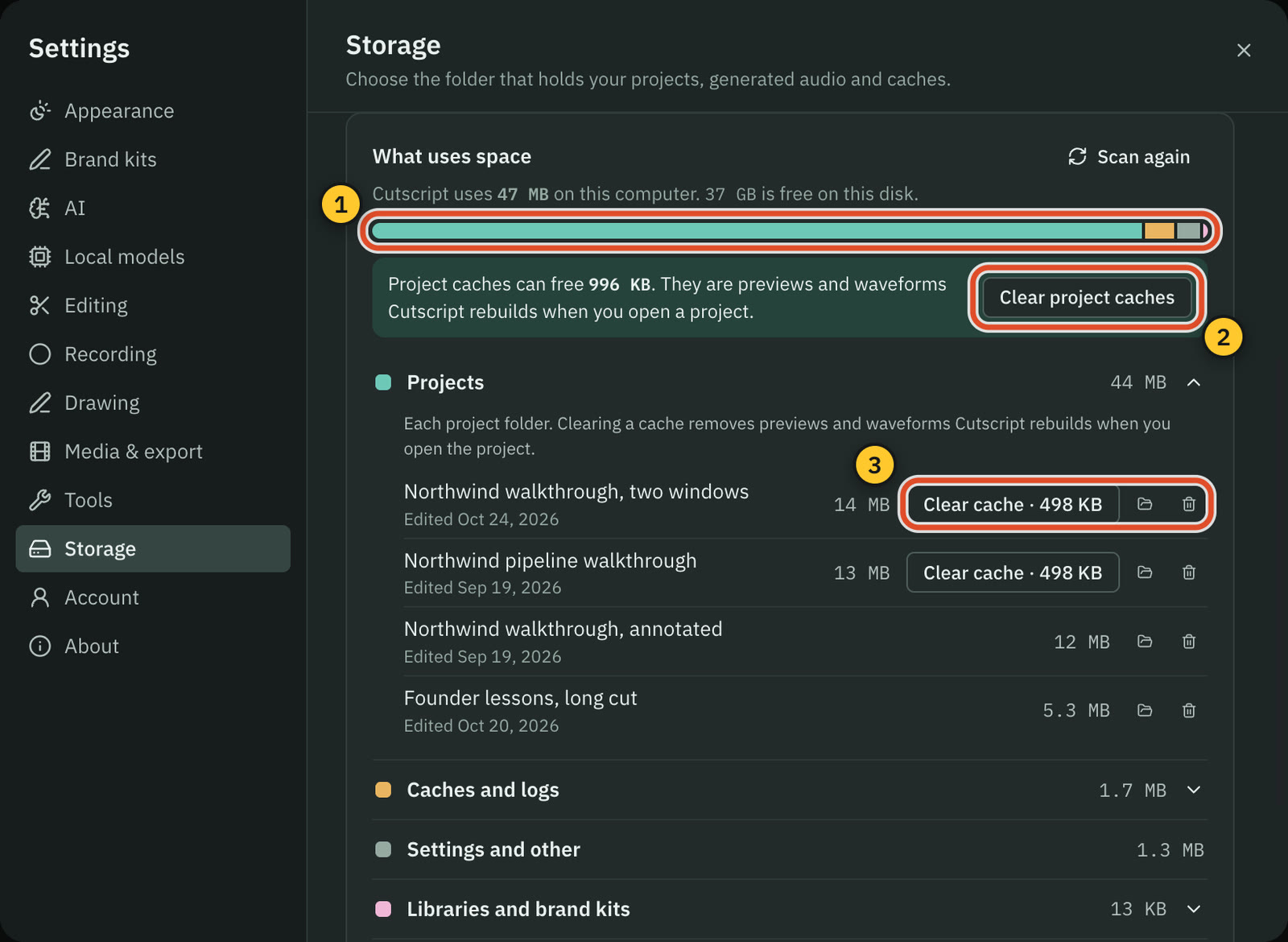
CutscriptFiles on your computer, and you post them
TellaHosted links, analytics, publishing and teams
| What | Cutscript | Tella |
|---|---|---|
| Where the video is kept | YesOn your computer, in a folder you can change | YesTella workspace, no storage limits on paid plans |
| Work with no connection | PartlyRecording, timeline, export, up to 14 days after a check | Not found in their docsNot found in their docs |
| Share links with access control | NoNot offered | YesPrivate, workspace, password or embed only |
| Comments on a video | NoNot offered | YesOn by default for new videos |
| Viewer analytics | NoNot offered | Yes30 days; Premium adds 12 months and all time |
| Direct publishing | NoNot offered, you post the file yourself | YesYouTube, Shorts, LinkedIn, X, TikTok, Instagram, Facebook |
| Team workspaces | NoNot offered. Pro covers one computer at a time | YesCo-editing. SSO and SCIM: add-on, or in Enterprise |
| API and MCP | NoNot offered | YesOn every plan, including the trial |
More detail
Cutscript
- Recording, editing, blur and export run on your computer, with no upload of video files and no analytics or crash reports.
- Cloud AI steps send the text, audio or still frames they need to the provider you pick. Whisper on Apple silicon sends nothing.
- Local export is the only destination today: no share links, comments, viewer analytics, direct publishing or team workspaces.
- Recording, the timeline and export work offline once you are signed in, for up to 14 days on the last plan check.
- Editing by text works offline once the transcript exists. An offline transcript needs Whisper on an Apple silicon Mac.
Tella
- Share access is Private, Anyone with the link, Everyone in workspace, Password or Embed only. Comments are on by default.
- Analytics show watch time, unique viewers, percentage viewed, a funnel, and recent viewers with city, country and device.
- One export can publish to YouTube, Shorts, LinkedIn, X, TikTok, Instagram and Facebook, scheduled up to 30 days ahead.
- Workspaces have a shared library and playlists, three roles, free viewers, and real-time co-editing since 18 Sep 2026.
- Mac app recordings stay on the computer temporarily, then upload, and Tella asks for about 2.5 to 5 Mbps of upload speed.
Price and plans
Cutscript's headline price is lower, but Tella's includes hosting and AI credits. Prices checked 31 Oct 2026.
CutscriptFree, or Pro at $4.17 a month paid yearly ($49.99 a year)
TellaA 7-day trial, then per-user plans
| What | Cutscript | Tella |
|---|---|---|
| Paid yearly | Yes$4.17 a month ($49.99 a year) | YesPro $13, Premium $19 per user a month |
| Paid monthly | Yes$9.99 a month | Not found in their docsNot found in their docs |
| Free plan | YesEvery feature except timeline export. Free account needed | No7-day trial, no credit card |
| What one plan covers | YesOne computer at a time | YesOne user. Viewers are free |
| AI included | NoNone. Your provider bills you directly | Yes4,500 credits on Pro, 9,000 on Premium |
| After you stop paying | YesFree plan. Your files stay on your computer | PartlyVideos stay shareable. No recording, editing or export |
More detail
Cutscript
- Free: every feature except timeline export. Needs a free account. Video exports carry a watermark that moves around the frame.
- Pro: $4.17 a month paid yearly ($49.99 a year), or $9.99 paid monthly. It removes the watermark and adds timeline export.
- Pro covers one computer at a time, at the same price on a Mac or a Windows PC.
- Neither plan includes AI credits. Each provider bills you directly, so count that too.
- On the free plan, an honest review on X earns two video exports without the watermark.
Tella
- Free trial: 7 days, no credit card, HD at 30 FPS, clips up to 2 hours and 4,500 Agent credits. There is no forever-free plan.
- Pro: $13 per user per month, billed annually, with 4,500 credits per user per month, 4K export and 6-hour clips.
- Premium: $19 per user per month, billed annually, with 9,000 credits, a custom domain and 60 FPS at any length.
- Enterprise: custom price, with SSO, SCIM and a SOC 2 Type II report. On Pro and Premium, SSO is a $125 a month add-on.
- Extra credits start at $25 for 25,000, for Agent messages, Auto Layouts, Remove mistakes, Auto Capture and AI images and video.
Where Tella is the better pick
Sharing comes with the video
You get links with access control, comments, reactions, an email gate and analytics. Cutscript has none of this today: you get a file and post it.
Built for teams
Shared workspaces and playlists, three roles, free viewers, real-time co-editing, SSO and SCIM. Cutscript Pro covers one computer at a time.
Publishing from the editor
One export goes to YouTube, Shorts, LinkedIn, X, TikTok, Instagram and Facebook, scheduled up to 30 days ahead. API and MCP too.
Nothing to install
Recording and editing work in a browser, and phone or tablet browsers record quick camera videos. Cutscript needs a Mac or Windows app.
Transcripts and credits included
Transcripts, subtitles and exports use no credits, and paid seats include 4,500 or 9,000 credits a month. No Cutscript plan includes AI credits.
Long clips, no watermark
Tella says exported files carry no watermark. Paid plans allow 6-hour clips and have no storage or bandwidth limits.
Moving from Tella to Cutscript
- Before your plan ends, download what you want to keep. After it ends you cannot record, edit or export.
- Download finished videos as MP4, or raw recordings (paid plans) if you want footage to edit again.
- Install Cutscript on a Mac, or from the Microsoft Store on Windows, and sign in with a free account.
- Import with File › Import Media…. There is no Tella importer, so layouts, zooms and subtitles stay behind.
- Transcribe with a key or Whisper on an Apple silicon Mac. Editing by text and captions need the transcript.
- Imported video has no pointer data, so add zooms by hand. Links and comments stay with wherever you post.
Questions
Can I move my Tella videos into Cutscript?
Yes, as files. Download MP4s, or raw recordings on a paid Tella plan, then use File › Import Media… in Cutscript. Layouts, zooms and subtitles do not come across.
Does Tella have a free plan?
No. Every new workspace gets a 7-day free trial with no credit card, and there is no forever-free plan. Cutscript has a free plan with every feature except timeline export, with a watermark on video exports, and it needs a free account.
Does Tella add a watermark?
Tella says exported files carry no watermark. Its pricing page lists removing branding from video pages under Premium. Cutscript's free plan adds a moving watermark to video exports, and Pro removes it. Audio, subtitle and transcript exports have none.
Can I use my ChatGPT or Claude plan in both?
Yes. In Tella, since 16 Oct 2026, a connected plan covers the model, while tools still use credits and you need a paid plan. In Cutscript, a plan covers the AI's text and the Claude plan needs a Mac. Transcripts need a key or Whisper on Apple silicon, pictures and music a key.
Can Cutscript share a video by link?
No. Cutscript has no share links and does not upload your video files. You export a file and post it yourself, wherever you like.
Do they both work on Windows?
Yes. Cutscript comes from the Microsoft Store, with no area recording, drawing or click tracking on Windows. Colors and Face reach Windows with the next Store update. Tella's Windows app is in Beta with no area selection, and Tella also records in a browser.
Which one costs less?
Cutscript is free, or Pro at $4.17 a month paid yearly ($49.99 a year), or $9.99 monthly, on one computer at a time. Tella Pro is $13 per user a month billed annually, Premium $19. Tella's price includes hosting and AI credits, and with Cutscript you pay your AI provider too.
Try it on your own video.
Free with a Cutscript account. Video exports have a watermark, and Pro removes it.
Download CutscriptFirst published 31 October 2026, last checked 31 October 2026. Prices and features change, so check before you decide. The people in our screenshots are stock footage and do not use or endorse Cutscript. Screenshots show Cutscript 0.1 beta. Seen something wrong or out of date? Tell us and we will fix it.