Cutscriptvs Camtasia
Pick Camtasia for training courses, quizzes and team review. Pick Cutscript, a 0.1 beta screen recorder and editor, to cut by script with AI on your own accounts.
Written by the people who make Cutscript. Checked 31 October 2026. Camtasia and its logo are trademarks of their owner, and Cutscript is not affiliated with or endorsed by them.
Pick Cutscript if
- You want an AI chat that edits the video you already have
- You want AI on accounts you already pay for, or local models
- You want to pay by the month, or a smaller yearly bill without a watermark
- You want a Pro timeline file for Final Cut, Premiere or Resolve
- You need blur that follows what it hides
Pick Camtasia if
- You make training courses with quizzes, hotspots or SCORM
- Your team reviews video with share links and comments
- You record on Windows and want cursor tools and auto zoom there
- You want voices, avatars and stock assets inside one plan
- You want a product with a steady release history
At a glance
| What | Cutscript | Camtasia |
|---|---|---|
| Best for | Demos, tutorials and talks cut by script, AI on your accounts | Corporate training, customer education, educators |
| Maturity | 0.1 beta. Expect rough edges | Version 2026.2, updated October 2026 |
| Price (checked 31 Oct 2026) | Free, or Pro at $4.17 a month paid yearly ($49.99 a year), or $9.99 monthly | Four plans, billed yearly only. Watermark-free from Essentials at $179.88 a year, Create $249 (US dollars) |
| Free plan | YesEvery feature except timeline export and Remove background. Free account needed | YesFree editor download, no stated time limit |
| Watermark | PartlyA moving watermark on free video exports. Pro removes it | PartlyFree download and Starter. Essentials and up export clean |
| Platforms | YesMac and Windows. Recording on a Mac needs macOS 15 | YesWindows and Mac, plus a free browser tool |
| Where files live | On your computer. Cloud AI steps send what they need | Local drives. Cloud for sharing and some AI |
| Sharing | NoYou get a file and post it yourself | YesScreencast view links with comments |
| Editing | YesScript and timeline in one window. Needs a transcript | YesMultitrack timeline. Text editing via Audiate |
| AI | YesChat that edits, video plans, short clips. Your plan or keys | PartlyScripts, voices, avatars by plan. Editing chat not found |
| Automatic zooms | PartlyMac only, from recorded clicks. By hand on Windows | YesSmartFocus on .trec and Rev recordings |
| Training output | NoNot offered | YesQuizzes, hotspots, Smart Player, SCORM |
YesPartlyNoNot found in their docs
Recording
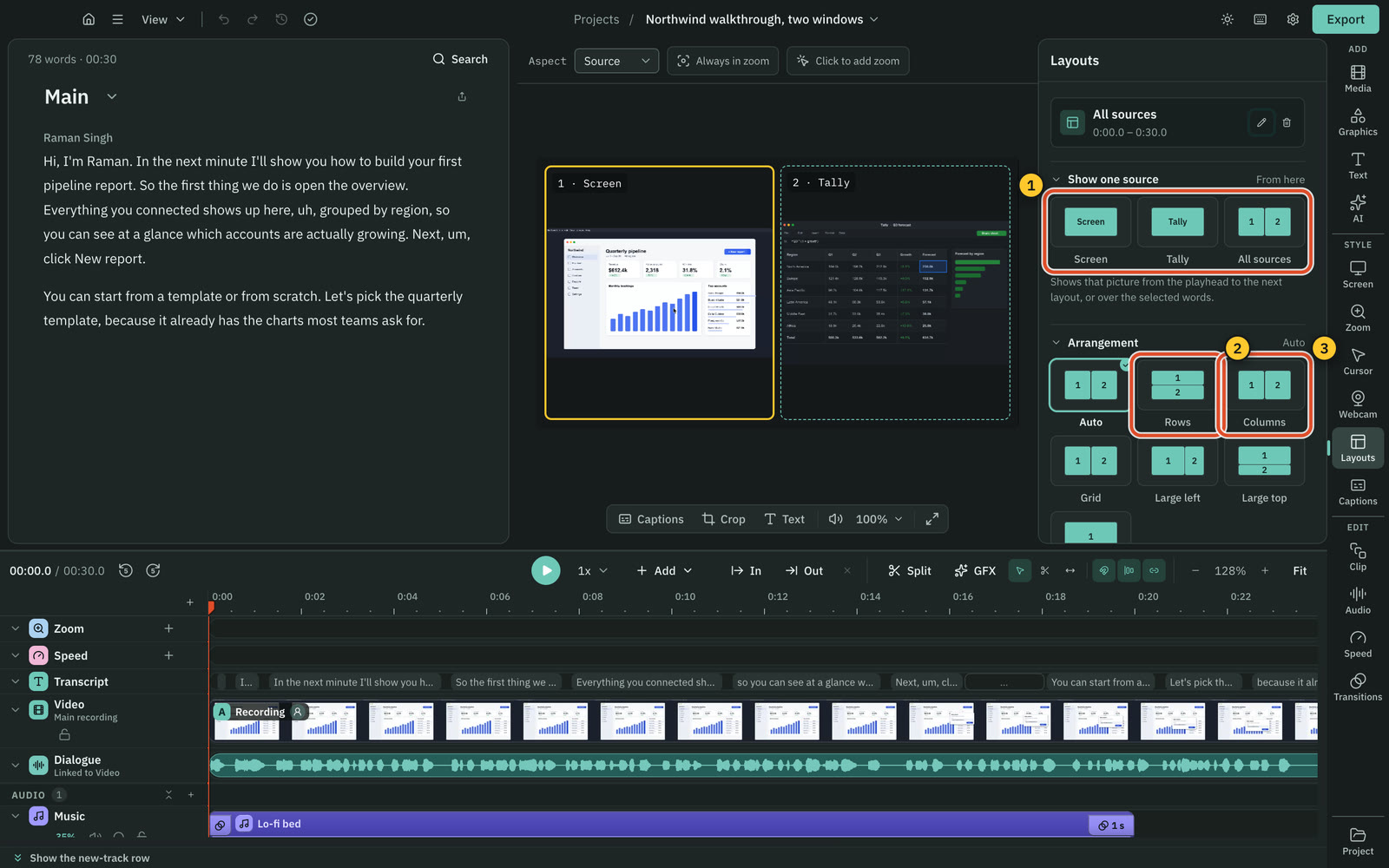
Both keep each source on its own track. Cutscript records up to three pictures in one take, and Camtasia lines up several cameras.
CutscriptSeveral pictures in one take, more tools on a Mac
CamtasiaUp to 4K at 60 fps, with cursor data kept apart
| What | Cutscript | Camtasia |
|---|---|---|
| Display and window | YesMac and Windows. Mac recording needs macOS 15 | YesDisplay, plus a single application window |
| Area | PartlyMac only. Free, set ratios or exact size | Not found in their docsNot found in their docs |
| Frame rate | YesUp to 60 fps. You pick 30 or 60 | YesUp to 4K at 60 fps |
| Each source on its own track | YesPicture, voice, system sound, camera | YesWebcam, mic, system audio. Editable from Essentials |
| Several pictures in one take | YesUp to three. Windows: displays and windows only | Not found in their docsNot found in their docs |
| Several cameras, lined up | NoNot offered | YesAuto Sync Media, by matching audio |
| iPhone or iPad | PartlyExperimental, Mac only, by cable | YesMac by cable. Otherwise via Capture app |
| Draw on screen during a take | PartlyMac only: pen, arrows, shapes, laser, spotlight | PartlyArrow, Square, Step via Snagit. Pen on Mac |
More detail
Cutscript
- Display and window recording: Mac and Windows, with macOS 15 or later on a Mac. Area recording and hiding icons: Mac only.
- Add up to two more pictures to a take, each in its own file with no sound. On Windows they are displays and windows only.
- On a Mac you can draw during a take: pen, highlighter, arrows, shapes, step counter, laser, spotlight and whiteboard.
- iPhone, iPad and sound from one app are experimental, on a Mac, off until you turn them on, and not checked on real hardware.
- After a crash, you can turn the saved files of an unfinished take into a project. A take stops and saves below 500 MB free disk.
Camtasia
- Records up to 4K at 60 fps, or one application window. Closing it stops the recording, and system audio comes only from it.
- Webcam, microphone and system audio each get a track, and the Editor tracks cursor data so you can change it after recording.
- Auto Sync Media (2026.1) lines up several camera tracks by matching their audio.
- Only the Mac editor records an iOS device directly, by cable. On Windows or wirelessly, you use the TechSmith Capture app.
- On Starter, Editor screen recordings are watermarked. They are clean from Essentials up.
Editing by text and timeline
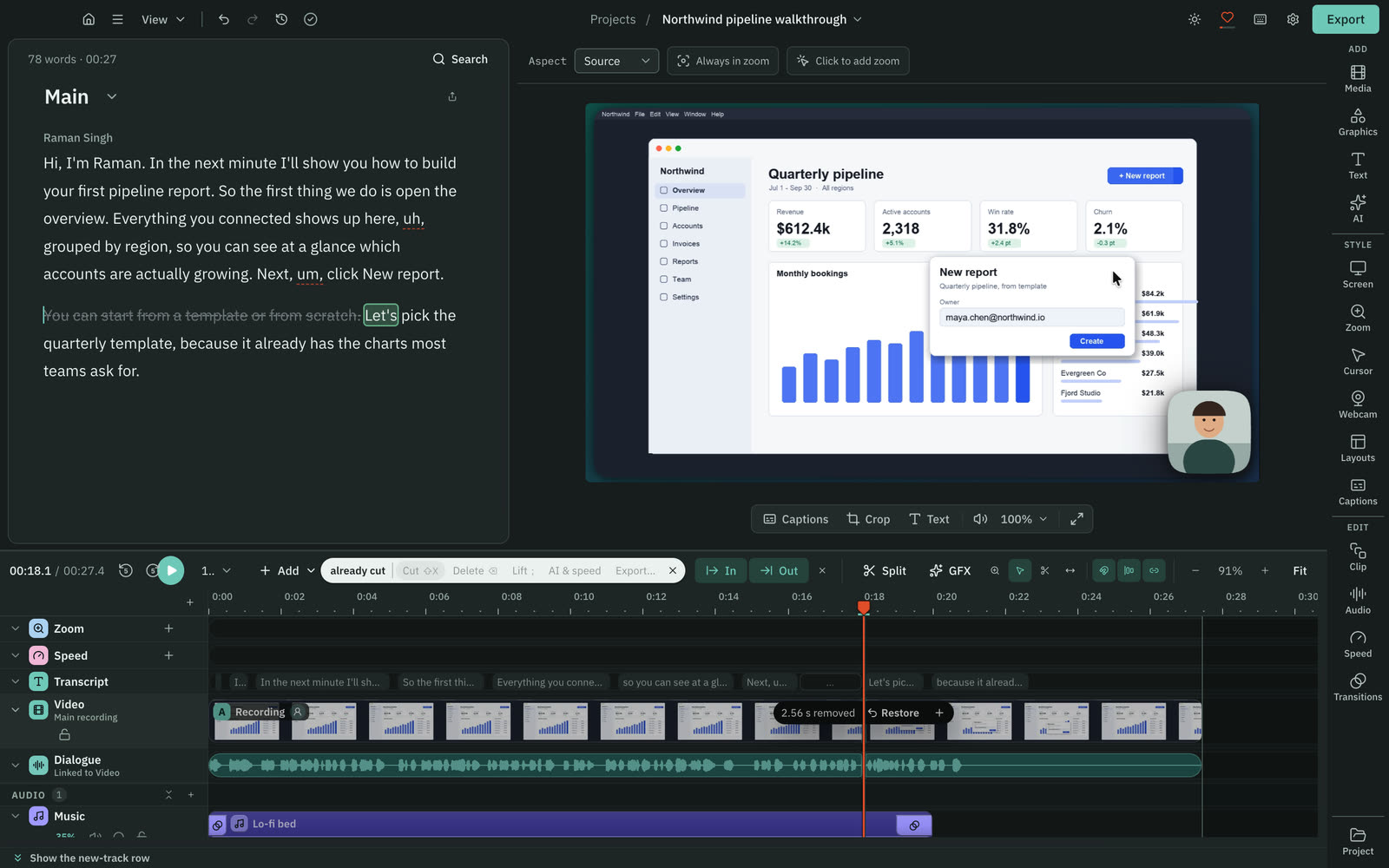
Both cut video by editing text and have a multitrack timeline. Camtasia has the longer effects list, while Cutscript keeps the script in the editor.
CutscriptScript and timeline in one window
CamtasiaEdit as Text via Audiate, 33 effects, multitrack
| What | Cutscript | Camtasia |
|---|---|---|
| Cut by deleting words | YesIn the editor, once a transcript exists | YesVia Audiate, from Essentials |
| Filler words and pauses | YesOn your computer, no AI. Editable word list | YesOne click in Audiate, English only |
| Multitrack timeline | YesHide, mute, solo, lock, reorder tracks | YesMultitrack, watermark-free from Essentials |
| Transitions | YesDissolve, push, wipe, iris, 0.1 to 4 s | YesOver 120 or over 175, their pages differ |
| Effects on a clip | PartlyShort list: speed, frames, patterns, arrows | Yes33 effects in four groups |
| Several edits of one video | YesCompositions, media shared between them | Not found in their docsNot found in their docs |
| Bring in a video from a link | YesYouTube, TikTok, Vimeo, X, for videos you may use | Not found in their docsNot found in their docs |
| Zoom recordings and slides | NoNot offered. Imports video, audio and images | YesZoom cloud recordings and PowerPoint slides |
More detail
Cutscript
- Delete words and the picture and sound follow. Ignore keeps a cut word struck through, and any cut can be restored.
- The script needs a transcript, from your own key or from Whisper on a Mac with Apple silicon.
- Filler words, long pauses and repeated phrases are found on your computer with no AI, once a transcript exists.
- The timeline has video, image and audio tracks, Select, Razor and Slip tools, markers and speed from 0.25x to 4x.
- Compositions keep several edits of one video in one project. Your original media is never changed.
Camtasia
- Edit as Text (2026.0.0, Windows and Mac) sends media to Camtasia Audiate, and your transcript edits come back as video cuts.
- Text editing and filler removal are in Essentials, Create and Pro, not Starter. Multitrack editing is watermarked on Starter.
- Audiate can strip hesitations, silent gaps or passages in one click. Automatic filler detection is English only.
- The effects overview lists 33 effects in four groups, including Blend Mode, Media Matte, Device Frame and Clip Speed.
- You can import images, video, camera footage and PowerPoint slides, and connect a Zoom account to import cloud recordings.
Zooms and cursor
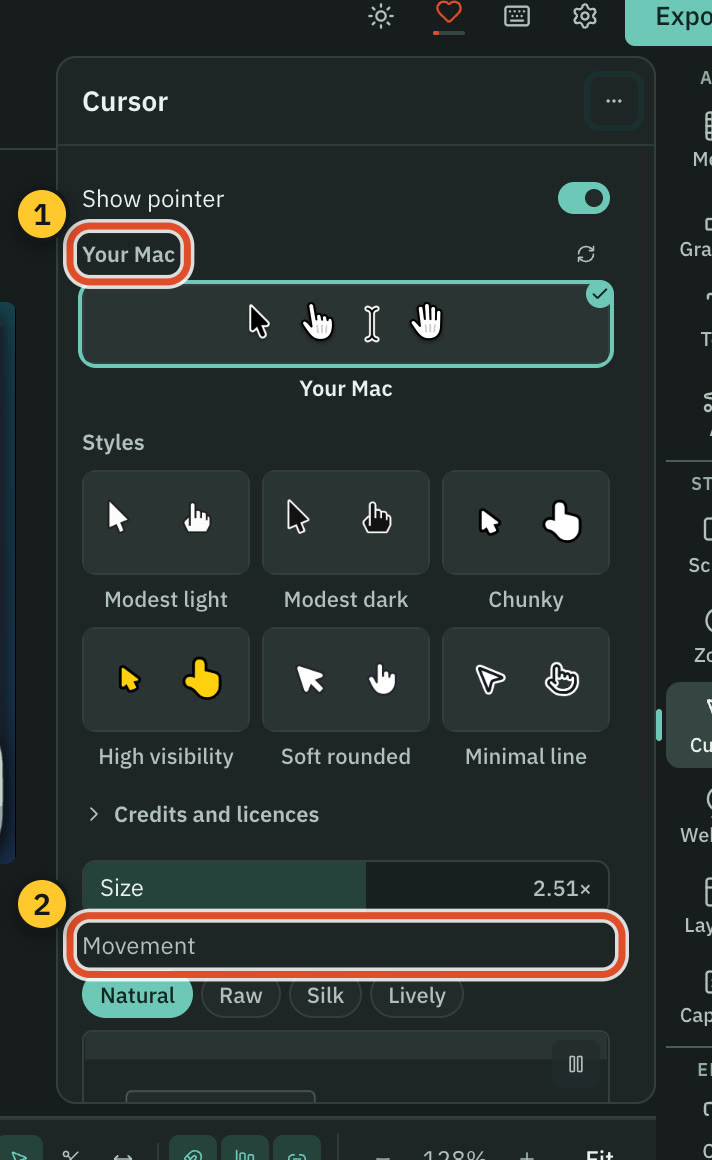
Camtasia has the longer list of cursor and click effects, on Windows and Mac. Cutscript's editable pointer and click zooms work on a Mac only.
CutscriptEditable pointer and click zooms, on a Mac
CamtasiaNamed cursor and click effects, plus SmartFocus
| What | Cutscript | Camtasia |
|---|---|---|
| Automatic zoom | PartlyMac only, from clicks. Fewer, Balanced, More | YesSmartFocus, on .trec and Rev recordings |
| Zoom by hand | YesMac and Windows. 1x to 5x, ease curves | YesAlso by hand, on top of SmartFocus |
| Restyle pointer after recording | PartlyMac only. Six styles plus your Mac's own, 0.5x to 10x | YesSize, shape and movement |
| Smooth the pointer | PartlyMac only. Natural, Raw, Silk or Lively | YesA Smoothing effect |
| Click effects | PartlyMac only. Six effects, such as Ripple | YesClick Burst, Rings, Ripple, Scope, Warp |
| Click sounds | PartlyMac only. Five sounds, mixed into export | YesA Sound click effect |
| Cursor tools on imported video | NoNot offered. No pointer data | YesPath Creator and click effects, on other apps' media |
| Add a zoom during a take | PartlyMac only. Drag a box or click a point | Not found in their docsNot found in their docs |
More detail
Cutscript
- On a Mac, a take records your pointer path and, with one macOS permission, your clicks. The editor redraws the pointer from that.
- Automatic zooms from your clicks work on a Mac: Fewer, Balanced or More, and you can redo or review them.
- On a Mac: six pointer styles plus your Mac's own, size 0.5x to 10x, and Natural, Raw, Silk or Lively movement.
- On a Mac: click effects Spotlight, Ripple, Echo, Circle, Zoom pop and Highlighter, and five click sounds mixed into the export.
- On Mac and Windows you add zooms by hand: press Z or drag the Zoom lane, 1x to 5x. An imported video has no pointer data.
Camtasia
- Screen and cursor data are separate layers in the TREC format, so you can edit the cursor without recording again.
- Cursor effects include Glow, Magnify, Spotlight and Lens. Click effects include Click Burst, Ripple, Rings and Warp.
- Cursor Path Creator and click effects also work on media made in other apps. For TREC recordings, Rev media is unpacked first.
- SmartFocus adds zoom and pan to .trec recordings, tuned for over 30 seconds. It replaces animations already applied.
- Cursor effects and editing are watermarked on Starter and clean from Essentials.
Look and layout
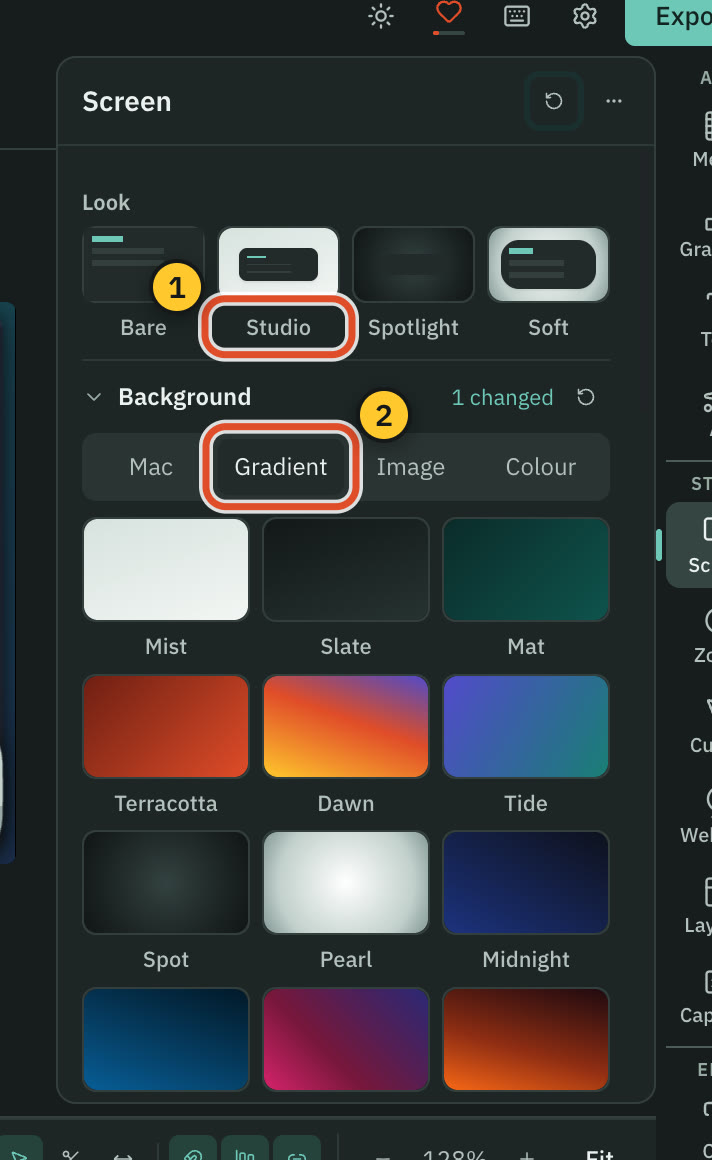
Both have backgrounds, corners, shadows and layouts, and both remove a webcam background without a solid colour. Cutscript lists more camera shapes.
CutscriptA Screen panel and many camera shapes
CamtasiaRev layouts, plus effects for corners and shadow
| What | Cutscript | Camtasia |
|---|---|---|
| Background | YesGradient, image or colour. Wallpapers on a Mac | YesColours, patterns, animations in Rev |
| Padding | Yes0 to 100% | Not found in their docsNot found in their docs |
| Corners, shadow and device frames | YesScreen panel, plus phone and laptop frames | YesCorner Rounding, Drop Shadow, Device Frame |
| Camera shapes | YesCircle, pill, oval, diamond, hexagon and more | PartlyCircle in a Rev layout, no others listed |
| Remove the backdrop | YesPro: any video with a person. Chroma key on both plans | YesRemove a Color, on-device Background Removal |
| Layouts | Yes2, 3 or 4 panels of screen, camera or media | YesScreen, camera, balanced, picture-in-picture |
| Tall video | YesSix ratios incl. 9:16. AI can frame speakers | Partly9:16 canvas, vertical layouts, crop by hand |
| Settings for one clip | YesPer clip, with Copy look and Paste look | Not found in their docsNot found in their docs |
More detail
Cutscript
- Four ready-made looks: Bare, Studio, Spotlight and Soft. New recordings open on Studio.
- Backgrounds are a gradient, an image or a colour. Padding runs 0 to 100%, corners 0 to 50% and shadow 0 to 200%.
- The camera can be a circle, rounded, square, pill, oval, wide, tall, framed, full screen, diamond or hexagon.
- With Pro, Remove background cuts a person out of any video, no green screen, on your computer. It takes time and disk space.
- Layouts split the frame into 2, 3 or 4 panels, and any clip can have its own settings.
Camtasia
- Rev's Background tab offers colours, patterns and animations, with screen-focused, camera-focused and balanced layouts.
- Picture-in-picture, fullscreen camera and a circular camera are built-in Rev layouts. Vertical layouts arrived in 2026.1.0.
- You can move and resize the camera in the Editor. Once Rev media is unpacked, it cannot go back to Rev.
- Effects include Corner Rounding, Border, Drop Shadow, Device Frame, Reflection, Spotlight, Vignette, Blend Mode and Media Matte.
- Remove a Color and Background Removal are effects. Background removal runs on your device and is listed from Starter.
Colour and blur
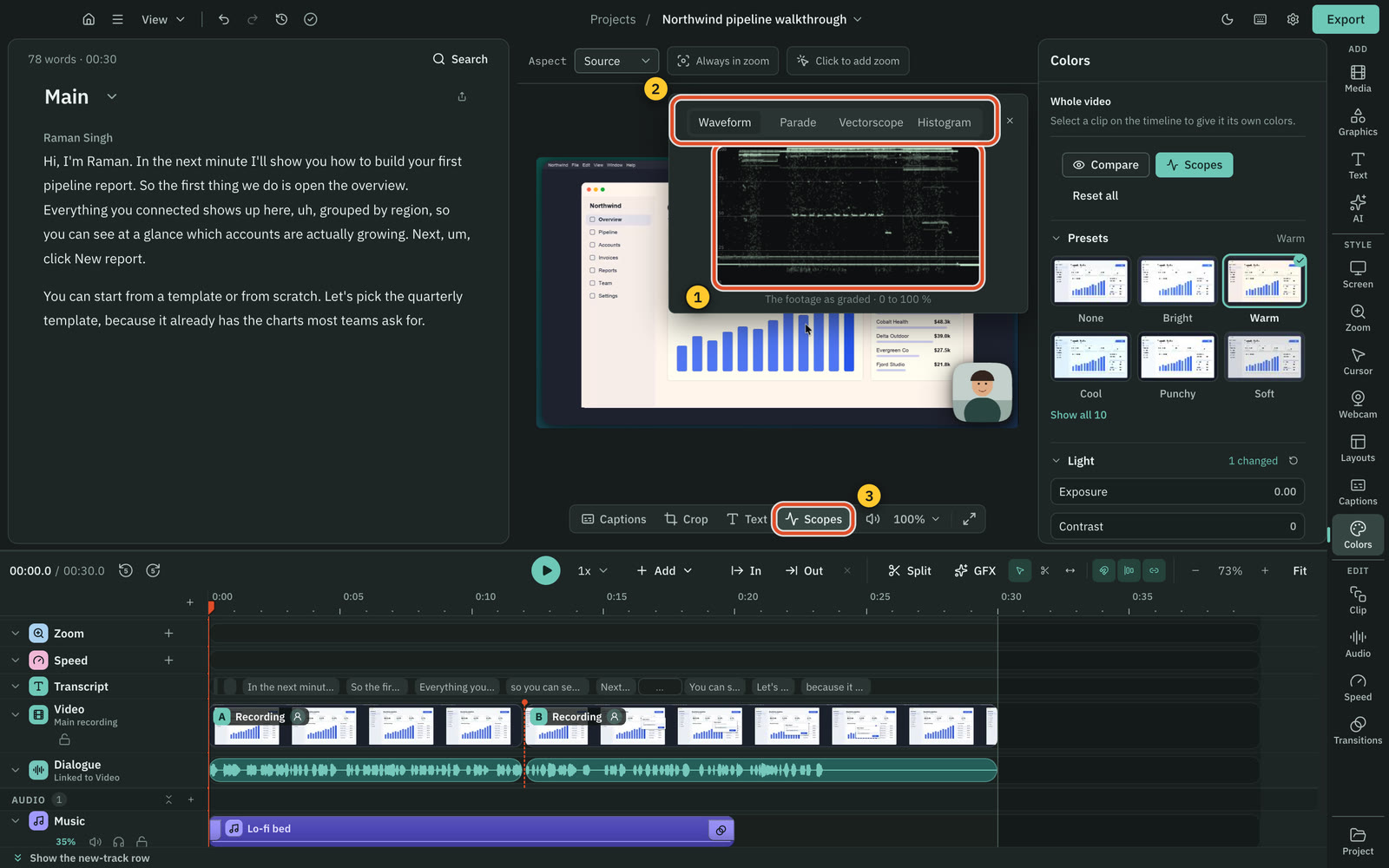
Cutscript has a blur that follows, scopes and face colour. Camtasia has colour effects, a LUT and a blur you move by hand.
CutscriptGrade, scopes, face colour and tracking blur
CamtasiaColour effects, a LUT and a Blur Region
| What | Cutscript | Camtasia |
|---|---|---|
| Light and colour controls | YesSliders and wheels | YesColor Adjustment, Filters, Tint, Colorize |
| A .cube look | YesImport a .cube, set intensity | YesA LUT effect with intensity |
| Scopes | YesFour scopes | Not found in their docsNot found in their docs |
| Colour for the face only | YesPresets, sliders or AI | Not found in their docsNot found in their docs |
| Grade with AI | YesReads up to four frames | Not found in their docsNot found in their docs |
| Blur an area | YesBlur or pixelate, strength 1 to 100, tint | YesBlur Region, feather, invert, oval or box |
| Blur that follows | YesPixel lock, Mac and Windows. Apple Vision on Mac | PartlyBy hand, with a Custom animation |
| Find every face or email | PartlyMac only. Review and switch any off | Not found in their docsNot found in their docs |
More detail
Cutscript
- Colors: sliders, presets, wheels, a vignette and a .cube look, on a Mac and on Windows.
- Scopes are Waveform, Parade, Vectorscope with a skin-tone line, and Histogram. A graded video exports as H.264.
- Face: click a face for its own colours. Faces are found on your computer, nothing uploaded.
- Blur or pixelate an area, and Pixel lock follows it, with per-frame fixes. Export warns if the subject is lost.
- Blur all faces, Blur all emails and Apple Vision tracking work on a Mac.
Camtasia
- Colour effects: Color Adjustment, Color Filters, Color Tint, Colorize, Glow, Remove a Color, and Sepia on Mac.
- A LUT effect opens .cube files, with intensity and ease in and out. No waveform, vectorscope or histogram is named.
- TechSmith's own blog says Camtasia Editor is built for training and tutorials, not cinematic colour grading.
- Blur Region has amount, tint, oval or rectangle, invert, corner rounding, feather, and ease in and out.
- To follow a moving subject you apply a Custom animation and drag the blur. Snagit's AI blur is for images, not video.
Captions
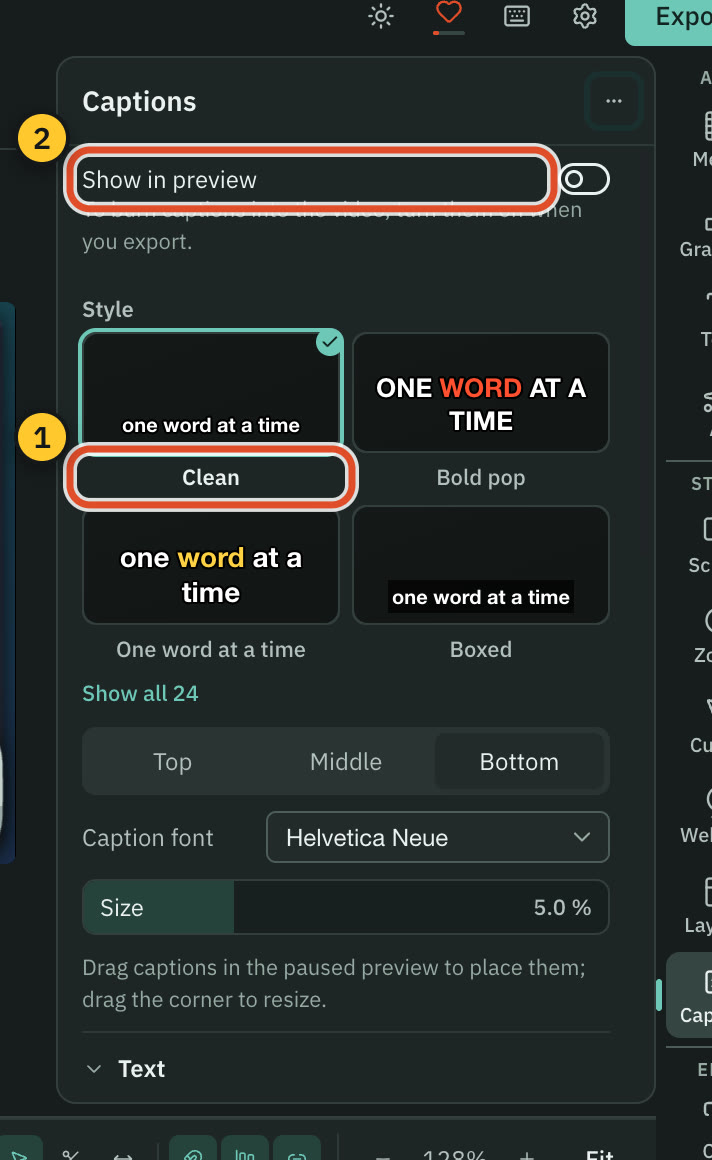
Both style captions word by word and export subtitle files. Camtasia transcribes on your device, and Cutscript needs your key or Whisper on an Apple silicon Mac.
Cutscript24 styles, on a transcript you set up
CamtasiaDynamic and closed captions, on-device speech-to-text
| What | Cutscript | Camtasia |
|---|---|---|
| Transcript with no AI account | PartlyApple silicon Mac with Whisper, else a key | YesOn your device, Windows and Mac |
| What a transcript costs | YesYour provider's price. Whisper is free | YesUnlimited from Essentials, per their terms |
| Transcript languages | Yes90+ with Scribe v2, 99 with Whisper | Not found in their docsNot found in their docs |
| Styled captions | Yes24 styles, every setting editable | YesDynamic captions, savable styles |
| Word by word | YesHighlight, underline, reveal or active word | YesDynamic captions, draggable word timing |
| Captions viewers can turn off | PartlyExport a subtitle file to upload with the video | YesClosed captions with a CC button |
| Subtitle files | PartlyExport only: SRT or VTT | YesImport and export SAMI, SRT, VTT |
| Burn in | YesMatches the preview, fits portrait and square | YesBurned in, exported as a local file |
More detail
Cutscript
- Transcripts need an ElevenLabs, fal.ai or OpenRouter key, or Whisper on Apple silicon. ChatGPT and Claude plans cannot transcribe.
- Pick one of 24 styles, such as Bold pop, Karaoke or Word reveal. Every setting stays editable.
- Highlight the word being said, reveal words as spoken, or show only the active word.
- Use any installed font, an outline or a box, and drag the captions on the preview.
- Burn captions in, or export SRT or VTT timed to the edited video. Export the transcript as Word, Markdown, HTML, TXT or RTF.
Camtasia
- In Camtasia Editor, speech-to-text uses whisper.cpp on your device. Audiate's speech-to-text runs in the cloud on Deepgram.
- Dynamic captions are always on screen. You can drag word timing on a transcript bar and save a style for reuse.
- Dynamic captions are watermarked on Starter and clean from Essentials.
- Closed captions come from speech-to-text, an Audiate transcript or typing, and viewers can switch them off with the CC button.
- SAMI, SRT and VTT import and export. Burned-in captions are always visible. Script sync is Windows only.
AI
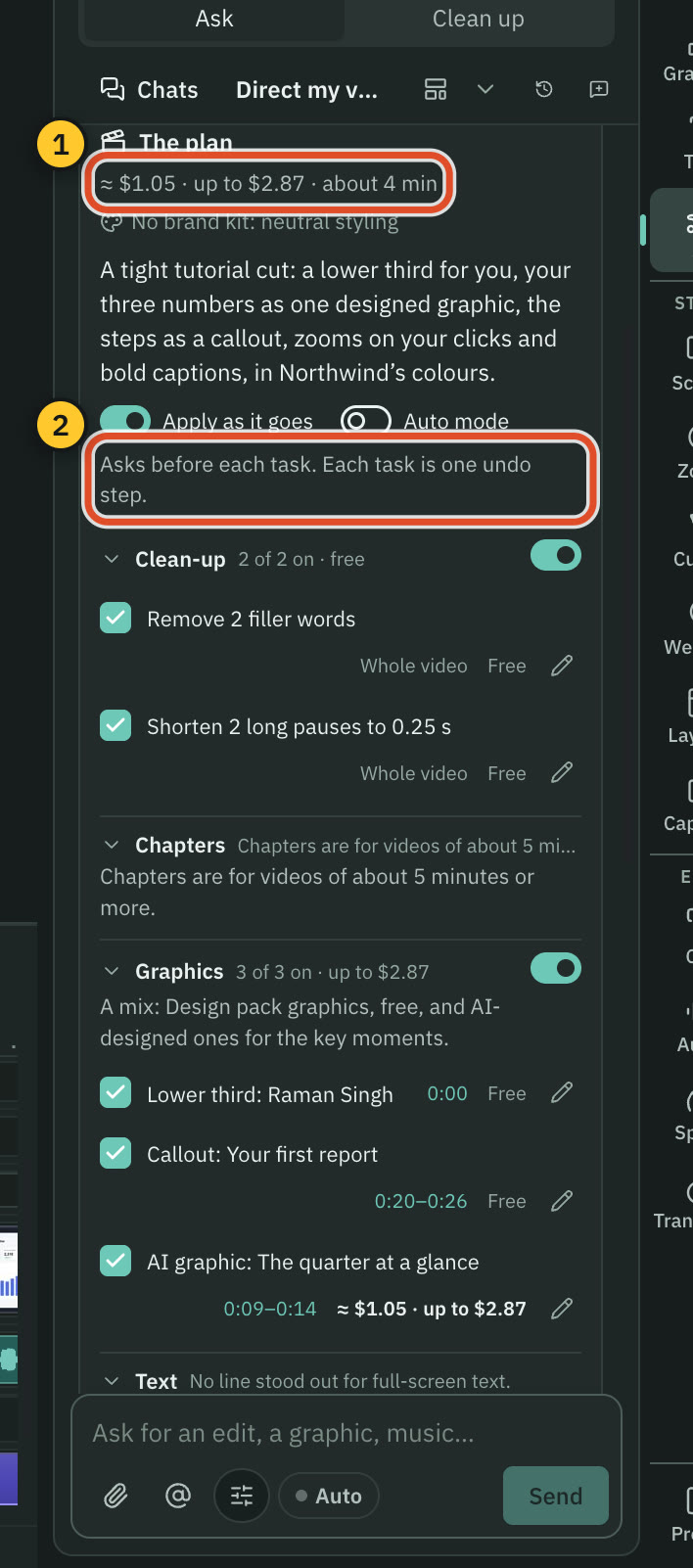
Cutscript's AI chat edits the video you already have, on accounts you own. Camtasia's AI generates scripts, voices, avatars and new videos, included by plan.
CutscriptOne AI, Direct my video and short clips
CamtasiaPrompt to script, screenshots to video, AI by plan
| What | Cutscript | Camtasia |
|---|---|---|
| AI chat that edits your video | YesOne AI. Changes arrive as cards | Not found in their docsNot found in their docs |
| AI plan for a whole edit | YesDirect my video, approved by you first | Not found in their docsNot found in their docs |
| Narrated video from screenshots | NoNot offered | YesChatGPT plugin and Camtasia.ai |
| Short clips from a long video | YesUp to ten scored clips | Not found in their docsNot found in their docs |
| Your own ChatGPT or Claude plan | YesChatGPT plan, or Claude plan on a Mac | Not found in their docsNot found in their docs |
| Your own API keys | YesOpenRouter, ElevenLabs, fal.ai, OpenAI | Not found in their docsNot found in their docs |
| Models on your computer | YesOllama on Mac and Windows. Whisper on Apple silicon | PartlyFixed models for speech, noise and backgrounds |
| What AI costs | YesYour provider, your plan, or a free local model | YesIncluded by plan, subject to their terms |
More detail
Cutscript
- One AI is a chat for the whole editor. It proposes changes to your script, timeline and look as cards, and Apply is one undo step.
- Direct my video reads the transcript, asks a few questions and writes a priced plan you approve first.
- Make short clips finds up to ten scored clips. They follow a face on a Mac, and the pointer or a still crop on Windows.
- It runs on your ChatGPT plan, your Claude plan on a Mac, an OpenRouter key, or Ollama on your computer. A plan covers text only.
- Most paid steps show the price first, and you can undo to before any message. The AI does not record, export or run code.
Camtasia
- An AI chat that edits an existing timeline: not found in their docs.
- The Camtasia plugin in ChatGPT makes a new video from screenshots. It needs a TechSmith account and does not edit video.
- Camtasia.ai is a free browser tool: from up to 10 images it makes a script, voiceover and auto zoom, with no sign-in or watermark.
- Script, voice and avatar generation runs through Audiate. Camtasia Pro adds AI titles, chapters and descriptions.
- Providers are fixed per feature: Azure, ElevenLabs, Deepgram, D-ID. Some models run on your device, like whisper.cpp.
Voices and sound
Camtasia includes voices, avatars and translation in its plans. Cutscript uses your own provider accounts, which gives cloned voices and music, with no avatars.
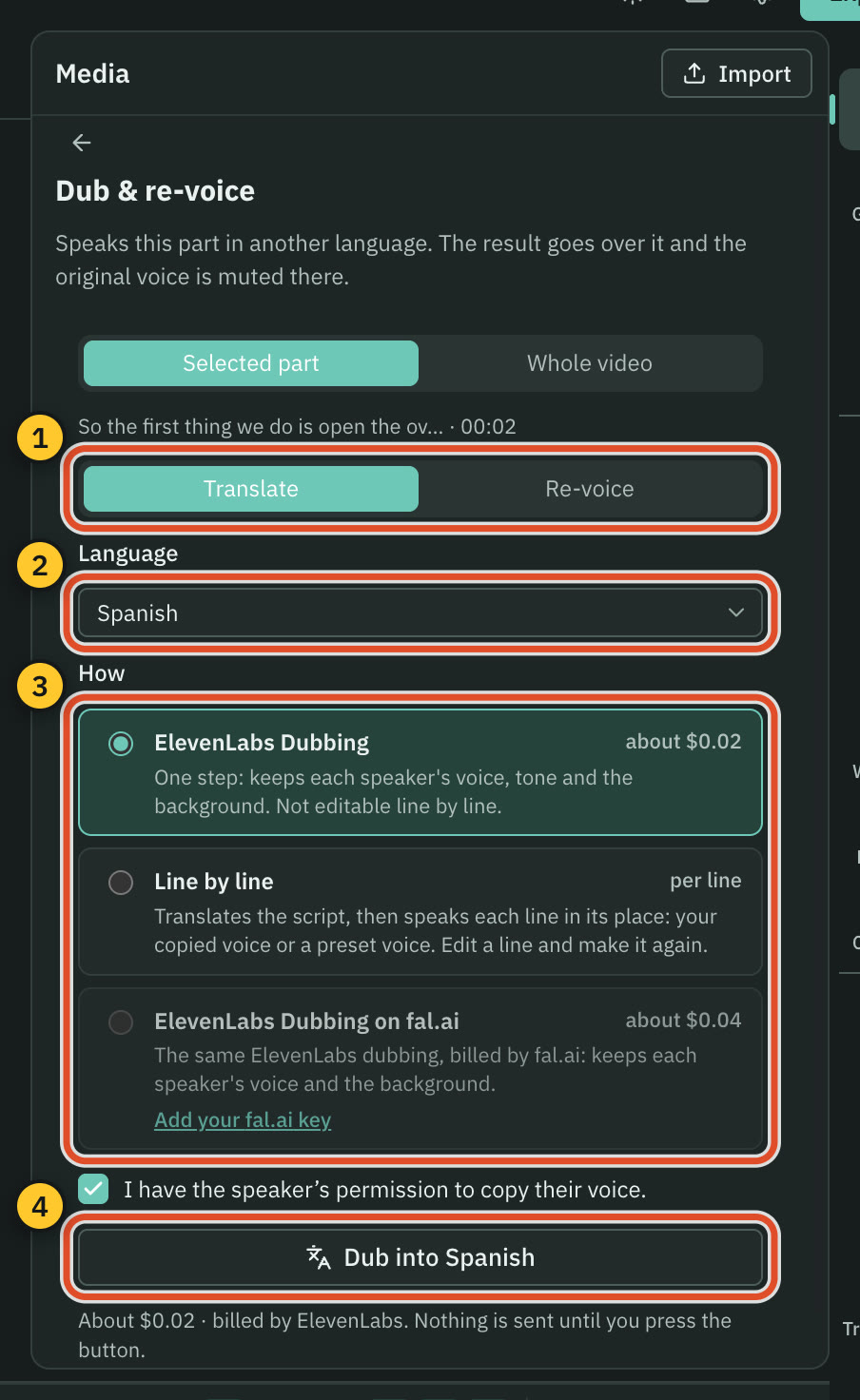
CutscriptVoiceover, dubbing and music through your keys
CamtasiaVoices, avatars, translation and dubbing by plan
| What | Cutscript | Camtasia |
|---|---|---|
| Voiceover from text | YesYour key, or an Apple silicon Mac voice | YesFrom Create. 100+ or 200+ voices |
| A voice copied from a sample | YesElevenLabs clones, or Fish from a sample | Not found in their docsNot found in their docs |
| Dub into another language | YesElevenLabs Dubbing, or Line by line | YesOn Camtasia Pro or standalone Audiate |
| Say it again in another voice | YesRe-voice, keeping timing and emotion | Not found in their docsNot found in their docs |
| AI avatars | NoNot offered | Yes49 or 50+ stock avatars, on Pro |
| Clean up a voice | YesBuilt-in offline, Apple Voice Isolation, or your key | YesOn-device noise removal, from Starter |
| Music and effects from a prompt | YesElevenLabs, fal.ai or OpenRouter | Not found in their docsNot found in their docs |
| Stock music and effects | NoNot offered. Your own or generated audio | YesUnder 100, then the full library on Pro |
More detail
Cutscript
- Voiceover runs on your ElevenLabs, fal.ai, OpenRouter or OpenAI key, or a voice on an Apple silicon Mac that sends nothing.
- Use your ElevenLabs cloned voices, or have Fish copy a 10 to 30 second sample. Copying someone's voice needs their permission.
- ElevenLabs Dubbing keeps each speaker's voice and background sound. Line by line translates your script and speaks each line.
- Generate music and sound effects from a prompt. Cutscript ships no music or effects library, so bring your own files.
- Enhance voice cleans audio with no internet, Apple Voice Isolation on a Mac, or ElevenLabs and fal.ai on your key.
Camtasia
- Voiceover generation starts at Create. The store page says 200+ options, and the AI voice page says 100+, powered by ElevenLabs.
- Voices cover English, Spanish, German, French, Italian, Portuguese and Dutch.
- Script translation and audio dubbing come with Pro or standalone Audiate. Translation overwrites the existing script and audio.
- Avatars come with Pro or standalone Audiate, and are stock avatars. TechSmith gives 50+ in one place and 49 elsewhere.
- Background noise removal is listed from Starter and runs on your device. Essentials adds studio-quality audio effects.
Graphics and stock
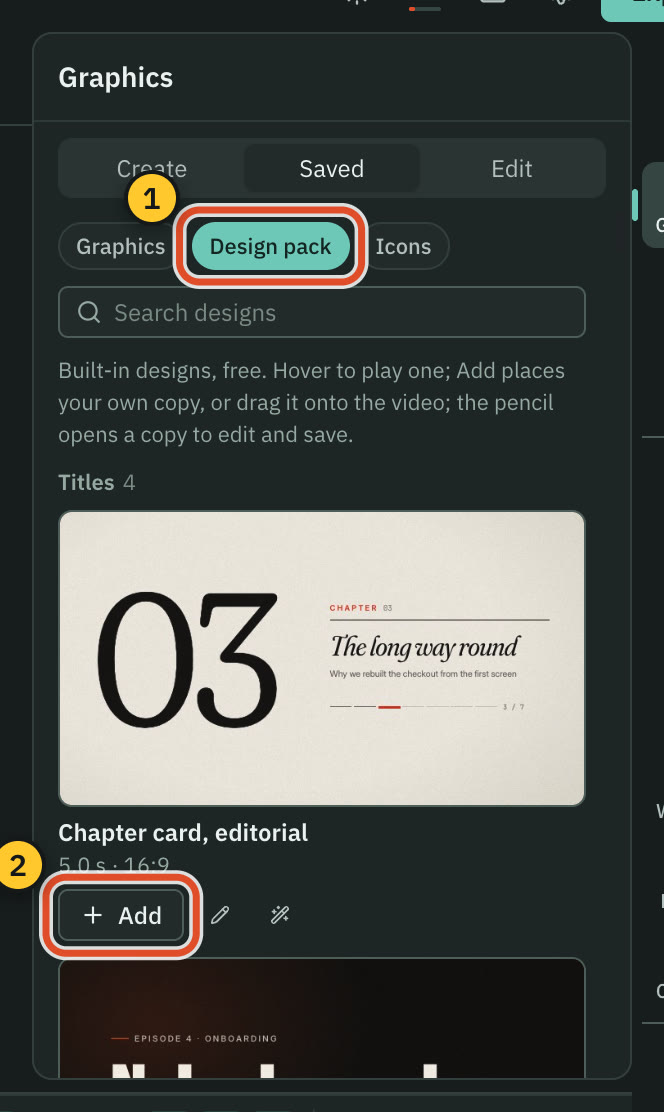
Camtasia Pro includes a 100M+ asset library. Cutscript ships a smaller Design pack, and its AI design tools run on your accounts.
CutscriptA Design pack, an AI design director, brand kits
CamtasiaStock assets, templates and customizable animations
| What | Cutscript | Camtasia |
|---|---|---|
| Ready-made motion graphics | Yes31 in the Design pack, offline | YesCustomizable animations, since 2026.2 |
| Stock video, audio and images | NoNot offered. No bundled library | Yes100M+ on Pro. Under 100 on lower plans |
| Graphics from a prompt | YesDesign director on your AI account | PartlyImage generation (beta), Pro only |
| Charts and maps | Yes29 chart types and route maps. Need AI | Not found in their docsNot found in their docs |
| Brand kit | Yes16 colours, four fonts, logos. Import from a site | PartlyTemplate fonts and colours, Pro brand assets |
| Reusable designs | YesSaved library, repeating graphics, Update all | YesTemplates and themes, shared as a file |
| Lottie and SVG | PartlySVG imports. Lottie plays only in graphic code | YesBetter Lottie since 2026.2, SVG on both |
| Arrows and callouts | YesArrows in eight directions, boxes, fitted images | YesCallouts. Curved arrows on Windows since 2026.2.0 |
More detail
Cutscript
- The Design pack has 31 motion graphics, such as titles, maps, charts, versus screens and countdowns. It works offline with no AI.
- Edit any graphic by hand: its words, colours, numbers, rows, pictures, timing and code, with no AI.
- The design director makes motion graphics of 1 to 60 seconds, with a storyboard and a price first. It needs an AI source.
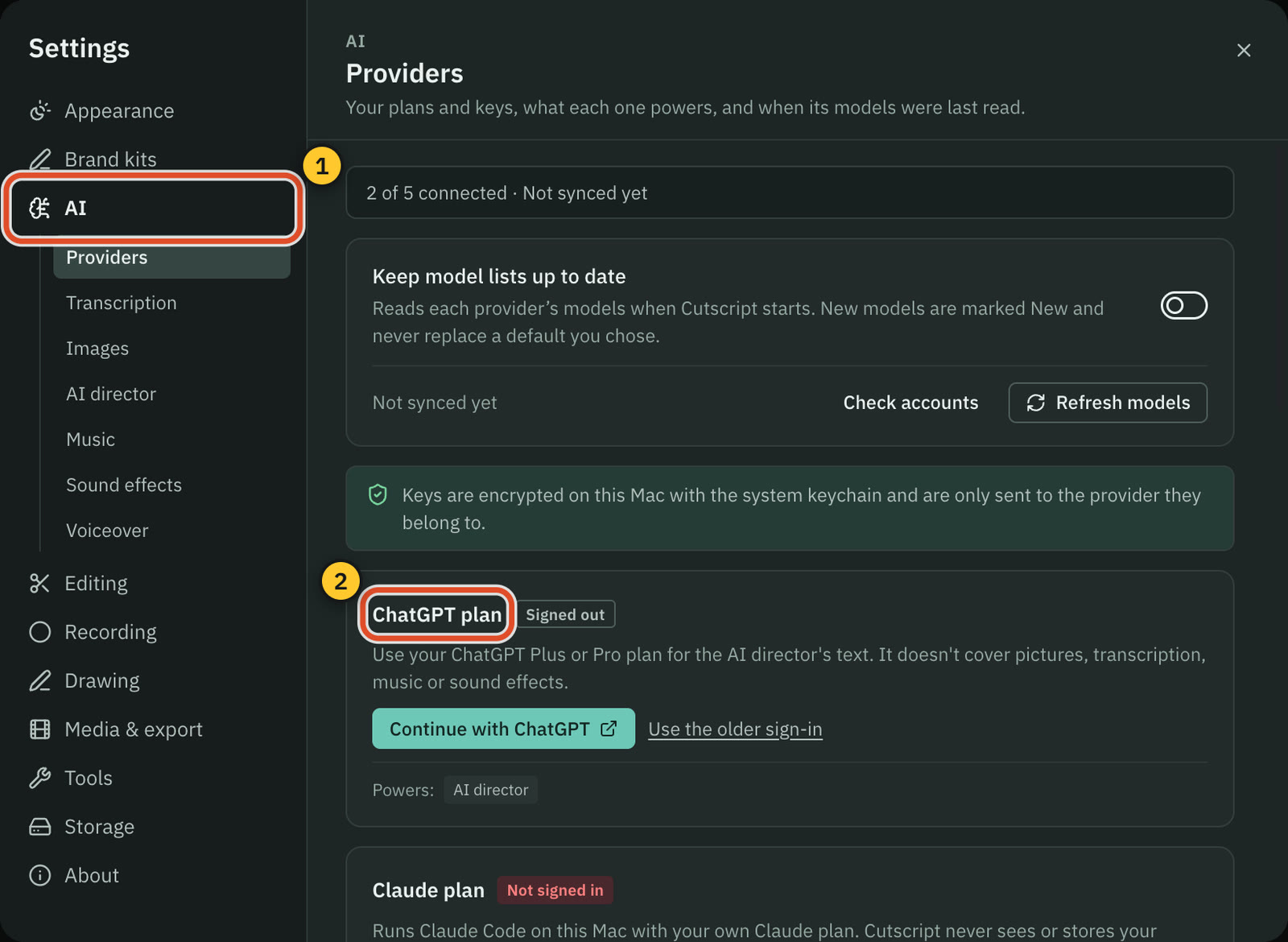
- With the AI you also get charts from your data in 29 types, route maps, and infographics with over 13,000 icons.
- Brand kits hold up to 16 colours, four fonts and logos, and import from a website with no AI.
Camtasia
- Pro includes 100M+ royalty-free assets. Starter, Essentials and Create list fewer than 100 stock assets of each kind.
- The asset terms bar resale as standalone files, use as a logo, merchandise, and registering music with YouTube.
- Camtasia 2026.2 added customizable animations in Assets and improved Lottie support. Motion path is a named effect.
- Windows 2026.2.2 added basic SVG support, and Mac 2026.2.2 added SVG Tiny 1.2 rendering.
- You can adjust a template's fonts, colours and images and share it as a file. Pro adds brand assets and image generation in beta.
Export and sharing
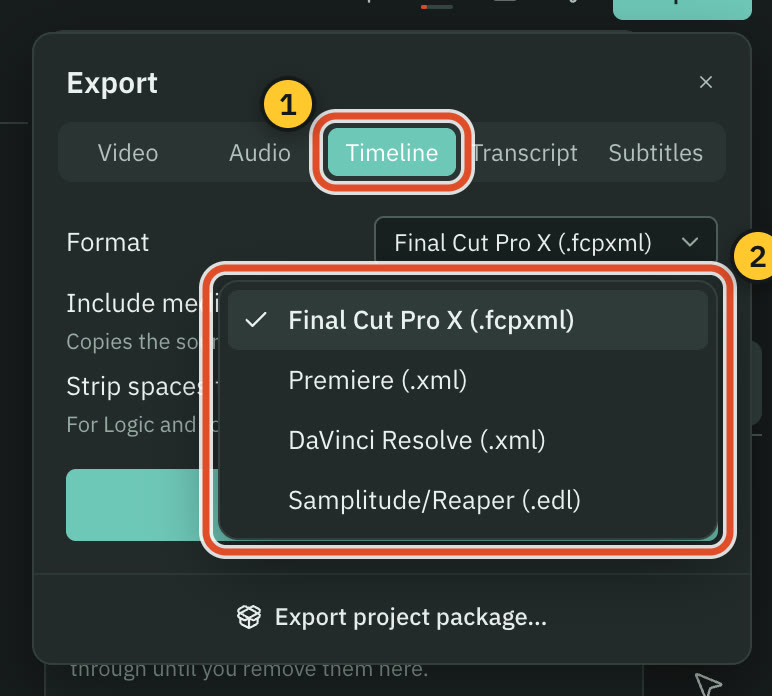
Both write video files to your computer. Camtasia also uploads, shares links and packages courses, while Cutscript, on Pro, hands a timeline to another editor.
CutscriptLocal files, plus timeline hand-off on Pro
CamtasiaLocal files, YouTube, Screencast and SCORM
| What | Cutscript | Camtasia |
|---|---|---|
| Video formats | PartlyH.264. HEVC, ProRes, WebM only without motion effects | YesMP4, GIF, WebM. MOV not named |
| Resolution and frame rate | YesSource or 480p to 4K, 24 to 60 fps | Not found in their docsNot found in their docs |
| Transparent video | NoNot offered. No alpha channel | YesWebM with transparency, since 2026.2.0 |
| Hand-off to other editors | YesPro only: Final Cut, Premiere, Resolve or EDL | Not found in their docsNot found in their docs |
| Upload from the app | NoNot offered. You post the file | YesYouTube and Screencast |
| Share links with comments | NoNot offered | YesScreencast links, comments, reactions |
| Quizzes, hotspots and SCORM | NoNot offered | YesSmart Player and SCORM, from Essentials |
| Working with a team | PartlyMove one .csproj file. No shared comments | YesCamtasia Online invites and comments |
More detail
Cutscript
- Export MP4 H.264, MP4 HEVC, MOV ProRes or WebM VP9, at source size or 480p to 4K, 24 to 60 fps. It never scales up.
- With motion effects like zooms or a camera bubble, only MP4 H.264 is offered, so a new recording exports as H.264.
- Timeline export is Pro only: Final Cut Pro, Premiere Pro, DaVinci Resolve or EDL. It carries cuts and audio clips, not your look.
- Export audio as M4A, WAV, MP3 or FLAC, with a loudness target from Peak to -23 LUFS.
- Export several compositions at once, each as MP4 H.264. Cutscript uploads nothing today, so you post the file yourself.
Camtasia
- Local File export lists MP4, GIF, M4A and WebM. WebM arrived in 2026.2.0 with transparency support.
- You can upload to YouTube or Screencast, batch export, and export a timeline selection.
- MP4 with Smart Player adds a table of contents, captions, search, quizzes and hotspots. SCORM packages serve an LMS.
- Quizzes and hotspots do not work on YouTube. Quizzes and SCORM export arrive with Essentials.
- Screencast links open with no login, with an optional access phrase. Free keeps 25 videos for 12 months, Pro is unlimited.
Price
Cutscript Pro costs less per year than Camtasia's first watermark-free plan, but Camtasia bundles Snagit, Audiate and AI. Checked 31 October 2026.
CutscriptFree, or Pro at $4.17 a month, $49.99 a year
CamtasiaFour yearly plans, watermark-free from Essentials
| What | Cutscript | Camtasia |
|---|---|---|
| Free to start | YesEvery feature except timeline export and Remove background | YesEditor download, no stated time limit |
| Watermark | PartlyA moving watermark on free video exports | PartlyFree download and Starter |
| First plan without a watermark | YesPro, $4.17 a month paid yearly ($49.99 a year) | YesEssentials, $179.88 a year (US dollars) |
| Pay monthly | Yes$9.99 a month | NoNot offered on individual plans |
| AI in the price | NoNot included, providers bill you | YesIncluded by plan tier |
| Computers | YesOne computer at a time | PartlyTwo devices, or one signed in. Pages differ |
| Cancel or refund | YesCancel any time. Refund within 7 days | Yes14-day money-back on all plans |
| Teams | NoNot offered | YesBusiness License, discounts from ten licences |
More detail
Cutscript
- The free plan has every feature except timeline export and Remove background. It needs a free account.
- Free video exports carry a moving watermark. Audio, subtitle and transcript exports have none. Pro removes it.
- Pro: $4.17 a month paid yearly ($49.99 a year), or $9.99 monthly. No watermark, plus timeline export and Remove background.
- Pro covers one computer at a time, Mac or Windows. You can remove up to 3 computers every 30 days.
- Cancel any time, and Pro lasts to the end of the paid period. We refund your first payment within 7 days, no questions asked.
Camtasia
- Four plans, all billed yearly with no monthly option: Starter, Essentials, Create and Pro. Starter output is watermarked.
- Prices show in your local currency. We saw ₹1,599 for Starter, ₹7,399 for Essentials, ₹9,999 for Create and ₹28,200 for Pro.
- In US dollars, a TechSmith blog lists Essentials at $179.88 a year and Create at $249. We found no US dollar price for Pro.
- The free download has no stated time limit, and exports carry a watermark. TechSmith says it may end that version at any time.
- A student offer is $45 a year in the US, Canada and the UK. Business License volume discounts start at ten licences.
Platforms
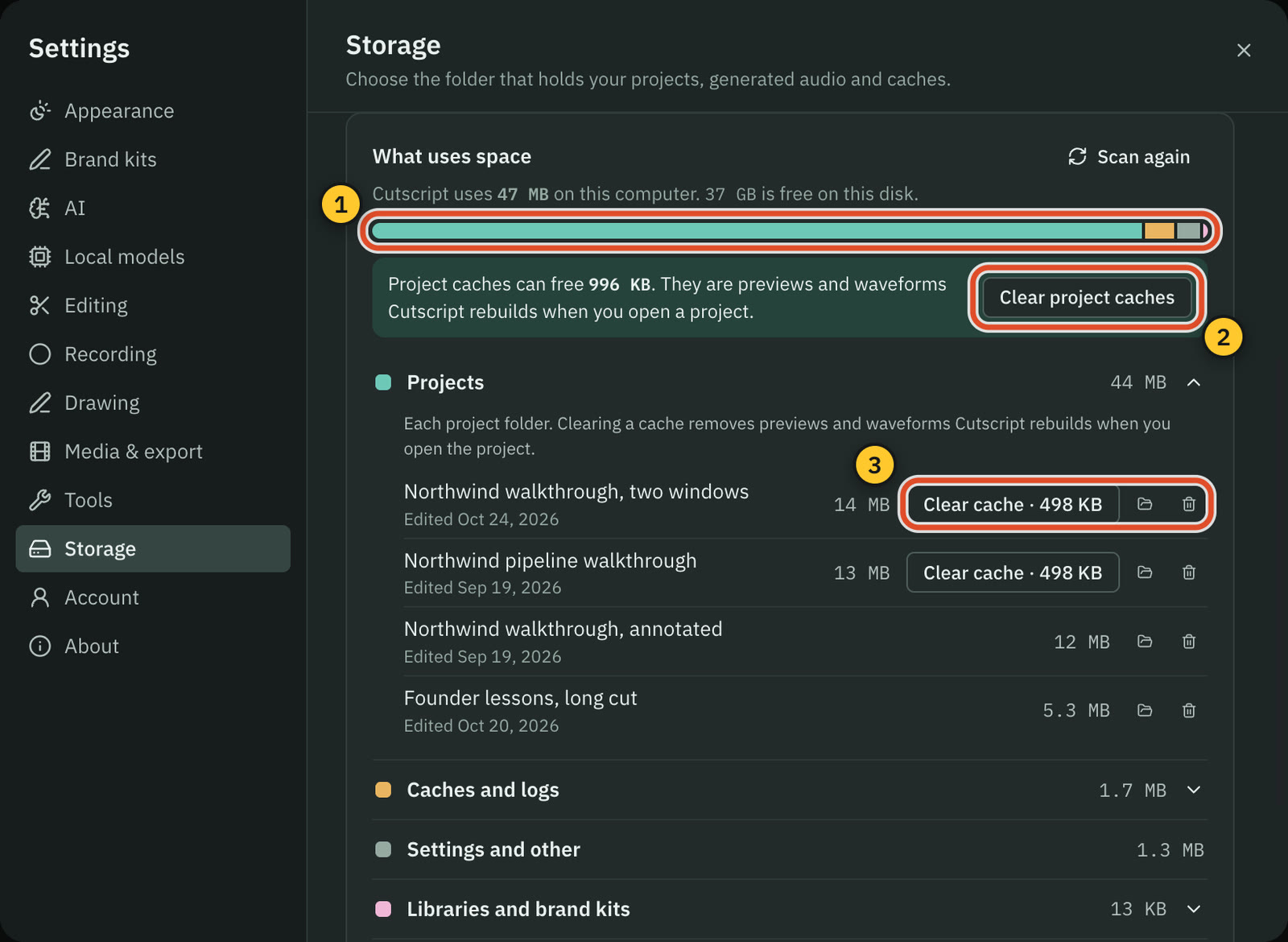
Both are desktop apps for Mac and Windows with media on local drives. TechSmith says its features nearly match on both, while several Cutscript tools are Mac only.
CutscriptMac and 64-bit Windows, some tools Mac only
CamtasiaWindows and macOS, with phone helpers and a browser tool
| What | Cutscript | Camtasia |
|---|---|---|
| Mac | YesmacOS 14 to open, macOS 15 to record | YesmacOS 14 or later. Apple silicon recommended |
| Windows | YesWindows 10 1809+ or 11, via Microsoft Store | YesWindows 10 20H2+ or 11 23H2+, 64-bit |
| Same features on both | PartlySeveral recording tools are Mac only | YesTechSmith says nearly identical |
| In a browser | NoNot offered | YesCamtasia Online and Camtasia.ai, in Chrome |
| Phone apps | NoNot offered. iPhone recording is experimental | PartlyCapture and Fuse send media, no editing |
| Offline | PartlyRecording, timeline, export work offline | YesWorks offline. Activation every 90 days |
| What goes to the cloud | YesCloud AI steps, plan checks and link downloads | YesCloud for Audiate, Online, image generation |
| Account | YesFree cutscript.dev account, signed in once | YesTechSmith account to download and sign in |
More detail
Cutscript
- Mac: opens on macOS 14, records on macOS 15 or later, Apple silicon or Intel. Windows: 10 version 1809 or later, or 11, 64-bit.
- Mac only: area recording, iPhone and iPad, click tracking, editable pointer, drawing, Blur all faces and emails, Claude plan.
- Recording, the timeline and export work offline once you are signed in. The plan check needs a connection at least every 14 days.
- Editing by text works offline once the transcript exists. An offline transcript needs Whisper on an Apple silicon Mac.
- Files stay on your computer. Cloud AI steps send the text, audio or still frames they need to the provider you pick.
Camtasia
- Windows 10 20H2 or later and Windows 11 23H2 or later, both 64-bit. macOS 14 or later, with macOS 26 or later recommended.
- Minimum 8 GB RAM and 4 GB free disk. Windows needs an Intel Haswell or AMD Ryzen 2000 or newer. Snapdragon X by emulation only.
- TechSmith says features are nearly identical on both. A few differ, such as script sync (Windows) and Sepia (Mac).
- Media must sit on local drives, not OneDrive, iCloud or Dropbox-synced folders, while you record or edit.
- It runs without internet, though some cloud and AI features need it. Subscriptions need internet to activate, then every 90 days.
Where Camtasia is the better pick
Training and course output
Smart Player adds a table of contents, search, quizzes and hotspots to an MP4, and SCORM packages go to an LMS, from Essentials. Cutscript has none of these.
Team sharing and licences
Screencast view links need no login, with comments and reactions. Camtasia Online adds email invites, and the Business License has volume discounts from ten licences.
Same tools on Windows and Mac
TechSmith says Windows and Mac features are nearly identical. In Cutscript, click tracking, the editable pointer and drawing work on a Mac only.
Cursor tools and effects
More cursor and click effects, SmartFocus zoom and 33 visual effects. Cutscript's Remove background comes with Pro, works on people only and takes time and disk space.
Voices, avatars and stock assets
Voiceover starts at Create. Camtasia Pro adds avatars, translation, dubbing and 100M+ royalty-free assets. Cutscript has no avatars or stock library.
Captions with no setup
Camtasia Editor transcribes on your device on Windows and Mac, and imports and exports SAMI, SRT and VTT. Viewers can switch closed captions off in the player.
Moving from Camtasia to Cutscript
- Install Cutscript and sign in once with a free account. On Windows, get it from the Microsoft Store.
- Cutscript cannot open Camtasia projects, so your timeline, effects and TREC cursor data stay behind.
- Export old videos from Camtasia as MP4 first. Exports from the free download or Starter carry a watermark.
- Choose File › New Project… and pick the file. An imported video has no pointer data, so you zoom by hand.
- For captions or text editing, add an ElevenLabs, fal.ai or OpenRouter key, or Whisper on Apple silicon.
- Keep Camtasia for quizzes, SCORM and Screencast. Try the free plan first: video exports carry a watermark.
Questions
Is Cutscript cheaper than Camtasia?
Cutscript Pro is $4.17 a month paid yearly ($49.99 a year), or $9.99 monthly, on one computer at a time. A TechSmith blog lists Camtasia's first watermark-free plan, Essentials, at $179.88 a year (US dollars). Camtasia includes AI by plan. In Cutscript, you pay your AI providers.
Can I use either one for free?
Cutscript's free plan has every feature except timeline export and Remove background, and needs a free account. Video exports carry a watermark, but audio, subtitles and transcripts do not. Camtasia's free download has no stated time limit and also exports with a watermark.
Does Cutscript work the same on Windows?
Not quite. Windows has the same editor, timeline, captions, graphics, export and cloud AI, plus Colors and Face. Area recording, click tracking, automatic zooms, the editable pointer, drawing and Blur all faces and emails are Mac only.
Can Cutscript make quizzes or SCORM packages?
No. Cutscript writes video, audio, subtitle and transcript files. Camtasia has quizzes and hotspots through its Smart Player, and SCORM packages for an LMS, from the Essentials plan.
Does Camtasia have an AI chat that edits my footage?
We could not find one in their docs. We found AI that generates scripts, voices and avatars, and a ChatGPT plugin that builds a new video from screenshots.
Do I need an AI account to use Cutscript?
Not to record, edit on the timeline, add zooms or export. Captions and editing by text need a transcript, which takes your own ElevenLabs, fal.ai or OpenRouter key, or a Whisper model on a Mac with Apple silicon.
Can I open my Camtasia projects in Cutscript?
No. Cutscript imports video, audio and image files, so your timeline and effects stay in Camtasia. Export the video from Camtasia, import the file into Cutscript, and add zooms by hand.
Try it on your own video.
Free with a Cutscript account. Video exports have a watermark. Pro removes it and adds timeline export and Remove background.
Download CutscriptFirst published 31 October 2026, last checked 31 October 2026. Prices and features change, so check before you decide. The people in our screenshots are stock footage and do not use or endorse Cutscript. Screenshots show Cutscript 0.1 beta. Seen something wrong or out of date? Tell us and we will fix it.