How to transcribe conversations: free Mac and AI steps
Record an interview with consent, get a transcript with the apps on your Mac, then add speaker labels and an export with Cutscript.
A one-hour interview takes 6 to 8 hours to type out by hand, according to the National Park Service. I have lost whole weekends to that. Now I let software write the first draft and spend my time on the parts only a person can do.
This guide shows how to transcribe conversations in three steps: record it well, get the text, and fix it. I cover the free tools on your Mac and where they stop, then what Cutscript adds.
Quick answer: Ask the other person for a clear yes on the recording, then record close to the microphone. On an Apple silicon Mac, Voice Memos or Notes can transcribe it for free. For speaker labels and a file export, transcribe in Cutscript and export the transcript as Word, Markdown, HTML, text or RTF.
Key Takeaways
Get a spoken yes before you record, because consent rules differ by place and the recording itself can hold the proof.
Clean audio from a close microphone matters more than the transcription tool you pick.
Voice Memos and Notes transcribe on an Apple silicon Mac, but Apple's pages do not mention speaker labels.
Cutscript labels speakers with an ElevenLabs, fal.ai or OpenRouter model that lists Speakers, and not with local Whisper.
The transcript export in Cutscript can carry speaker names and a time at each paragraph, in five file formats.
Claude can tidy the text, keep speaker names consistent and pull quotes, as long as you paste it the transcript and tell it not to invent words.
How do you record a conversation the right way?
Start with consent. Under federal law in the US, a person who is part of a conversation, or who has one party's prior consent, can record it unless the goal is a crime or a wrong. State and country rules can be stricter, and I am not a lawyer.
My habit is to ask every time and keep the yes on tape.
Apple does the same for calls. Its guide says to make sure the other participant gives explicit consent before you record, and both people hear a notice. If you plan to publish the text, the National Park Service also advises signed release forms and a review by the person you interviewed.
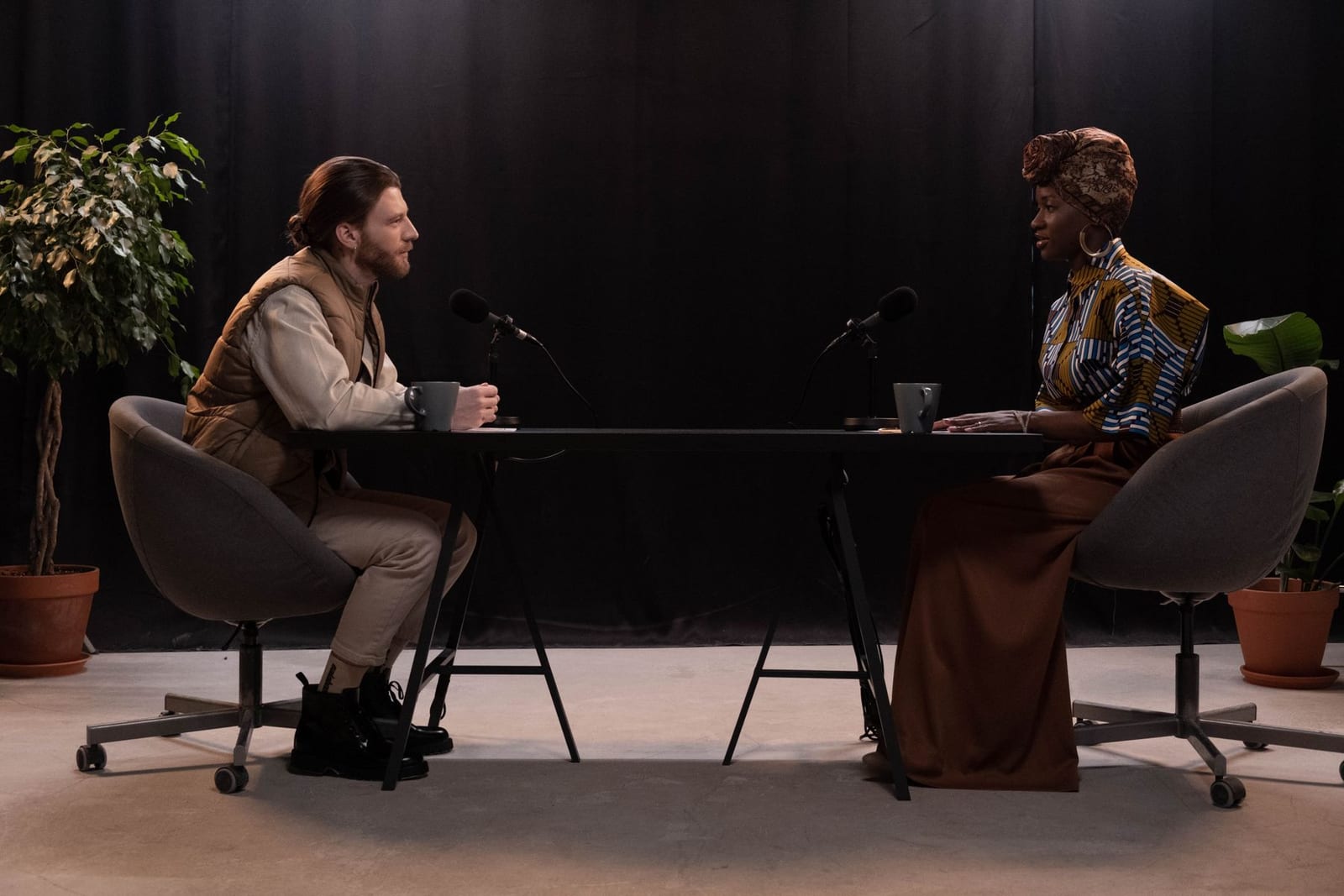
A clean recording in five habits
Say the purpose, the date and "Is it okay if I record this?" at the start, and let them answer on tape.
Pick the quietest room you have and turn off fans and notifications.
Put a microphone within a hand's width of each voice, and watch the level meter before you start.
Ask people not to talk over each other. Overlapping speech is where every transcriber guesses.
Do a ten-second test, play it back, then record.
Clear speech from a close microphone gives the best words, and I wrote more on getting clean sound in the docs.
What can the free Mac tools transcribe?
Three apps that come with a Mac can turn speech into text. Each one has limits, so check your own Mac before you rely on it.
Tool | Needs | Good for | Limit |
|---|---|---|---|
Voice Memos | Apple silicon, macOS Sequoia or later | A recording or live text | Apple's page lists no speaker labels or languages |
Notes | M1 or later, a supported language | Audio inside a note | Apple's page lists no speaker labels |
Live Captions | Apple silicon | Live text on screen | Apple's page does not say you can save it |
Voice Memos
Voice Memos can show a transcript with the Transcription button, live while you record or afterwards. The older version of that page says it needs macOS Sequoia and a Mac with Apple silicon, and that it is not available in every country or region. To copy the text, select it, Control-click, and choose Copy.
Notes
In Notes, you click the Attachment button, choose Record Audio, and press Record. Apple says transcription is available on Macs with M1 or later, and lists English, Spanish, Portuguese, Italian, French, German, Japanese, Korean and Chinese. One line on that page ties it to an English device language, so look for the Transcription button before you plan around it.
To copy, double-click the recording, click Transcription, then More, then Copy Transcript.
Live Captions
Turn on Live Captions in System Settings › Accessibility. Apple limits it to Apple silicon and says it is not offered in every language or region. A microphone icon switches between computer audio and the microphone, so it works for a person sitting next to you.
The page does not say you can save the text, and Apple warns the accuracy varies.
What the built-in tools cannot do
None of the three pages promises speaker labels, timecodes or a Word or Markdown file. For one speaker and a quick copy and paste, that is fine. For an interview with two voices, you want names on the lines.
How to transcribe a conversation in Cutscript
Cutscript writes the transcript with a time for every word, then lets you fix words, rename speakers and export. Transcription runs on your own account, and the transcription docs show the price before you run it.
Pick a model and set speaker options
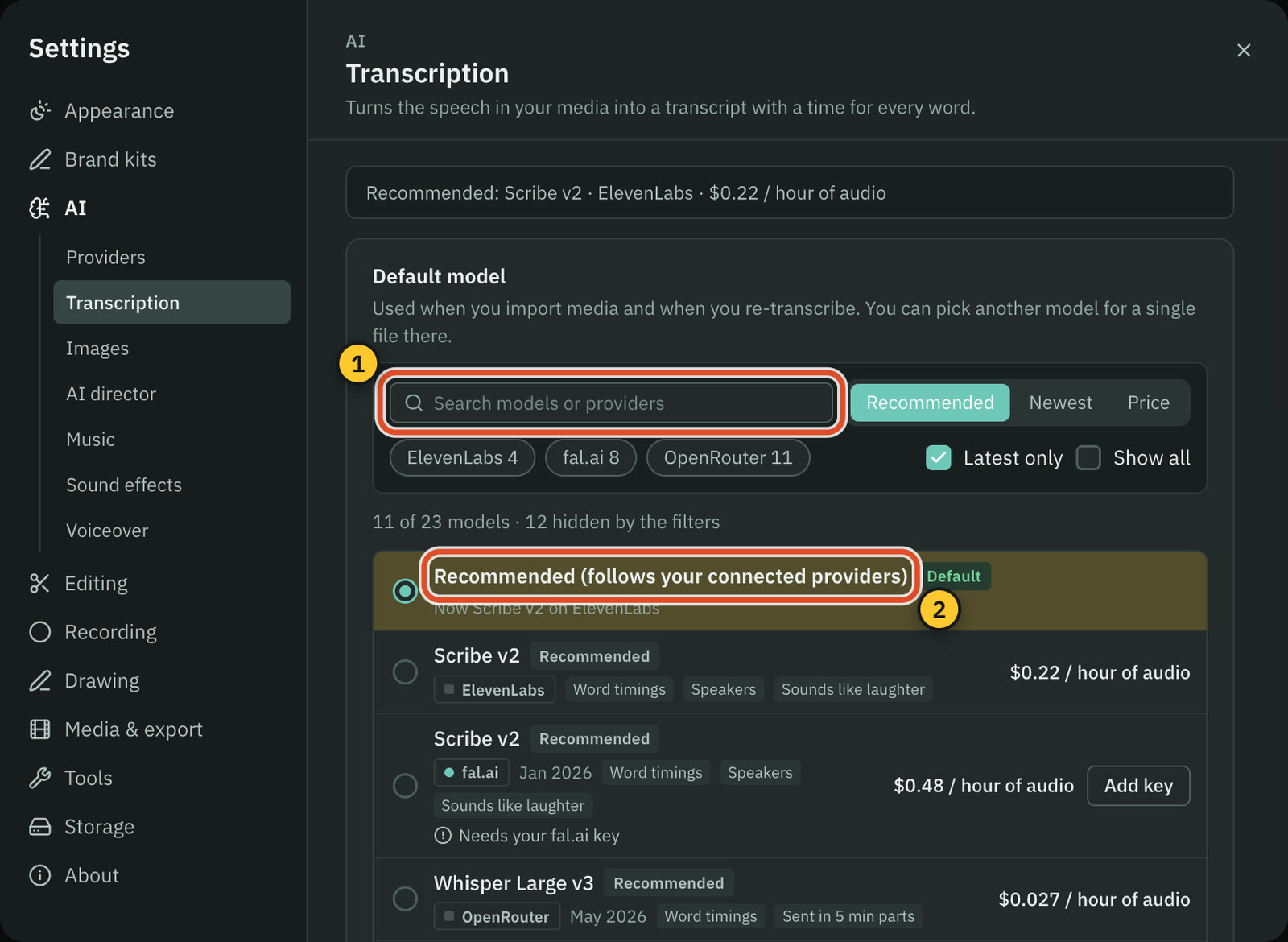
Open Settings › AI › Transcription and check the default model and its price per hour of audio.
Choose a model that shows Speakers. Recommended follows your connected providers: Scribe v2 on ElevenLabs first, then fal.ai.
Under Options, leave Identify speakers on, and set Expected speakers if you know the count. That hint goes from Auto-detect to 8, and works with ElevenLabs only.
Local Whisper on an Apple silicon Mac is free and keeps your audio on the computer, but it has no speaker labels.
Cutscript also lists Fish Transcribe 1 Pro on OpenRouter, made for interviews, at $0.36 per hour. It labels speakers per part, so names can shift between five-minute parts. For an interview, I choose a model that labels the whole file at once.
Start the transcript
On the home screen, drag your audio or video file onto the box, or press Attach.
Use File › New Project… (
⌘ N) if you want to choose the language, speaker count and model first.Press Create project, and watch Extracting audio, Uploading audio, then Transcribing.
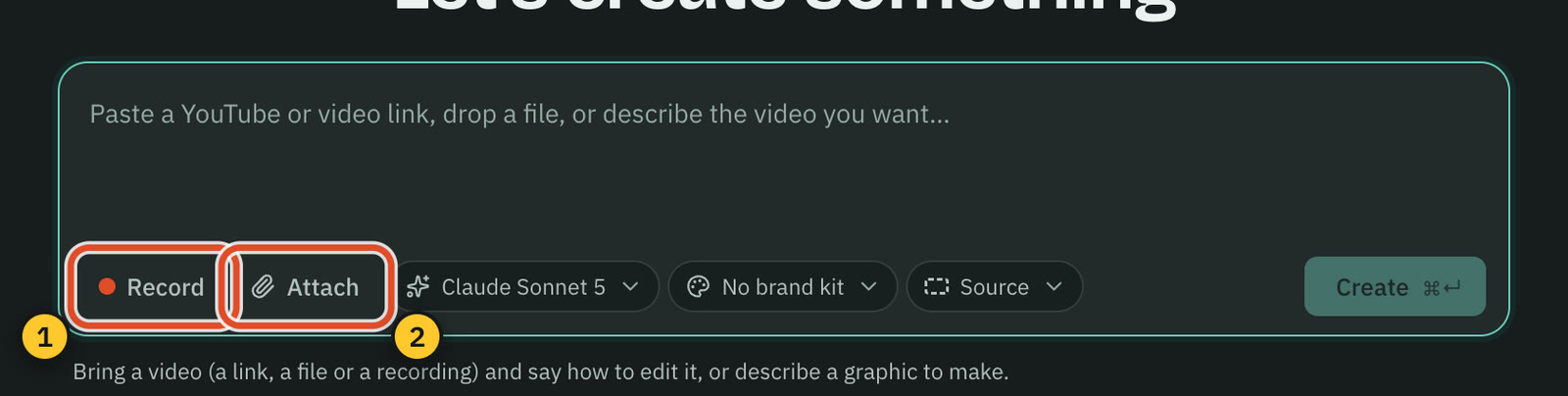
A new Cutscript recording is transcribed on its own when Transcribe automatically is on. The first video walkthrough covers both ways in.
Fix the names and the words
Skim the first minute. If the language is wrong, use Re-transcribe… right away, because it resets your edits.
Then click a speaker's name above a paragraph and rename it, and press Enter to apply it everywhere. To fix a wrong word, select it and press C, or use Correct all instances… for a name that is wrong in many places.
Export the transcript
Press Export or
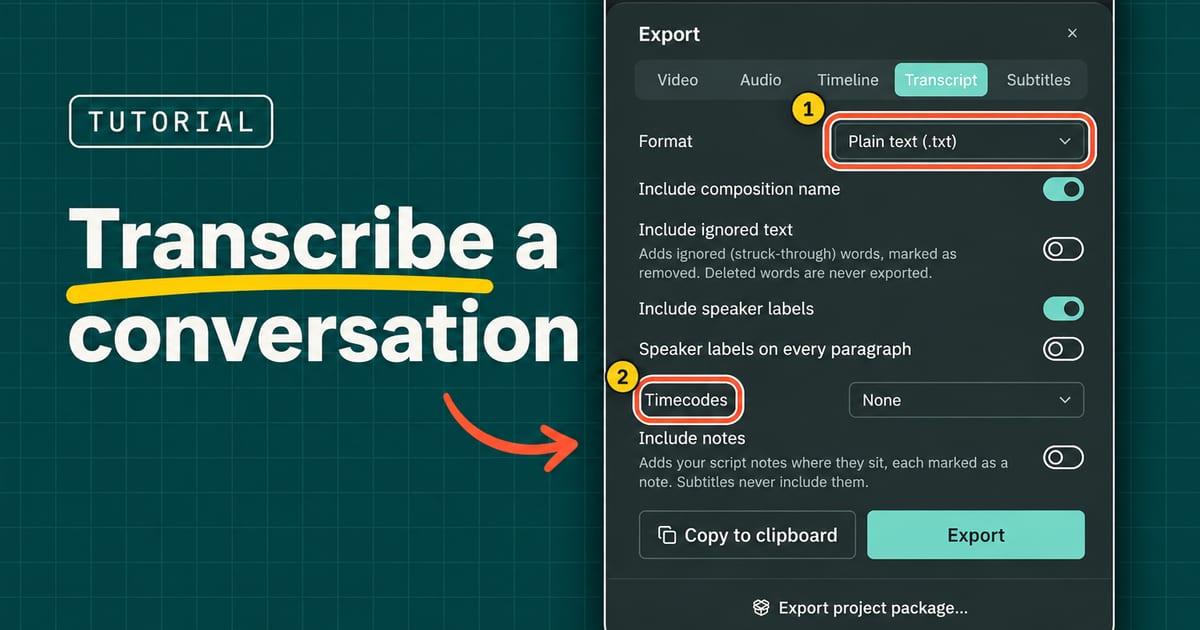
⌘ E, then open the Transcript tab.Choose a Format: Plain text (.txt), Markdown (.md), Microsoft Word (.docx), HyperText Markup Language (.html) or Rich Text Format (.rtf).
Turn on Include speaker labels, and Speaker labels on every paragraph if you want the name on each paragraph.
Set Timecodes to Paragraph for a time at the start of each paragraph.
Press Export, or Copy to clipboard to paste the text elsewhere. Word has to be a file.
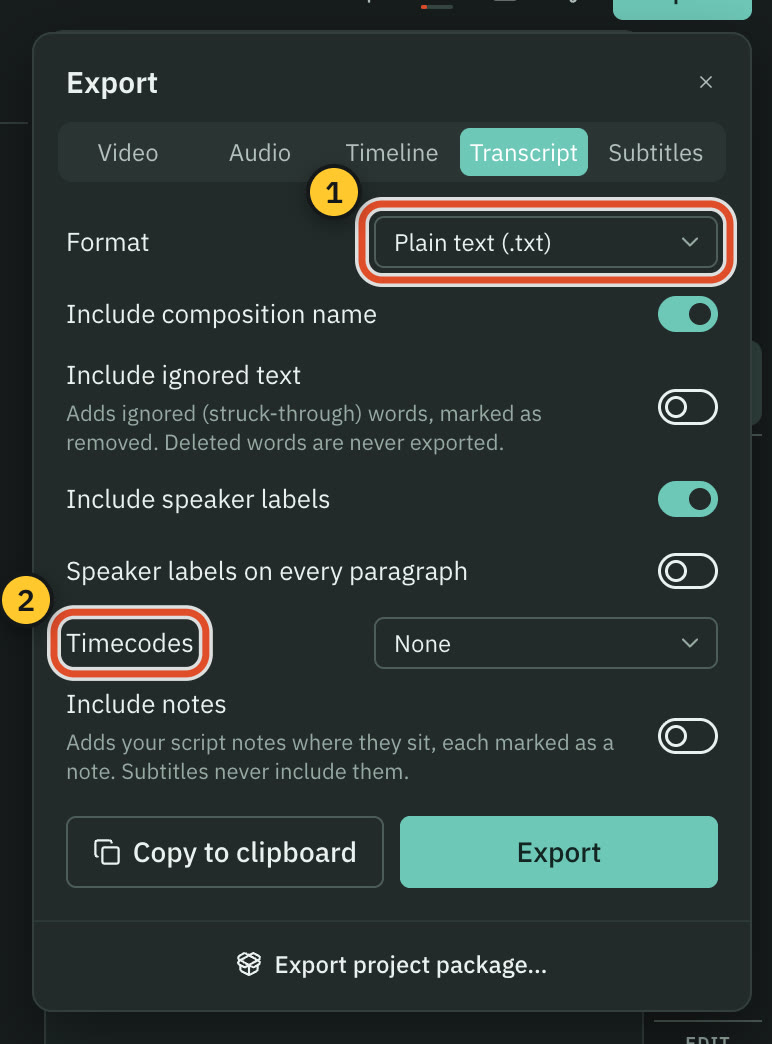
The export is local and needs no AI. It follows your edit, so deleted words stay out. The full list is on the transcripts and subtitles page, and the free plan includes it.
Can Claude clean up a transcript?
Yes, Claude can work on the text. It reads the transcript you paste. In the Claude desktop app, Claude Code can run FFmpeg on your recording to cut a part into a new file, but in a regular chat the upload list for Claude covers documents and images, not audio files, so it cannot check a word against the recording.
Paste the exported .txt with speaker labels and timecodes, and only for a conversation you have consent to share.
Paste this into Claude with the transcript underneath it.
You are an editor who cleans interview transcripts. Below is a raw transcript with speaker labels and timecodes.

Rules:
- Keep every speaker's meaning and wording. Never add facts or words that are not in the transcript.
- Remove "um", "uh" and false starts. Keep everything else the person said.
- Mark anything unclear as [unclear] with its timecode. Do not guess.
- Use one name per person. The speakers are "Interviewer" (Sam) and "Guest" (Priya). Rename any variant such as "Speaker 1" or "Sam:" to "Interviewer".
- Keep the timecode at the start of each paragraph.

Output, in this order:
1. The cleaned transcript.
2. A list of 5 quotes, each under 40 words, copied exactly from the cleaned transcript, each with its speaker and timecode.
3. A list of every name, number and term you were unsure of, with its timecode, so I can check it against the audio.

Transcript:
[paste the transcript here]
I always check a quote against the audio before I publish it. Claude works from the text you give it, so a word the transcriber got wrong stays wrong.
Settings and mistakes to avoid
Transcribing before fixing the audio. A noisy recording stays hard to read, even after clean-up. Fix the microphone first.
Forgetting the speaker count. Set Expected speakers for ElevenLabs if you know it, so two voices do not become three.
Picking a model with no Speakers tag. Local Whisper and some cloud models give no labels.
Re-transcribing after editing. It replaces the transcript and resets your corrections and speaker names.
Skipping the check on names. Names and numbers are where transcribers fail first.
Which way should you pick?
Way | Cost | Speaker labels | Export |
|---|---|---|---|
Voice Memos or Notes | Free | Not mentioned by Apple | Copy the text |
Live Captions | Free | Not mentioned by Apple | Not documented |
Cutscript with a cloud model | Your provider's price | Yes, with a model that lists Speakers | Five formats, with timecodes |
Cutscript with local Whisper | Free | No | Five formats, with timecodes |
Use the Mac apps for a quick note to yourself. Use Cutscript when you need names, timecodes or a file for a client, an editor or an archive.

Frequently Asked Questions (FAQs)
Can I transcribe a conversation for free on a Mac?
Yes, on an Apple silicon Mac. Voice Memos and Notes can transcribe speech, and Live Captions shows it live. Apple says not every language or region is supported. Cutscript with local Whisper is free too.
Does Voice Memos label who is speaking?
Apple's Voice Memos page does not mention speaker labels, so I would not count on them. For labels, transcribe with a Cutscript model that lists Speakers. Expect to check the names on a quick read.
Do I need permission to record a conversation?
Get it anyway. US federal law allows recording when you are a party to the call or one party has given prior consent, and state rules can be stricter. I am not a lawyer, so ask for a clear yes on the recording.
How long does it take to transcribe an interview?
By hand, about 6 to 8 hours for each hour of audio. A model writes the first draft in a fraction of that time. You still need a pass to fix names and numbers.
Can Live Captions save a transcript?
Apple's Live Captions page does not say you can save or export the text. It shows captions on screen. If you need a file, record the audio and transcribe it in Notes, Voice Memos or Cutscript.
Final Thoughts
A good transcript starts before the record button: a yes from the other person, a quiet room and a microphone close to the voice.
The apps on your Mac handle a quick copy of the words. When you need names on the lines and a file to hand over, transcribe in Cutscript and export it with speaker labels. Record your next conversation, transcribe it, and clean the text with the prompt above.
Comments
Longer questions go better in the forum.
No comments yet. Ask a question or add what you found.
Sign in with GitHub or Google to comment.
Sign in to commentKeep reading
Tutorials
Extract audio from video on a Mac: 3 free ways, step by step
Pull the sound out of any video on a Mac with QuickTime Player, FFmpeg or Cutscript, and learn which of MP3, WAV and M4A to keep.
Tutorials
Blur screen in a video: 3 ways to hide private details
Hide emails, names, passwords and faces in a screen recording. A fixed box, a blur that follows, and what QuickTime Player and iMovie can do.
Tutorials
Lower third: how to make one for free on a Mac
What a lower third is, the safe area and contrast rules that keep it readable, and three free ways to build one on a Mac.