Local AI models
Download AI models that run on your own Mac: Whisper for transcripts, Ollama for the AI director, and voices. Free, and your media stays with you.
Settings › Local models lists AI models that run on this computer instead of on a cloud provider. It reads what your Mac has, marks the model that suits it as Recommended, and downloads only the ones you choose. A local model costs nothing to run, and your audio and text stay on the computer. It is slower than the cloud, and small models make more mistakes.
Before you start
- Transcription and voices need a Mac with Apple silicon (M1 or later). On an Intel Mac, only the Ollama text models run here, and the cloud providers in Settings › AI still work.
- Qwen3-TTS voices need macOS 15 or later. The Whisper models and Pocket TTS run on macOS 14.
- Text models need Ollama, a free app from ollama.com. Cutscript does not install it for you.
- The download needs an internet connection and disk space. Each model shows its size before you download it, and Cutscript always leaves at least 5 GB free on the disk. Once a model is on your Mac, it works offline.
- The cloud stays the default. Downloading a model changes nothing until you choose it in Settings › AI.
Open Local models
- Press
⌘ ,to open Settings. - Choose Local models.
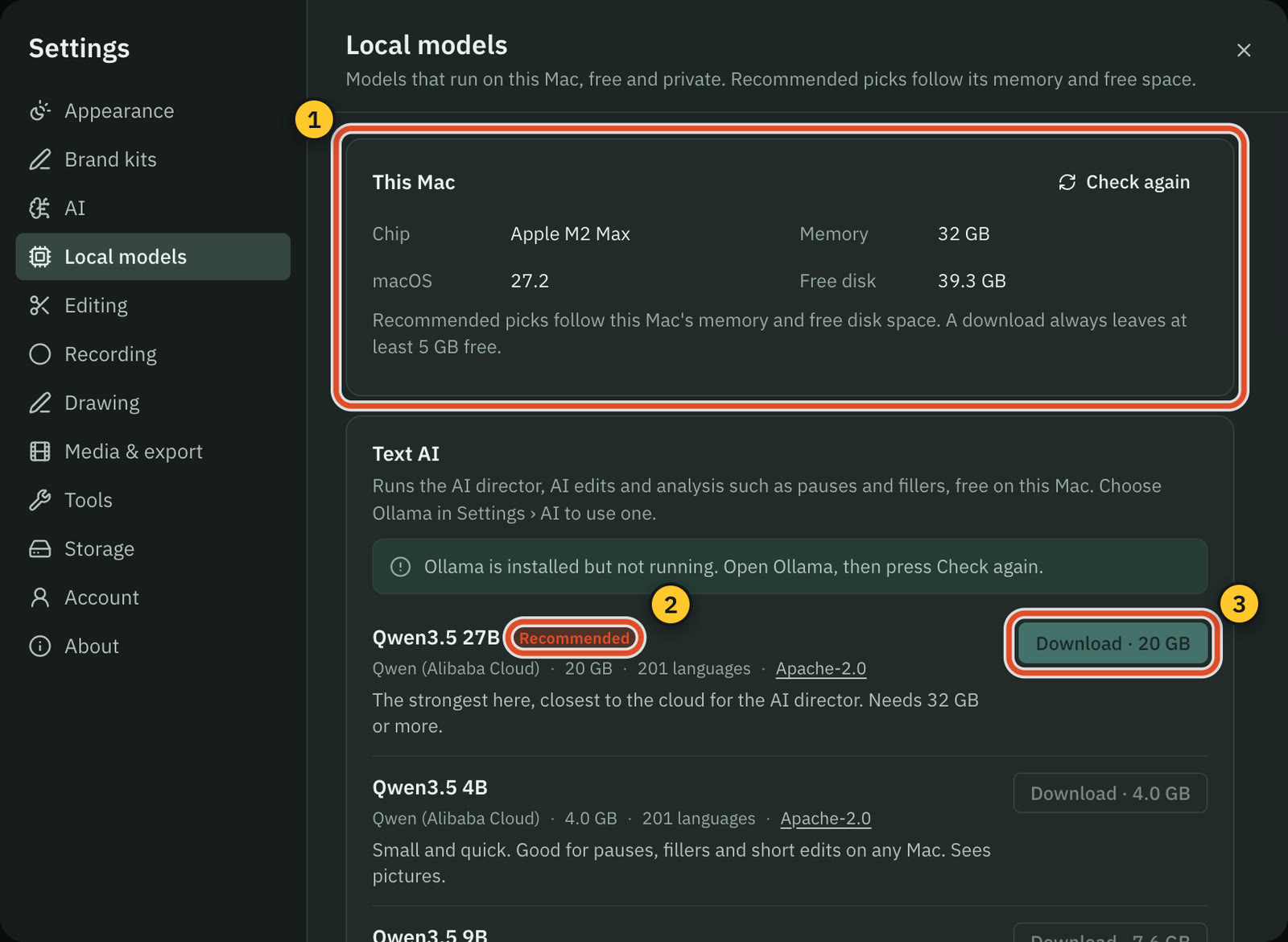
The This Mac card at the top shows the Chip, Memory, macOS and Free disk. The recommendations follow the memory and the free space. Press Check again after you free some space or open Ollama.
Below it are four sections: Text AI, Transcription, Voices and Sound. Each model shows its name, who made it, its size, its languages and its licence (press the licence to read it), with a line on what it is good for. The recommended model comes first with a Recommended badge. A model this Mac cannot run says why, for example "Needs at least 16 GB of memory." or "Needs macOS 15.0 or later.", and its download button cannot be pressed.
Sound, for music and sound effects, has no models yet.
Download, cancel or remove a model
- Press Download on the model's row. The button shows the size, for example Download · 629 MB.
- The row shows Starting…, then Downloading with a percentage. Press Cancel to stop. A cancelled download is deleted.
- When it is done, the row says On this Mac.
If your connection drops during a Whisper or voice download, press Download again: it continues where it stopped.
To remove a model, press Remove on its row. Cutscript asks first and says how much space it frees. Press Remove to confirm, or Keep. You can download it again at any time.
Transcribe on your Mac with Whisper
Whisper turns speech into a transcript with a time for every word, without uploading your audio. Cutscript runs it with WhisperKit, on a Mac with Apple silicon.
| Model | Size | Languages | Good for |
|---|---|---|---|
| Whisper large-v3 turbo | 629 MB | 99 languages | The most accurate here. Best with 16 GB of memory or more. |
| Distil-Whisper large-v3 | 597 MB | English | Nearly as accurate on English, and a little faster. |
| Whisper small | 220 MB | 99 languages | A balance of speed and accuracy on 8 GB. |
| Whisper base | 149 MB | 99 languages | Fast, for clear speech. |
| Whisper tiny | 79 MB | 99 languages | The fastest. It misses more words. |
Every Whisper model needs at least 8 GB of memory. Cutscript recommends Whisper large-v3 turbo on a Mac with 16 GB or more, and Whisper small below that.
To use one:
- Download it in Settings › Local models.
- Open Settings › AI › Transcription. In the On this Mac card, choose the model. It becomes your default, with a Default badge, and its price reads Free.
- Transcribe as usual. New recordings with Transcribe automatically on use it too. See Transcription.
To go back to the cloud, press Use the cloud instead in the same card.
A transcript made on your Mac is slower than one from the cloud, and it has no speaker labels or sound tags.
Run the AI director on Ollama
Ollama is a free app that runs text models on your computer. With it, the AI director, AI edits and analysis such as pauses and fillers run on your Mac at no cost. Ollama models do not need Apple silicon.
- Install Ollama from ollama.com and open it. If it is missing, the Text AI section says "Ollama is not installed" and offers Download Ollama. If it is installed but closed, open it and press Check again.
- In Text AI, download a model. Ollama downloads it and keeps it in its own folder.
- Open Settings › AI › AI director, or press Open AI director at the bottom of Text AI.
- Under Runs on, choose Ollama.
- Under Models on Ollama, keep Best installed model, or pick one.
| Model | Size | Memory it needs | Good for |
|---|---|---|---|
| Qwen3.5 4B | 4.0 GB | 8 GB | Pauses, fillers and short edits. Sees pictures. |
| Qwen3.5 9B | 7.6 GB | 16 GB | AI edits and analysis. Sees pictures. |
| Gemma 4 12B | 8.0 GB | 16 GB, best with 24 GB | Writing in many languages. Sees pictures. |
| gpt-oss 20B | 14 GB | 24 GB | Reasoning. Text only: it cannot check pictures. |
| Qwen3.5 27B | 20 GB | 32 GB | The strongest here, closest to the cloud for the AI director. |
Cutscript recommends the largest model your memory and free space allow: Qwen3.5 4B on 8 GB, Qwen3.5 9B on 16 GB, Gemma 4 12B on 24 GB and Qwen3.5 27B on 32 GB or more. It never recommends gpt-oss 20B, because the AI director checks pictures. With a model that cannot see pictures, the steps that check pictures stop and say so.
Ollama only covers text. Pictures, transcription, music and sound effects still use the providers set for them in Settings › AI.
Voices on your Mac
Two voice engines make a voiceover from your words on a Mac with Apple silicon.
| Model | Size | Languages | What it does |
|---|---|---|---|
| Qwen3-TTS 0.6B | 1.1 GB | 10 languages | Nine preset voices. About as fast as real time. Needs macOS 15. |
| Qwen3-TTS 1.7B | 2.2 GB | 10 languages | The same voices, read more accurately, and it follows a tone line. Takes about twice the length of the speech to make. Needs 16 GB of memory and macOS 15. |
| Pocket TTS (English) | 499 MB | English | Copies the speaker's voice for dubbing, with their permission, and has 22 preset voices. |
Qwen3-TTS speaks English, Chinese, Japanese, Korean, German, French, Russian, Portuguese, Spanish and Italian. Its voices are Ryan and Aiden (English), Serena, Vivian, Uncle Fu, Dylan and Eric (Chinese), Ono Anna (Japanese) and Sohee (Korean). Each one speaks all ten languages, best in its own. These voices do not speak Hindi yet. Cutscript recommends Qwen3-TTS 0.6B on every Mac that can run it.
Use a downloaded voice in three places:
- Settings › AI › Voiceover. In the On this Mac card, choose a model to make it your default. Use the cloud instead goes back.
- Media › Voiceover. Choose This Mac as the Voice provider. A voiceover made here can be up to 5,000 characters. See Voiceover.
- Dub & re-voice. Under Translate, Line by line can copy the speaker's voice with Pocket TTS on this Mac, or speak with a preset voice from This Mac. See Dub and re-voice.
Copying a voice needs the speaker's permission, and the panel asks you to confirm you have it.
Where models are stored
- Whisper and voice models are kept in Cutscript's own folder, in
modelsinside the app data folder (~/Library/Application Support/Cutscript/models). Settings › About shows the app data folder. - Ollama models stay in Ollama's own folder,
~/.ollama. Removing one in Cutscript asks Ollama to delete it, so Ollama has to be open. - Settings › Storage › What uses space lists every installed model under Local models, with a button to remove it. See Storage and cleaning up.
Removing the Cutscript app leaves the models folder in place.
Common problems
"Ollama is installed but not running." Open Ollama, then press Check again.
"There is not enough free disk space." The message says how much the model needs, including the 5 GB Cutscript keeps free. Free some space, or choose a smaller model. Storage and cleaning up shows what Cutscript itself uses.
"The download stopped because the connection dropped." Press Download again. It continues where it stopped.
"Your default, Whisper small, is no longer on this Mac." The model you chose was removed. Download it again in Local models, or pick another model.
A model says "Needs a Mac with Apple silicon." Transcription and voice models use Apple's Core ML and do not run on an Intel Mac. Use a cloud provider, or an Ollama text model.
Related
Was this page helpful?
Comments
Longer questions go better in the forum.
No comments yet. Ask a question or add what you found.
Sign in with GitHub or Google to comment.
Sign in to comment