Enhance voice
Remove background noise and clicks from a voice with Apple Voice Isolation or the built-in clean-up, both free, or with ElevenLabs or fal.ai on your own key.
Enhance voice makes a cleaned copy of your recorded voice and plays it in the preview and the export. Your recording is never changed, and every word stays exactly where it was, so your edits and captions still line up.
Before you start
- It cleans the microphone of a take recorded in Cutscript. For an imported video, an audio file, or a take with no microphone, it cleans the recording's own audio.
- If you used Unlink audio on the picture, the sound is on its own clips and Enhance voice tells you to link it again first.
- Apple Voice Isolation and the Built-in clean-up run on your Mac. They are free and need no internet or account.
- ElevenLabs Voice Isolator and fal.ai clean audio upload the audio to that provider and are charged to your own account. They appear in the list once you add that provider's key in Settings › AI › Providers. See Connect an AI account.
Clean up a voice
- Open Audio in the right rail, under Edit.
- Turn on Enhance voice with the switch in the group heading.
- Pick an engine. Each row shows what it does and what it costs, and only engines your Mac can run are listed.
- With Apple Voice Isolation, choose the Model: Voice, or High quality voice, which is cleaner and a little slower and needs macOS 15 or later.
- Set Strength. It runs from 0 to 100 % and starts at 80 %, which blends the cleaned voice with the original.
- Leave Polish on for EQ, de-essing and a compressor that make the voice clearer and steadier.
- Press Enhance.
- Use Listen to, Original and Enhanced, to compare. This switch is for listening only. The export follows the Enhance voice switch above it.
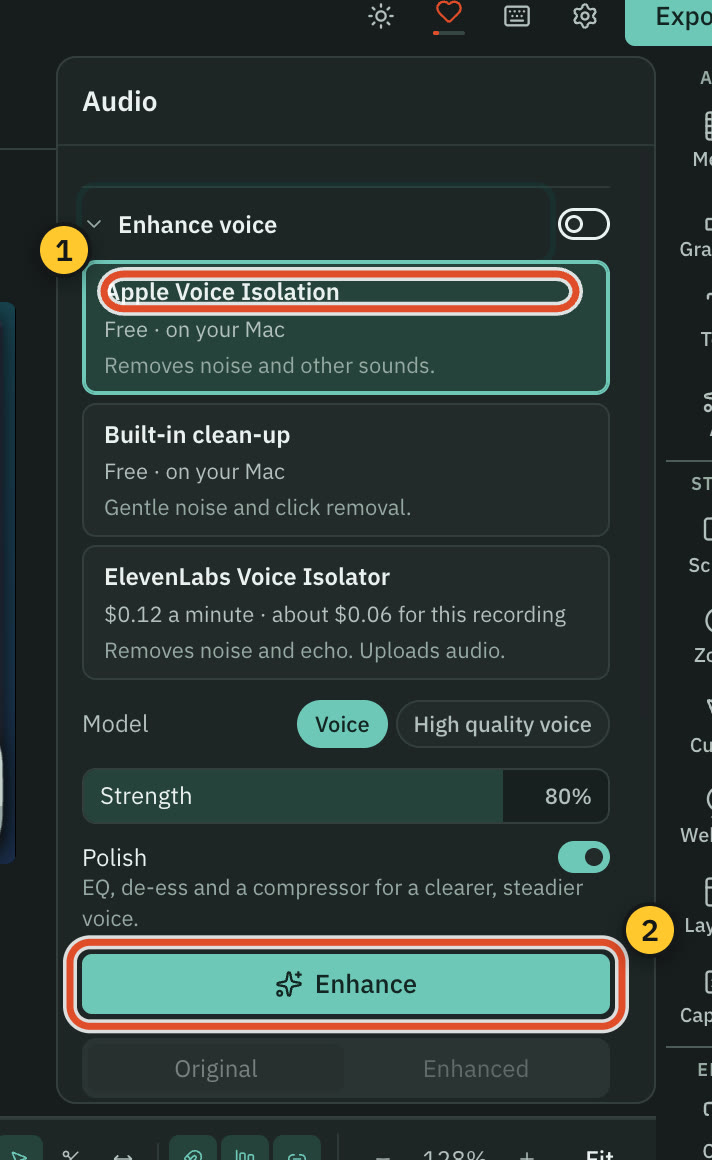
Once a copy exists, the button says Enhance again. If you change a setting, the panel says "Settings changed. Enhance again to hear them."
The four engines
| Engine | Cost | Notes |
|---|---|---|
| Apple Voice Isolation | Free, on your Mac | Removes noise and other sounds. Needs macOS 13 or later. |
| Built-in clean-up | Free, on your Mac | Gentle noise and click removal. |
| ElevenLabs Voice Isolator | $0.12 a minute | Removes noise and echo. Takes up to 60 minutes of audio. |
| fal.ai clean audio | $0.0125 a minute, billed in whole minutes | Removes noise. Takes up to 30 minutes of audio. |
These prices come from the table inside the app. For a paid engine the button shows the price, and a confirmation says how many minutes of audio will be sent, to whom, and what it costs. Nothing is uploaded until you confirm with the Enhance for button, which shows the price. A recording longer than the engine's limit cannot use it, and the panel points you to a free engine.
Tip: The cloud clean-up is kept after the first run. Changing Strength or Polish later mixes from the saved copy, so it costs nothing again.
What it makes
The enhanced copy is a 48 kHz mono file that is exactly as long as the original and starts at the same moment, so it takes the original's place. Turn the switch off and the original plays again.
Mix levels
Below Enhance voice, Mix lists the recorded microphone and system audio of a take, each with its own level. Loudness for the whole video is set at export, not here. See Export a video.
Ask the AI to do it
The AI chat can clean up your audio when you ask, using the free engines, and Direct my video includes a free voice clean-up in its Sound section. See One AI and Direct my video.
Related
Was this page helpful?
Comments
Longer questions go better in the forum.
No comments yet. Ask a question or add what you found.
Sign in with GitHub or Google to comment.
Sign in to comment