Write your own skill
Write a SKILL.md the design director reads for your kind of graphic. Learn its fields, its sections and the checks it must pass before it saves.
A skill you write teaches the design director how you like a certain graphic made: your recap card, your episode title, your product reveal. It lives on your Mac and is used the next time a request fits it. This page shows how to write one and what the editor checks.
Before you start
- You do not need an AI account to write, check and save a skill. You need one to see it used.
- A skill is a plain text file called
SKILL.md. It has a block of settings at the top, then a fixed set of sections. - The editor starts you with a working template, so you never write from a blank page.
Write one
- Press
⌘ ,, choose AI, then AI director, then Skills. - Press New skill. A window opens with a SKILL.md pane and a Lint panel beside it.
- Replace the template's words with your own, section by section. The pane shows your line and column, and the size against 20 KB.
- Watch the Lint panel. It checks as you type, a moment after you stop. Its first line reads "Ready to save: the lint found nothing", or says how many errors you must fix. The template starts with one error, "A skill needs at least 3 trigger phrases or words." Fill in
triggersto clear it. - Try Test routing in the same window. Type a request you expect the skill to handle. The list shows which skills would load, and your draft is marked This skill when it is one of them.
- Press Save skill (or
⌘ S). It is enabled only when the lint finds no errors. A notice says Saved with the skill's title, and the skill opens for reading.
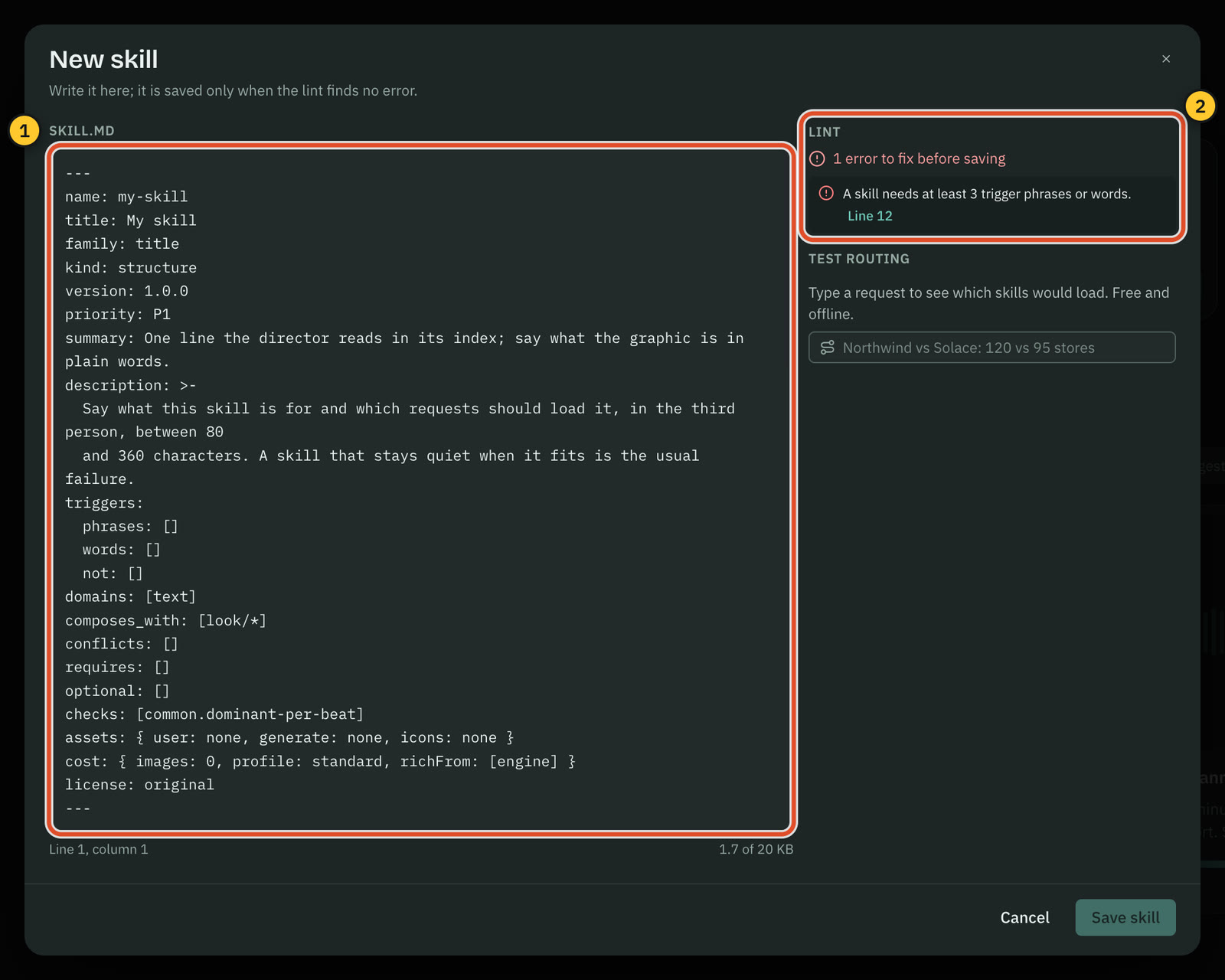
Warnings are shown and kept. Errors stop the save. Each issue has a Line button that puts the caret on the line to fix.
The settings block
The top of the file is a block between two --- lines. Here is an example of one that passes.
---
name: pipeline-recap
title: Pipeline recap card
family: title
kind: structure
version: 1.0.0
priority: P1
summary: A recap card for a sales pipeline: the quarter, three numbers and the one that matters.
description: >-
  A recap card for a quarter's pipeline: a headline, three headline numbers and the one that
  matters most. Use it when the person asks for a quarterly or sales recap with a few figures.
triggers:
  phrases: [pipeline recap, quarter recap, sales recap]
  words: [pipeline, quarter, recap]
  not: []
domains: [text]
composes_with: [look/*]
conflicts: []
requires: []
optional: []
checks: [common.dominant-per-beat]
assets: { user: none, generate: none, icons: none }
cost: { images: 0, profile: standard, richFrom: [engine] }
license: original
---| Field | What it is | Rule |
|---|---|---|
name | The skill's name. Its id is <family>/<name>. | 3 to 48 lowercase letters, digits or hyphens |
title | The name people read | At most 40 characters |
family | The group it sits in | One of the 24 families: direction, compare, data, map, title, quote, launch, list, time, social, urgency, announce, explain, brand, transition, saas, commerce, realestate, finance, sport, edu, event, podcast, look |
kind | What it does | structure (what a beat is), treatment (how a scene handles something, such as logos), look (a style preset) or direction (how to proceed when nothing fits) |
version | Its version | Three numbers, such as 1.0.0 |
priority | How central it is | P0, P1 or P2. P1 suits most skills |
summary | Its one line in the director's index | At most 100 characters |
description | What it is for and which requests should load it | 80 to 360 characters, in the third person. If conflicts is not empty, say "Not for …" |
triggers | The words that bring it in | At least three positive terms in phrases and words. not lists words that keep it out. A word cannot be both |
signals | What the request must carry (optional) | Minimum counts of entities, logos, images, tables and places, plus aspect, overVideo and transcript |
domains | The rulebooks it needs | Any of map, text, chart, infographic, image |
composes_with, conflicts | Skills it works with, and skills it clashes with | Skill ids, or family/* |
requires, optional | Drawing parts it depends on | A required part this build lacks makes the skill Unavailable |
checks | Automatic checks the result must pass | Ids such as common.dominant-per-beat and common.richness-planes |
assets | What it needs from you, and what it makes | One short phrase each for user, generate and icons, or none |
cost | The pictures and richness it plans | images 0 to 2. profile is lean, standard or rich. richFrom names the source of richness and includes generated exactly when images is 1 or 2 |
license | Where the text came from | original for your own words |
The sections
After the settings come thirteen sections, once each, in this order. Limits are in characters of the words you write. Markdown marks and <!-- comments --> are not counted.
| Section | What goes in it | Limit |
|---|---|---|
## When to use | The request it answers, and a close neighbour to use instead | 600 |
## Concept and variations | The idea in a paragraph, then two to four variations as - Name: when it fits | 1,200 |
## Storyboard | The beats as shares of the scene, and what each shows | 1,400 |
## Composition | The layout in the scene language's words | 1,600 |
## Motion | What enters first, how, and what holds at the end | 900 |
## Assets | What the person gives you, and what to generate | 900 |
## Style | The palette, type and energy it prefers | 500 |
## Do and ## Don't | A short calibration list | 800 together |
## Checks | The listed checks, in words | 300 |
## Examples | One line for each worked example | Not sent |
## Engine parts | Required and optional parts, in words | Not sent |
## Cost | The images and a typical price | Not sent |
What a structure skill sends to the model stays within 6,000 characters. A treatment, look or direction skill sends at most 2,500. The whole file is at most 20 KB.
What the lint checks
- The settings fields and their lengths, as in the table.
- Every section is there once, in order, and none is empty or over its limit.
- Backticked words are known. A word in backticks must be part of the director's scene language (a layer type, a field or a value), a skill id, an engine part or a check id. The template shows the style:
text,role,headline,zone,center. If the lint flags a word, remove the backticks or use a word from the template. - No pixel positions. No pixels, no
x=ory=coordinates, no percentages from a frame edge and no hex colours. Place things with zones, anchors and size classes, and name colours in words. - Image patterns are safe. A quoted pattern on a Generate line must not ask for lettering, logos, trademarks or named people.
- Optional parts have a fallback. Each optional engine part needs a "Without E5" style line that says what to do when it is missing.
Writing a good skill
- Use your own words. Write guidance, not a template. Name choices and the conditions for each, and offer at least two variations.
- Give durations as shares or ranges. Never timestamps.
- Keep honesty in. Where the skill shows numbers, say that every number must trace to what the person gave, never invent a metric, and ask when values are missing.
- Let pictures support. Images never carry words. The engine writes the text.
- Disambiguate. If a close neighbour exists, add a "use … instead" line, a
nottrigger and aconflictsentry. - Use made-up brands in examples, such as "Northwind" and "Solace".
Edit, share and restore
- Open the skill and press Edit to change it. Changes save only when the lint passes.
- Duplicate makes a copy under a new name, such as
my-skill-copy. - Export… writes the skill's folder to a place you choose. Others can add it with Import…, or by dropping the folder or
SKILL.mdonto the library. Imported skills start switched off. - Delete moves the skill's folder to the Trash.
Your skills are stored in Cutscript's data folder, in director-skills, one folder for each skill.
Common problems
Save skill is disabled. The lint found an error. Read the red lines, press a Line button to jump to one, and fix it.
The description is rejected. It must be 80 to 360 characters. Count the characters, and write it in the third person.
"… is not a word of the scene language". A backticked word is not one the director knows. Remove the backticks.
My skill never loads. Use Test routing. Add triggers that match how you phrase the request, and check the skill is switched on.
Related
Was this page helpful?
Comments
Longer questions go better in the forum.
No comments yet. Ask a question or add what you found.
Sign in with GitHub or Google to comment.
Sign in to comment