Media, music and sound effects
Bring in your own video, audio and images, or generate music and sound effects from a text prompt on your own ElevenLabs, fal.ai or OpenRouter account.
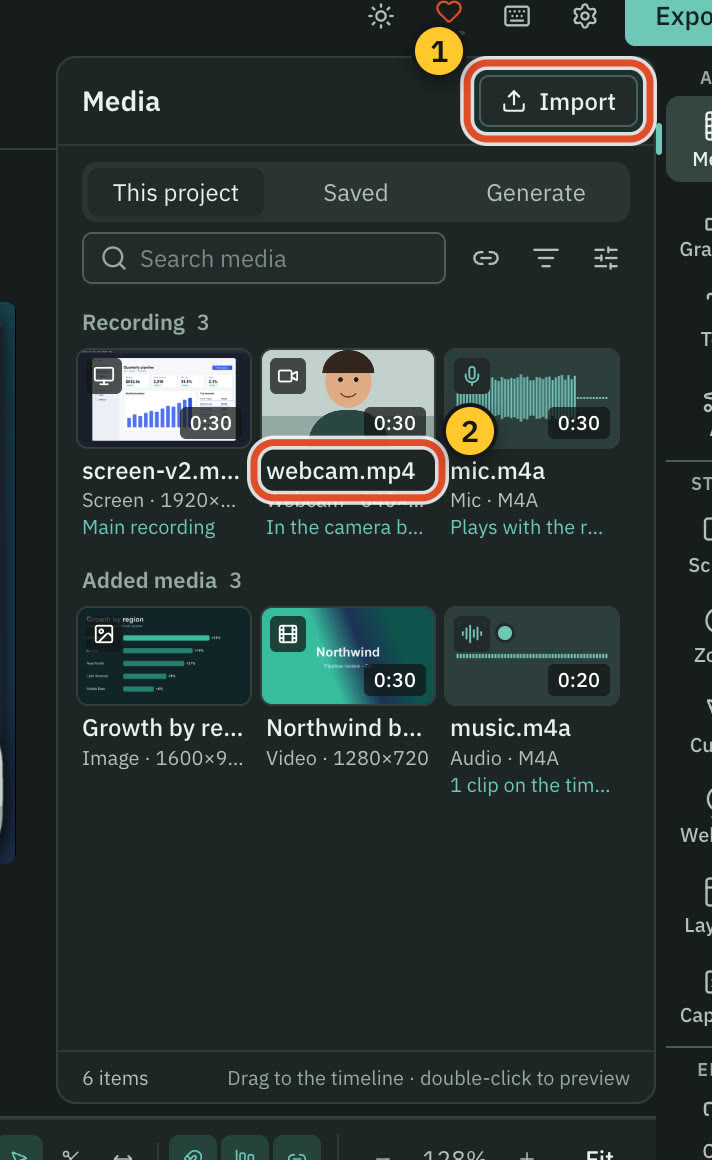
The Media panel holds everything you add to the timeline: the files in your project, things you saved from other projects, and generators for music, sound effects and voiceover.
Before you start
- Importing files, the library and previews need no account and no internet.
- Cutscript does not ship a music or sound-effect library. You use your own files or generate new audio.
- Generating music or sound effects uses your own account on ElevenLabs, fal.ai or OpenRouter, which charges you directly. Cutscript shows the price before it sends anything. See Prices before every paid step.
Bring in your own files
- Open Media in the right rail (
⌘ 1) and stay on This project. - Press Import, drop files into the panel, paste them, or choose File ▸ Import Media… (
⌘ I).
Cutscript imports video (mp4, mov, m4v, webm, mkv, avi, mts, mpg, mpeg), audio (m4a, mp3, wav, wave, aif, aiff, flac, ogg, oga, opus, aac, caf) and images (png, jpg, jpeg, gif, webp, heic, heif, svg). A file that is already in the project is selected, not imported twice. Any other type is refused with a sentence that says so.
Search the library, filter it by type, switch between grid and list, and drag a tile onto the timeline. To bring in a video from a web address, press the link button, labelled Download from a link. See Bring in a video from a link.
Find what you saved
The Saved tab is shared by every project. Its sections are Imported, Music, Sound effects, Voices, VFX, Patterns, Mockups and Online. Audio rows are small players: hover for a moment, or press play, and scrub along the row. Drag a row onto the timeline to use it. Each generated row names the provider that made it.
Online searches licensed public collections for logos (Simple Icons) and arrows and icons (Tabler). Only the searches you submit go online.
Generate music
- Open the Generate tab and choose Music.
- Write a Prompt, or pick one of the example chips.
- Set Duration. It starts at 30 seconds. Some models take the length as a hint and show About instead, and some make clips of one fixed length.
- Turn Instrumental only on or off, where the model has the switch.
- Choose a Model. If you leave it alone, the default from Settings › AI is used.
- Leave Add to timeline at playhead when ready on if you want it placed for you.
- Read the line under the button. It gives the estimated price and who charges it, for example "charged by fal.ai".
- Press Generate. Nothing is sent before this.
Generate a sound effect
Choose Sound effect on the Generate tab. Describe a sound, such as "Whoosh transition" or "Soft UI click". Then:
- Automatic duration lets the model choose the length. Turn it off to set Duration yourself.
- Prompt influence runs from More creative to Follow prompt. It starts at 0.30.
- Loop makes a sound that repeats without a gap, on models that support it.
Choose a Model, check the price line and press Generate.
Add audio for one part of the video
- Select words in the script.
- Right-click and open Add audio.
- Choose Add music for this part, Add sound effect for this part or Add voiceover for this part….
The length is locked to your selection. Music goes on a music track, fades in for 0.3 seconds and out for 0.5, and stays pinned to those words if you edit around them.
Which provider does what
| Provider | Music | Sound effects | Voiceover |
|---|---|---|---|
| ElevenLabs | Yes | Yes | Yes |
| fal.ai | Yes | Yes | Yes |
| OpenRouter | Yes | An experimental model | Yes |
Add the keys in Settings › AI › Providers, then choose a default model for each in Settings › AI. The model list shows each model's price. See Connect an AI account.
What is free
Your own files, the library, previews, the Design pack, Enhance voice with its on-Mac engines, and the five click sounds Cutscript makes itself. Generated music, sound effects and voiceover are charged by the provider you picked.
Related
Was this page helpful?
Comments
Longer questions go better in the forum.
No comments yet. Ask a question or add what you found.
Sign in with GitHub or Google to comment.
Sign in to comment