The Design pack
31 hand-made motion graphics, free and offline. Add one, type your own words into it, and keep your edited copy for every project.
The Design pack is a set of finished motion graphics that come with Cutscript: titles, lower thirds, maps, charts, versus screens, quotes, countdowns and more. They cost nothing, need no AI and no internet, and every one is a design you can edit. When you add one, you get your own copy. The pack itself never changes.
Before you start
- A project open in the editor.
- Nothing else. The pack is built in.
Add a graphic from the pack
This example adds a lower third with a name and a role.
- Move the playhead to where the graphic should start.
- Open Graphics in the right rail (
⌘ 2), then the Saved tab, then choose Design pack from the row of Graphics, Design pack and Icons. - Under Titles, find Lower third over footage. Hover over it, or tab to it, and it plays.
- Press Add. Your own copy lands at the playhead, and the panel switches to Edit so you can change it.
- Under Content, type the name and the role. Press Space to play it on the preview.
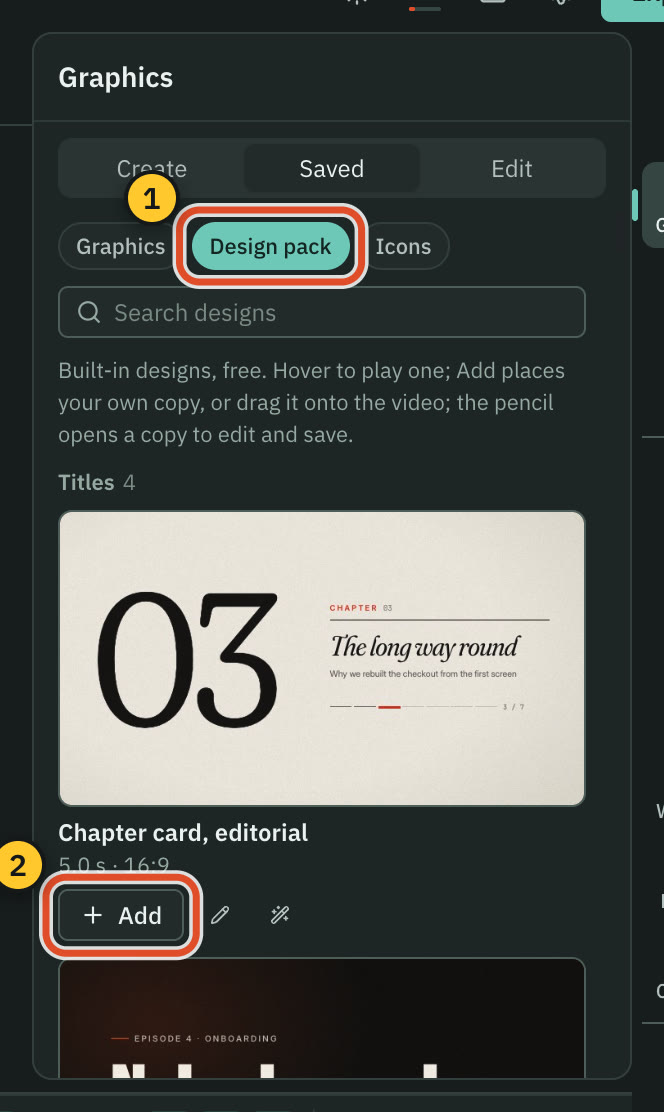
You can also drag a card onto the preview or onto the timeline.
Find a design
- Type in Search designs. Every word you type must appear in a design's title, description, group, aspect or the skills it shows, so "map night", "versus" and "9:16" all work.
- Each card shows its length and shape, for example "5.0 s · 16:9", and the number of sample pictures it ships with.
- A design that is transparent plays over a stand-in for your footage in its card.
What is in it
The designs are grouped as follows. The number beside each group is how many it holds.
| Group | Designs |
|---|---|
| Titles (4) | Chapter card, editorial · Cold open, kinetic · Lower third over footage · Full-screen spoken words |
| Maps (4) | Night route with landmarks (Delhi → Paris) · Choropleth of a rate · Global reach on a dotted globe · Neighbourhood by walking time |
| Charts (5) | Growth line, drawn · Hero stat, odometer · KPI trio, ledger · Leaderboard race · Earnings, quarterly bars |
| Versus (2) | Versus, two logos · Before and after, wipe |
| Lists (2) | Checklist, drawn ticks · Roadmap spine |
| Quotes (1) | Testimonial, Fraunces |
| Social (2) | Follow prompt, one spring · Episode card, record sleeve |
| Countdowns & sales (2) | Flash-sale countdown badge · Discount badge, burst |
| Transitions (1) | Iris wipe with a section name |
| Logo stings (2) | Logo sting, liquid iris · Partnership, shared ground |
| Launch (2) | Product hero in 3D · App screen, tilt and spotlight |
| Explainers (2) | System diagram, request path · Quiz question |
| Events (1) | Speaker lineup |
| Sport (1) | Score bug with a goal |
Edit your copy
Adding a design puts a normal graphic in your video, with its full code and its default texts. From then on it is yours.
- Change the words, colours, numbers, rows, pictures and timing in Graphics › Edit, in the Content and Timing groups. See Edit a graphic by hand.
- Trim it on the timeline. It holds its moments longer, and never plays slower. Some designs cannot be made shorter than they were drawn.
- Edits stay in your video. They never change the pack.
- Save to library keeps your edited copy, code included, in Graphics › Saved › Graphics for every project.
Every card also has two small buttons:
- The pencil opens a copy for editing without placing it in your video.
- The wand opens a new conversation about that design, so a message like "make it gold" is a small priced change to it, not a new graphic. See The design director.
The pack's sample pictures are drawn illustrations. They are added to your media library only when you add or edit a design, never when you hover over one. Swap them for your own in the picture fields.
Use the pack with the AI
The AI chat can add pack graphics for you and fill them with your own words at the moment they belong. In Direct my video, choosing Templates (Design pack, free) keeps every graphic free. A design that repeats, such as a chapter card, is placed as a copy of the same design with new details.
Limits
- Built-in designs cannot be deleted or changed in place.
- A design keeps the shape it was made in. A 9:16 design such as Follow prompt, one spring sits inside a 16:9 card, and fills the frame when your video has its shape.
- Add waits while another graphic is being added. If the Text lane is locked, it asks you to turn the lock off first. Turn off the lock on the lane and add the design again.
Related
Was this page helpful?
Comments
Longer questions go better in the forum.
No comments yet. Ask a question or add what you found.
Sign in with GitHub or Google to comment.
Sign in to comment