Prices before every paid step
How Cutscript shows what an AI step will cost before it runs, how approval works, and the spending limits you can set.
Cutscript is free. The AI providers charge you directly, on the accounts you connected. Cutscript's job is to show you what a step will cost before it runs, and to wait for your click. This page explains where the prices appear, how to read them, and how to put a ceiling on what is spent.
The rule
- Price. Every step that costs money shows its price first.
- Approve. You press a button to go ahead.
- Run. Only then is anything sent to a paid provider.
A step with no cost says so: Free, or "Free · on this Mac". Clean-ups, Design pack graphics, zooms from your clicks and editing a graphic by hand are free.
Where you see prices
| Where | What it shows | Your click |
|---|---|---|
| The line under the AI chat's message box | The price of the request you are about to send | Send |
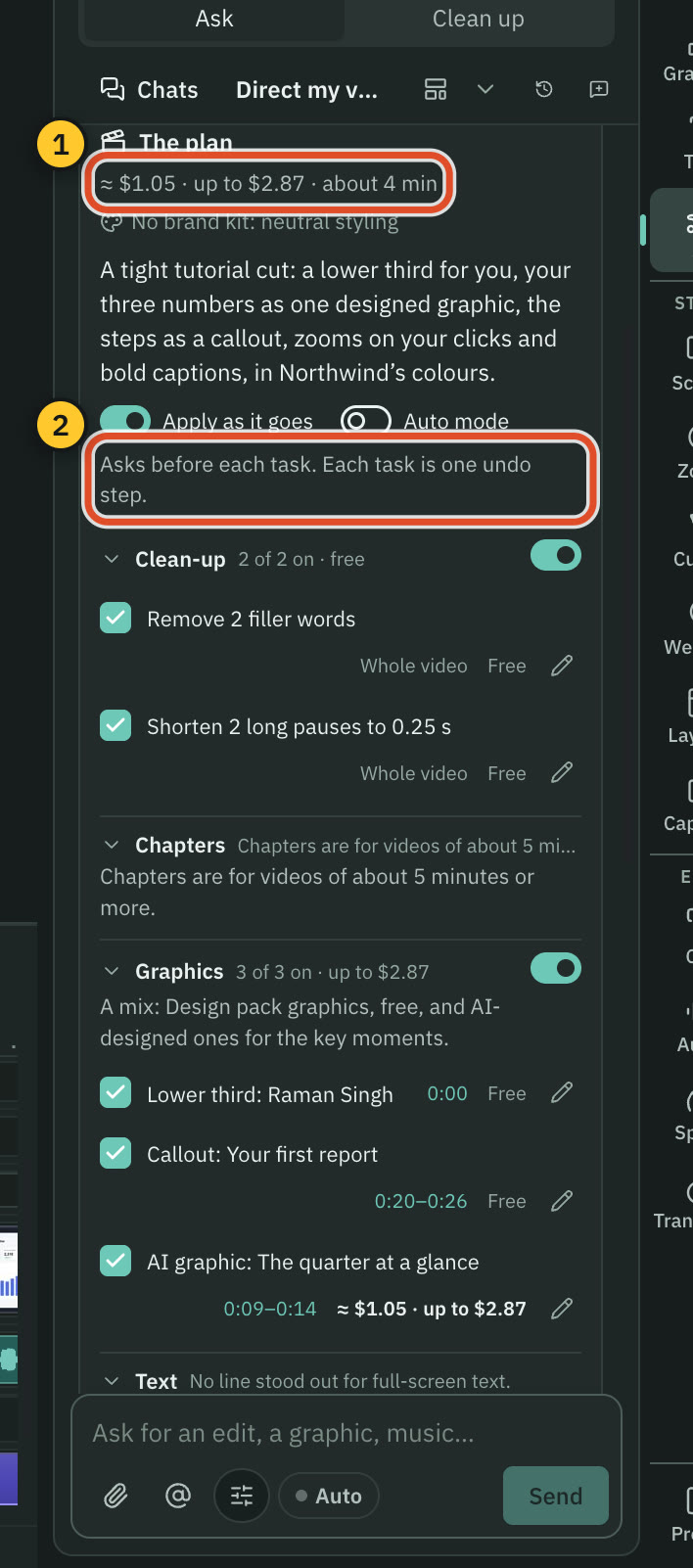
| Direct my video | The reading and planning on the Send line, the planning on Continue, then the plan's total and each item | Approve plan |
| A run card in the chat | The price of one step, such as a picture or music | Run, Build or Generate |
| A storyboard card in Graphics | The price of building the graphic, and of building without pictures | Build or Build without images |
| The clipper | The search on the Send line, creation free, then the price of Check by image | Check by image or Free checks only |
| Settings › AI model lists, and the Transcribe… dialog | A price with its unit for every model, and an estimate for your file's length | The model you pick |
How to read a price
- "≈ $1.05 · up to $2.87". The first figure is the typical price. The second is the most it can cost.
- "Free" or "Free · on this Mac". No provider is involved.
- "Runs on your Claude plan" or "$0 on your ChatGPT plan". The text runs on your plan, so Cutscript has no price for it. See below.
- "Uses your ElevenLabs credits · 30 s". ElevenLabs bills credits, not dollars, so Cutscript shows the amount of audio instead of guessing a figure.
- "Price unknown · up to …". The provider did not publish a price. Cutscript shows the most the step can cost.
- Units in model lists. Prices are per hour of audio, per minute, per second, per clip, per image, per 1,000 characters, or per million tokens for text. A plan model says "Included in your plan". "About" means the provider prices by something Cutscript can only approximate. Picture prices can be estimates, and the card says so.
While Cutscript works out a price, the line reads Pricing…. If it cannot, it says Price unavailable, or names what is missing, such as a key.
Approval in Direct my video
The plan lists each item with its price. Nothing runs until you press Approve plan, or Approve free parts only. The approved total, plus 10 % and one cent, becomes the run's budget. If a task would cost more than the budget, the run stops and shows Run anyway with the price, or Skip it.
With Auto mode off, each task also stops and asks first. See Direct my video.
Auto mode
In the AI chat, Auto applies changes and runs steps up to the price on the Send line without asking each step. A step that would go over that price waits for you. Auto mode never spends beyond what the line under the box showed. See One AI.
Spending limits
Open Settings › AI › AI director › Behaviour & limits. The Spending limits card shows what you have spent today and lets you set:
- Per message. A message that could cost more than this asks for a second click first. The default is $0.50. When it applies, the line under the box says "over your" and your limit, and the first click asks. The button then shows the price, and the second click sends it. A run card says "Up to $X is over your $Y limit: click again to go ahead", and its button becomes Run anyway.
- Per day. Off by default, so there is no daily limit. Choose Limit to set an amount. Past it, the AI director waits until tomorrow, and the line under the box says the day's limit would be passed, and how to change it.
- Per design. In the Checks and looks card. A graphic that could cost more than this asks first. The default is $4.
Limits count the AI director's OpenRouter and fal.ai spending. They do not count:
- requests that run on your ChatGPT or Claude plan;
- transcription, voiceover, music and sound effects, which the provider charges and Cutscript prices but does not cap.
The Spent today line shows the total, split by provider, and the number of calls. Actual costs are recorded on this Mac only.
Plans
Text on a ChatGPT or Claude plan has no price in Cutscript and does not count toward these limits. It counts against your plan's own usage limits, which you manage with OpenAI or Anthropic. Pictures are never part of a plan. They are always priced and always count.
What does not show a price
A few things start with your default settings and do not stop to ask:
- The Transcribe button in an empty project, and Transcribe automatically for a new recording. Both use your default model. Its price is in Settings › AI › Transcription, and the Transcribe… dialog shows the estimate for your file. See Transcription.
- Creating a project from the home screen. It starts a transcription with your default model and shows no price. Check the default in Settings › AI › Transcription first.
- Analyze with AI on a brand kit. It makes one short text request to your AI director, which costs nothing on a plan. It has no price line.
Common questions
Why did Cutscript ask twice? The step could cost more than your per-message or per-design limit. Press again to go ahead, or raise the limit.
Why is the price a range? A model's output length is not known until it answers. The typical figure is the usual case. The second figure is the ceiling.
Can I keep the AI chat at no cost? Run the AI director on a plan and leave the Images default on None. The chat's text then has no price in Cutscript, and no pictures are made. Paid steps still wait for your click.
Related
Was this page helpful?
Comments
Longer questions go better in the forum.
No comments yet. Ask a question or add what you found.
Sign in with GitHub or Google to comment.
Sign in to comment