Welcome to Cutscript
Cutscript is a free, open-source Mac video editor where you cut a video by editing its transcript.
Cutscript is a video editor for macOS built around one idea: edit the words, and the video follows. You record your screen or bring in a video, turn the speech into a transcript, and delete text to cut the footage. Then you polish the result on a timeline and export it.
It suits people who talk over a screen or a camera: product demos, tutorials, talks, interviews and short clips. You do not need editing experience. If you can edit a document, you can cut a video.
What you can do
- Record a display, a window or an area, with your voice, system sound and camera, and draw on screen while you record. See Record your screen.
- Edit by text. Select words in the transcript and delete them. Remove filler words, long pauses and repeated phrases in one pass. See Edit by editing text.
- Fine-tune on a timeline with several tracks, transitions, and more than one version of a video in a project. See The timeline.
- Polish. Zooms that follow your clicks, cursor effects, backgrounds, a camera bubble, captions, text on screen and cleaner voice. See Zooms.
- Use AI when you want it. Ask for an edit in plain words, let the AI direct a whole video, or turn a long video into short clips. See How AI works in Cutscript.
- Export MP4, MOV or WebM, audio files, timelines for Final Cut Pro, Premiere Pro or DaVinci Resolve, and transcripts or subtitles. See Export a video.
What to know first
- It is free and open source. The source code is on GitHub under the GNU AGPL-3.0-only. There is no Cutscript account, no licence key and no watermark. Donations are optional and add nothing to the app.
- It runs on Macs with Apple silicon. There is no Windows or Intel Mac version yet. See System requirements.
- AI runs on your own accounts. Cutscript costs nothing, and the providers you connect charge you directly: ElevenLabs, fal.ai, OpenRouter, or a ChatGPT or Claude plan for the AI director's text. Cutscript shows the price before most paid AI steps. The few that start without one are listed in Prices before every paid step.
- The transcript comes from the cloud. Transcription runs on ElevenLabs, fal.ai or OpenRouter, and there is no on-device transcription today. Everything else works offline: recording, the timeline, zooms, cursor effects and export.
- It is a beta. The app calls its version "0.1 beta". Expect change, and read Known limitations.
Where to start
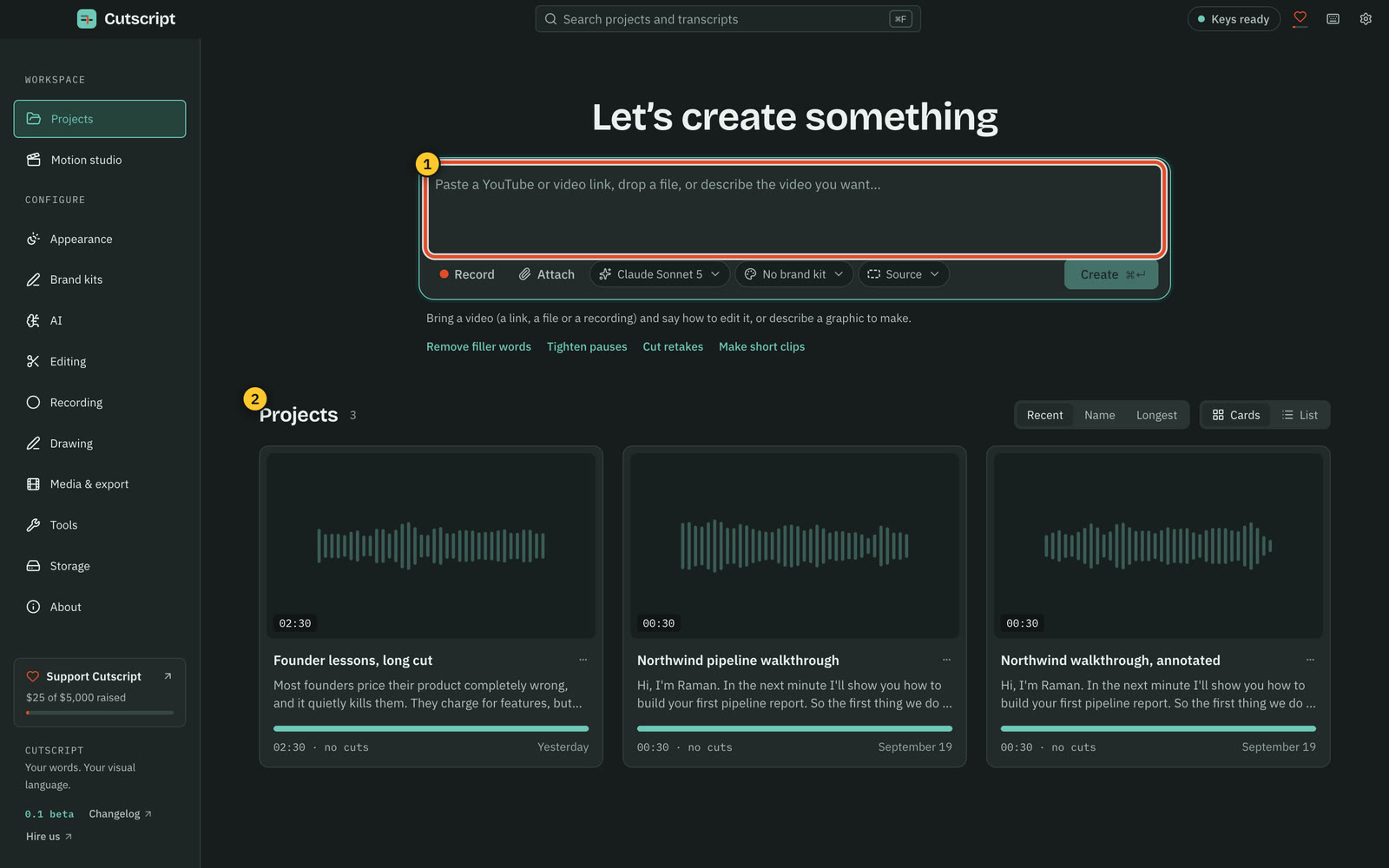
When you open Cutscript you land on the home screen. Paste a link, drop a file or press Record to start, and your projects sit below.
Related
Was this page helpful?
Comments
Longer questions go better in the forum.
No comments yet. Ask a question or add what you found.
Sign in with GitHub or Google to comment.
Sign in to comment