ChatGPT plan
Sign in with your ChatGPT Plus or Pro plan so the AI director writes on your plan instead of a pay-per-use key.
If you pay for ChatGPT Plus or Pro, you can use that plan for the AI director's text: the AI chat, Direct my video, Make short clips and new graphics. You sign in once on OpenAI's own page. Cutscript does not see your password.
Before you start
- A ChatGPT Plus or Pro plan.
- An internet connection and a browser on your Mac.
- The plan covers AI director text only. It does not make pictures, transcribe audio or generate music and sound effects, so you still need a key from OpenRouter, ElevenLabs or fal.ai for those.
Sign in
- Press
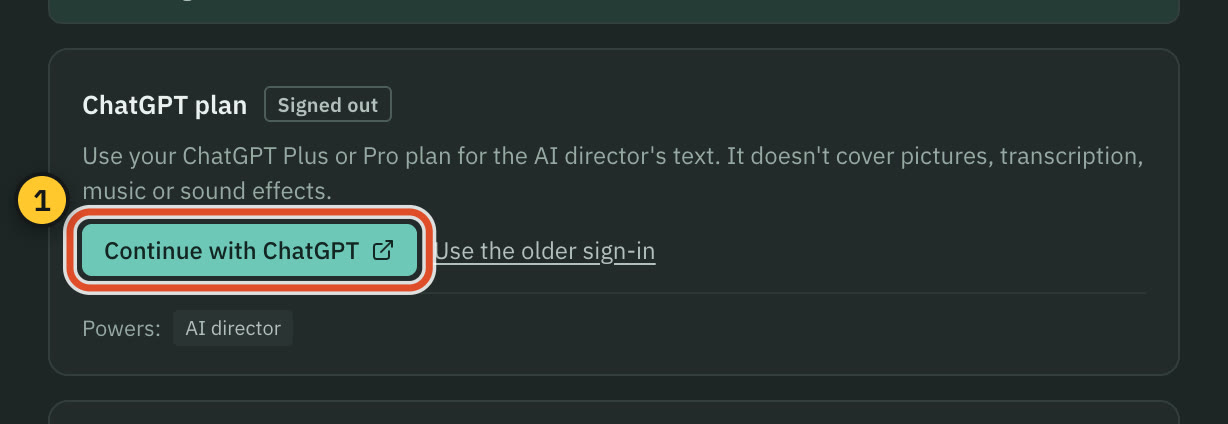
⌘ ,, choose AI, then Providers. - On the ChatGPT plan card, press Continue with ChatGPT.
- Your browser opens OpenAI's page. Sign in and approve Cutscript.
- Go back to Cutscript. The badge changes from Signed out to Signed in, and the card shows who is signed in, for example "Signed in as you@example.com · Plus".
While Cutscript waits, the card says "Finish signing in on OpenAI's page…". If the page did not open, press Copy link and paste it into your browser. Cancel stops the sign-in.
Use it for the AI director
A signed-in plan is not used until the AI director runs on it.
- If the AI director's current source could not run, for example because there is no OpenRouter key, Cutscript switches to your plan for you and shows a notice with Undo.
- Otherwise press Use it for the AI director on the card. Once it is chosen, the card says "Runs the AI director".
You can also pick the source in Settings › AI › AI director › Model, under Runs on. The same page lists Models on ChatGPT plan. Plan default uses whatever your plan uses by default, and the list is read from your plan when you sign in.
What it costs
Text on your plan has no price in Cutscript. Price lines say "Runs on your ChatGPT plan" or "$0 on your ChatGPT plan", and the plan's text does not count toward Cutscript's spending limits. It does count against your ChatGPT plan's own usage limits. The first time you sign in, a notice reminds you of this and points to Manage usage, which opens ChatGPT's usage settings where you can set a cap for Cutscript. Press Got it to dismiss the notice.
Pictures are never covered by the plan. They are always priced, and they need an OpenRouter or fal.ai key.
Sign out
Press Sign out on the card. Cutscript asks OpenAI to end the sign-in and removes it from your Mac. The sign-in is stored encrypted on your Mac. If your Mac cannot encrypt it, the card says so, and you sign in again after you quit Cutscript.
Common problems
"Plan usage not allowed". You are signed in, but the sign-in does not allow plan usage for Cutscript yet. Press Allow plan usage and approve it on OpenAI's page.
"Another app is using the sign-in port." Press Use the older sign-in, then Use a code instead. The card shows a short code. Press Open OpenAI's page, enter the code there, and approve. The code has a countdown, and you can press Copy code. The older sign-in was made for OpenAI's Codex app, so OpenAI's page may mention Codex.
The sign-in took too long. Cutscript stops a sign-in that waits too long. Press Continue with ChatGPT again.
You reached the plan's usage limit. The message says when the limit resets. Wait, raise the cap under Manage usage, or switch the AI director to another source in Settings › AI › AI director.
Reading a PDF or a picture from a web link fails. These need an OpenRouter key. Add the picture from your Mac instead.
Your workspace does not allow it. Some ChatGPT workspaces switch this off. Ask your workspace admin, or use another source for the AI director.
Related
Was this page helpful?
Comments
Longer questions go better in the forum.
No comments yet. Ask a question or add what you found.
Sign in with GitHub or Google to comment.
Sign in to comment