Claude plan
Run the AI director on your own Claude plan through Claude Code on your Mac. Cutscript never sees or stores your Claude login.
If you have a Claude plan, Cutscript can use it for the AI director's text: the AI chat, Direct my video, Make short clips and new graphics. It does this by running Claude Code, which you install and sign in to yourself.
Before you start
- A Mac. The Claude plan is macOS only in this beta.
- A Claude plan. Claude Code signs in with it.
- Claude Code installed on this Mac. Cutscript does not bundle it. The card links to Anthropic's setup page.
- The plan covers AI director text only. Pictures, transcription, music and sound effects need a key from OpenRouter, ElevenLabs or fal.ai.
Set it up
- Press
⌘ ,, choose AI, then Providers, and find the Claude plan card. Its badge says Checking… for a moment while Cutscript looks for Claude Code. - If the badge says Not installed, press How to install. Anthropic's setup page opens in your browser. Install Claude Code, then come back and press Look again.
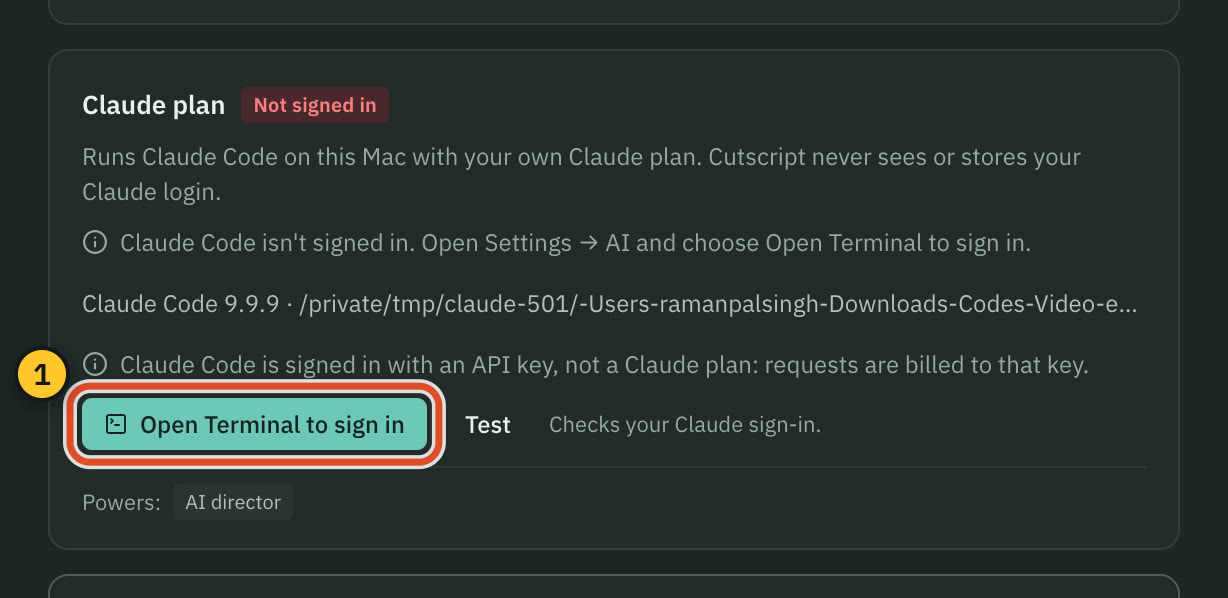
- When the badge says Not signed in, press Open Terminal to sign in. Terminal opens and starts Claude Code in an empty folder.
- In Terminal, sign in on Anthropic's page when Claude Code asks. If it does not ask, type
/login. When it is done, type/exit. - Back in Cutscript, press Test. It checks your Claude sign-in. The badge changes to Ready, and the card shows something like "Claude Code 2.1.290" and where it was found.
- Press Use it for the AI director. The card then says "Runs the AI director".
You can also choose the source in Settings › AI › AI director › Model, under Runs on. That page lists the models too: Claude Code default, Sonnet, Opus, Haiku and Fable. Fable is marked "May use extra usage credits", and Cutscript never picks it for you. Claude Code always uses the newest model of each name.
How Cutscript finds and runs Claude Code
Cutscript looks for claude on your PATH, then where your login shell finds it, then in ~/.local/bin, /opt/homebrew/bin, /usr/local/bin and ~/.npm-global/bin. It never opens your Claude Code settings folder, the keychain or any token.
For each request it starts your own claude for one answer, with every Claude Code tool switched off, in an empty folder, and without saving a session. Anything that looks like a credential is removed from that process's environment. The sign-in is only ever Claude Code's.
What it costs
Text on the plan has no price in Cutscript. Price lines say "Runs on your Claude plan" or "$0 on your Claude plan", and these requests do not count toward Cutscript's spending limits. They count against your Claude plan's own usage limits.
If Claude Code is signed in with an API key instead of a plan, the card says "Claude Code is signed in with an API key, not a Claude plan: requests are billed to that key." It still works. The same note appears for a sign-in through a cloud provider.
Sign out
Cutscript does not hold your login, so there is nothing to remove in Cutscript. To stop using the plan, choose another source in Settings › AI › AI director › Model. To sign out of Claude, run Claude Code in Terminal and sign out there.
Common problems
Not installed. Install Claude Code from Anthropic's page, then press Look again. If it lives somewhere other than the places above, add it to your PATH.
Not signed in. Press Open Terminal to sign in and finish the steps above, then press Test.
"Update Claude Code to use Sonnet 5.5 (needs 2.1.284 or later)." The card tells you when your version of Claude Code is too old for a model you chose. Update Claude Code, then press Test. The note names the version you need.
Your plan is busy, or you reached its limit. The message says when the limit resets. Wait, or switch the AI director to another source.
"Claude Code didn't start." Check it in Terminal by running claude. Then press Look again or Test.
PDFs, and pictures that are not PNG, JPEG, GIF or WebP. The Claude plan reads those four picture types only, and reading a PDF needs an OpenRouter key.
Note: Cutscript uses the name "Claude plan" and describes what it runs. It is not affiliated with Anthropic.
Related
Was this page helpful?
Comments
Longer questions go better in the forum.
No comments yet. Ask a question or add what you found.
Sign in with GitHub or Google to comment.
Sign in to comment