OpenRouter
Connect OpenRouter with a sign-in or an API key. One account covers the AI director, pictures, transcription, music, sound effects and voiceover.
OpenRouter is one account that reaches models from many makers, billed per request. In Cutscript it is the widest provider: a single OpenRouter key can run every AI feature. It is the smallest setup if you want one key instead of several accounts.
Before you start
- An OpenRouter account. You pay OpenRouter directly, per request, from credit you add on its site.
- An internet connection.
- Nothing to install.
What it powers
The card ends with Powers: Transcription, Pictures, AI director, Music, Sound effects and Voiceover. You choose which model does each job in Settings › AI, so OpenRouter can run all of them or only some.
Connect it
You can sign in, or paste a key.
Sign in with OpenRouter
- Press
⌘ ,, choose AI, then Providers, and find the OpenRouter card. - Press Sign in with OpenRouter. Your browser opens OpenRouter's page.
- Approve Cutscript there. OpenRouter hands back an ordinary key, and Cutscript stores it the same way as a key you paste. While it waits, the card says "Finish signing in on OpenRouter's page…".
- Back in Cutscript, the badge reads Connected.
If the page did not open, press Copy link and paste the link into your browser. Cancel stops the sign-in. A sign-in that waits more than ten minutes is stopped. The sign-in uses a temporary address on your own Mac to receive the answer.
Paste a key
- On the OpenRouter card, press Get a key. OpenRouter's page for API keys opens in your browser.
- Create a key there and copy it. Treat it like a password.
- In Cutscript, press Paste a key, then paste the key into the field. The field hides what you type. Press the eye button to show or hide it.
- Press Save, or press Return.
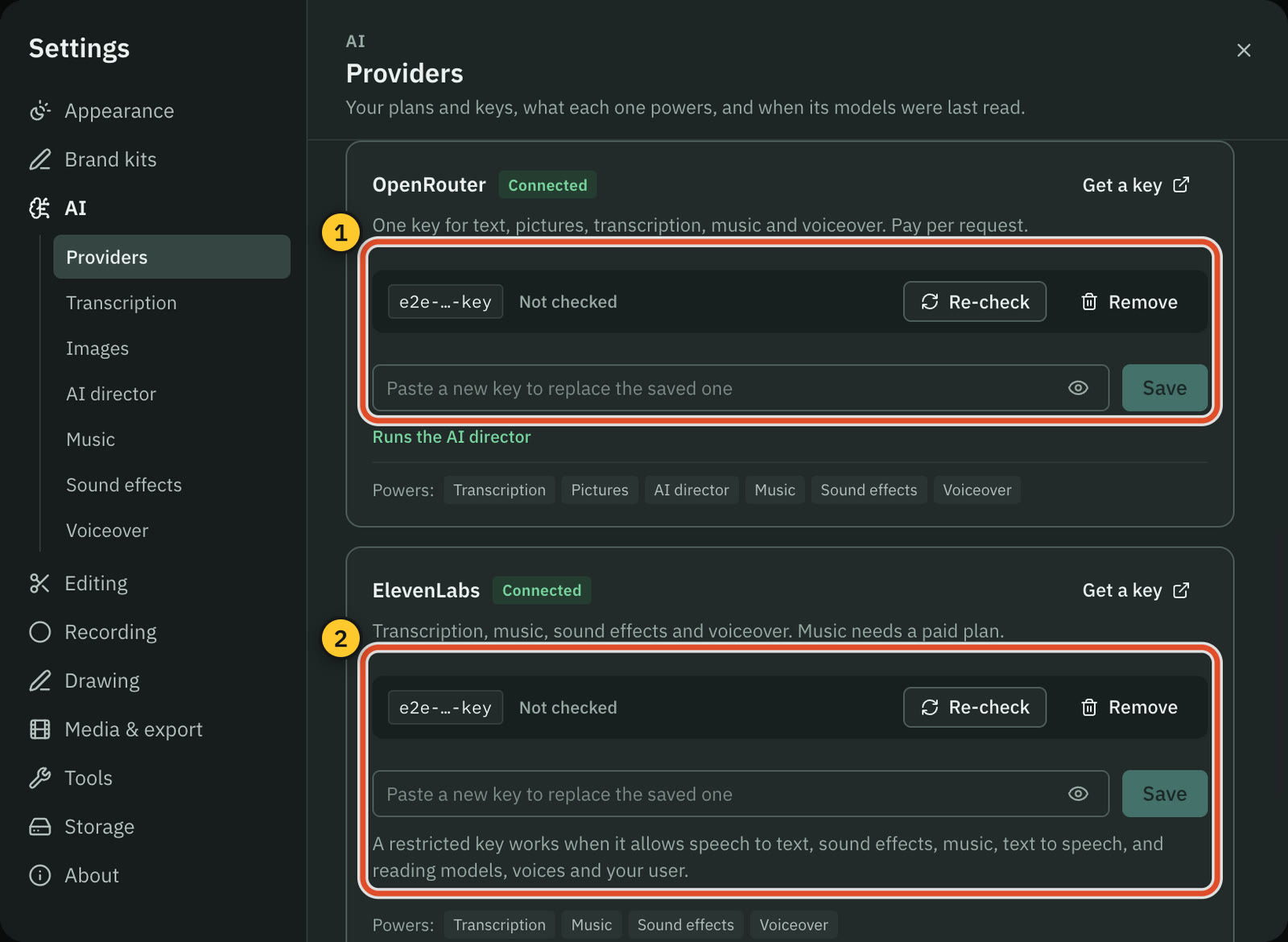
Cutscript checks the key as it saves it, and a notice says the result: OpenRouter key saved, or OpenRouter rejected the key.
After you connect
The card shows the saved key as a short preview, a check word (Valid, Invalid or Not checked) and when it was checked. It also shows a line from your OpenRouter account, such as the key's label, how much it has used and any spending limit you set on the key. Press Re-check to check it again, or Check accounts at the top of the page to check every key.
Then set up what you want it to do:
- AI director. Press Use it for the AI director, or pick OpenRouter under Runs on in Settings › AI › AI director › Model. That page lists the models with their prices per million tokens. It also offers "Recommended: Claude Sonnet 5.5 as the AI model, Claude Opus 5.5 for design", with a Use recommended button. Nothing changes until you press it. While the AI director runs on OpenRouter, Advanced on that page sets OpenRouter's routing and the temperature.
- Transcription. See Transcription.
- Pictures. Pictures stay off until you choose an image model in Settings › AI › Images.
What it costs
OpenRouter bills your OpenRouter account for each request. Cutscript reads the model prices from OpenRouter's live list and shows them before anything runs. The AI director's spending counts toward the limits you set in Settings › AI › AI director › Behaviour & limits. See Prices before every paid step.
Disconnect
Press Remove on the card, then Remove key to confirm. The key is deleted from your Mac. Cutscript warns that the AI director stops unless it runs on a plan, and that OpenRouter pictures, transcription and music stop too. To cancel the key itself, delete it on OpenRouter's site.
Common problems
"Invalid OpenRouter API key." The key was rejected. Create a new key on OpenRouter and paste it again. Check that nothing was added before or after it.
"Insufficient OpenRouter credits." Your OpenRouter account has no credit left for this request. Add credit on OpenRouter, or choose a cheaper model.
"OpenRouter is rate limiting requests." Wait a moment and try again.
"The model is unavailable, or no provider matches your provider routing settings." Pick another model, or loosen the routing under Advanced in the AI director settings.
"You didn't allow the sign-in on OpenRouter's page, so nothing changed." Start again with Sign in with OpenRouter, or paste a key instead.
"The key from OpenRouter couldn't be saved on this Mac." Try the sign-in again, or paste a key.
"Could not reach OpenRouter." Check your internet connection.
Related
Was this page helpful?
Comments
Longer questions go better in the forum.
No comments yet. Ask a question or add what you found.
Sign in with GitHub or Google to comment.
Sign in to comment